A Comprehensive Guide on How To Add Pictures to Google Reviews

Introduction

In the competitive world of digital marketing, online reviews play a significant role in shaping consumer decisions. Google Reviews, in particular, is trusted by millions worldwide when seeking insights about local businesses.

While well-written text reviews are valuable, adding pictures to your Google Reviews can provide an extra layer of authenticity and visual appeal.

Whether you want to showcase a delicious meal at a restaurant, highlight the breathtaking views of a hotel, or capture the impeccable service at a local business, including photos in your Google reviews can leave a lasting impression on readers.

Whether you're a business owner or a customer looking to share your experiences, this blog post will guide you through adding pictures to your Google Reviews.

Are you ready to take your feedback to the next level? Let's dive in and discover how to add pictures to your Google reviews like a pro!

7 Easy Steps for Adding Photos to Your Google Reviews

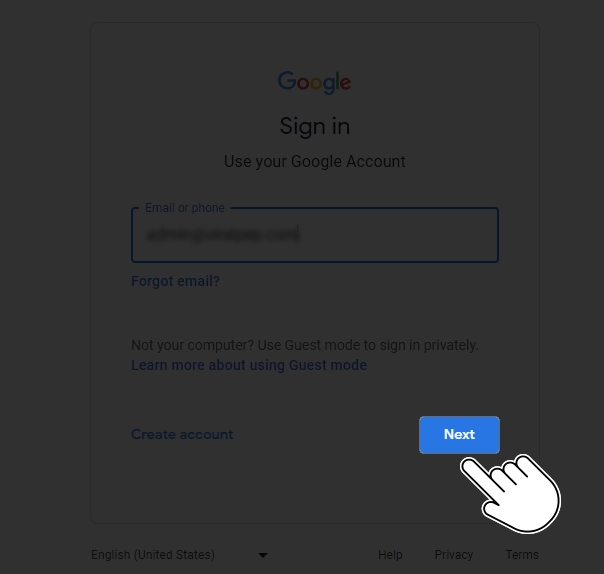
  1. Step 1: Sign in to your Google account

    To begin, ensure you are signed in to your Google account. This step is necessary to access the Google Maps platform and contribute to reviews.

    Sign in to your Google account
  2. Locate the business on Google

    Find the business you wish to review using the Google search engine or the Google Maps app. Enter the name of the business and the location in the search bar, and the search results will display relevant options.

    Locate the business on Google
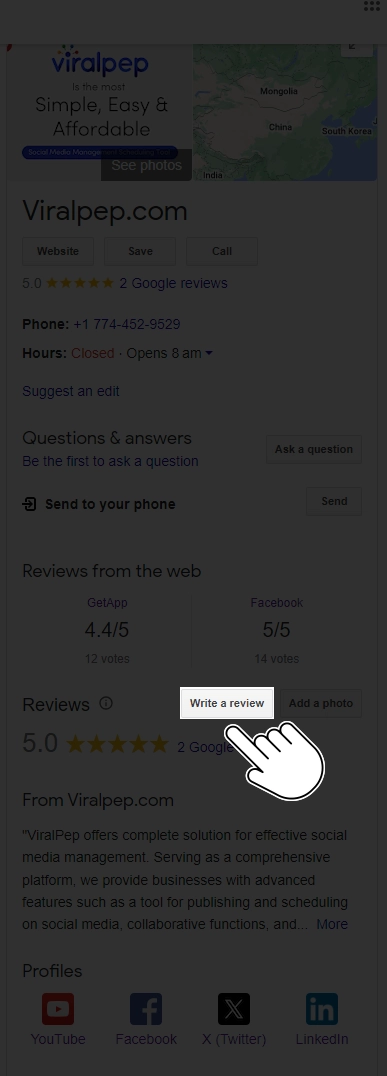
  3. Step 3: Write your review

    Once you have located the desired business, click the "Write a review" button or similar option. A review box will allow you to share your thoughts and experiences.

    write review
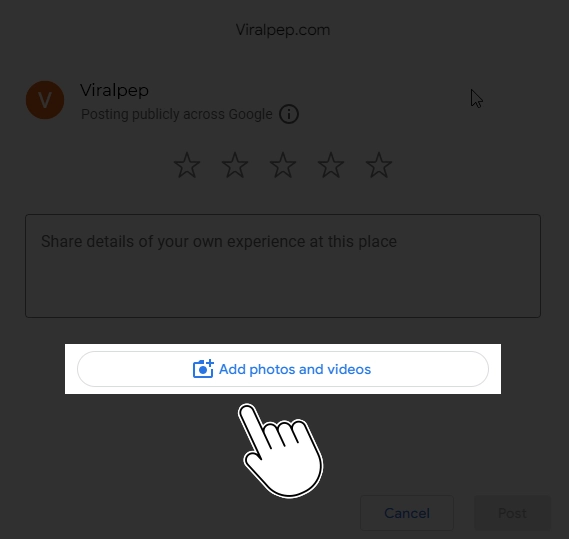
  4. Step 4: Click on the camera icon

    Within the review box, you will notice a small camera icon. Click on it to open the photo upload options.

    Click on the camera icon
  5. Step 5: Choose your picture

    You have two options for adding a picture to your Google Review:

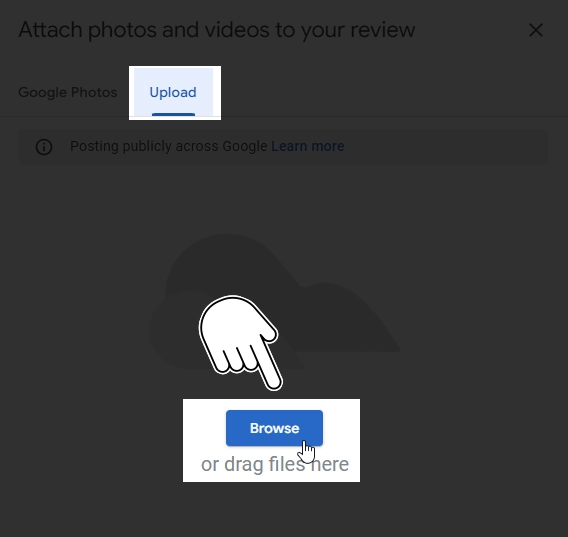
    • Upload from your computer or mobile device: Click the "Choose photos" button and select the image you want to include. You can browse your files or photo gallery to find the appropriate picture.

    • Take a photo using your device's camera: Click on the camera icon and grant permission for Google to access your camera. Capture the desired image, which will automatically be added to your review.

      select your picture
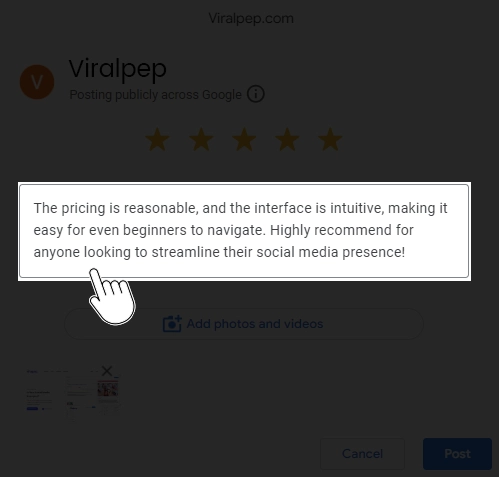
  6. Step 6: Add captions and details

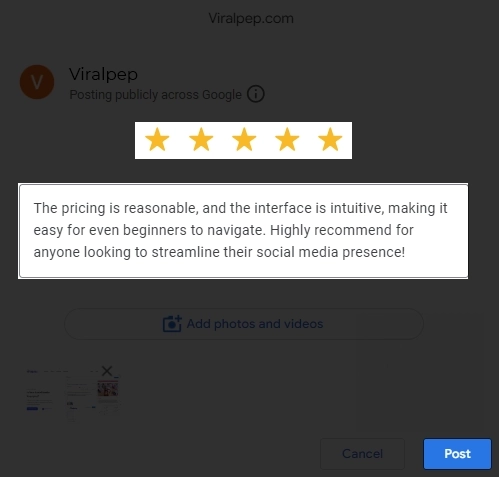
    Once you've uploaded the picture, you can enhance your review by adding captions and details about the image. This step is optional but can give readers context and a richer experience.

    Add captions and details
  7. Step 7: Submit your review

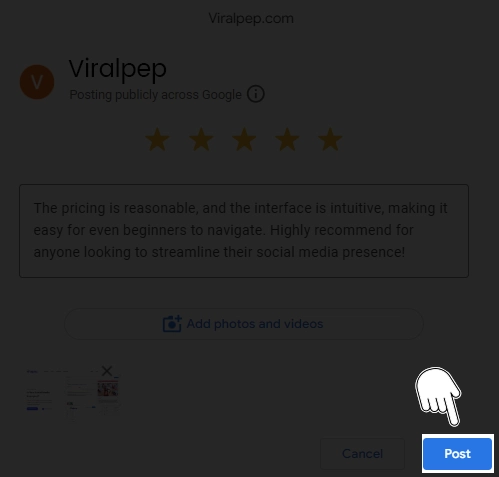
    After attaching the picture and refining your review, it's time to submit it. Take a moment to review your text and ensure your picture appears as intended. If everything looks good, click the "Post" or "Submit" button to publish your review on Google.

    Submit your review

What are the Benefits of Adding Pictures to Google Reviews?

Adding pictures to Google Reviews can provide several benefits for reviewers and potential customers. Here are some of the advantages of including pictures in your Google Reviews:

  • Enhanced Visual Information: Pictures can help to visually illustrate your experience or highlight specific aspects of a product, service, or location. They provide a more comprehensive view and add depth to your review.

  • Increased Credibility: Including pictures in your review adds an extra layer of authenticity and credibility. People tend to trust reviews with visual evidence more than text-only reviews, as photos can validate your claims and experiences.

  • Improved Engagement: Reviews with images tend to attract more attention and engagement from users. People are naturally drawn to visual content, and including pictures can make your review stand out in a sea of text-based reviews.

  • Greater Understanding: Pictures can convey information that might be difficult to express through words alone. By including relevant images, you can provide a clearer understanding of your experience or highlight specific details that are important to mention.

  • Increased Context: Images can help set the context for your review, especially if you're reviewing a restaurant, hotel, tourist attraction, or any place with visual elements. Potential customers can get a glimpse of the ambiance, decor, food presentation, or product quality through the images, giving them a better idea of what to expect.

  • Visual Comparison: If you're comparing multiple products or services in your review, pictures can help visually illustrate their differences. This can be particularly helpful when reviewing products, hotels, or other visually distinct offerings.

  • Better SEO Visibility: Including pictures in your Google Reviews can improve search engine optimization (SEO) visibility. Google tends to prioritize reviews with images, which may appear in image search results, attracting more attention to your review.

Remember to ensure that the pictures you include are relevant, high-quality, and respectful of privacy considerations. By leveraging the power of visuals, you can make your Google Reviews more impactful and informative for businesses and potential customers.

Tips for Adding Pictures to Google Reviews

Adding pictures to Google Reviews can greatly enhance your review and provide valuable visual information to other users. Here are some tips for adding pictures to your Google Reviews:

  • Use relevant pictures: Ensure that the pictures you add are relevant to your review. For example, if you're reviewing a restaurant, include pictures of the ambiance, food, or drinks. If you're reviewing a hotel, add pictures of the rooms or amenities.

  • Capture the essence: Try to capture the essence of your experience in the picture. If you had a memorable dish at a restaurant, take a picture of that particular dish. If you enjoyed the scenic view at a tourist spot, capture the beauty in your photo.

  • High-quality images: Aim to provide high-quality images that are clear, well-lit, and properly focused. Avoid blurry or pixelated pictures, as they may not convey the desired message effectively.

  • Quantity: Don't overdo it with too many pictures. Select a few representative images that showcase the most important aspects of your experience. Three to five pictures are usually sufficient.

  • Be respectful: Ensure your pictures comply with Google's content policies and guidelines. Avoid adding inappropriate or offensive images.

  • Diversity: Include pictures showcasing different aspects of the place or experience you're reviewing. This can give readers a well-rounded perspective.

  • Provide captions: Consider adding brief captions to your pictures to provide additional context or highlight specific details. This can help viewers understand what they see and why it's relevant to your review.

  • Review the review: Before submitting your review with pictures, take a moment to review everything. Ensure the pictures accurately represent your experience and align with the written portion of your review.

  • Upload process: When writing your review on Google, you'll typically find an option to add pictures within the review box. Click on the image icon, which usually resembles a camera or a "+" sign, to upload the desired pictures from your device.

  • Be mindful of image quality: Select clear, well-lit photos that accurately represent your experience. Blurry or dark images may not provide the desired impact.

  • Respect copyright and privacy: Ensure the pictures you add are your own, or that you have permission to use them. Avoid sharing images that may compromise privacy or violate copyright laws.

  • Highlight key aspects: Choose pictures that emphasize the business's unique features, products, or services. This can help potential customers get a better understanding of what to expect.

  • Show before and after: If your experience involves a transformation or improvement, consider including a "before" picture alongside an "after" picture. This visual comparison can add value to your review.

Conclusion

Adding pictures to your Google Reviews can greatly enhance your online contributions and provide valuable information to others.

Whether you're a business owner or a customer, sharing visually captivating images can make your reviews more engaging and trustworthy. Follow the simple steps outlined in this blog post, and you'll be well on your way to creating impactful Google Reviews that leave a lasting impression.

Remember, a picture is worth a thousand words, and by incorporating them into your reviews, you can make your experiences come to life on Google. Happy reviewing!

FAQs

Can I add multiple pictures to my Google Review?

Yes. You can add multiple pictures. Adding multiple pictures to Google reviews will help more users to grab the knowledge and feedback of the particular organization.

Can businesses add pictures to their own Google reviews?

No, businesses cannot add pictures to their own Google reviews. Only customers or users who have experienced the business can add photos to their reviews.

Are there any size or format requirements for the pictures I upload?

Yes, Google has certain size and format requirements for pictures uploaded to Google Reviews. Here are some guidelines to keep in mind:

  • File Size: Each picture should be no larger than 5 MB.
  • Image Formats: Google accepts the following image formats: JPG, PNG, and GIF.
  • Image Resolution: It’s recommended to upload high-quality images with a resolution of at least 720 pixels tall and wide.
  • Aspect Ratio: Using images with a standard 4:3 or 16:9 aspect ratio is best. Square images (1:1) are also accepted.
  • Content Guidelines: Ensure that your pictures comply with Google’s content guidelines. Avoid uploading inappropriate, offensive, or copyrighted images.
  • Relevant Content: The pictures you upload should be relevant to your review and showcase the business, its products, or services.

Can I add pictures to an existing Google review?

Yes, you can add pictures to an existing Google review. Follow these steps:

  • Go to Google Maps and find the business whose review you want to edit.
  • Scroll down to your review and click on the three-dot menu icon.
  • Select “Edit review.”
  • Click on the camera icon within the review box to add or edit photos.
  • Choose a photo from your device or take a new one using your camera.
  • Once selected, the photo will be uploaded and added to your review.

How long does it take for my review to appear on Google after I submit it?

The timeframe for a review to appear on Google after submission can vary. Generally, reviews should be visible on Google immediately, but there can be some delays depending on various factors.

Can I add pictures to Google reviews from the Google Maps mobile app?

Yes. You can add pictures to Google reviews from the Google Maps mobile app. The process is similar to adding photos from the desktop version. Simply find the business, open the review section, and tap on the camera icon to upload photos from your device or take new ones.

Do I retain ownership of the pictures I add to Google reviews?

You retain ownership of the pictures you add to your Google reviews. However, by uploading the photos, you grant Google a license to use, modify, and display them concerning the review and business listing.

Are there any guidelines or restrictions on the content of the pictures I add to Google reviews?

Yes, Google has guidelines and restrictions regarding the content of the pictures added to reviews. Avoid uploading photos that contain explicit or adult content or personal information, or violate Google’s content policies.

Viralpep’s New Features: The Game-changer Your Social Media Strategy Needs

Introduction

Effective online presence is key to success in the ever-evolving social media landscape. Viralpep, the trusted social media management tool, will make your social media life even easier with exciting new features that will elevate your social media game to the next level. Get ready for a thrilling journey into Viralpep’s latest innovations. We’ve got something for everyone, from Pinterest integration that unlocks a new visual playground to drafts that let you curate your content on your terms. If you’re a video enthusiast, get ready to unleash your creativity with an expanded video file size limit.

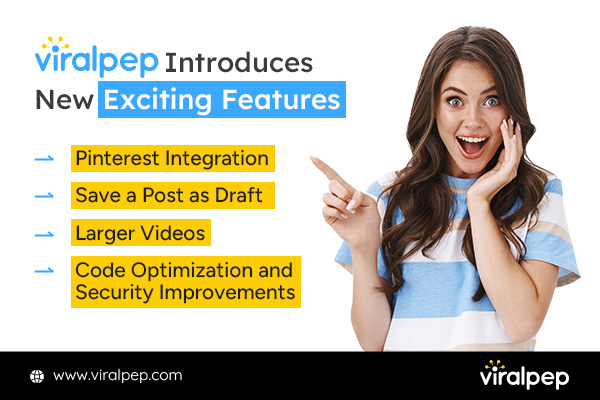
Viralpep Introduces New Exciting Features

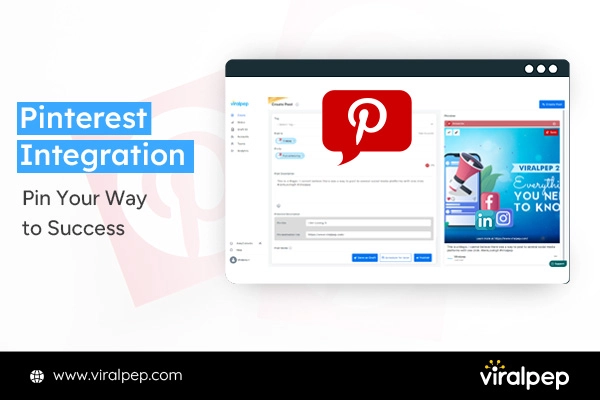
  1. Pinterest Integration: Pin Your Way to Success

    We are delighted to announce that Viralpep now supports Pinterest. Apart from the well-loved social networks like Twitter, LinkedIn, Instagram, and Facebook, we’ve expanded our reach to Pinterest, offering you even more ways to engage and connect with your audience.

    Pinterest Integration Pin Feature in Viralpep

    With Viralpep’s Pinterest support, you can seamlessly schedule and manage your posts, select one or multiple boards, upload images, add interactive links, add hashtags, and more to gain better control over your content strategy and reach your audience at perfect times. But that’s not all! Viralpep also provides powerful Pinterest Analytics tools to help you measure the impact of your pins. Gain insights into your Pinterest performance, track engagement, and fine-tune your strategy for optimal results. Experience the full potential of Pinterest with Viralpep’s scheduling and analytics features. Start making your pins go viral and take your Pinterest presence to the next level! You asked, and Viralpep delivered! Now, you can seamlessly connect post, and analyze multiple Pinterest accounts and boards to Viralpep, putting Pinterest on par with other major social media platforms like Facebook, LinkedIn, Instagram, and Twitter. Schedule Pinterest Boards with Viralpep Today

  2. Drafts: Your Posts, Your Schedule

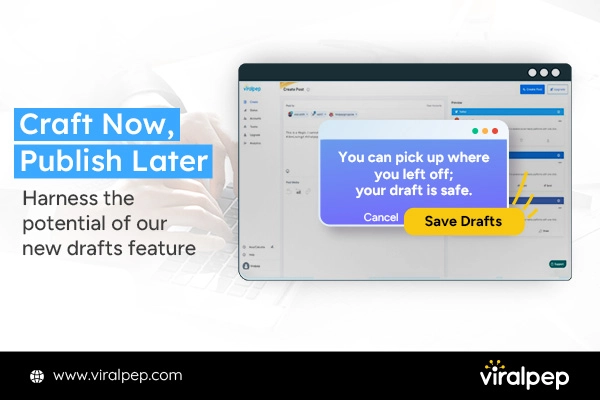
    In the hustle and bustle of life, we understand that timing is everything. Introducing Viralpep’s innovative “Drafts” feature, your solution for those moments when inspiration strikes but you’re not quite ready to share your brilliance with the world.

    Draft Post Feature in Viralpep

    With our new “Drafts” feature, you have the power to craft and save an unlimited number of posts for future use. Whether it’s a witty tweet, an engaging Facebook update, a professional LinkedIn post, interesting pins, or a stunning Instagram caption, you can now tailor your content to your schedule. No more rushing to hit that ‘post’ button; it’s your content, on your terms. You can revisit and refine your drafts anytime, ensuring each post is perfectly timed to captivate your audience. Take control of your social media strategy and let your creativity flow, knowing your content is safe, accessible, and ready to shine when the moment is just right. Try Viralpeps Drafts Feature

  3. Elevate Your Storytelling with Larger, Higher-Quality Videos

    Video content is a powerhouse on social media, and Viralpep knows it. That’s why they’ve upped the ante on video file size limits. Previously capped at 50 MB, you can now upload videos up to a whopping 400 MB in size!

    Large Video Posting Feature in Viralpep

    Share your stories, products, and ideas in stunning detail without worrying about compression or quality loss. Engage your audience with visually compelling content like never before.

    Social Presence with Viralpep's Bigger Videos!

  4. Code Optimization and Security Improvement

    Efficiency is the game’s name in the digital age, and Viralpep is all about making your experience seamless and lightning-fast. With our Code Optimization, we’ve fine-tuned our code to ensure that Viralpep runs at peak performance.

    Code Optimization and Security Improvement in Viralpep

    • Faster Load Times

      To get rid of the frustrating loading delays. Viralpep now loads in the blink of an eye, helping you work more efficiently.

    • Smooth User Experience

      Navigating through Viralpep is now smoother than ever. Enjoy a hassle-free experience as you manage your social media accounts.

    • Reduced Resource Consumption

      We care about your resources. The optimized code ensures that Viralpep uses minimal system resources, making it easy on your devices.

    • Robust Security Enhancement

      At Viralpep, we understand your data is invaluable and protect it seriously. Our Security Improvement is made to make you feel very sure that your information is safe. We do this by using strong codes and checks and regularly checking if everything is safe.

Experience the Digital Age with Viralpep

Enhance Your Social Media Presence with Viralpep

With these new features, Viralpep continues to prove its dedication to simplifying and enhancing your social media management experience. Whether you’re a small business owner, a social media manager, or an influencer, these updates empower you to take control of your online presence and make a more significant impact. Stay tuned for more exciting developments from Viralpep as they continue to innovate and provide you with the tools you need to succeed in the world of social media marketing. Ready to elevate your social media game? Try out Viralpep’s new features today and watch your online presence soar! Elevate Your Efficiency Today With Viralpep Read also: How to use Social Media Marketing to Grow Your Business

FAQs

Pinterest Integration: Pin Your Way to Success

How do I connect my Pinterest account to Viralpep?

  • Log in to your Viralpep account.
  • Go to the “Settings” or “Account Settings” section.
  • Look for “Social Media Accounts” or a similar option.
  • Click on “Connect Pinterest” and follow the prompts to authorize Viralpep to access your Pinterest account.

Can I manage multiple Pinterest boards through Viralpep?

Yes, you can manage multiple Pinterest boards through Viralpep. Viralpep offers comprehensive support for organizing and scheduling pins across all your Pinterest boards.

Is it possible to schedule pins in advance?

Absolutely, you can schedule pins in advance using Viralpep. Simply create your pin, set the date and time you want it to be posted, and Viralpep will automatically publish it at the scheduled time.

Is there a way to view Pinterest analytics within Viralpep?

Yes, Viralpep provides Pinterest analytics tools, allowing you to view the performance of your pins, including impressions, clicks, and engagement metrics, all within the Viralpep platform.

Can I add collaborators to my Pinterest boards through Viralpep?

Yes, you can add collaborators to your Pinterest boards through Viralpep. Utilize the team collaboration features to invite and manage collaborators with role-based access control.

How do I disconnect my Pinterest account from Viralpep?

  • Log in to your Viralpep account.
  • Go to “Settings” or “Account Settings.”
  • Look for “Social Media Accounts” or a similar option.
  • Find your connected Pinterest account and click on the option to disconnect or remove it.

Drafts: Your Posts, Your Schedule

How do I save a post as a draft?

To save a post as a :

  • Create your post or content as usual in Viralpep.
  • Before clicking the “Post” or “Publish” button, look for the “Save as Draft” or a similar option.
  • Click on it to save your post as a draft.

Can I edit my drafts later?

Yes, you can edit your drafts later. Simply access the “Drafts” section within Viralpep, locate the draft you want to edit, and make the necessary changes.

Is there a limit to the number of drafts I can save?

Viralpep typically does not impose a strict limit on the number of drafts you can save. However, there may be practical limitations based on your subscription plan or available storage space.

Can I schedule a draft to be posted at a later time?

Yes, you can schedule a draft to be posted at a later time. After editing your draft, use the scheduling feature to set the date and time for it to be posted.

Bigger, Better Videos: Share Your Story in Stunning Detail

What is the maximum video file size I can upload?

The maximum video file size you can upload is 400MB

Are there any specific video formats supported?

The commonly supported video formats include MP4 and MOV.

Will the quality of my video be compromised after uploading?

The video compression process is typically taken care of by social media platforms only. Viralpep is not responsible for compressing any type of file.

Can I schedule video posts in advance?

Yes, you can typically schedule video posts in advance using Viralpep’s scheduling features. Set the date and time you want your video to be posted, and Viralpep will publish it at the scheduled time.

Is it possible to upload multiple videos at once?

With the help of the social media management tool, you can upload single video at a time.

Is there a duration limit for the videos I can upload?

The duration limit of the video in Viralpep strictly works as per the social media platforms.

Crafting an Exceptional Social Media Content Calendar for Restaurants

Introduction

Are you a restaurant owner or marketer looking to elevate your online game and create a buzz in the digital world? If so, you’re in the right place!

In the fast-paced world of social media, standing out and engaging your target audience requires careful planning, creativity, and adaptability.

We understand the challenges you face, and that’s why we’ve curated this interactive blog – to provide you with easy-to-follow steps, expert tips, and actionable insights that will help you master the art of social media for your restaurant.

Let’s deep dive into the art of crafting the best social media content calendar for restaurants – a powerful tool to connect with your audience, increase brand visibility, and ultimately boost your business.

What Is a Marketing Calendar?

A marketing calendar, or a marketing schedule or plan, is a strategic tool businesses use to organize, plan, and manage their marketing activities over a specific period, typically for a year. It serves as a roadmap that outlines the marketing initiatives, campaigns, and promotions to be executed throughout the year.

The marketing calendar is essential to a company’s overall marketing strategy. It helps marketing teams, and businesses stay organized, maintain consistency in messaging, and ensure that campaigns are executed on time and aligned with broader business goals.

Read also: Be One Step Ahead with Social Media Scheduling

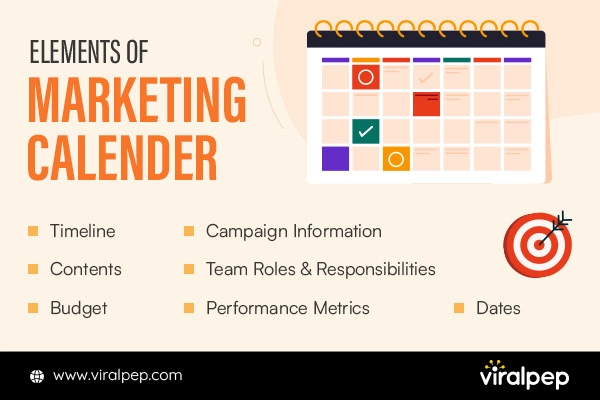
What are the Key Elements of a Marketing Calendar?

Key Elements of a Marketing Calendar

Key elements typically included in a marketing calendar are:

  1. Timeline

    The marketing calendar displays a timeline for the year, usually divided into months or quarters, indicating when each marketing activity or campaign will take place.

  2. Campaign Details

    For each marketing activity, the calendar provides essential details such as the campaign name, objectives, target audience, key messaging, and channels for promotion.

  3. Content and Creatives

    It outlines the content and creative assets required for each campaign, such as blog posts, social media content, graphics, videos, or email newsletters.

  4. Budget Allocation

    The marketing calendar may include a budget allocation for each campaign, helping to manage resources effectively and prioritize activities.

  5. Team Responsibilities

    It assigns responsibilities to team members or stakeholders executing the marketing activities. This ensures accountability and clear communication within the marketing team.

  6. Important Dates

    The marketing calendar may highlight significant dates, such as holidays, industry events, or product launches, to plan campaigns around relevant occasions.

  7. Performance Metrics

    Some marketing calendars also include space to track each campaign’s key performance indicators (KPIs), enabling evaluation and measurement of success.

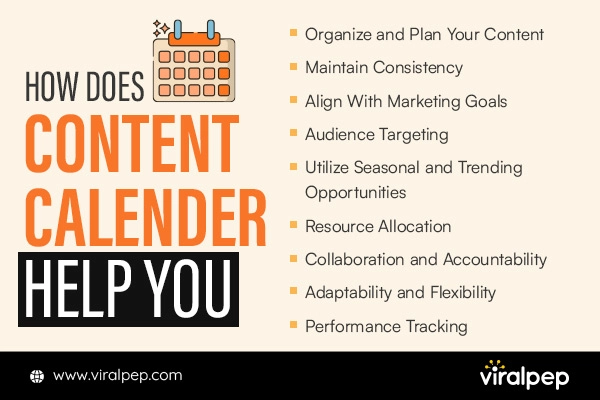
Importance of Content Calendar

Importance of Content Calendar

A content calendar is crucial for businesses and organizations engaging in content marketing and social media activities. Here are some of the key reasons why having a content calendar is essential:

    • Organization and Planning

      A content calendar provides a structured and organized content creation and distribution approach. It allows marketing teams to plan content, ensuring a steady flow of relevant and timely materials.

    • Consistency

      Consistency is vital for building a strong brand presence and maintaining audience engagement. Businesses can ensure a regular posting schedule with a content calendar, reducing the risk of gaps or irregular content distribution.

    • Aligning with Marketing Objectives

      A content calendar helps align content creation with the overall marketing strategy and business objectives. Each content can be tailored to support specific goals, whether increasing website traffic, generating leads, or promoting a new product/service.

    • Audience Targeting

      Understanding your target audience is crucial for effective content marketing. A content calendar allows businesses to strategize content that caters to their audience’s needs, interests, and preferences, leading to higher engagement and conversion rates.

    • Utilizing Seasonal and Trending Opportunities

      Content calendars enable businesses to plan for seasonal and trending content in advance. By capitalizing on relevant events, holidays, and industry trends, businesses can stay relevant and leverage opportunities for increased visibility and reach.

    • Resource Allocation

      A content calendar facilitates efficient resource management. It helps appropriately allocate time, budget, and human resources to create high-quality content and meet deadlines.

    • Collaboration and Accountability

      Different teams and stakeholders can collaborate more effectively with a content calendar. Everyone involved in content creation knows their roles and responsibilities, fostering accountability and ensuring timely content delivery.

    • Adaptability and Flexibility

      A content calendar provides structure but allows room for adaptability and flexibility. Businesses can adjust based on emerging trends, unforeseen events, or changes in the market landscape.

    • Performance Tracking

      Content calendars make tracking the performance of individual pieces of content and overall campaigns easier. Website traffic, social media engagement, and lead generation can be measured against specific content items to gauge success and inform future strategies.

    • Repurposing and Recycling Content

      A content calendar helps identify opportunities to repurpose or recycle content, maximizing the value of each piece and extending its reach across various channels.

So, a content calendar is an indispensable tool for effective content marketing. It streamlines content creation, ensures consistency and relevance, and aligns efforts with business objectives, leading to increased brand visibility, audience engagement, and business growth.

Related Blog: Reasons Why Content Scheduling Makes Social Media Marketing Efficient

Easy Steps For Creating a Social Media Calendar For Restaurants

Creating a social media calendar for restaurants doesn’t have to be complicated. Here are some easy steps to follow:

Understand Your Target Audience

Understand Your Target Audience

Before diving into creating content, it’s crucial to have a deep understanding of your target audience. Who are your customers? What are their interests, preferences, and pain points?

Understanding your audience will help you tailor your content to resonate with them, driving higher engagement and connection.

Conduct thorough research to understand your target audience’s preferences, interests, and behaviors. Knowing what appeals to them will help you create content that resonates and engages effectively.

Define Your Restaurant’s Social Media Goals

Setting clear goals is essential for measuring the success of your social media efforts. Are you looking to increase brand awareness, drive more reservations, showcase your culinary expertise, or run promotions?

Your content calendar should align with your objectives, making tracking progress and necessary adjustments easier.

Define your social media goals, whether it’s increasing brand awareness, driving more reservations, promoting special events, or showcasing your culinary expertise.

Align your content calendar with these objectives to measure success accurately.

Read also: Social Media Marketing – How to Write Meaningful Content

Opt For The Right Social Media Platforms

Choose the Right Social Media Platforms

While being active on multiple social media platforms is beneficial, focusing on the ones most relevant to your restaurant and audience is essential.

Platforms like Facebook, Instagram, Twitter, and Pinterest are popular restaurant choices due to their visual nature and widespread user base.

Focus on the social media platforms where your target audience is most active. Different platforms have distinct user demographics and formats, so tailor your content accordingly.

Make an Appropriate Planning For Seasonal and Themed Content

Plan for seasonal and themed posts to keep your content fresh and engaging. Whether it’s holiday-themed dishes, special promotions, or community events, tying your content to relevant occasions will captivate your audience and create a sense of urgency.

Incorporate seasonal and themed content into your calendar to keep your content fresh and relevant. Highlight holiday specials, celebrations, or community events to create excitement and urgency.

Diversify Content Types

Variety is essential when it comes to social media content. Incorporate a mix of images, videos, user-generated content, polls, stories, and behind-the-scenes glimpses to keep your audience interested and entertained.

Mix up your content with various formats like high-quality images, videos, GIFs, stories, polls, and user-generated content. Visual content tends to perform well, especially for restaurants.

Always Encourage User-Generated Content

Encourage your customers to share their experiences at your restaurant by running user-generated content campaigns.

This content acts as social proof, shows appreciation for your customers, and fosters a sense of community.

Engage your customers by encouraging them to share their dining experiences through user-generated content. Repost and credit those who share, creating a sense of community and loyalty.

Schedule Regular Posts

Consistency is crucial for maintaining engagement on social media. Use scheduling tools like Hootsuite, Buffer, or Sprout Social to plan and automate your posts.

However, always be ready to respond promptly to comments and messages, as social media is about two-way communication.

Useful Resources: Best Social Media Scheduling Tools Compared

Leverage Influencer Marketing

Partnering with influencers and food bloggers can amplify your restaurant’s reach and visibility.

Identify influencers with an audience that aligns with your target market, and collaborate with them to promote your restaurant and menu items.

Monitor Analytics and Adjust

Keep a close eye on social media analytics to track the performance of your content. Metrics like engagement rate, click-throughs, and reach will provide valuable insights into what’s resonating with your audience and what isn’t.

Always make a habit of tracking the performance of your social media posts using analytics tools. Analyze engagement metrics, audience demographics, and post reach to understand the resonating content and adjust your strategy accordingly.

Based on these analytics, adjust your content strategy for continuous improvement.

Related Blog: Most Important Social Media Metrics for Your Business

Engage with Your Audience

Engage with Your Audience

Social media is a platform for building relationships. Respond to comments, messages, and mentions promptly. Engage with your audience by asking questions, running polls, and showing appreciation for their support.

Respond to comments, messages, and mentions promptly. Engaging with your audience builds trust and loyalty, fostering a positive online community.

Include Behind-the-Scenes Content

Give your audience a glimpse behind the scenes to build a connection. Share moments from the kitchen, staff introductions, or the story behind a new dish.

Always Be Active With Latest Trends

Keep an eye on social media trends, hashtags, and viral content. Incorporating relevant trends into your content can boost visibility and engagement.

Make an Active Collaboration with Local Partners

Partner with nearby businesses or organizations to cross-promote each other’s content. This can help expand your reach within the local community.

By considering these points and crafting a thoughtful social media content calendar, your restaurant can establish a robust online presence, connect with customers, and drive business growth.

Read also: Best Social Media Platforms for Restaurants

Conclusion

Armed with valuable insights and actionable tips, you are well on your way to conquering the digital landscape and engaging your audience like never before.

Remember, a well-crafted content calendar is not just a schedule; it’s a roadmap to success. By understanding your audience, setting clear objectives, and planning your content strategically, you can build a robust online presence that leaves a lasting impression on your followers.

As you embark on this exciting adventure, don’t forget the power of consistency, creativity, and adaptability. Stay attuned to seasonal trends, collaborate with influencers, and leverage user-generated content to build a thriving online community.

FAQs

Why is a social media content calendar important for my restaurant?

A social media content calendar is essential for your restaurant because it helps you plan and organize your content effectively. It ensures consistency in posting, allows you to align your content with business objectives, and helps you stay ahead with timely and relevant posts.

How do I determine the best social media platforms for my restaurant?

Research to understand your target audience’s preferences. Analyze which platforms they are most active on and which ones align best with your restaurant’s brand and content style. Focus on those platforms to maximize engagement.

How often should I post on social media?

Consistency is key, but the frequency may vary depending on the platform and your audience’s behavior. Posting once or twice daily on platforms like Instagram and Facebook is generally recommended, while Twitter may require more frequent posts due to its fast-paced nature.

What types of content should I include in my calendar?

Diversify your content to keep your audience engaged. Include high-quality images of your dishes, behind-the-scenes glimpses, videos showcasing cooking techniques, user-generated content, promotions, and seasonal specials.

Should I work with influencers to promote my restaurant on social media?

Influencer marketing can be a powerful tool to expand your restaurant’s reach and credibility. Collaborating with influencers or local food bloggers who align with your brand can introduce your restaurant to a wider audience.

How do I measure the success of my social media content calendar?

Use social media analytics tools to track key metrics such as engagement rate, reach, click-throughs, and follower growth. These metrics will provide insights into how well your content is performing and whether it aligns with your goals.

How can I ensure my content remains relevant and timely?

Stay up-to-date with current trends, seasonal events, and holidays. Incorporate relevant themes into your content to keep it fresh and engaging.

Should I respond to comments and messages on social media?

Absolutely! Engaging with your audience is crucial for building relationships and fostering a positive online community. Respond promptly to comments, messages, and mentions to show appreciation and address concerns.

How often should I review and update my social media content calendar?

Regularly review your social media analytics to understand what content resonates with your audience and what doesn’t. Use this data to update your content calendar periodically, ensuring it stays effective and relevant.

The Ultimate Guide to Best Social Media Platforms for Restaurants

Introduction

In today’s digital age, social media has become crucial for restaurants to promote their businesses and engage with customers. With the vast array of social media platforms available, it’s important to understand which ones are the most effective for reaching your target audience and maximizing your online presence. In this blog, we will explore the best social media platforms for restaurants and provide strategies for creating compelling content, driving traffic, and building a loyal customer base.

  1. Understanding Your Restaurant’s Target Audience

    Understanding Your Restaurant's Target Audience

  2. Identifying your target audience and their social media preferences is crucial in developing an effective social media strategy for your restaurant. By understanding your ideal customers and where they spend their time online, you can tailor your content and choose the right platforms to reach them.

    Here are some points to consider

    Identifying Your Target Audience

    Start by clearly defining your restaurant’s target audience. Consider age, gender, location, interests, and lifestyle.

    Ask yourself questions like

    • Who are the people most likely to visit and enjoy my restaurant?
    • What are their demographics (age, gender, income level)?
    • What are their interests, hobbies, and preferences?
    • Are they residents, tourists, or a mix of both?

    Social Media Preferences

    Once you clearly understand your target audience, research their social media preferences. Find out which platforms they use the most and which align with their interests and behaviors. Some considerations include: Are they more active on Facebook, Instagram, Twitter, YouTube, TikTok, Pinterest, LinkedIn, or a combination? Do they prefer visual platforms like Instagram and Pinterest, or are they more engaged with real-time updates on Twitter? Are they more likely to consume video content on YouTube or short-form videos on TikTok? Related Blog: Why Businesses Prefer Facebook and Twitter for Brand Marketing

    Analyzing Demographics and Online Behavior

    Utilize data and analytics tools to gather insights about your target audience’s demographics and online behavior. This information will help you make informed decisions about the platforms to focus on. Consider the following: Use social media analytics tools to gain insights into the demographics of your existing social media followers. Conduct surveys or analyze customer data to understand their online behavior, such as how frequently they use social media and what content they engage with. Research industry reports and studies to understand broader social media usage trends among your target audience Related Blog: Most Important Social Media Metrics for Your Business

    Determining the Right Platforms

    Based on the information gathered, determine which social media platforms align best with your target audience. Consider the platform’s user base, engagement levels, and the type of content that performs well. It’s important to focus on platforms where your target audience is most active and receptive to your messaging. For example, if your target audience is food enthusiasts who enjoy visual content, platforms like Instagram and Pinterest may be highly effective. On the other hand, if your target audience is professionals in the food industry, LinkedIn might be a valuable platform for networking and thought leadership. Remember, being present on every social media platform is unnecessary. Instead, focus your efforts on a few key platforms where you can engage with your target audience effectively. By understanding your restaurant’s target audience and their social media preferences, you can create content that resonates with them and choose the platforms that offer the highest potential for engagement and conversions. Regularly monitor and analyze your social media efforts to ensure you reach and connect with the right audience, and adjust your strategy as needed.

  3. Facebook: The Versatile Marketing Tool

    Facebook The Versatile Marketing Tool

  4. Facebook is the largest social media platform, with billions of active users worldwide. It’s an essential tool for restaurant marketing. By utilizing Facebook effectively, you can reach a massive audience and increase your online presence. With diverse demographics, it offers opportunities to target specific locations.

    Utilizing Facebook Pages for Restaurants

    Setting up a Facebook Page for your restaurant is crucial in establishing a strong online presence. Here’s how you can make the most of Facebook Pages:

    Profile Setup

    Create a professional and appealing profile for your restaurant. Include key information such as your restaurant’s name, location, contact details, website link, and opening hours. Use high-quality images that showcase your ambiance, cuisine, and unique features.

    Branding

    Sustain consistent branding across your Facebook Page. Use your logo as the profile picture, and choose a visually appealing cover photo that reflects your restaurant’s personality. Customize the color scheme to align with your branding. This helps in creating a memorable and cohesive brand image.

    Content Strategy

    Develop a content strategy that combines engaging and informative posts. Share enticing food photos, behind-the-scenes glimpses, special promotions, and updates about new menu items or events. Encourage user-generated content by inviting customers to share their experiences and reviews. Use a mix of images, videos, and text to keep your audience engaged.

    Leveraging Facebook Groups and Events

    Facebook Groups and Events offer unique opportunities to engage with local communities and promote your restaurant:

    Facebook Groups

    Join local community groups related to food, dining, or your location. Participate actively by providing valuable insights, answering questions, and sharing relevant content. Be authentic and avoid being overly promotional. Engaging with the community helps build trust and establishes your restaurant as a valuable part of the local scene. You May Like: Connecting Your Facebook Group to Viralpep

    Facebook Events

    Create and promote events to generate buzz and attract customers. This can include hosting special tasting events, live music nights, or limited-time offers. Encourage attendees to invite friends and share the event, expanding your reach. Engage with participants by responding to their comments, questions, and feedback. By effectively utilizing Facebook Pages, Groups, and Events, you can engage with your local community, promote special offers, and increase your restaurant’s visibility. Remember to consistently post relevant and engaging content, interact with your audience, and leverage the power of Facebook’s extensive reach to boost your restaurant’s online presence. Must Readable Blog: Simple Ways to Increase Facebook Engagement

  5. Instagram: Visual Delight for Food Enthusiasts

    Instagram Visual Delight for Food Enthusiasts

    Instagram’s Visual-Driven Nature and Popularity Among Foodies

    Instagram is a social media platform known for its visually-driven nature, making it a perfect venue for restaurants to showcase their delectable dishes and engage with food enthusiasts. With its focus on images and videos, Instagram has become immensely popular among individuals who love discovering and sharing culinary experiences. Leveraging Instagram can significantly boost your restaurant’s online presence and attract a dedicated community of food lovers. Tips for You: Convert Your Instagram Account into a Business Account

    Crafting an Enticing Instagram Profile and Aesthetic

    To maximize Instagram’s potential, follow these tips to create an enticing profile and establish a cohesive aesthetic:

    Profile Optimization

    Optimize your Instagram profile by choosing a username that reflects your restaurant’s name or brand. Craft a compelling bio highlighting your unique selling points, cuisine, ambiance, or awards. Include a link to your website or reservation platform to drive traffic.

    Consistent Branding

    Maintain a consistent visual identity across your Instagram feed. Choose a consistent color scheme and style that aligns with your restaurant’s branding. This creates a cohesive and recognizable aesthetic that helps your content stand out.

    High-Quality Imagery

    Invest in high-quality food photography to showcase your dishes in the best light. Use professional equipment or hire a photographer if possible. Clear, well-lit, and delicious images will capture your audience’s attention and entice them to your restaurant.

    Maximizing Engagement with Captivating Content

    Engaging content is key to attracting and retaining your Instagram audience. Here are some content strategies to maximize engagement:

    Captivating Food Photography

    Share stunning photos of your dishes, focusing on presentation and visual appeal. Experiment with different angles, compositions, and lighting techniques to make your food look mouthwatering.

    Behind-the-Scenes Content

    Offer a glimpse into your restaurant’s behind-the-scenes activities, including chef preparations, kitchen processes, and staff interactions. This adds authenticity and humanizes your brand.

    User-Generated Content (UGC)

    Encourage your customers to share their dining experiences by using a branded hashtag or tagging your restaurant in their posts. Repost User-Generated Content to showcase your customers’ love for your food, ambiance, or service. UGC fosters a sense of community and loyalty.

    Utilizing Instagram Stories, IGTV, and Instagram Reels

    Instagram offers various features to create dynamic and engaging content. Incorporate these into your strategy for added reach and interaction:

    Instagram Stories

    Utilize the Stories feature to share behind-the-scenes moments, daily specials, limited-time offers, and sneak peeks. Leverage interactive features like polls, questions, and quizzes to engage your audience further.

    IGTV (Instagram TV)

    IGTV allows you to share longer-form videos like recipe tutorials, chef interviews, or food-related storytelling. Create visually appealing and informative content that keeps your audience captivated.

    Instagram Reels

    Leverage the short-form video format of Reels to create entertaining and shareable content. Showcasing quick recipes, kitchen hacks, or food-related challenges can help your content go viral and reach a wider audience. By crafting an enticing Instagram profile, curating captivating content, and utilizing the platform’s interactive features, you can engage with food enthusiasts, increase your restaurant’s visibility, and foster a dedicated community of followers on Instagram. Embrace Instagram’s visual delight and make your restaurant an Instagram-worthy culinary destination. Related Blog:

    1. How to Find Reels You Liked on Instagram
    2. How to See Who Someone Recently Followed on Instagram
    3. How to Use Instagram Hashtags to Grow Your Business
  6. Twitter: Real-Time Updates and Customer Interaction

    Twitter Real-Time Updates and Customer Interaction

    Understanding Twitter’s Fast-Paced and Conversational Environment

    Twitter is a social media platform known for its fast-paced and real-time nature. It allows users to share brief updates and news and converse with others. Understanding Twitter’s unique environment is crucial for effectively utilizing it for your restaurant’s online presence.

    Establishing a Restaurant’s Twitter Presence and Building a Loyal Follower Base

    To confirm your restaurant’s presence and build a loyal following on Twitter, consider the following steps:

    Create a Twitter Profile

    Set up a Twitter account specifically for your restaurant. Use your restaurant’s name or a username that aligns with your brand. Add a bio highlighting your restaurant’s key aspects, such as cuisine, location, and unique features.

    Follow Relevant Accounts

    Follow accounts related to the food industry, local influencers, food bloggers, and other restaurants in your area. Engage with their content by liking, retweeting, and commenting to establish connections and increase your visibility within the community.

    Engage with Your Audience

    Actively participate in conversations related to food, dining, and local events. Respond to tweets, answer questions, and provide helpful recommendations. Show genuine interest in your followers and foster meaningful interactions to build a loyal follower base. Read also: How to Use Social Media Marketing to Grow Your Business

    Utilizing Hashtags, Trending Topics, and Location-Based Targeting

    Hashtags, trending topics, and location-based targeting are essential tools on Twitter to reach a wider audience and engage with users interested in your restaurant. Here’s how to make the most of them:

    Hashtags

    Incorporate relevant and popular hashtags in your tweets to increase their discoverability. Use industry-specific hashtags or trending hashtags, or create your own branded hashtag. This helps users find your content and join the conversation.

    Trending Topics

    Monitor the Twitter trends section to identify relevant topics and join discussions that align with your restaurant’s offerings. Share your insights, experiences, or special promotions related to trending topics to increase engagement and visibility.

    Location-Based Targeting

    Leverage location-based targeting to connect with Twitter users in your area. Use location-specific hashtags, engage with local influencers and organizations, and share content highlighting your restaurant’s connection to the community.

    Engaging Customers Through Prompt Responses, Special Deals, and Live Event Coverage

    Twitter provides opportunities to engage with customers and create a positive brand image. Consider the following strategies:

    Prompt Responses

    Monitor your notifications and respond promptly to customer inquiries, feedback, and mentions. Prompt and personalized responses show that you value your customers’ opinions and can help build loyalty.

    Special Deals and Offers

    Announce exclusive Twitter-only deals, discounts, or promotions to reward your followers. Encourage them to retweet and share the offer to increase its reach and create a sense of urgency.

    Live Event Coverage

    Cover live events such as food festivals, charity events, or special celebrations related to your restaurant. Share real-time updates, photos, and videos to provide an immersive experience for your Twitter audience. By understanding Twitter’s fast-paced environment, actively engaging with your audience, utilizing hashtags and trending topics, and leveraging location-based targeting, you can maximize the potential of Twitter for your restaurant. Embrace the platform’s real-time nature to provide updates, interact with customers, and create a buzz around your restaurant’s offerings.

  7. YouTube: Showcasing Culinary Expertise and Storytelling

    YouTube Showcasing Culinary Expertise and Storytelling

    Exploring the Power of Video Content in Promoting Your Restaurant

    YouTube is a powerful platform for showcasing your restaurant’s culinary expertise and engaging with a wider audience through video content. Videos allow you to visually demonstrate recipes, cooking techniques, and behind-the-scenes insights, creating a more immersive and interactive experience for viewers.

    Creating Compelling and Professional-Quality Videos

    To create compelling videos that resonate with your audience and highlight your culinary expertise, consider the following tips:

    Recipe Videos

    Create step-by-step recipe videos that showcase your signature dishes or popular menu items. Present this engaging and visually appealing process, emphasizing the ingredients, cooking techniques, and final presentation.

    Cooking Techniques and Tips

    Share videos demonstrating specific cooking techniques, provide tips and tricks, or offer guidance on using unique ingredients. These videos establish your restaurant as a useful culinary knowledge and expertise resource.

    Chef Interviews and Stories

    Feature interviews with your chefs or staff members to give viewers a glimpse into their background, passion for food, and inspirations. These videos help humanize your brand and build a connection with your audience. Read also: An In-Depth Guide to Social Media Video Specs

    Optimizing YouTube SEO for Improved Visibility and Reach

    To ensure your YouTube videos reach a broader audience and gain visibility, focus on optimizing them for search engine optimization (SEO). Here are some strategies:

    Keyword Research

    Conduct keyword research to identify relevant and popular search terms for your restaurant, cuisine, or video content. Incorporate these keywords in your video titles, descriptions, and tags. Related Blog: A Step-by-Step Guide to Find Easy-to-Rank Keywords

    Engaging Titles and Thumbnails

    Craft compelling video titles that accurately describe the content and entice viewers to click. Create eye-catching thumbnails visually representing the video and attracting attention in search results.

    Detailed Descriptions

    Write clear and informative video descriptions that include relevant keywords, a summary of the video content, and links to your restaurant’s website or social media accounts.

    Collaborating with Influencers and Hosting Live Streams to Enhance Engagement

    To further enhance engagement and reach a wider audience, consider these strategies:

    Influencer Collaborations

    Collaborate with food influencers or local celebrities with a strong YouTube following. Create joint videos featuring them visiting your restaurant, trying your dishes, or participating in cooking challenges. This collaboration exposes your restaurant to its audience generating increased interest and engagement.

    Live Streams and Q&A Sessions

    Host live streaming sessions where you interact with viewers in real time, answer their questions, and provide cooking demonstrations. Live streams create an interactive experience and allow your audience to engage directly with your restaurant. By leveraging the power of video content on YouTube, showcasing your culinary expertise, optimizing for SEO, and exploring collaborations with influencers or hosting live streams, you can effectively promote your restaurant and build a dedicated community of food enthusiasts. YouTube provides:

    • A platform for storytelling
    • Sharing knowledge.
    • Connecting and engaging with a wider audience visually.
  8. TikTok: Riding the Wave of Short-Form Video Craze

    TikTok Riding the Wave of Short-Form Video Craze

    Understanding TikTok’s Explosive Growth and Popularity

    TikTok has experienced explosive growth and has become a cultural phenomenon, especially among younger demographics. The platform allows users to create and share short-form videos set to music, often featuring creative editing, visual effects, and engaging content. Understanding TikTok’s popularity and user base is essential for harnessing its potential for promoting your restaurant.

    Harnessing the Platform’s Unique Creative Tools and Trends

    TikTok offers a range of creative tools and trends that can help you create captivating videos. Here’s how you can make the most of them:

    Effects and Filters

    Experiment with TikTok’s effects and filters to add visual flair to your videos. Whether using face filters, text overlays, or AR effects, these tools can make your content more engaging and shareable.

    Music and Sounds

    Leverage TikTok’s extensive library of music and sounds to enhance the mood and vibe of your videos. Choose tracks that align with your restaurant’s brand and create a captivating atmosphere.

    Challenges and Trends

    Stay up-to-date with popular challenges and trends on TikTok. Participating in relevant challenges can increase your visibility and help you connect with the platform’s user base. Put your unique spin on challenges to showcase your restaurant’s personality.

    Developing Fun and Engaging Short-Form Videos

    When creating TikTok videos for your restaurant, focus on showcasing the highlights, behind-the-scenes moments, and special promotions. Here are some ideas:

    Showcase Signature Dishes

    Create visually appealing videos featuring your restaurant’s most popular or visually stunning dishes. Highlight their presentation, preparation, and unique ingredients to entice viewers.

    Behind-the-Scenes Moments

    Offer a glimpse into the behind-the-scenes activities of your restaurant, such as the cooking process, staff interactions, or the creation of new dishes. This gives viewers an exclusive look at your restaurant’s inner workings and adds authenticity to your brand.

    Special Promotions and Offers

    Announce and promote special discounts, limited-time offers, or exclusive deals through TikTok videos. Create a sense of urgency and excitement to encourage viewers to visit your restaurant or engage with your promotions. Remember to keep your TikTok videos short, engaging, and visually appealing. Captivate viewers’ attention within the first few seconds and effectively deliver your message or showcase your restaurant’s unique aspects. TikTok’s short-form video format provides an opportunity to showcase your restaurant’s personality, creativity, and culinary highlights in a fun and entertaining way. Embrace the platform’s unique features, stay on top of trends, and leverage its creative tools to create TikTok videos that resonate with your target audience and generate buzz around your restaurant. Read also: 5 Surefire Ways to Quickly Raise Your Social Media Game

  9. Pinterest: Inspiring Food Lovers and Driving Traffic

    Pinterest Inspiring Food Lovers and Driving Traffic

    Exploring Pinterest’s Visual Discovery Nature and Its Impact on Restaurant Marketing

    Pinterest is a visual discovery platform that offers tremendous potential for restaurant marketing. Users turn to Pinterest for inspiration and ideas, making it an ideal platform to showcase your restaurant’s culinary offerings. Understanding the visual discovery nature of Pinterest is crucial for leveraging its impact on your restaurant’s marketing efforts.

    Creating Visually Appealing Boards Featuring Recipes, Food Styling, and Restaurant Ambiance

    To effectively utilize Pinterest, focus on creating visually appealing boards that capture the essence of your restaurant. Consider the following tips:

    Recipe Inspiration

    Curate boards featuring recipes that align with your restaurant’s cuisine. Pin visually enticing images of dishes and link them back to your blog or website for the full recipe. This not only inspires users but also drives traffic to your online platforms.

    Food Styling and Presentation

    Highlight your restaurant’s attention to detail and presentation by sharing boards dedicated to food styling. Pin images that showcase beautifully plated dishes, unique garnishes, and creative presentation ideas.

    Restaurant Ambiance and Décor

    Create boards that capture the ambiance and atmosphere of your restaurant. Include images of your interior design, outdoor seating areas, or any unique features that set your restaurant apart. This allows potential customers to visualize their dining experience.

    Optimizing Pins for Search and Driving Traffic to Your Website or Reservation Platform

    To maximize the reach of your restaurant on Pinterest and drive traffic to your website or reservation platform, follow these optimization techniques:

    Keyword-Rich Descriptions

    Craft descriptions for your pins that incorporate relevant keywords and phrases. This helps your pins appear in search results when users are looking for specific recipes, cuisines, or dining experiences.

    Clear Call-to-Actions

    Include clear and compelling calls-to-action in your pin descriptions. Encourage users to visit your website, make a reservation, or explore more of your content. Related Blog: How to Write Meaningful and Clickable Content

    Rich Pin Integration

    Take advantage of Rich Pins, a Pinterest feature that provides additional information within pins, such as recipe ingredients or location details. This enhances the user experience and encourages engagement with your pins.

    Engage with the Community

    Actively engage with other users on Pinterest by repinning, liking, and commenting on relevant content. This helps build relationships, increase visibility, and attract followers to your restaurant’s boards. By understanding Pinterest’s visual discovery nature, creating visually appealing boards, and optimizing your pins for search, you can effectively inspire food lovers and drive traffic to your website or reservation platform. Pinterest’s emphasis on visuals and inspiration makes it a valuable platform for showcasing your restaurant’s culinary creations and attracting potential customers.

  10. LinkedIn: Building Connections with Professionals and Influencers

    LinkedIn Building Connections with Professionals and Influencers

    Leveraging LinkedIn’s Professional Networking Capabilities for Restaurant Branding

    LinkedIn is a powerful platform for building professional connections and establishing your restaurant’s brand within the industry. Here’s how you can leverage LinkedIn’s features to enhance your restaurant branding efforts:

    Company Page Optimization

    Create a compelling and informative LinkedIn Company Page for your restaurant. Include relevant information about your business, such as your mission, values, specialties, and achievements. Use high-quality visuals and consistent branding to create a professional and engaging presence.

    Engaging with Industry Groups

    Join LinkedIn groups relevant to the restaurant industry. Participate in discussions, share insights, and provide valuable contributions to establish yourself as an industry expert. Engaging with like-minded professionals can expand your network and enhance your restaurant’s visibility.

    Employee Advocacy

    Encourage restaurant employees to create LinkedIn profiles and connect with your Company Page. They can help amplify your restaurant’s brand messaging and share relevant updates with their networks. Employee advocacy adds authenticity and expands the reach of your restaurant’s message.

    Connecting with Industry Influencers, Food Bloggers, and Local Businesses

    LinkedIn provides a valuable opportunity to connect with industry influencers, food bloggers, and local businesses. Here’s how to foster meaningful connections:

    Identify Key Influencers and Bloggers

    Research and identify influential individuals and popular food bloggers within your industry. Connect with them on LinkedIn and engage with their content by liking, commenting, and sharing. Building relationships with influencers and bloggers can lead to collaborations, content partnerships, and increased visibility for your restaurant.

    Personalized Connection Requests

    When contacting industry influencers, bloggers, or local businesses, send customized connection requests explaining why you want to connect and how you can mutually benefit from the connection. Personalization shows genuine interest and increases the likelihood of establishing meaningful relationships.

    Sharing Thought Leadership Content, Job Postings, and Company Updates

    LinkedIn provides a platform for sharing thought leadership content, job postings, and company updates, allowing you to showcase your restaurant’s expertise and attract top talent. Consider these strategies:

    Thought Leadership Articles

    Publish articles on LinkedIn that demonstrate your expertise in the restaurant industry. Share insights, tips, and trends to position yourself as a thought leader. Engage with readers by responding to comments and fostering discussions.

    Job Postings and Career Opportunities

    Use LinkedIn’s job posting feature to advertise open positions within your restaurant. Use the platform’s vast professional network to attract qualified candidates who align with your restaurant’s values and culture.

    Company Updates and Milestones

    Share updates about your restaurant’s achievements, new menu offerings, community involvement, and other notable milestones. Keep your LinkedIn network informed and engaged with your restaurant’s latest news and developments. By leveraging LinkedIn’s professional networking capabilities, connecting with influencers and bloggers, and sharing thought leadership content, job postings, and company updates, you can effectively build connections, establish your restaurant’s brand, and attract industry professionals to your restaurant. LinkedIn offers a valuable platform for networking, showcasing expertise, and fostering collaborations within the restaurant industry. Read also: Lets build brand trust using social media

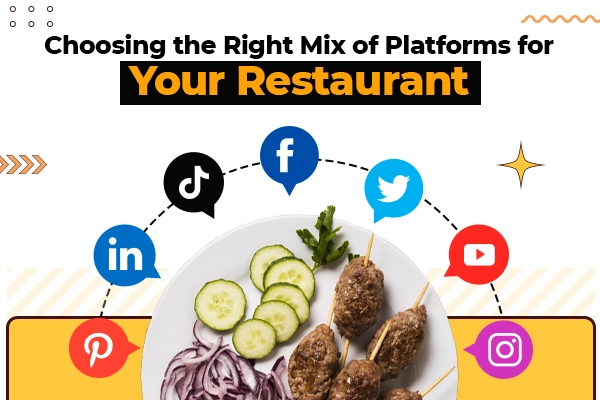
  11. Choosing the Right Mix of Platforms for Your Restaurant

    Choosing the Right Mix of Platforms for Your Restaurant Evaluating the strengths and weaknesses of each platform discussed: After exploring various social media platforms for restaurants, evaluating their strengths and weaknesses is important. Consider the following factors:

    Facebook

    Strengths

    Wide user base, versatile marketing tools, and ability to engage with local communities through Pages, Groups, and Events.

    Weaknesses

    Declining organic reach and competition for attention in users’ news feeds.

    Instagram

    Strengths

    Visual-driven nature, popularity among food enthusiasts, the potential for high engagement through captivating food photography, and user-generated content.

    Weaknesses

    Limited link placement opportunities and time-consuming content creation.

    Twitter

    Strengths

    Real-time updates, fast-paced and conversational environment, effective for customer interaction, and prompt responses.

    Weaknesses

    Character limit for posts, the short lifespan of tweets in users’ feeds.

    YouTube

    Strengths

    Power of video content, showcasing culinary expertise through high-quality videos, the potential for collaborations, and live streaming.

    Weaknesses

    Time and resources required for video production, competition in a saturated video platform.

    TikTok

    Strengths

    Explosive growth and popularity, unique creative tools, potential for viral content, and reaching younger demographics.

    Weaknesses

    Short video format may not suit all content types. Need to keep up with trends and stay relevant.

    Pinterest

    Strengths

    Visual discovery of nature, inspiring food lovers, driving traffic through visually appealing boards and optimized pins.

    Weaknesses

    Limited real-time interaction, less emphasis on direct customer engagement.

    LinkedIn

    Strengths

    Professional networking capabilities, connecting with professionals, influencers, and local businesses, sharing thought leadership content.

    Weaknesses

    More focused on B2B interactions and less on visual content.

    Considering your restaurant’s goals, target audience, and available resources

    When choosing the right mix of platforms, consider the following:

    Goals

    Determine your restaurant’s social media goals, such as increasing brand awareness, driving website traffic, promoting special offers, or engaging with the local community.

    Target Audience

    Identify your restaurant’s target audience and their preferred social media platforms. Consider the demographic, interests, and behavior of your audience.

    Resources

    Evaluate your available resources, including time, budget, and team capacity for managing multiple social media platforms effectively. Read also: How to Give Your Social Media Marketing Meaning

    Formulating a social media strategy that combines the most effective platforms for your business

    Based on the evaluation above, develop a social media strategy that combines the most effective platforms for your restaurant:

    Focus on Core Platforms

    Select a few platforms that align with your restaurant’s goals, target audience, and available resources. These core platforms should receive most of your attention and content creation efforts.

    Content Adaptation

    Adapt your content to suit each platform’s strengths and audience preferences. Tailor your messaging, visuals, and engagement strategies to maximize effectiveness on each platform.

    Cross-Promotion

    Leverage the strengths of one platform to promote your presence on other social media. For example, use Instagram to showcase your YouTube videos or share Pinterest boards on Facebook.

    Monitoring and Analysis

    Regularly monitor the performance of your social media efforts using analytics tools. Adjust your strategy based on insights and feedback to optimize results.Remember, the social media landscape constantly evolves, so be open to experimentation and adapt your strategy as new platforms and trends emerge. By evaluating platform strengths and weaknesses, considering your restaurant’s goals and target audience, and formulating a well-rounded social media strategy, you can effectively leverage the most effective platforms for your restaurant’s online presence and customer engagement.

Read also: Know the Best Time to Post on Social Media

Conclusion

This blog explores the best social media platforms for restaurants and provides strategies for boosting your online presence and engaging customers. You can successfully navigate the social media landscape and grow your restaurant business by consistently creating valuable content, engaging with your audience, and measuring your results. Remember to stay adaptable and embrace evolving social media trends to stay ahead of the competition. Your restaurant can thrive digitally with the right social media approach.

FAQs

Why is social media important for restaurants in today’s digital age?

Social media allows restaurants to connect with a wider audience, build brand awareness, engage with customers, promote special offers, and showcase their culinary creations in a visually appealing way.

How can I determine my restaurant’s target audience and their preferred social media platforms?

Conduct market research, analyze demographics, and study online behavior to understand your target audience’s preferences. Surveying existing customers and using social media analytics can provide valuable insights.

Which social media platform is best for engaging with local communities and promoting special offers?

Facebook offers various features, such as Pages, Groups, and Events, that allow restaurants to connect with local communities, share offers, and organize events to attract customers.

How can I create an enticing Instagram profile for my restaurant?

Craft a visually appealing profile using high-quality food photography, showcasing your restaurant’s ambiance and maintaining a consistent aesthetic. Focus on creating engaging content that resonates with food enthusiasts.

What content should I share on Instagram to maximize engagement?

Share captivating food photography, behind-the-scenes moments, and user-generated content. Use Instagram Stories, IGTV, and Reels to create dynamic and engaging content.

How can I establish and grow a loyal follower base on Twitter?

Engage with your audience through prompt responses, share special deals and promotions, participate in trending topics, utilize hashtags, and provide live event coverage to build a loyal Twitter following.

What are the benefits of using YouTube for restaurant promotion?

YouTube lets you showcase your culinary expertise through recipes, cooking techniques, and chef interviews. It provides an opportunity to engage with a wider audience and collaborate with influencers to enhance engagement.

How can I optimize my pins on Pinterest to drive traffic to my restaurant’s website or reservation platform?

Optimize your pins by using keyword-rich descriptions, creating visually appealing boards featuring recipes and food styling, and strategically placing links that direct users to your website or reservation platform.

How can LinkedIn help build connections with professionals and influencers for my restaurant?

LinkedIn offers a platform for networking with professionals, connecting with influencers and bloggers, and sharing thought leadership content. It allows you to establish your restaurant as an industry expert and attract talent within the industry.

How to Find Reels You Liked on Instagram

Are you searching for a quick and effortless way to find reels you liked on Instagram? Whether you want to revisit your favorite reels or organize your liked content, we’ve got you covered. In this comprehensive guide, we’ll walk you through the simple steps to locate and rediscover the reels that caught your attention.

Plus, we’ll introduce you to Viralpep.com, a powerful social media management tool that can enhance your Instagram experience. Sign up now to streamline your social media presence and unlock even more features for Instagram, including scheduling posts, managing reels, and more.

Discovering the reels you liked on Instagram is easier than you might think. Follow these steps to access your favorite reels in just a few clicks:

How to Find Reels You Liked on Instagram on iPhone

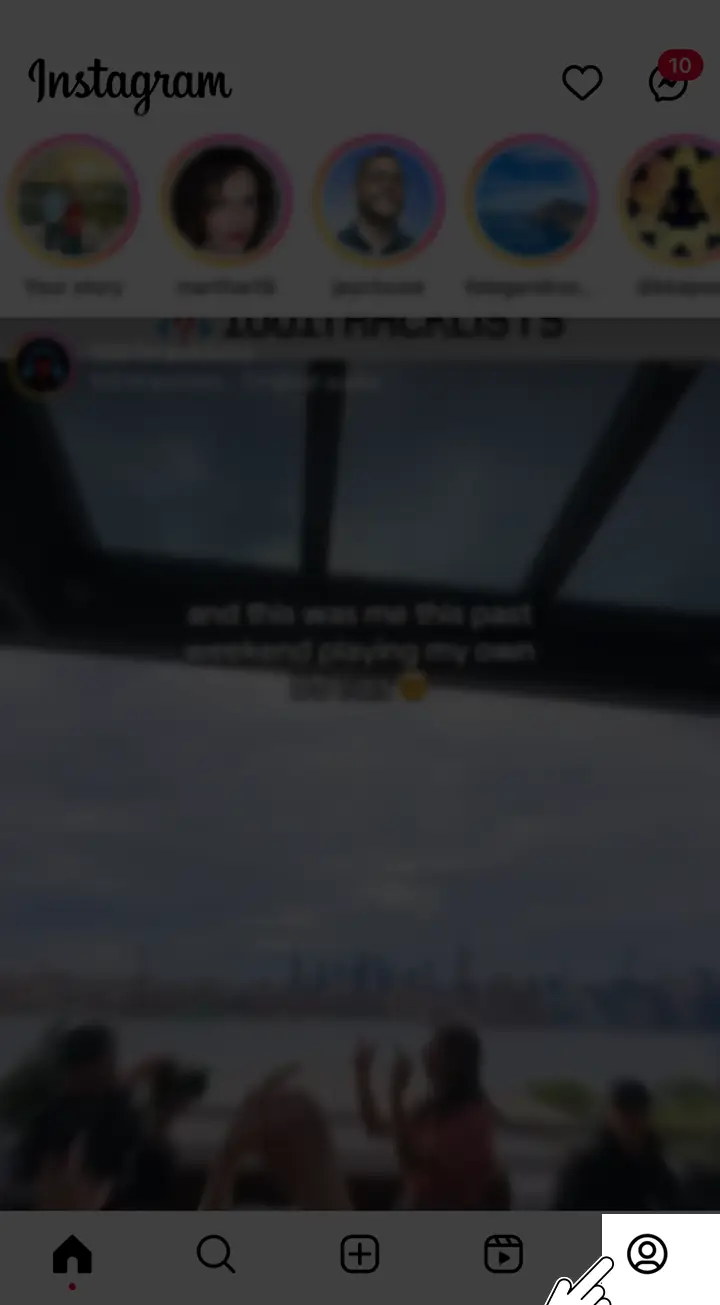
  1. Open the Instagram app on your iPhone and log into your account.
  2. Tap on the profile icon located at the bottom-right corner to access your profile page.Click on the profile icon to access profile page of instagram in Iphone
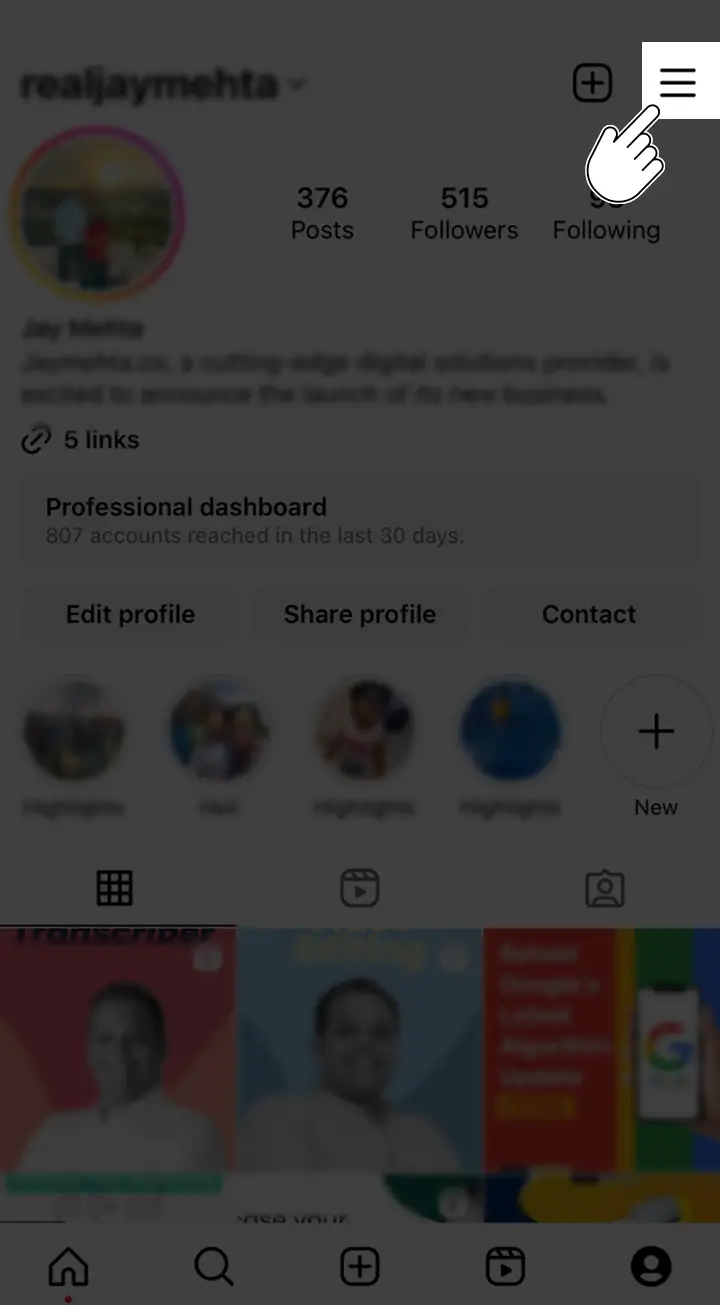
  3. Look for the three horizontal lines at the top-right corner and tap on them to access additional options.Click on the three horizontal lines in Instagram to access additional options
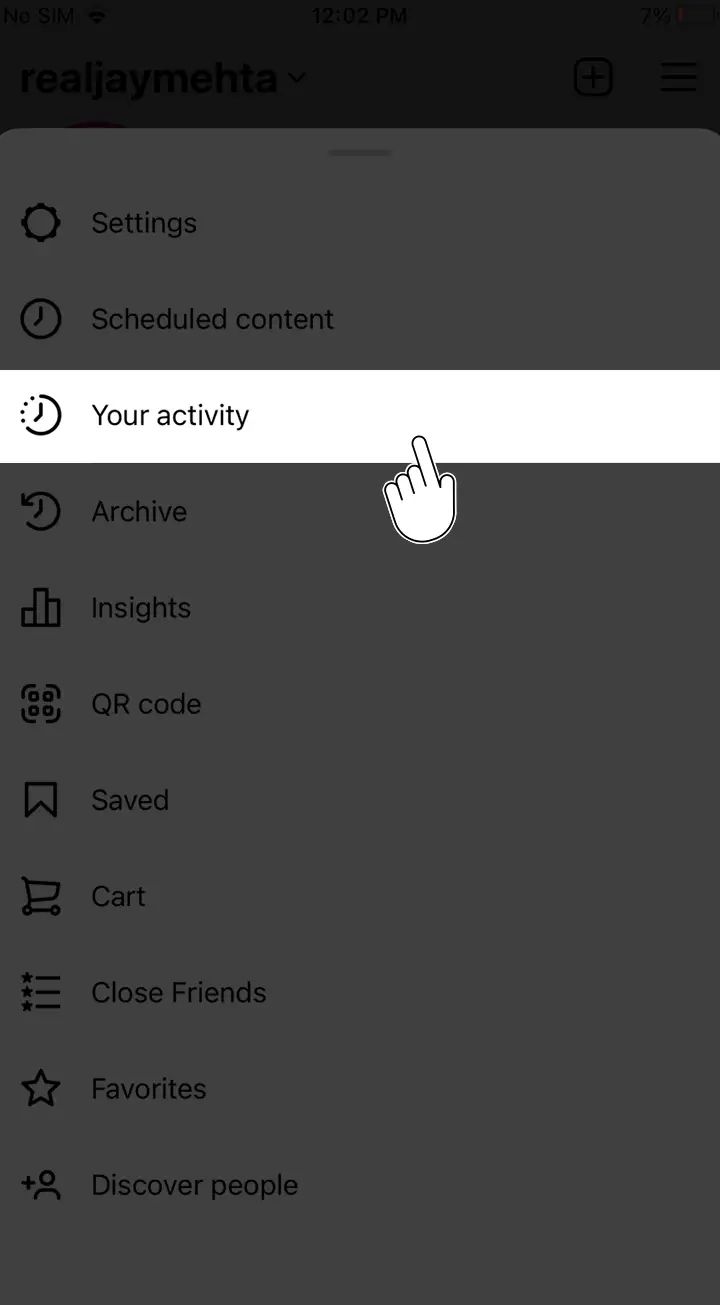
  4. A menu will appear at the bottom of your screen. Look for the “Your activity” option and give it a tap.Click on your activity option in instagram in Iphone
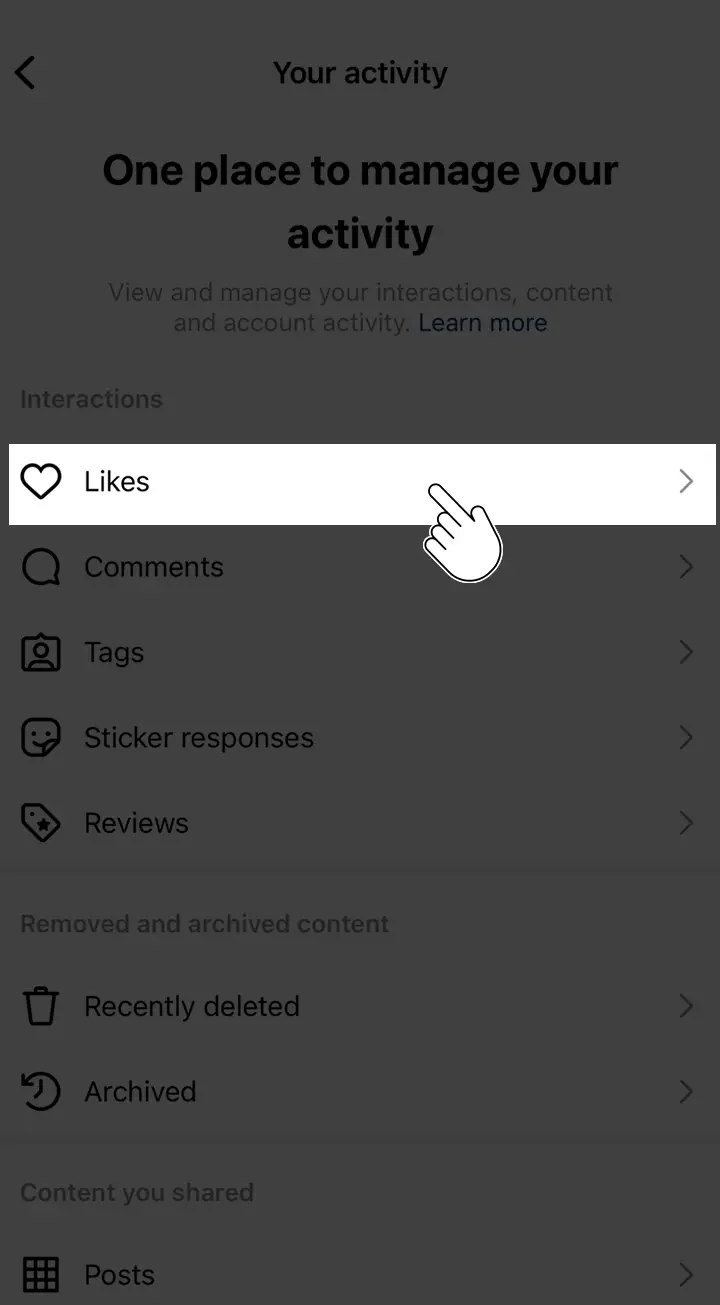
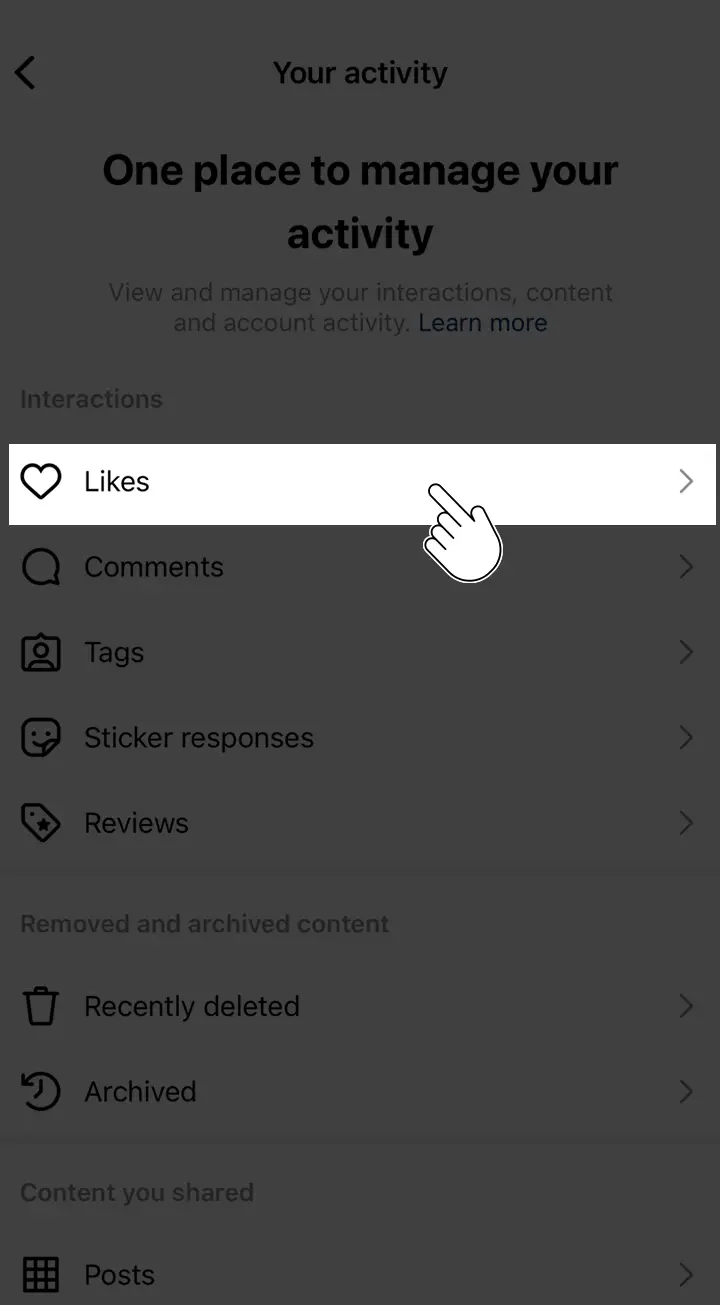
  5. This will open the “Your Activity” page. Navigate to the “Likes” option, which is represented by a heart icon, and tap on it.Click on likes option in instagram in Iphone
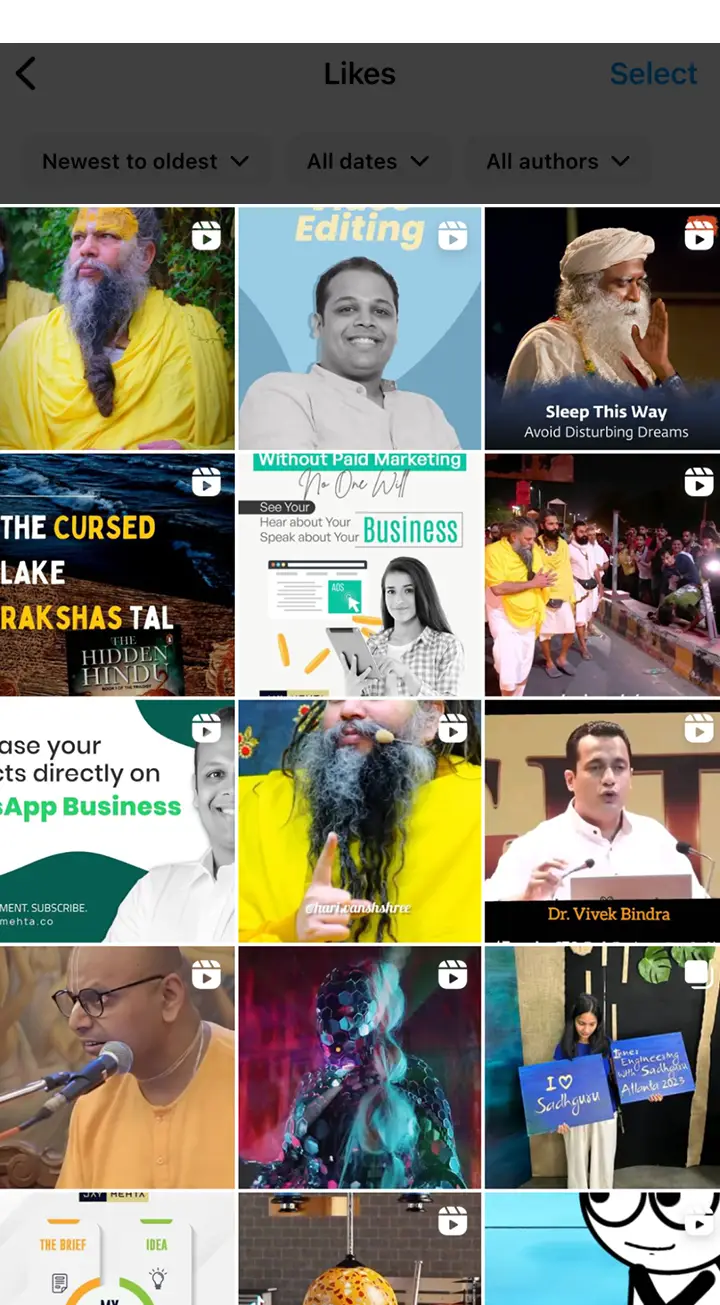
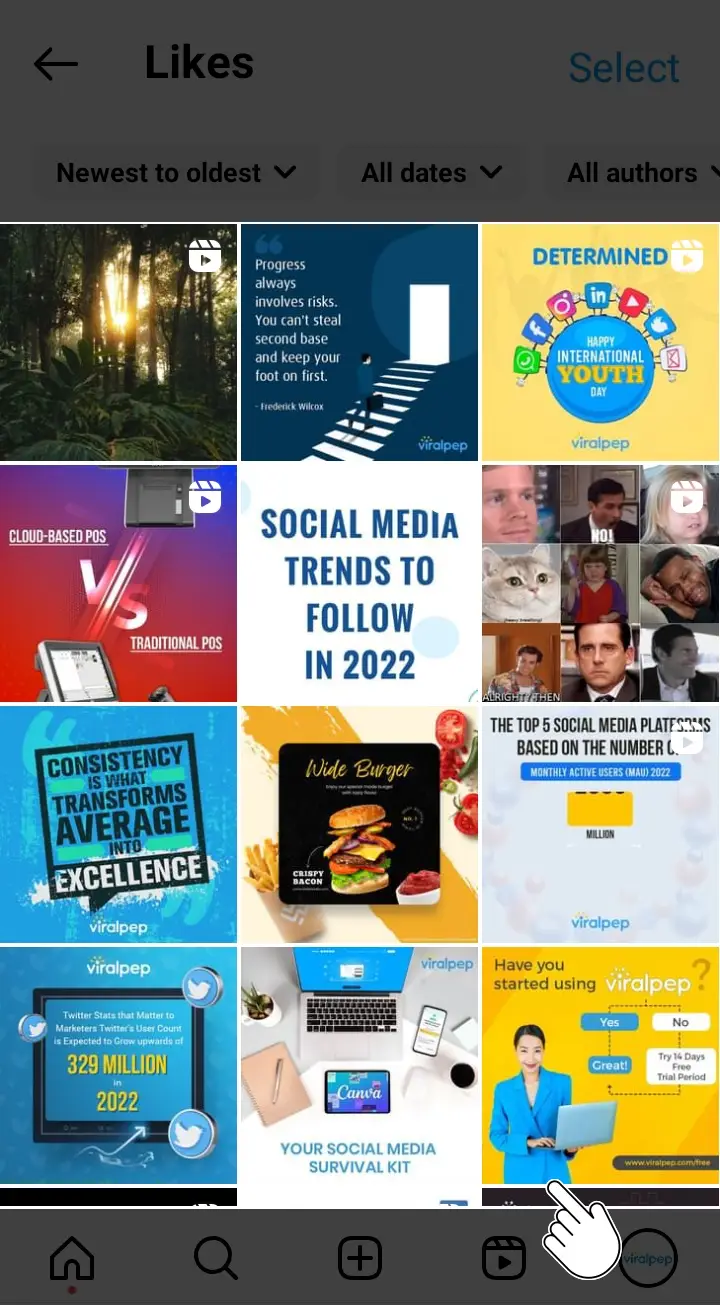
  6. Now, you will be able to see all your liked posts, including reels as well.Liked Post section in Instagram in Iphone
  7. Take a scroll through the list and find those awesome reels you’ve liked. Wanna watch one? Just tap on it to view it in full screen.

Follow these steps, and you’ll be able to track down and enjoy all your liked reels on Instagram using your trusty iPhone.

How to Find Reels You Liked on Instagram on Android

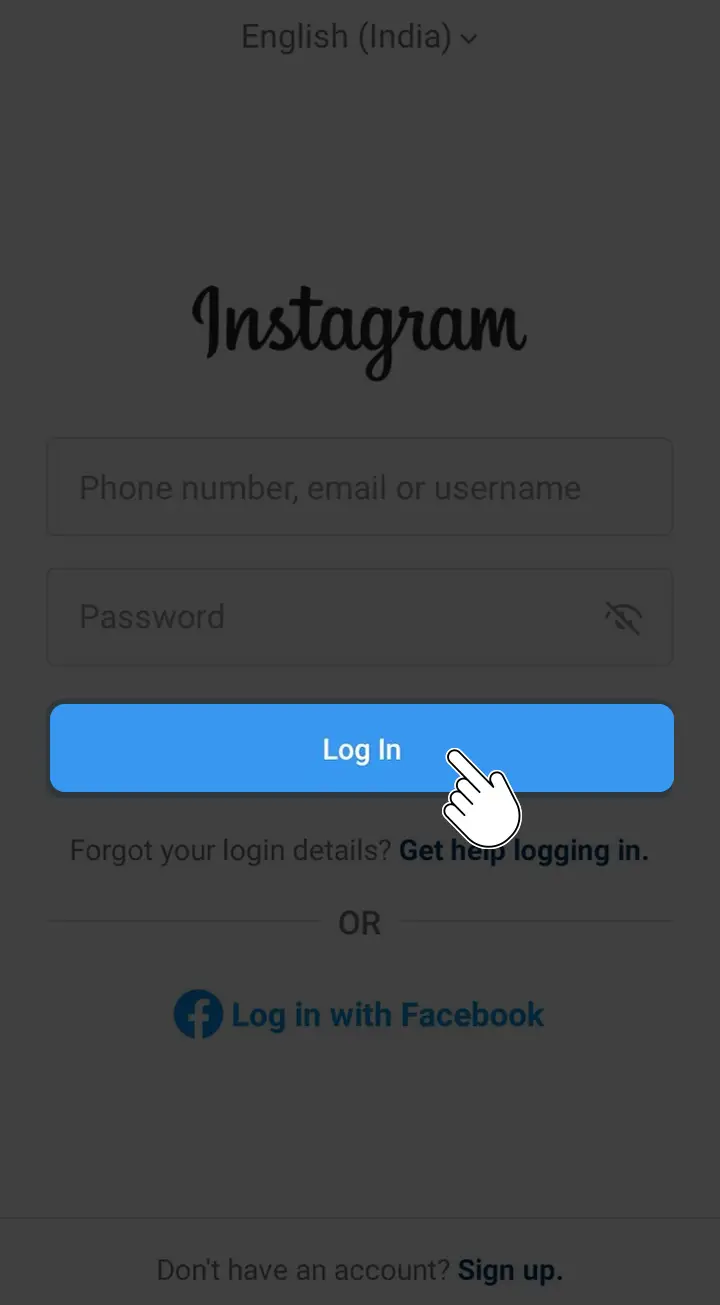
  1. Open the Instagram App on your Android device and log in to your account.Login to Instagram
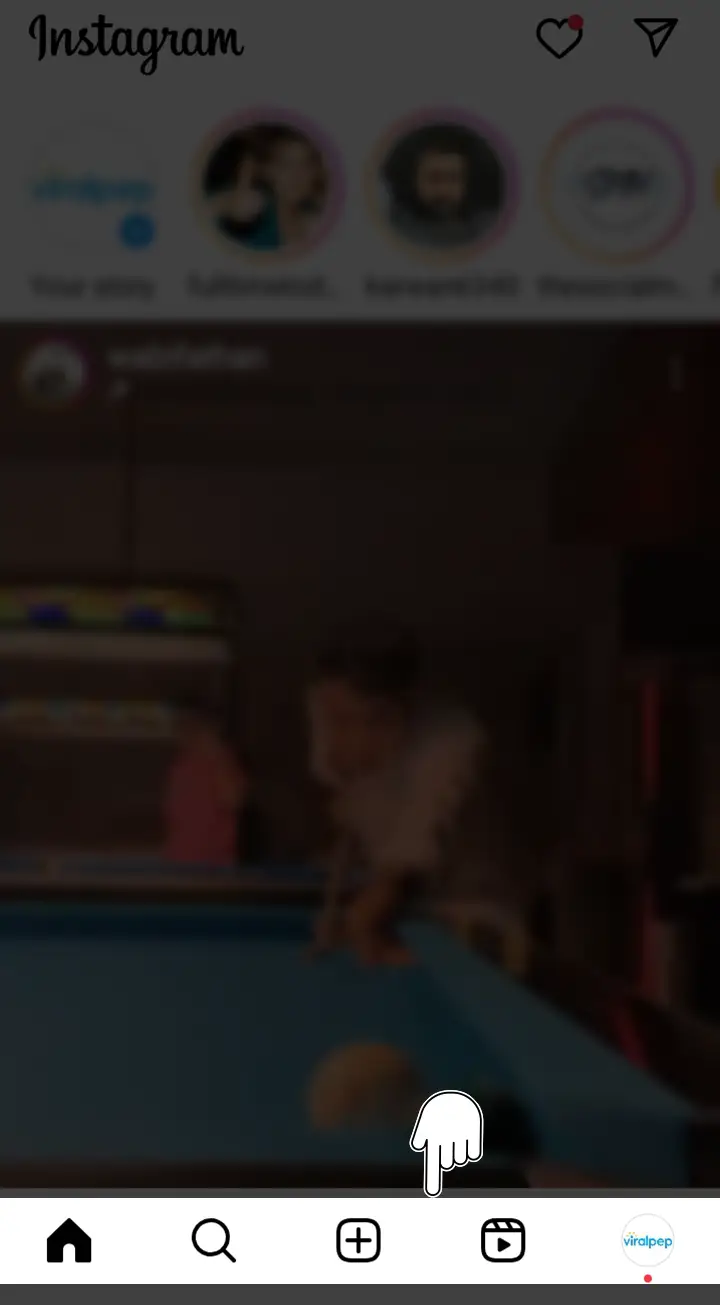
  2. You will enter the Instagram home screen, where you can see the various icons bottom of the screen in your app.Navigation buttons in Instagram
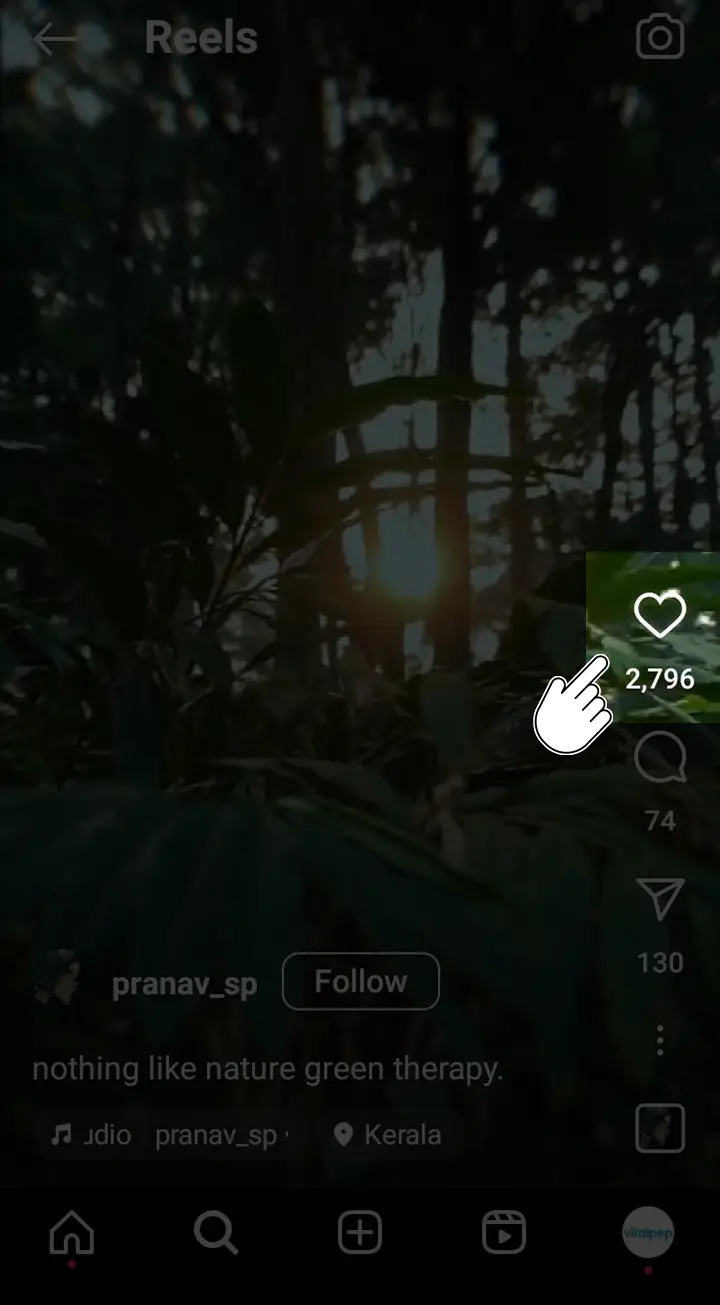
  3. Explore the Reels section for captivating and entertaining content. Tap the reel to view it full screen, and double-tap or tap the heart button to like it. Keep scrolling to discover and enjoy the new reels.Click on heart button to like reels
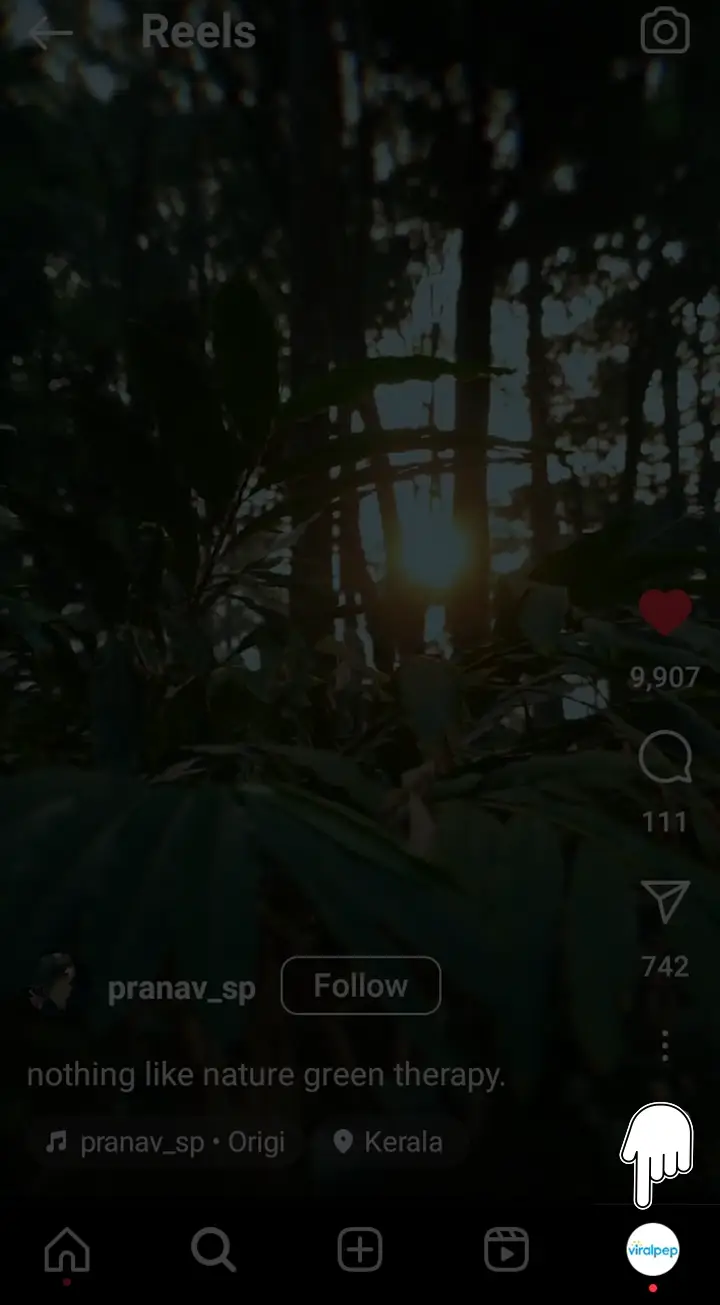
  4. Now, if you want to find your liked Reels, tap on the profile icon located at the bottom right corner. This will take you to your profile page.Find your liked Reels by tapping on the profile icon
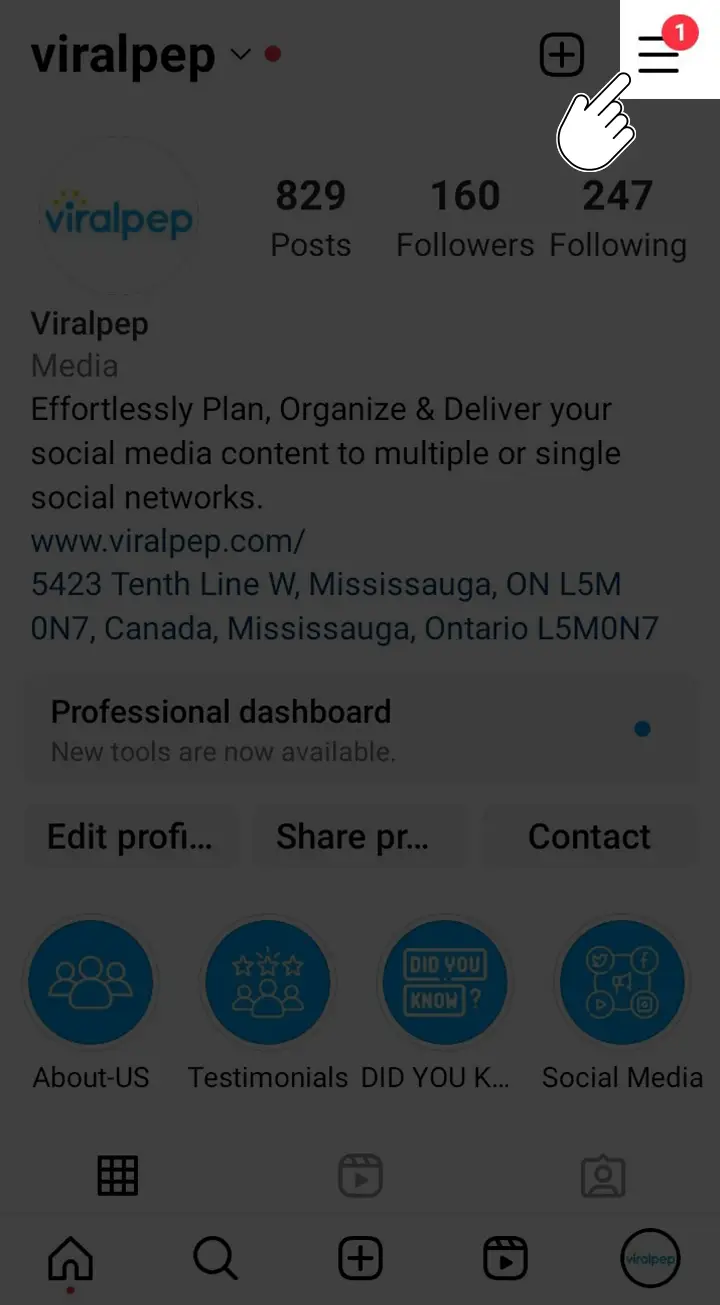
  5. On your profile page, look for the three horizontal lines in the top-right corner and tap on them to access the menu.Tap on three horizontal lines to access the menu
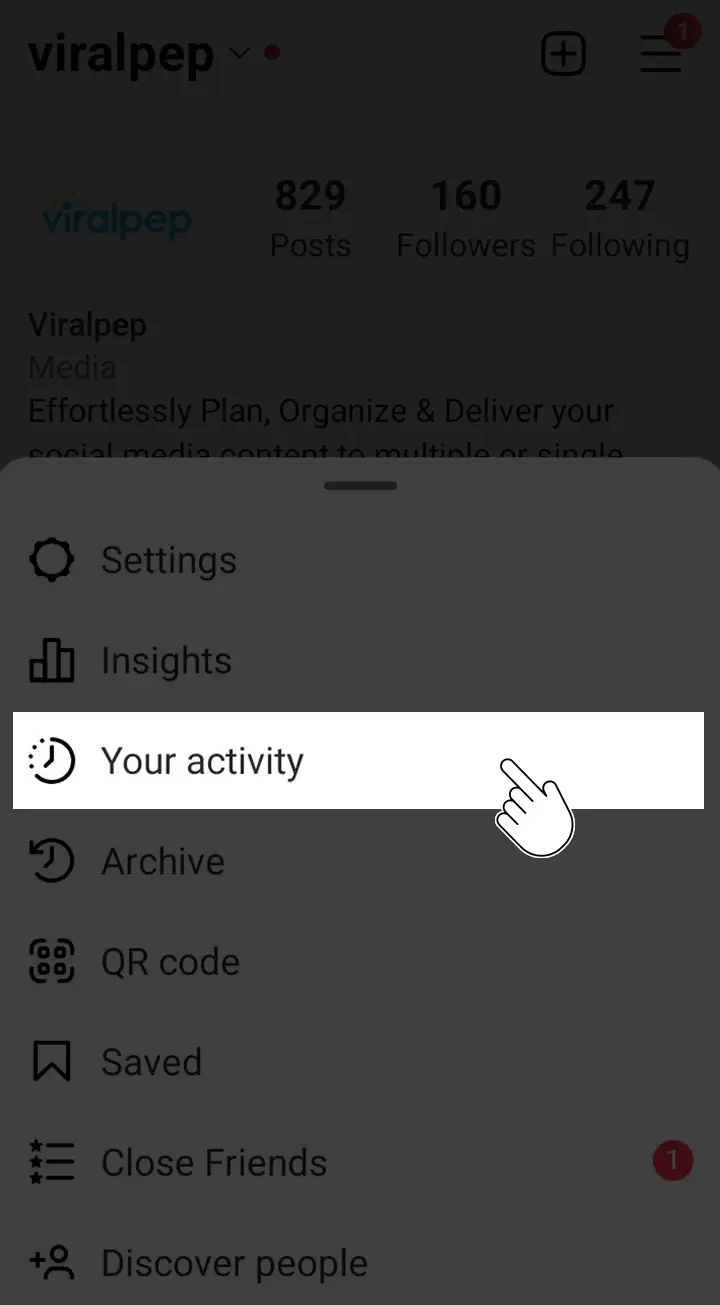
  6. A menu will appear at the bottom of your screen. Then, go to “Your activity.”Your activity option in Instagram
  7. You will land on the “Your activity” page. Look for the “Likes” section, which has a heart icon. Tap on it.Likes option in Instagram
  8. This will display a list of all the posts you have liked, including Reels.Liked post and reels in instagram
  9. Scroll through the list to find the Reels you have liked. You can tap on a Reel to view it in full screen.

By following these steps on your iPhone or Android device, you can easily find the Reels you have liked on Instagram and browse through them at your convenience.

Read also: How Instagram #Hashtags Can Be a Game Changer For Your Business?

Conclusion

Finding reels you liked on Instagram is a breeze with the simple steps outlined in this guide. Whether you choose to explore your liked reels directly on the Instagram app for iPhone or Android, you can easily rediscover your favorite content and stay engaged with the reels that inspire you.

Don’t miss out on the opportunity to optimize your Instagram experience—sign up for Viralpep.com today and unlock a world of social media management possibilities.

Remember to utilize Viralpep.com for seamless social media management, including Instagram scheduling, organizing liked reels, and more. Reclaim control over your Instagram experience and rediscover the excitement of the reels you loved.

Unleash Your Social Media Potential with Exciting Updates on Viralpep

Introduction

We are thrilled to bring you some exhilarating news and updates that will revolutionize your social media experience while using Viralpep. In this blog post, we want to express our deepest gratitude to all of you for your continuous support and invaluable feedback.

It is your unwavering dedication that has propelled Viralpep to new heights as a leading social media scheduling tool.

We believe in constantly evolving to meet your evolving needs. That’s why we have been diligently working behind the scenes to enhance the Viralpep platform.

We are thrilled to introduce a host of new features that will elevate your user experience to unparalleled levels. These updates are listed below:

Enhanced text editor of Viralpep

Enhanced Text Editor: Save Time and Ensure Consistent Messaging

Our revamped text editor is a game-changer! We understand the importance of conveying the same text across multiple social media platforms without the hassle of repetitive typing and styling.

With the enhanced text editor, you can now enjoy greater flexibility and convenience. Craft your messages once and effortlessly share them across various channels, saving valuable time and ensuring consistent messaging for your brand.

Improved video file upload mechanism for Linkedin

Improved Video File Upload Mechanism for LinkedIn: Maximize Engagement on the Professional Network

LinkedIn has become an indispensable platform for professionals and businesses alike. Recognizing its significance, we have optimized the video file upload process specifically for LinkedIn.

Our improved mechanism enables you to seamlessly upload your engaging video content, attracting more attention and driving increased engagement from your LinkedIn audience.

Elevate your professional networking strategies and make a lasting impact with captivating videos.

Realistic social post preview panel of Viralpep

Realistic Preview Panel: Visualize Your Posts with Confidence

We understand the importance of seeing how your posts will appear before sharing them with the world. With our latest update, we have resolved any issues with the preview panel design, offering you a realistic view of your content.

Now, you can visualize your posts accurately and gain confidence in their appearance across various social media channels. Ensure your content looks perfect and captivates your audience’s attention every time.

Scheduled post deletion feature in Viralpep

Scheduled Post Deletion: Flexibility for Evolving Social Media Plans

We know that social media strategies can change rapidly. That’s why we have introduced a post delete option for scheduled posts.

Our new feature allows you to easily remove or modify scheduled posts, giving you the flexibility to adapt your content to align perfectly with your evolving marketing strategies. Feel empowered and take control of your social media calendar effortlessly.

Conclusion

At Viralpep, we are committed to providing you with a cutting-edge social media management platform.

With our latest updates, including the enhanced text editor, improved video file upload mechanism for LinkedIn, realistic preview panel, and scheduled post deletion option, we aim to empower you to unleash your social media potential like never before.

Log into your Viralpep account today and explore these exciting new features. We can’t wait to see the incredible results you achieve!

Remember, your success is our success. We value your feedback, so if you have any questions, concerns, or suggestions, our dedicated support team is always here to assist you. Stay tuned for more exciting updates, and happy social media marketing!

Guide to social media’s importance in 2023 for your business growth

Your business can’t survive without social media. Hence, it is essential to understand social media’s importance and appropriate application to help your business excel in 2023. Social media is much more than just marketing your products or services. What it can offer depends on how well you understand it. There is more to what social media is and can deliver in the future to establish your business as a market leader. Social media is the best technology offers you today for generating brand awareness and establishing yourself as an authority. If used with a proper understanding and time-tested strategies, social media can augment your target audience and earn your business the reputation it deserves. If you wish to leverage the power of social media and grow your business in 2023 exponentially, then this blog is for you.

Definition of social media

In real life, you can’t limit social media to a small definition. Social media is an ocean of websites and apps that allow users to create and share content. Social media is more of a participative platform where your audience can interact with you and share their thoughts. Although the term usually refers to sites such as Facebook, Twitter, LinkedIn, and Instagram, it includes other platforms such as Snapchat and Pinterest. Social media comes with a bunch of benefits. It can help you stay connected with friends, family, and business associates. Despite being a virtual world, social media allows you to make new friends, develop a network of followers, learn new things, and gain insights into different business avenues. Social media offers a window to stay current with the latest developments. You may share your thoughts and ideas on current issues and participate in online debates and surveys. Using social media to promote your business, build your brand or raise awareness for a cause are masterstroke benefits of social media. Caution: Social media has pitfalls like any other tool, gadget, or technology. This information closely applies to the youths of today. Using social media excessively or inappropriately can lead to addiction, depression, isolation, cyberbullying, and other social problems. Psychosomatic disorders or ailments attribute their existence to excess and unrestrained use of social media. Therefore, it is important to use social media with accountability and responsibility.

Importance of social media in the modern world

How can you underestimate the importance of social media in this modern world? In a time when people are increasingly connected online, social media provides a valuable catalytic platform to engage and stay connected. By using social media, businesses and individuals can increase their reach, build relationships, and connect with new and potential customers. If you wish to discover why social media is an important part of inbound marketing, talk to your digital marketing agency. Digital marketers can use social media to create and share content, helping to promote brand awareness and drive website traffic. Using social media effectively and wisely is important to maximize its benefits. Social media can be an invaluable asset for your business and its growth when used correctly. Facebook, Twitter, LinkedIn, and Instagram have become integral to our lives, providing a constant flow of news, entertainment, and knowledge. Grabbing your share of news, entertainment, and knowledge is an elementary part of social media. It is also a powerful tool for businesses and professionals. A well-executed social media strategy can help to increase brand awareness, build customer loyalty, drive sales, and earn great profits. For instance, if you’re a business owner looking to expand your operations or cash out, you may be wondering about the best way to sell private company stock to investors, partners, or the public. Businesses must focus on creating engaging content to maximize the potential of social media. It will encourage users to engage and interact. Doing so will help businesses reach a wider audience and ultimately improve their bottom line.

How social media benefits businesses

Social media has become inevitable for businesses in the modern world. It provides organizations with a wide range of benefits, from increased customer engagement to improved brand credibility. It also helps businesses reach a wider audience and build brand authority. As social media enables increased customer engagement, companies can use it to communicate directly with customers, allowing them to build relationships, gain feedback, and improve customer service. Companies can also use social media to generate leads and boost sales. Social media also provides businesses with an excellent platform to target specific audiences. Companies dealing in customized products or solutions can use social media to reach people with specific choices. Social media allows these companies to tailor their marketing message to target specific audiences. Finally, social media is an excellent tool for building a brand. Companies can use social media to showcase their products and services, create campaigns, and build a strong brand presence. Social media also allows companies to track engagement and gain valuable insights into customer behavior.

Social Media Platforms

Overview of popular social media platforms

Who doesn’t know what a social media platform is? With social media becoming an essential part of our daily routine, we have started developing our lifestyle in and around it. These social media platforms help us connect with people, create content, share information, and express our views and opinions. With the internet upgrading to 5G, users can easily stay connected with their near and dear ones on the move. Various popular social media platforms, including Facebook, Instagram, Twitter, and YouTube, are available today. Facebook is one of the most popular social media platforms, with over 2.6 billion users. It allows users to post photos, share stories, and connect with friends and family. Instagram is another popular platform, with close to 1.5 billion users. It’s primarily a visual platform allowing users to share photos, gifs, reels, and videos. Twitter is a microblogging platform, with users limited to 280 characters per post. It’s a great way to stay updated on the news and engage with others. LinkedIn is a great platform for professionals and businesses alike. Professionals and businesses use LinkedIn as a networking tool to build relationships and create new business opportunities, while job seekers use it to find potential recruiters and employers. YouTube is a popular video platform, with users sharing videos, shorts, live streams, and creating audio-video content. No matter which social platform interests you, there are multiple opportunities to grow personally and professionally using today’s social media platforms. Social platforms are more than generous to offer multiple options so that everyone can have their bite of happiness.

The unique benefits of each platform

Let’s understand the benefits of each platform.

Facebook

Facebook is a great platform for creating a community, allowing users to create groups and events and even market their businesses. It also has a great newsfeed feature that lets users stay updated with events and news easily. Additionally, Facebook Ads are one of the most powerful and cost-effective ways to reach potential customers.

Instagram

Instagram is a great platform for visual storytelling and content creation. Its features, like Instagram Stories, allow users to create and share creative content with their followers easily. Instagram’s Explore tab can help users discover new accounts, content, and trends. Instagram Reels is a crazy feature. It allows users to create 15 minutes long videos  and post it to their accounts. Users can voice their messages or share them for entertainment.

Twitter

Twitter is great for networking and connecting with other users and influencers. It is also a great platform for staying informed on the latest trends, news, and events. Twitter’s hashtag feature also allows users to find and join conversations about topics that interest them quickly.

LinkedIn

LinkedIn is the perfect platform for professionals and businesses to build networks and develop relationships with potential customers and partners. It is also a great platform for job seekers to find recruiters and employers. LinkedIn’s Groups feature also allows professionals to join existing conversations and start their own.

YouTube

YouTube is the perfect platform for creating and sharing video content. It is also great for hosting live streams and creating engaging content for viewers. Additionally, YouTube’s powerful analytics allow creators to track their videos’ performance and adjust their content to improve engagement. Users can create albums on their YouTube accounts and save the videos to them. Most users access YouTube for entertainment, but YouTube is a marvelous platform for sharing knowledge and information. Creating video content on YouTube fetches you more engagement than plain text content. Subject matter experts can create video tutorials or product (unboxing) guides on YouTube. Such videos can help your followers learn more about what you have to offer and also help you get new followers if you create content in easy to digest manner.
Which platforms are best for your business


Which platforms are best for your business?

Social media is an essential platform for every business, small or big. It allows them to connect with customers, build relationships, expand their reach, and increase their visibility. With many different platforms, deciding which is right for your business can take time and effort. We are sharing a brief about a few business-oriented social media platforms:

Facebook

Since the last few decades, Facebook has earned popularity as the best social media platform. Facebook efficiently accommodates businesses of all sizes. It helps you connect with your current customers and reach out to potential customers. You can share updates, promotions, and other content to help you build relationships with your existing customers and find new ones.

Twitter

Twitter is a great platform for businesses, especially those that want to engage in customer service. It lets you quickly respond to customer inquiries, share relevant content, and build relationships.

LinkedIn

LinkedIn is the perfect platform for businesses looking to build relationships with other businesses and professionals. You can join relevant groups, share content, and network with other businesses in your industry.

Instagram

Instagram is great for businesses that want to reach a visual audience. It allows you to share photos and videos of your products, services, and events, which helps you build relationships with customers.

YouTube

YouTube is a great platform for businesses that want to showcase their products and services more visually and engagingly. You can create videos and use them to reach out to potential customers. There is a lot to what social media platforms can do to promote business growth and make your brand successful. Considering your business goals, the company’s vision, and the target audience, you can research to find the appropriate platforms for your business.

Establishing Your Business on Social Media

Establishing your business on social media requires different skill sets. Let us discuss them in brief.

Creating a social media strategy

Your primary step to creating a functional social media strategy for your business is understanding your audience. What are their interests? What platforms do they use? Once you have a good idea of your customers, you can create content and strategies that appeal to them. Customize your social media strategy to suit your business’s needs and goals successfully.
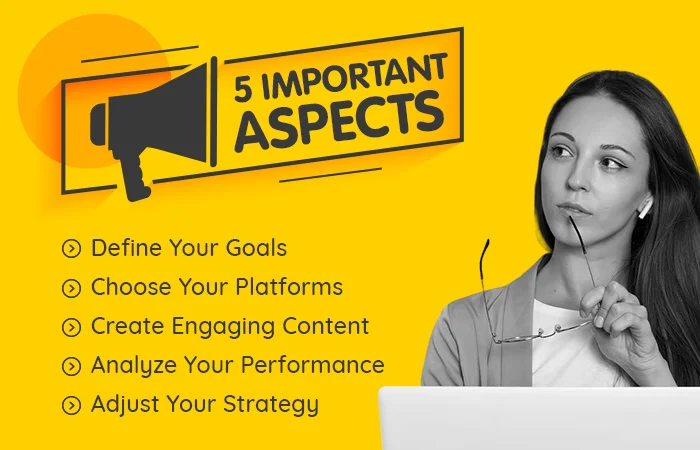
5 Important Aspects

  Here are 5 important aspects to consider while creating a social media strategy to establish your business on social media:

1. Define Your Goals

Before starting your social media strategy, you must clearly understand your goals and objectives. Determine the objectives you want to achieve with your social media presence. Are you looking to increase brand awareness, generate leads, or drive sales? Knowing your goals will help you determine which social media platforms you should use and what content you should create and share.

2. Choose Your Platforms: 

Once you know your goals, decide which social media platforms to use. Different platforms will suit different businesses. So, choose the most suitable platform for your target audience.

3. Create Engaging Content

Once you’ve chosen your platforms, it’s time to start creating content. Aim to create content that is engaging, informative, and entertaining. You want to create content encouraging people to engage with your posts and share them with friends and followers.

4. Analyze Your Performance

It’s important to track and analyze your performance. This analysis will help you understand which content is performing well and which needs revision. It will also help you identify areas that need improvement.

5. Adjust Your Strategy

As you track your performance, you may find that certain aspects of your social media strategy aren’t performing as expected. In this case, reviewing, revising, adjusting your strategy, and making changes are important to ensure it is as effective as possible. Creating a successful social media strategy takes time, effort, and dedication. By following these aspects, you can create a social media strategy to help you establish your business on social media and achieve your dream goals.

Identifying your target audience

Identifying your target audience is crucial in establishing your business on social media. Knowing who you are targeting will help you create a marketing strategy tailored to your target audience’s needs and interests. It will also help you develop content that resonates with your target audience and allows you to understand the behavior of your followers better. Knowing and understanding your target audience can help you identify the most effective platforms to reach them. It will also maximize your marketing efforts and get the best return on investment.

Best practices for posting and engaging with followers

This section will discuss the best practices you must adopt while posting on social media to achieve the right amount of engagement with your followers. Businesses should follow these 4 best practices when posting on social media and engaging with followers.

  1. It is important to be strategic about the platforms you use. Not all platforms will be relevant to all businesses, so choosing the ones most likely to reach your target audience is important.
  2. You should post regularly and consistently to keep your followers engaged.
  3. Ensure your posts are interesting and valuable to your audience – no one appreciates wasting time on reading irrelevant or boring content. Social media features like hashtags, @mentions, and geotagging help you reach a wider audience and encourage more interaction. Maximize their use for more engagement.
  4. Interacting with your audience will allow you to develop trust – answer their questions, respond to their comments, and run competitions or giveaways to keep them returning for more.

Following the above-stated best practices can increase social media engagement and help your organization reach a wider audience.
Building Brand Awareness

Building Brand Awareness

Reaching a wide and targeted audience through social media platforms is one of the best ways to increase brand awareness. Businesses can increase visibility and improve customer engagement through targeted campaigns and content. Businesses can create relationships with their customers and build trust by creating content relevant to their target audience. Your content must carry an element of freshness every time it is posted. If your content brings a difference to someone’s life, consider it as your first step to success. Furthermore, businesses can use social media to engage with customers in meaningful dialogue to build relationships and develop loyalty. By utilizing the power of social media, businesses can effectively create brand awareness and reach more customers.

How can social media increase brand recognition?

Creating and sharing content on social media is one of the ways to enhance brand recognition. This can include anything from product updates and reviews to photos and videos of the brand’s products. This content can be shared across various social media platforms, making it more likely to be seen by a wider audience. Another way social media can help increase brand recognition is by promoting events and activities. This can include anything from product launches to meet-ups and social media contests. Promoting these events and activities allows brands to reach a broader audience and create a community around their products. Social media can help increase brand recognition by creating and sharing content, promoting events and activities, and being visible across various platforms.

Create a strong online presence.

Establishing your online presence on social media must be a significant part of your marketing strategy. You can connect with potential buyers and partners by building a strong online presence, increasing brand awareness, and strengthening the trust element for your brand. Consider implementing these suggestions to create a strong online presence for your organization:

1. Allow social media to bridge your company to your customers and partners

Use social media to connect with current and potential customers. Sharing the latest news, product information, and service development will attract customers and potential buyers to your social media handle. If this information interests your customers, they will happily follow your social media page. Potential partners and business associates can be your great asset. Collaborate with them on joint marketing campaigns. Create a win-win situation for a healthy and long-lasting relationship. Ensure transparency in your transactions. Share information about your products and services, and discuss potential outcomes to benefit your business collaborators.

2. Use social media to build brand awareness

A brand is the first thing any buyer looks for. Only products that belong to a brand culture will be easily accepted in the market. So building brand awareness using social media gives a thorough boost to your business. Share your unique brand story. Highlight the benefits of using your products or services. Narrate the benefits as if they are the real solution to a problem.

3. Use social media to communicate your brand message

Let your brand messages flow amongst your followers. These messages are your brand vibrations and ensure your customers can relate to these vibrations. It will help generate an emotion of loyalty within your buyer circle. Communicate your brand message using social media to build a positive and powerful image for your business. Focus on key messages that resonate with your target audience.

4. Use social media to stay up to date with trends

Everyone loves being a trendsetter. But becoming a trendsetter is more challenging than said. Nevertheless, if you can’t be a trendsetter, you can at least stay current with the prevailing trends in your business domain. Use social media to track industry changes, learn about upcoming trends, and adapt to new marketing developments. Switch to proven strategies with solid logical foundations.

Leveraging social media for free advertising

Social media is a powerful tool easily accessible to businesses of any size. It helps you find and target a broader spectrum of audiences for free. Why pay for ads when you have a full-blown social media universe for free? Use this free opportunity to advertise your products, services, and brand to increase brand awareness, generate leads, and drive sales. When done correctly, social media advertising can establish customer relationships, drive web traffic, and positively impact your business. Each social media platform is unique, and so is how to manage it. Understanding the different platforms in their perspectives is important to help you use them to your advantage. From creating engaging content to tracking analytics, you can use various strategies to leverage social media and maximize your marketing efforts.

Engaging with customers

If you use social media to engage with customers, you are progressing toward building great relations. Successful engagement results in a positive brand experience.

Responding to customer inquiries

Businesses can interact directly with customers through social media, respond to their questions and concerns, and gain valuable feedback. If you receive genuine feedback, insist upon thanking your customers for their time and efforts. Make it a point to work on the suggested drawbacks. This strategy helps businesses understand their customer’s needs and create more personalized solutions to match their requirements and resolve problems. Ideally, your solution must address your customer’s pain area. Additionally, social media can help businesses grow their reach, engage with potential customers, and build loyalty among existing customers. Defining a timeframe during which you or your team will respond to a customer’s query is good practice. You might have to race against time to make your audience feel their concerns are paramount. If you still need to fetch a solution to the issue, at least update your user with a brief about the progress. Your response will always keep your customer happy and connected.

Encouraging customer feedback and reviews

Encouraging customer feedback and reviews is essential to maintaining a positive customer relationship and encouraging repeat business. By allowing customers to share their thoughts and experiences with your company, you can build trust and create a strong bond of loyalty. In addition to providing valuable feedback, reviews help you identify the areas needing improvement. Gathering customer feedback in one place lets you quickly identify and address any issues affecting your customers’ experience. Make it easy for customers to leave feedback. Make it clear where customers can leave reviews and how long they will be visible. Make it clear where customers can leave reviews and how long they will be visible. Offer a review incentive. Consider offering customers a discount, a free product, or another incentive for leaving a review. Follow up on reviews. Respond to positive and negative reviews and thank customers for their feedback. Educate your team about feedback and train them to respond within the stipulated timeframe. There is no alternative to client satisfaction. A happy and satisfied customer is your best brand ambassador.

Building customer loyalty through social media

Customer loyalty is more about retaining your existing customers. It is the trust that motivates customers to buy your products or services. The essential aspect is that this trust must continue. Loyalty is a respective term. If your company continues to deliver to your customer’s expectations, he will never attempt to find your alternative. The day when you take him for granted and offer a sub-standard product, he might accept it, but he will never return for his next purchase. Every time a customer buys your product, thank him enough and promise yourself to offer him the best of the best – The best can be your product, service, or customer support. Social media apps offer a great platform to stay connected with your customers. You can keep your clients informed of your latest items and promotions by connecting with them via social media. Building customer loyalty through social media is a great way to ensure your customers visit you again. You can also create social media content tailored to your customer’s interests. When your content interests them, they will be loyal to your brand. By creating a social media strategy focusing on customer loyalty (and satisfaction), you can ensure your business thrives long into the future. Customer loyalty is a rare commodity; it takes effort and dedication.

Growing your audience

Creating engaging content is the most effective way to expand your family of followers on social media. Your content has to be relevant to your audience’s choice and interest. Use social media to display and share your stories, images, and videos that connect with your followers. Use social media to promote your events, products, and services. Doing this will increase the chances of keeping your followers glued to what you offer them.

Tips for gaining followers

Here are 5 important tips/suggestions for gaining followers on social media.

  1. Broaden your reach with hashtags. Using hashtags will help your content will gain better visibility on social media. Use specific hashtags to attract interested audiences and make them a part of your discussion.
  2. Share interesting and original content. Avoid posting content that is just a restatement of what others have said. Share content that is unique and offers a new perspective on the topic. Stick to your domain of expertise and industry.
  3. Use social media to build relationships with your followers. Respond to their comments and engage with them, making them feel appreciated and encouraging them to follow your account.
  4. Your brand is significant as people know you by your brand. Your brand gives you a business identity. Use social media to promote your brand and connect with potential customers. Share your company’s mission and vision, and offer free content or giveaways in exchange for following.
  5. Use social media to connect with potential customers and understand their wants. It will help you create tailor-made content relevant to their wants and interests.

Using paid social media advertising

Use paid social media advertising to reach your target audience in several ways. One way is to run ads specifically tailored to a certain demographic. For example, if you sell kidswear for kids aged 6 to 8 years, you might run specifically geared ads. Your products are for the kids, but the parents are the target. Your ads might be targeted at a broader spectrum but tailored to a certain audience. Such ads are often referred to as “targeted ads.” Another way to use paid social media advertising is to run ads encouraging people to share your content in their network. For example, you might run an ad saying, “Share this ad to get a gift.” When people share your content, you earn ad space on their social media profile, and their followers may see the ad. Using this strategy effectively gets your message out to a broader audience and has superior coverage. Overall, paid social media advertising effectively reaches your target audience and encourages followers to share your content.

Expanding your reach through collaborations and partnerships

Social media platforms have become an increasingly powerful tool for businesses, allowing them to connect with their customers and build relationships with their target audiences. However, reaching many people through social media alone may take time and effort. One way to maximize these platforms’ potential is to collaborate and partner with other brands, organizations, and influencers. Partnering with other brands can be a great way to extend your reach and broaden your network. By working together, you can combine individual followers to create a larger audience pool. You can achieve this through sponsored posts, product giveaways, and influencer collaborations. Working with influencers is particularly effective, as they have a built-in audience of followers who are more likely to be interested in your product or service. Collaborations with other organizations can also be beneficial for expanding your reach. This collaborative process will involve forming a joint venture, sponsoring events, or creating joint marketing campaigns. By collaborating with other organizations, you can tap into their existing network of followers and reach more people. Collaborations and partnerships can be a great way to increase your reach on social media. To ensure long-lasting relationships with your target audience, you must work with other organizations, brands, and influencers and crack a mutually beneficial deal.

Measuring Success on Social Media

Measuring success on social media is difficult yet essential for any business. With the right metrics, you can track progress, identify areas of opportunity, and understand the impact of your campaigns. You can also identify key performance indicators, analyze social media metrics, and adjust your strategy based on data. You must understand which metrics are most important and what truths they reveal. Understanding the context of your industry and business goals is the key to measuring success on social media accurately.

Identifying key performance indicators (KPIs)

Social media marketing is essential to any marketing strategy, and identifying the right key performance indicators (KPIs) is key to measuring success. KPIs can help you evaluate the effectiveness of your social media efforts. Consider your social media marketing strategy’s objectives before setting KPIs. To enhance brand awareness, website traffic, or lead generation, you must choose the best KPIs to gauge progress by keeping your goals in sight.
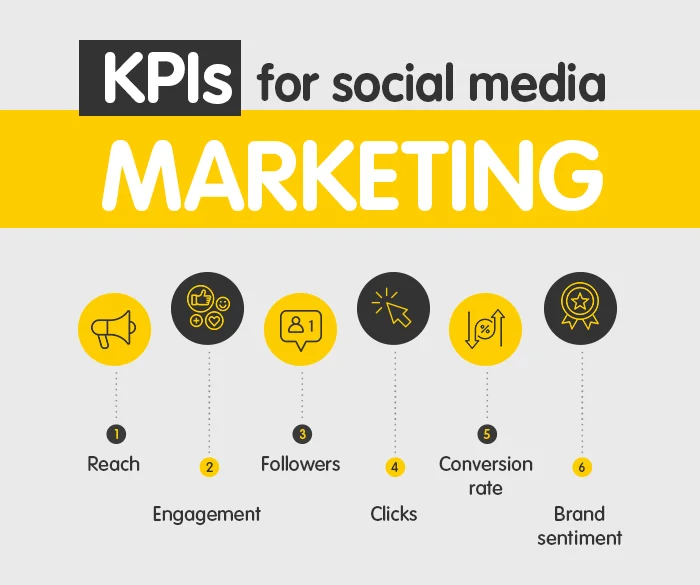
KPIs for social media marketing

Check out some of the most commonly used KPIs for social media marketing:

  • Reach – How many people are exposed to your content?
  • Engagement – How many people interact with your content?
  • Followers – How many people are following your social media accounts?
  • Clicks – How many people are clicking through to your website from your social media posts?
  • Conversion rate – How many people are taking the desired action after viewing your content?
  • Brand sentiment – What is the overall sentiment towards your brand?

Analyzing social media metrics.

Analyzing social media metrics from a business perspective is essential for any company that wants to make the most of its digital presence. Social media platforms provide an invaluable opportunity for companies to reach out to customers and build relationships with them. By measuring the performance of their social media campaigns, companies can track their progress and make adjustments to improve their performance. When analyzing social media metrics, companies should focus on key performance indicators (KPIs) such as followers, engagement, reach, impressions, and conversions. These metrics help companies understand how their content performs and which strategies most effectively achieve business objectives. Knowing the number of followers is a great way to measure the size of a company’s audience and the effectiveness of its content in attracting new followers. Engagement measures how much people engage with the content by liking, commenting, and sharing. A reach refers to the number of people viewing a particular content. Impressions measure how many times a piece of content has been seen. Finally, conversions track how many people took action, such as clicking a link or signing up for a service or product demo. By analyzing these metrics, companies can gain valuable insights into their audiences’ tastes, choices, and interests and the effectiveness of their content.

Adjusting your strategy based on data

Social media marketing has the power to build your brand, spread awareness, and connect with potential customers to increase your reach. However, the success of your social media marketing strategy depends on how well you use data to adjust your approach. You must analyze your data to determine your best platforms. This data will help you decide the content that resonates with your audience and guide you toward optimizing your campaigns for maximum impact. Your data is awesome information that helps you redefine your social media efforts. Keep a close eye on which social media platforms drive the most engagement. For example, if you see more engagement on Instagram than on Twitter, it is time to shift your focus and efforts to Instagram. The type of content that fetches engagement is equally important. You must look at which type of content is performing the best. For example, consider creating more video content if video posts generate more engagement than text-based posts. You can also use data to refine your targeting. Look at your analytics to determine what types of people engage with your content, such as age, gender, location, interests, etc. It can help you create more tailored campaigns and ensure that you’re reaching the right people. Finally, you should use data to track your progress. Each month, review your analytics to see which campaigns are performing the best and which fail. This outcome will clarify areas needing improvement so you can adjust your strategy, time, finance, and efforts accordingly. Using data to restructure your social media marketing strategy ensures that your campaigns remain effective in maximizing your results to get the most out of your efforts.

Conclusion

Social media remains a key component of any successful business in 2023. It provides an effective platform for connecting with customers and other allied businesses and helps build brand recognition, boost sales, and generate revenue. By leveraging the power of social media, businesses can strengthen their customer relationships and ensure that their messages spread to a larger audience. As technology evolves and advances, businesses must adapt to the new environment and stay ahead of the curve. This progression in the existing social media strategies will help your business thrive in the changing landscape.

Viralpep Launches New Powerful Features for Social Media Management

Welcome to Viralpep.com, your social media scheduling tool! We are excited to announce the launch of several new features to help you take your social media presence to the next level. With these new features, you can easily create and schedule engaging content, track performance, and collaborate with your team. Keep reading to learn more about our new features and how they can help you succeed on social media.

Upload reels to your Instagram account from Viralpep

Upload reels to your Instagram account from Viralpep

Yes, you heard it right! Viralpep subscribers can now easily upload Instagram Reels from their Viralpep account. Use your innovative idea to shoot a short, amusing video and add music to capture users’ attention. Add the flavors of facts, filters, effects, and other creative tools. Preview your video in its totality. Viralpep is Ready when you are. Now upload this video to your Instagram Reels from your Viralpep account. All of these result in a high level of engagement for individuals and organizations alike.

Upload more media with fewer efforts

Upload more media with fewer efforts

With social platforms relaxing their limits, you can now upload more images per post on all 4 social media accounts. Viralpep offers a range of features, including the ability to upload multiple images for each post. The updated limits are as follows:

  • Facebook offers 10 images per post,
  • Instagram offers 10 images per post,
  • LinkedIn offers 9 images per post,
  • and Twitter offers 4 images per post.

You can create more engaging and informative posts with multiple images. You can add a video, gif, links, or hashtags to your post. You can also schedule your posts and track their performance through your Viralpep account.

Security Updates

Security Updates

We implemented enhanced security measures to protect the stored user data in the system. We reviewed the website code, modified it, and updated it to ensure the highest level of security. We secured all user data from unauthorized access by applying complex security measures. Our teams continuously monitor the system for suspicious activities. Viralpep is committed to providing its users with a secure experience.

Performance upgrades

Performance upgrades

At Viralpep, we consider user experience as a serious affair. Using extensive optimization patterns and multiple testing algorithms, we have improved our product’s (application) performance, ensuring that all the functions run smoothly. We have also increased the speed of all the functions to deliver the expected results within a reasonable timeframe. Our performance upgrades will ensure our customers a flawless and pleasant product experience. To learn more about these features. Signup to our exciting plans and enjoy much more powerful and easy to use features from Viralpep.

Social Media Video Specs: Video Upload Requirements on Social Media

Video marketing is known to be one of the significant aspects of creating constant engagement and growth on social media. Marketers feel more optimistic about the ROI offered by video than ever, as it strongly influences traffic, leads, sales, and audience understanding.

Implementing successful video marketing might seem like a task; however, it becomes a breeze when you ensure certain aspects are in order—a few of them being the specs, size, and dimension of your video content.

Just like every social media platform is recognized via a different video sharing name, for instance, Shorts on YouTube and Reels on Instagram. Similarly, they are followed by different sizes and dimensions to complement the quality of your uploaded videos.

But the concerning fact is, how do you determine social media video specs? This blog post will help you understand the exact size and dimension required for your video content to get the desired engagement through your social media marketing.

Different Social Media Video Sizes Requirements

1. Facebook Video Specs

Numerous types of videos can be posted on Facebook; however, each has a different dimension you must consider before broadcasting your video content.

Here are a few types of videos shared on Facebook.

  • Shared Video Posts

Shared videos are the most common videos on Facebook, which are reshared on the story by your mutual connections and brands. These videos can be auto-played in the news feed and have an orientation of either landscape or portrait.

Specifications

  1. Video dimension – 1280*720 (landscape and square)
  2. Landscape ratio: 16:9
  3. Portrait ratio: 9:16, If the video has an attached link, then the ratio will be 16:9
  4. File size: Maximum of 4GB (Viralpep supports 50 MB)
  5. Video length: Maximum of 4 hours
  6. The aspect ratio for mobile in both orientations is 2:3
  • 360° Videos

Back in 2015, Facebook rolled out 360° Videos in the news feed for publishers to record and upload a 360 degree view of their surroundings. These videos can also be panned and rotated from the user’s perspective so that they enjoy the view from multiple angles with no blind spots.

Specifications

  1. Maximum dimension of monoscopic videos: 5120*2560, and the aspect ratio is 2:1
  2. Maximum dimension for stereoscopic videos: 5120*5120, and the aspect ratio is 1:1
  3. Maximum length: half an hour
  4. Maximum file size: 10 GB (Viralpep supports 50 MB)
  5. Embedded 360 metadata in the video
  6. File type: MP4 container
  • Video Advertisements

Facebook Ads are an excellent marketing tactic if used the right way. With just a few ads, you can increase your reach without any geographical boundaries.

Moreover, Facebook has created diverse ad types offering a space for marketers to display their business objectives. Let’s understand the types of Facebook video ad specs.

  • Desktop News Feed Link Videos

These videos appear in the right corner of the user’s feed, sharing a landscape or square dimension. Desktop video ads are similar to shared videos and are generally played between organic ads. Now let’s look at the specifications of desktop news feed link videos.

Specifications

  1. Dimension: 1280*720 pixels
  2. Format: .MOV or .MP4 file
  3. The ratio for the landscape aspect: 16:9
  4. The ratio for the square aspect: 1:1
  5. Maximum playing duration: 4 hours
  6. Maximum size: 4GB (Viralpep supports 50 MB)
  • Carousel Video Ads

Carousel video ads are a format for video ads that includes multiple images or videos in a single advertisement.

Specifications

  1. Dimension for landscape and square: 1080*1080
  2. Square aspect ratio: 1:1
  3. Maximum size: 4 GB (Viralpep supports 50 MB)
  4. File type: .MP4 and .MOV
  5. Maximum length: 4 hours
  6. Maximum carousels: 2 to 10 (Viralpep supports only a single video file)
  • Collection Video Ads for Mobile

This ad type is an ideal alternative for marketing products such as apparel, as its structure allows it to feature 3 product images altogether, giving an immersive viewing experience to users.

Specifications

  1. Dimension for landscape and square: 1080*1080
  2. The aspect ratio for landscape: 16:9
  3. The aspect ratio for the square: 1:1
  4. Maximum file size: 4 GB (Viralpep supports 50 MB)
  5. Maximum length: 2 hours
  • Canvas Video Ads

Canvas ads are full-screen interactive ads, advertised to give life to brands and products on mobile. One of the outstanding features of this ad type is that it has no text or character limit.

Specifications

  1. Dimension for square and landscape: 120*628
  2. The aspect ratio for landscape: 16:9
  3. The aspect ratio for square: 1:1
  4. Maximum file size: 4 GB (Viralpep supports 50 MB)
  5. Maximum length: 2 hours
  • Slideshow Video Ads

It is a motion video created with catchy beats and text to describe a story across devices. Slideshow video ads tend to load fast and play effortlessly on every internet connection.

Specifications

  1. Dimension for landscape and square: 1200*720
  2. The aspect ratio for landscape: 16:9
  3. The aspect ratio for the square: 1:1
  4. Maximum duration: 15 seconds

2. Instagram Video Specs

Instagram, one of the most preferred interactive platforms, ranked 4th globally, with more than 1.386 billion users, has undoubtedly come a long way, especially after the advent of the ‘Reels’ feature.

In fact, according to the statistics, 91% of active users watch Instagram videos every week, hence making Instagram videos a sure shot way to boost your brand’s identity.

Since you know why Instagram is an exciting and fun alternative to keep your target audience glued to your brand, let’s comprehend the specifications for uploading video content on the platform.

  • Instagram Videos

The Instagram video refers to a big umbrella of many features, including Instagram feed, combining IGTV, stories, Instagram live, and Instagram ads.

On top of that, in 2015, Instagram upgraded its video format to three other orientations: landscape, portrait, and vertical, making it a perfect platform for sharing varied video content of any size.

Specifications

  1. Maximum video dimensions: 1920*1080p, 1080*1350p, 1080*1080p
  2. The aspect ratio of landscape: 1:9:1
  3. The aspect ratio of the portrait: 1:1
  4. The aspect ratio of vertical: 4:5 or 9:16
  5. Maximum file size: 4GB (Viralpep supports 50 MB)
  6. Length: 15 seconds to 10 minutes. For selected accounts, the duration can go upto 60 minutes.
  • Carousel Video Ads

Carousel video ads display multiple content elements in a video. To simplify, Instagram allows users to add videos to your carousel advert units. For a richer storytelling experience, the platform allows users to add upto five pieces of content, both video, and photos.

Specifications

  1. Maximum video dimensions: 1080*1080
  2. Aspect ratio: 1:1
  3. Maximum length: 60 seconds
  4. File type: .MP4 and .MOV
  5. Maximum carousels: 2 to 10 (Viralpep supports only a single video file)

3. Twitter Video Specs

Twitter, an online microblogging and social networking platform with more than 238 million daily active users around the globe, indicates that marketers could reach a broader range of audiences by ensuring consistency and living up with the trends.

  • Twitter In-Feed Videos

Twitter In-Feed Videos provide ease in sharing organic video content in both landscape and portrait orientation—the only accessible formats for uploading video content straight to the platform.

Moreover, the below-mentioned specs can be used for organic as well as paid advertisements, but do remember that the dimensions will convert as the bitmap shifts.

Specifications

  1. Dimensions for landscape: 1280*720
  2. Dimensions for the portrait: 720*1280
  3. Dimensions for square: 720*720
  4. The aspect ratio for landscape and portrait: 16:9
  5. The aspect ratio for square: 1:1
  6. Maximum length: 140 seconds
  7. File type: .MP4 (for web) and .MOV (for mobile)
  8. Maximum size of the file: 512MB (Viralpep supports 50 MB)

4. LinkedIn Video Specs

LinkedIn is the largest professional network that helps you connect and strengthen your relationships with like-minded individuals. You can depict your professional story, share your experience, showcase your skills, and educate people through LinkedIn shared videos.

  • LinkedIn Shared Videos

LinkedIn shared videos enable you to upload subjective information only through a shared video. One significant aspect of uploading a video on this platform is that it gives you a choice to attach YouTube links and LinkedIn Pulse articles in the shared video content.

Specifications

  1. Maximum dimensions: 4096*2304
  2. The aspect ratio: 1:2:4 or 2:4:1
  3. Maximum length: 10 minutes
  4. Type of file: .ASF, .AVI, .FLV, .MOV, .MPEG-1, .MPEG-4, .MKV and .WebM (Viralpep only supports .MP4 and .MOV formats)
  5. Maximum size: 5GB (Viralpep supports 50 MB)

So, this was all about the numerous dimensions and sizes of social media video ads. Moving forward, we will explain to you what platforms and activities Viralpep supports.

Virlapep  & the Social Media Platforms

No more worrying about your brand’s social media calendar! Streamline posting videos and images with Viralpep on all major platforms. Share your content with your audience with one of the best social media scheduling software the industry offers.

Viralpep makes scheduling your images and video content easy on all four major social media platforms. i.e., Facebook, Instagram, Twitter, and LinkedIn.

The below image walks you through features you can access on Viralpep.

Features of Social Media Platform

Conclusion

Viralpep brings all the assets required to schedule your social media plans in one place. Our research team has put together some of the most affordable subscription packages for businesses, agencies, and individuals.

Your chance to reach your target audience right on time lies on our platform. Don’t wait up and contact our team to get started.

How to Create a Social Media Calendar for Your Small Business?

Social media can be overwhelming at times, and engaging with a relevant audience gets even harder. Hard doesn’t mean that you shouldn’t have fun along the way and not use innovative ideas to build a connection with your audience. Planning is an essential part of whatever you do. Likewise, you also need a solid strategy while creating your social media plans. Social media calendars can help you visualize all your planned posts for upcoming months or years. On top of that, your brands will be able to cover all the important events without any hassles. Let’s look at how effectively you can leverage social media to stay ahead of the crowd.

What is a Social Media Calendar?

A social media calendar is a rough draft for your upcoming social media posts, classified by date. Social media executives can use content calendars to plan posts, manage campaigns, and reevaluate ongoing strategies.

Social media calendars can be created in many ways. You can structure your calendar using Google Calendars, spreadsheets, or an interactive dashboard. The social calendar comprises of following elements;

  • The social network and account of a brand;
  • The date and time the posts will go live;
  • Copy and creatives that will be used;
  • Tags and links to include.

How to Create a Social Media Calendar for your Small Business?

For a small business, it is extremely important to create a unique social identity. Therefore, we need a solid plan of what type of posts will go live and how effectively we can create a social media calendar. Follow these simple steps to curate a social calendar;

1. Identify Your Social Networks and Content

Building a social media content calendar requires a clear picture of your existing social media accounts. You can use social media scheduling software to create an up-to-date record of;

  • Spam accounts and outdated profiles;
  • Account security and passwords;
  • Goals and KPIs for each brand you are working with;
  • Demographics and personas of your target audience;
  • List of successful posts, tactics, and campaigns;
  • Shortcomings and opportunities for improvement;
  • Key metrics for measuring success on each platform.

When analyzing your current strategy, you must check how often you post and on which platform. Review analytics for any clues about your posting frequency and how your posting time impacts your conversions.

2. Choose Your Content Type

Deciding what kind of content to post is an essential social media strategy. There are endless ways to represent your content. You can use the rule of thirds;

  • One-third of your posts are for promotional purposes or to drive conversions.
  • One-third of your posts can be curated content that you can perceive from industry leaders.
  • One-third of your posts include personal interaction with the followers.

The 80/20 rule will always work;

  • 80 percent of your posts will inform, educate, and entertain.
  • The remaining 20 percent of posts will promote business or drive conversions.

3. What Your Social Media Calendar Should Include?

Your social media post calendar must not look exactly like someone else. For instance, a small business owner will have a simple calendar compared to big brands, which comprise a huge team. It is vital to map out the information and functions that are most essential for your business.

Begin with Basics, like;

  • Date
  • Platform
  • Copy
  • Time
  • Visuals
  • Link to assets.
  • Link to Published Post.

You can also add some advanced data, such as;

  • Product launch, contest, quiz;
  • Detail of targeted country;
  • Paid or organic? (In the case of paid marketing, an additional budget may require);
  • Approval time/date.

If you’re getting started, a simple spreadsheet works well. If you’re looking for a more advanced solution, you can use calendar tools, which we will elaborate on later in this article.

4. When is the Best Time to Post on All Social Media Platforms?

All social media platforms come with diverse benefits depending on your goals, audience, and content type. If you’re not noticing growth in your engagement, it is advisable to revisit your social media goals and overall KPIs. Knowing which days you get the most views helps you reach your goals faster.

The best time to post on social media to receive maximum engagement is on Tuesdays, Wednesdays, and Thursdays at 9 or 10 a.m. Midweek mornings prove advantageous on most platforms like Instagram, Facebook, Twitter, and LinkedIn.

  • Best time & day to post on social media – Tuesdays to Thursdays at 9 a.m. or 10 a.m

There’s a lot that you can post on social media. Every platform has unique features and experiences, including the most active time of the audience on that particular platform. The industry type also plays a major role here. Post content during different times, and see how it goes.

5. What Tools to Use to Create and Manage Your Social Media Calendar?

There are heaps of tools that can help you plan your social media calendar. Let’s take a look at a few.

Google Calendar

Google Calendar is a great tool for creating a social media calendar as it comes in the form of a calendar. On top of that, it allows you to select colors and is easily accessible. It is one of the most practical tools when you have multiple accounts to work on and many posts to publish. You can also set reminders to prepare events-specific campaigns.

Excel

It is a powerful tool for creating and managing social media calendars. It is adaptable and can be used in whatever form works best for you. Bonus – You can access sheets from anywhere and collaborate on them when needed.

Viralpep

Once you’ve designed your social media calendar, use Viralpep to handle your social media posts, engage with followers, and observe the success of your efforts. Sign up for a free trial today!