The Battle of the Titans: Social Media Management vs. Social Media Marketing

Introduction

Social media marketing and social media management are two distinct but interconnected aspects of leveraging social media platforms for business purposes. While they have different focuses, both play essential roles in building a strong online presence and engaging with the target audience.

The main question: how to differentiate the two main terminologies? What are the different aspects of these two technologies? We’ve curated an article depicting the differences between social media marketing and management.

The choice between the two depends on your specific goals and resources.

What is Social Media Management?

Social media management tool for business refers to the effective oversight and control of an organization's presence on various social media platforms. The primary roles of social media management include creating, publishing, analyzing, and engaging with content on Facebook, Twitter, Instagram, LinkedIn, YouTube, and other leading social media platforms.

Social media managers or management teams help you implement a robust social media strategy and execute tactics to achieve the organization's marketing and communication objectives.

What is Social Media Marketing?

Social media management refers to overseeing and implementing an organization's social media strategy. It involves creating, publishing, and managing content on various social media platforms to engage with the target audience and achieve specific marketing goals.

In simple layperson's terms, social media marketing is a flexible process that helps you use social media platforms, especially for promoting your products, services, or brands and engaging with target audiences.

With the help of the social media marketing approach, you can easily create and share your valuable content on platforms like Facebook, Twitter, Instagram, LinkedIn, and others to attract attention, drive website traffic, and foster brand awareness.

However, it requires consistent effort, a deep understanding of the target audience, and staying up-to-date with platform trends and algorithm changes to succeed.

How Does Social Media Management Work?

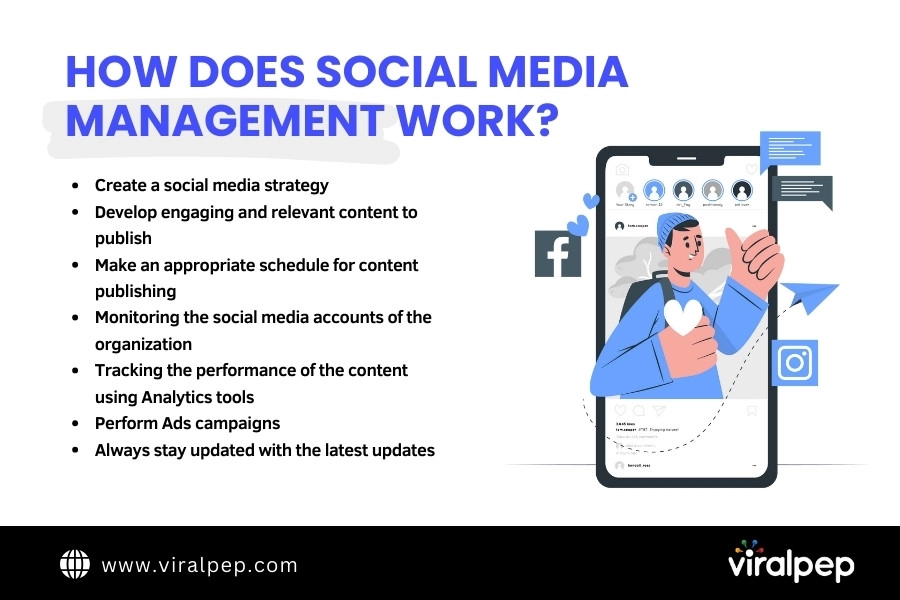
Social media management is a process that includes creating, scheduling, analyzing, and engaging with content on various social media platforms to establish and maintain an organization's online presence. It encompasses planning, content creation, community management, monitoring, and reporting.
How Does Social Media Management Work

Let’s highlight the simple breakdown of how social media management typically works:

  • Strategy development

    The first step is to create a social media strategy that aligns with the organization's goals and target audience. This comprises determining which platforms to use, setting objectives, and establishing a content plan.

  • Content creation

    Social media managers, equipped with a social media content calendar develop engaging and relevant content to share on social media platforms. This can include text-based posts, images, videos, infographics, and links to articles or blog posts. The content is tailored to the specific platform and the target audience's preferences.

  • Scheduling and publishing

    Social media management tools, including the use of a social media scheduling tool, often facilitate the scheduling of content in advance. This allows for consistent posting across platforms at optimal times when the target audience is most likely to be active. Managers may also leverage real-time posting for timely updates or news.

  • Community management

    Social media managers monitor the organization's social media accounts, respond to comments, messages, and mentions, and engage with the audience. They address questions, concerns, and feedback promptly and professionally. This interaction helps build a positive brand image and fosters customer relationships.

  • Monitoring and analytics

    Social media managers track the performance of their content using analytics tools provided by the platforms or third-party applications. Leveraging social media analytics tools, They analyze metrics such as reach, engagement, click-through rates, and conversions to measure the effectiveness of their social media efforts. This data helps guide future strategies and content decisions.

  • Ad campaigns and paid promotions

    Social media managers may run paid advertising campaigns on platforms like Facebook, Instagram, Twitter, or LinkedIn. They create targeted ads, set budgets, monitor performance, and optimize campaigns to reach specific goals such as increasing brand awareness, driving website traffic, or generating leads.

  • Staying updated

    Social media managers must stay current with the latest trends, algorithm changes, and best practices in social media marketing. They continuously research and experiment with new features, tools, and strategies to maximize their impact.

It's worth noting that a social media manager's specific tasks and responsibilities may vary depending on the organization's size, industry, and objectives. Additionally, some organizations may have dedicated teams or employ social media management agencies to handle these tasks.

How Does Social Media Marketing Work?

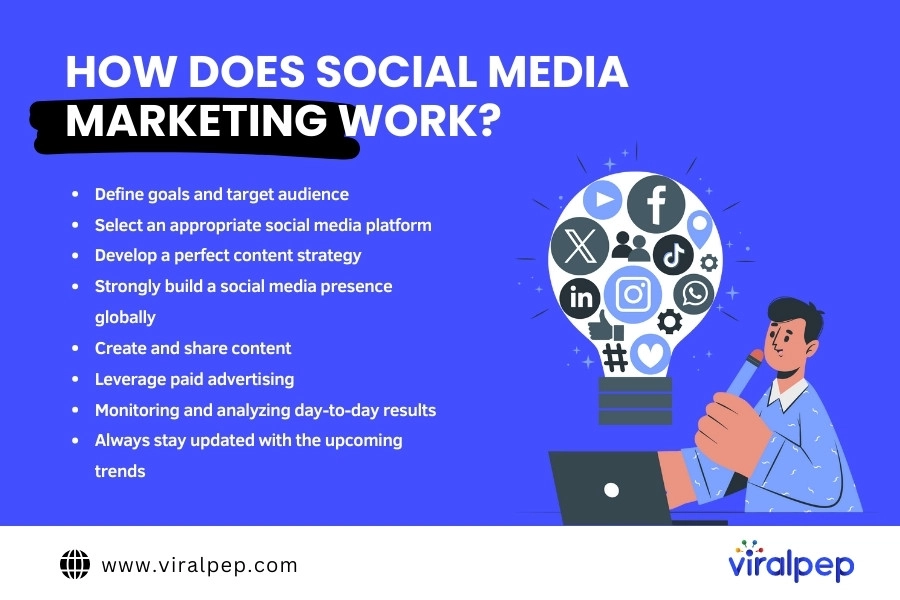
Social media marketing is a form of digital marketing that utilizes social media platforms to promote products, services, brands, or ideas. It involves creating and sharing content on social media platforms to engage and connect with the target audience.
How Does Social Media Marketing Work?

Here's a general overview of how social media marketing works:

  • Set Goals and Define Target Audience

    Start by identifying your marketing goals, such as increasing brand awareness, driving website traffic, generating leads, or boosting sales. Then, define your target audience to ensure your efforts are focused on reaching the right people.

  • Choose Relevant Social Media Platforms

    Research and select the social media platforms that align with your target audience and marketing goals. Popular platforms include Facebook, Instagram, Twitter, LinkedIn, YouTube, Pinterest, and others.

  • Create a Content Strategy

    Develop a content strategy that includes the type of content you will create (e.g., text, images, videos), the frequency of posting, and the tone and style that align with your brand. Content should be engaging, valuable, and shareable to encourage interaction and promote your brand.

  • Build a Social Media Presence

    Set up profiles on the chosen social media platforms and optimize them with your brand logo, description, and relevant links. Consistency in branding, voice, and visual elements across platforms is essential.

  • Generate and Share Content

    Create and share compelling content relevant to your audience and supporting your marketing goals. This can include informative articles, videos, images, infographics, polls, contests, and user-generated content. Encourage audience participation, such as comments, likes, shares, and reviews.

  • Engage with Your Audience

    Actively engage with your audience by promptly responding to comments, messages, and mentions. Show appreciation for positive feedback and address concerns or complaints helpfully and professionally.

  • Leverage Paid Advertising

    Consider utilizing paid advertising options on social media platforms to expand your reach and target specific demographics. Social media platforms often offer advanced targeting features that allow you to reach the most relevant audience for your business.

  • Monitor and Analyze Results

    Regularly monitor and analyze the performance of your social media marketing efforts using built-in analytics or third-party tools. Track metrics such as reach, engagement, click-through rates, conversions, and ROI. Adjust your strategy based on the insights gained from the data.

  • Stay Updated and Adapt

    Social media platforms are constantly evolving, so it's crucial to stay updated with new features, trends, and algorithm changes. Adapt your strategy accordingly to maximize your effectiveness on social media.

Effective social media marketing requires time, consistency, and experimentation to find what works best for your brand and audience.

Difference Between Social Media Marketing and Social Media Management

Here's a comparison table highlighting the key differences between social media marketing and social media management:
Aspect Social Media Marketing Social Media Management
Goal Promote products/services, generate leads Build and maintain an online presence
Focus Advertising and promotional campaigns Engagement and relationship management
Strategy Targeted content creation and distribution Content curation and scheduling
Audience Prospective and existing customers Brand followers and existing customers
Key Activities Ad campaigns, influencer partnerships Content creation, community management
Metrics Conversion rates, ROI, lead generation Engagement rate, follower growth
Tools Ad platforms (Facebook Ads, Google Ads) Social media management platforms
Time Frame Short-term campaigns Ongoing, long-term efforts
Skill Set Advertising, analytics, campaign management Content creation, community management

Social Media Marketing vs. Social Media Management: Which is the Best To Opt For?
Social media marketing is more focused on strategic planning, goal setting, and campaign execution with the aim of achieving specific business objectives.

Social media management is more about building and nurturing an online presence, enhancing brand image, and fostering customer engagement and loyalty.

The choice between social media marketing and social media management depends on your business goals, resources, and priorities. Here are some considerations:

  • If your main objective is to drive tangible business results like lead generation and sales, social media marketing would be more suitable. It requires strategic planning, advertising budgets, and a focus on measurable outcomes.
  • If you want to establish a strong online presence, build a community, and engage with your audience on social media, social media management is crucial. It emphasizes content curation, community interaction, and brand reputation management.
  • In many cases, a combination of both social media marketing and social media management is necessary to achieve comprehensive and effective results. While marketing helps achieve specific business objectives, management ensures your social media presence's long-term growth and sustainability.

FAQs

What skills are required for social media marketing?

Social media marketing requires skills, including content creation and curation, copywriting, data analysis, campaign planning, advertising knowledge, social media platform expertise, and measuring and interpreting metrics. Market research, branding, and customer relationship management skills can also be beneficial.

What skills are required for social media management?

Social media management requires content creation, copywriting, community management, customer service, social media platform knowledge, scheduling and organization, analytics tracking, and basic design skills. This general process includes good communication and interpersonal skills to effectively engage with followers and respond to comments and messages.

How do social media marketing and social media management work together?

Social media marketing and social media management are closely related and often work hand in hand. Social media management handles the day-to-day activities on social media platforms, such as content creation and engagement. In contrast, social media marketing focuses on creating and implementing a broader marketing strategy, including campaign planning, advertising, and analytics. The two functions complement each other to achieve marketing goals and maintain a strong social media presence.

Can social media marketing and social media management be done by the same person or team?

Yes, social media marketing and social media management can be performed by the same person or team, especially in small businesses or organizations with limited resources. However, in larger organizations, these roles may be split between different individuals or teams to ensure effective management and execution of social media's strategic and operational aspects.

What tools are commonly used in social media marketing and management?

There are numerous tools available for social media marketing and management, including:

  • Social media scheduling platforms (e.g., Hootsuite, Buffer)
  • Analytics tools (e.g., Google Analytics, Sprout Social)
  • Content creation tools (e.g., Canva, Adobe Creative Cloud)
  • Social listening tools (e.g., Mention, Brandwatch)
  • Advertising platforms (e.g., Facebook Ads Manager, Twitter Ads).

How can I measure the effectiveness of social media marketing and management efforts?

The effectiveness of social media marketing and management can be measured using various metrics, including engagement rate, reach, impressions, click-through rate, conversion rate, follower growth, customer acquisition cost, and return on investment (ROI). These metrics can be tracked through social media analytics tools and compared against predetermined goals and benchmarks to evaluate the success of the efforts.

Does Overposting on Social Media Matter?

In short, the answer is big Yes Overposting on social media matters the most as it can create several issues for you. Whether you are using social media for business or influencing people, overposting in a short period can overwhelm your followers and lead them to some negative sentiments. Also, overposting on social media can cause your users to unfollow or mute your account, as they receive many notifications from your account. If you want to know more about how overposting matters, this article is for you. Here, we will explore everything regarding this title, like its impact, negative consequences, the importance of addressing this issue, signs of overposting, and how to avoid it.

What is Overposting on Social Media?

Overposting on social media can be defined as sharing excessive content on your account in a very short time. Overposting might be good for your profile ranking, as the algorithms can refine new content from your profile, but it can be frustrating for your audience (followers). It is one of the significant problems for new influencers and businesses. They excessively post content, which leads to losing their audience. Have you ever noticed famous brands like Adidas or influencers like Cristiano Ronaldo? They post content once a week or after 3 days because they have a vast audience base they don’t want to lose.

What are the Signs of Overposting on Social Media?

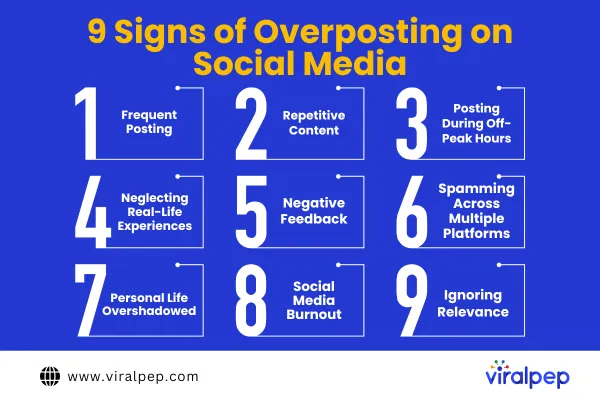
Here are a few indicators of excessive posting on social media sites. Sign of Overposting on Social Media

  • Frequent Posting

    Frequent posting refers to publishing several updates within a brief duration, resulting in a higher frequency of posts on social accounts. They intend to flood their fans’ feeds with their content until it spills over. Therefore, they post very frequently, even thrice daily, which can frustrate the audience.

  • Repetitive Content

    Many repeat the same ideas repeatedly, leading to excessive exposure to uninventive content. Their followers might need help receiving identical posts, images, and messages frequently.

  • Posting During Off-Peak Hours

    Posting at odd hours could imply over-posting, which means they need the strategy to understand when their target market is available. For instance, posting at midnight reveals that the publisher is insensitive towards followers at those times.

  • Neglecting Real-Life Experiences

    When one decides to go over, they might miss out on some priceless moments crucial in their lifetime. People may need to be more obsessed with documenting their lives on social media to overlook face-to-face encounters and physical happenings.

  • Negative Feedback

    People do not like repeatedly being exposed to certain information as it irritates them. Overposting occurs when people begin making derogatory statements or unfollowing one for posting too many updates.

  • Spamming Across Multiple Platforms

    It happens that overposters bombard users of different social networking sites with their content, which makes recipients frustrated. Such a step might see people share identical content on various platforms, thus causing a flood in their audience’s feed and probably resulting in annoyance.

  • Personal Life Overshadowed

    Posting takes up too many aspects of personal life when it begins overpowering one’s individual life; then we are talking overposting. A case in point is where over-posters place their online presence above their personal life, thus resulting in a disproportion.

  • Social Media Burnout

    Burnout may also result from overposting, either the posters themselves or their audience. You shouldn’t overload the system with excessive content. Overposting can be mentally and emotionally taxing for the individuals and their followers, leading to burnout.

  • Ignoring Relevance

    An over-poster often posts information that does not interest the readers, leading to confusion. The shared content may not appeal to their followers, resulting in disassociation and unenthusiasm.

Impact of Overposting on Users and Followers

Apart from affecting the person who overshares, this behavior also influences their audiences in some respects.

  • Unfollows and Unfriending

    Irritated fans will be tempted to unfollow or unfriend the social profile, lowering its social media influence. In turn, followers get annoyed with constant posts and unfollow the person or a brand to avoid their posts. It hinders the reach of future posts, shrinking the market.

  • Reduced Engagement

    Your audience will eventually be tired of over-posted content, thus diluting your engagement rates. Frequent postings make audiences tired and have limited engagement with the content. The consequence is reduced likes, comments, and shares.

  • Annoyance and Resentment

    Do not make too many posts to avoid irritating your followers. Constant posts that overwhelm followers may cause followers to hate them and thus hamper the image.

  • Damage to Personal and Professional Relationships

    Personal and professional relations can be negatively impacted by over-postings as people get tired of reading your updates. In other words, overposting can negatively affect friendships, relations with families, and office collegiality because people can start feeling ignored in favor of a desire to update their page.

  • Audience Saturation

    This is what overposting does; it saturates your readers, consequently killing their response to your postings. However, when audiences are overloaded with content, they can get saturated and unresponsive, making it impossible to capture them.

  • Content Fatigue

    This means that content fatigue will be triggered among your audience, and thus, they won’t notice your posts anymore. Following a series of posts with repetitive themes will cause followers to suffer content fatigue, where they ignore upcoming posts from exhaustion.

  • Spam Perception

    Too much posting may make your postings appear spam. If you flood people’s timelines with a considerable mass of posts, they might consider that spam, which will negatively affect your digital profile.

  • Missed Opportunities

    However, you may miss strategic and meaningful content if you over-post. These overposters focus too much on the number of posts, ignoring potential chances to produce great and expressive pieces.

  • Limited Reach

    Excessive posting can lead to your posts only being read by people from a small circle. Social media algorithms might cut down on visibility and, hence, the reach of posts perceived as too many or spammy (overposting).

  • Analytics Distortion

    Overposting can skew your analytics and make for an accurate analysis of how well your posts are performing. Excessive postings will give a false impression of performance statistics and may prevent adjustments necessary to improve the campaign.

Importance of Addressing the Issue

Publishers must smartly tackle the problem of overposting to maintain the decor and dignity of their websites. It prevents you from over-feeding your audience with too much information, leading to unfollows and disengagements. Maintaining relations, appealing to people’s interests, and protecting a brand’s integrity on social media demands carefully considering a balance between quantity and quality.

  • Reasons People Overpost

    After that, there are some of the most reasoned reasons why some influencers overpost on various social media platforms.

  • Personal Validation

    Some people overpost to seek validation through likes and comments. As they get positive reviews on social networking websites, they consider these as a measure of their self-worth. This is why they need continuous reassurance and approval from their virtual friends.

  • Attention-Seeking

    Often, overposting is just a cry for attention – we all need a bit of continuous positive feedback. Similarly, such people who want to be seen as necessary may post many stories to stay relevant and keep receiving recognition from their followers.

  • Business and Marketing Goals

    Businesses use overposting as a deliberate ploy to reach more consumers for their goods and services. Leveraging the benefits of a social media management tool for your business, they could post more frequently to expand their customer base as they believe it will cause more exposure, resulting in increased sales.

  • Fear of Missing Out (FOMO)

    FOMO could lead to posting too much because no one likes being left out (of a conversation). Individuals with FOMO post a lot to be included in every online discussion or event for the same reason.

  • Coping Mechanism

    Others post excessively to find companionship and ease tension. This type of behavior is an attempt to divert attention away from problems or inner turmoil experienced by the employee.

  • Comparing with Others

    Overposting results from trying to outdo others. In this case, people try to outperform their peers. People always compare what they do on the net with someone else’s activities, and if it is not enough, they want to write more so that other people can see at least something from them as well.

  • Documenting Every Moment

    Overposting occurs when individuals publish anything that comes to their minds on social media, including all the minor details of their lives. Other people are urged to record everything they do, whether simple or not, and formulate an online diary.

  • Social Pressure

    People may post too much because of social pressure, demanding that one be always active on social media. Individuals can be forced to live up to particular social requirements, such as constantly updating profiles online.

  • Building Influence

    Some aim to develop popularity and never stop posting messages. Many aspiring influencers might believe success is achieved by constantly uploading their content to get more followers or influence on social media.

  • Disconnection Anxiety

    Disconnection anxiety, which is also known as the fear of being out of the loop, could lead to overposting as a means of addressing such disconnection. Such individuals may post constantly so as not to be disconnected from their online social connections, which leads them to anxiety.

  • Social Obligation

    People usually feel obligated to be socially responsible in making frequent posts and following current trends. There is a need to conform to societal expectations, sometimes requiring regular updates to be recognized within the circles or networks one belongs to.

  • Negative Consequences of Overposting

    The disadvantages of over-posting within social media platforms.

  • Decline in Post Quality

    Quality is diminished when overposting happens where quantity wins. If time is taken to craft quality content, the frequency of posts decreases. Consequently, these entries will be hurriedly done, shallow, unoriginal, and all undesirable qualities of premium input.

  • Privacy Concerns

    Being overly candid can make issues concerning one’s privacy arise due to a large part of one’s life being put in the public domain. Sharing too much is often referred to as over-posting. This exposes one`s identity details, which could also expose one`s vulnerability to intrusion, hence identity theft, which could also expose one`s vulnerability.

  • Reputation Damage

    Being considered an “over-poster” can damage your reputation. It is also important not to be known as an over-poster; this works the same way you are branded. Such behavior will make other people perceive you as desperate for attention and irritating, thus damaging your reputation, whether related to your personal life or career.

  • Lost Opportunities

    While focusing on quantity, you might miss significant opportunities. You may miss out if you aim simply to be a prolific poster while ignoring more discreet methods of engaging people, like offers, campaigns, and collaborations.

  • Social Isolation

    Interestingly, overposting may result in social isolation by spending too much time on the Internet and less in the physical world. It can make an individual increasingly absorbed in social networks and decrease real-life social communications, thus diminishing physical social circles.

  • Cyberbullying

    If you overpost, you risk becoming a troll target. When you post a lot and gain publicity, you become more vulnerable to abuse by internet bullies and trolls.

  • Wasted Resources

    This overposting takes time and money and can be channeled elsewhere. Creation and distribution of too much stuff can become very costly and thus could be well-invested in other resources.

  • Audience Neglect

    It can also be inappropriate, especially when trying to reach out and interact with your audience, as frequent postings make them feel neglected. Your followers will likely ignore you in return, resulting from failing to respond to their comments and messages or not engaging them personally when you spend too much time sharing and posting.

  • Shortened Post Lifespan

    By overposting, you risk cutting your post’s lifespan as they are buried fast. Too much content makes you bury your older posts down the stream feed, reducing their life span and decreasing the time they can get attention.

  • Decline in User Experience

    You will have disengaged your users if they experience low user experiences, so they are unlikely to use your product. Posting too much of your content might make it hard for your audience to follow what you are saying. This may diminish their general experience and reduce their inclination to engage with your postings.

Why Balancing Quality and Quantity is Important?

Apart from other issues, we will discuss why balancing quality and quantity matters while posting on social media.

  • Quality Content

    Balancing quality and quantity is crucial for several reasons. First, here are some reasons for quality content:
    • User Engagement

      Quality content engages your audience, keeping them interested and returning for more. If you post extended captions and the post is not impressive or readable, there are higher chances that your post will get ignored. For lengthy posts, you must have readable and engaging text. That’s not an easy task because not everyone is born a copywriter. There’s always a solution to every problem; here, the solution is Reword Tool It’s an AI-powered online rewording tool that can modify your text posts and make them readable and exciting. It will remove redundancy or complex words and phrases and make your content more readable and impressive, resulting in more engagement.

    • Brand Image

      Some quality posts improve your brand image and reputation. Consistently producing quality content demonstrates your competence, and people perceive you as professional and reliable.

    • Credibility

      Your followers will trust and respect your good quality content. If your content is research-based, accurate, and well-presented, it is easier for your audience to trust your information, thus making you reliable.

    • SEO Benefits

      Search engines prefer quality content, which improves your online presence. Quality content ranks higher on search engines like Google, meaning more traffic.

    • Educational Value

      Such quality posts can enlighten and educate your target people, making you the leader in what you are marketing. Educational content demonstrates your knowledge and invites people to solicit your opinions and suggestions.

    • Audience Retention

      High-quality content ensures you hold on to your audiences, leading to minimal chances of an unfollow. It is always important to supply something of value to your audience because they will remain interested in what you are posting if they feel they keep getting something worth it.

    • Conversion Rates

      Quality content will increase businesses’ conversions. Good quality content compels your followers to do what you want, like buying or subscribing to newsletters.

    • Longevity

      Quality content lasts longer to provide continuous benefits. In addition, evergreen content refers to information that remains pertinent in the long run and still interests your readers, thus offering a lasting benefit.

    • Positive Feedback

      Positive response and engagement are more likely to be obtained for quality content. This means that most high-level posts earn positive comments, shares, and likes, improving your profile online.

    • Viral Potential

      If you want to go viral or expand your reach, produce high-quality content. Your audience will share exceptional and relevant content far beyond your target.

  • Quantity of Content

    The following are the benefits of the quantity of content while publishing on social media.

    • Consistency

      Post regularly and always maintain consistency to keep your readers engaged. Constant uploads let people know when to anticipate more material, thus cultivating their love for and interest in you.

    • Algorithm Favorability

      Consistent uploading times are preferable for social media platforms. Most social media sites emphasize posts from regular users, raising the chances for your post to appear in user streams.

    • Expanded Reach

      You can extend your reach to a wider audience through consistent posting. It is advisable to post more frequently since it may attract more followers.

    • Brand Presence

      If you need to build a permanent brand image in the minds of your customers, then post regularly. Consistent posting assists in maintaining the popularity of your brand.

    • Topical Relevance

      You could focus on good topics to enhance visibility and engagement. Keeping up with what is happening and updating your posts will also help increase your relevance in your audience’s mind, prompting them to engage more with you.

    • Community Building

      Posting high-quality frequent updates is one simple way of gaining an audience. Consistently posting builds a feeling that we belong together, where everyone can communicate with anyone else.

    • Feedback Opportunities

      As I mentioned, the greater the number of posts, the greater the chances of feedback and interactivity. Posting frequently allows your audience to give you feedback, ask queries, and participate in your content.

    • Storytelling Opportunities

      Quality lets you present a better life story that’s also engaging. Posting regularly will allow you to share different aspects of your life/brand story and make it fascinating rather than monotonous.

    • How to Avoid Overposting

      Lastly, the most common issue that most users were looking for is “How to avoid overposting on social media.” So, here are some effective ways that can help you with that.

    • Setting posting limits

      An efficient approach would be to limit posting by deciding the number of posts you would make each day or week. Therefore, this translates to limiting the number of posts that should be made over a particular period. You can also prevent spamming by setting a posting limit not to overwhelm your audience. It helps you maintain a healthy activity level that does not bore out people who follow you.

    • Creating a Content Calendar

      A social media content calendar provides a road map for future posts, ensuring they are compelling and on schedule. This includes creating posts for your social media in advance, considering major holidays, occasions, and what your audiences may like. This approach ensures you are always publishing on schedule; every post has a purpose and contributes to the overall strategy for content. It lets you confirm that the postings are not overdone and impulsive.

    • Scheduling Posts

      It is possible to post consistently without overposting by scheduling your posts. With the social media scheduling tools, you can plan your content for publication at certain time frames. It also reduces the chances of over-posting as the posts are spread over the day or week. Scheduling also lets you post during peak times, potentially driving more likes, comments, and shares.

Conclusion

Finally, posting too much on social media matters and has serious impacts on both individuals and companies. Maintaining a healthy online presence requires a proper balance between quality and quantity. Therefore, remember how often you should share information and its effect on your followers and respect.

Introducing the New Logo for Viralpep: A Fresh Look for Enhanced Social Media Management

Introduction

At Viralpep, we’re thrilled to announce the launch of our brand-new logo! As part of our ongoing commitment to providing top-notch social media management tools, we believe reflecting our growth and evolution through a refreshed visual identity is essential. Our new logo represents our dedication to empowering businesses and individuals with innovative solutions for effective social media strategies. In this blog post, we’ll delve into the inspiration behind the logo redesign, the key elements of the new design, and the impact we aim to create with this fresh look.

Why We Changed the Logo

The decision to change our logo was driven by our desire to better align with our users’ evolving needs and expectations. As Viralpep continues to grow and expand its offerings, we wanted a logo that represents our current capabilities and paves the way for future advancements. Our previous logo served us well, but it was time to embrace a design that captures the essence of our brand’s evolution and the cutting-edge solutions we offer.

The Key Elements

The new Viralpep logo encapsulates the essence of our brand through several key elements. Here’s a breakdown of what you can expect from our fresh look:

Streamlined Typography

We opted for a clean, modern typeface that exudes professionalism while maintaining a friendly and approachable feel. The refined typography reflects our commitment to providing a seamless and user-friendly experience.

Vibrant Color Palette

Our new logo features a refreshed color palette combining bold, energetic hues and sophistication. The vibrant colors symbolize the excitement and vibrancy of social media, while the subtler tones convey reliability and trustworthiness.

Dynamic Iconography

The new logo incorporates a dynamic icon that embodies the essence of Viralpep. The icon represents the interconnectedness of various social media platforms, reflecting our commitment to comprehensive social media management across multiple channels.

Image Suggestion ?

Include an image of the new Viralpep logo, showcasing the dynamic icon and vibrant colors to visually illustrate the changes and create excitement around the fresh look.

The Impact

With our new logo, we aim to create a lasting impact on our users and the social media management landscape as a whole. Here are a few ways we believe our fresh look will make a difference:

Enhanced Brand Identity

The new logo reinforces our brand identity and visually represents our commitment to innovation, efficiency, and growth.

Improved User Experience

The clean and modern logo design aligns with our dedication to providing an intuitive and user-friendly platform. It enhances the overall user experience, making it easier for our customers to navigate and utilize Viralpep’s extensive features.

Future-Focused Solutions

The new logo sets the stage for exciting future advancements and solutions. It represents our readiness to adapt and evolve in the ever-changing social media landscape.

Conclusion

The new logo for Viralpep marks an exciting milestone in our journey. With the help of Jay Mehta and our talented graphic team, we’ve crafted a logo that embodies our mission, values, and commitment to providing cutting-edge social media management solutions. We’re confident that our refreshed look will resonate.

The Ultimate Guide: How To Use Social Media To Sell Cars

In today’s digital landscape, social media has become a powerful tool for businesses to connect with their target audience, build brand awareness, and drive sales.
The automotive industry is no exception, as car dealerships and sales professionals are discovering the immense potential of using social media platforms to sell cars effectively. Whether you’re a small independent dealership or a prominent automotive brand, leveraging social media can significantly impact your sales by reaching a wider audience, showcasing your inventory, and fostering meaningful customer engagements.

10 Powerful Marketing Strategies To Use Social Media For Selling Cars

Want to sell cars successfully using social media? Here are some effective strategies and practical tips for driving your automotive sales:

Know Your Target Audience

Before diving into social media marketing, defining your target audience is essential. Identify the demographics, preferences, and buying behaviors of your potential customers. This knowledge will guide your content creation and ensure your messages resonate with the right people.

Choose the Right Social Media Platforms

Not all social media platforms are created equal. Focus on the platforms that align with your target audience to maximize your impact.

Supercharge Sales Choose the Perfect Social Platforms

Facebook, Instagram, and YouTube are popular for automotive sales, offering diverse advertising options, engagement features, and a vast user base. LinkedIn can be valuable for connecting with business professionals and fleet managers.

Create Engaging Content

Social media content plays a vital role in grabbing the attention of your audience and generating leads. Consider the following content ideas:

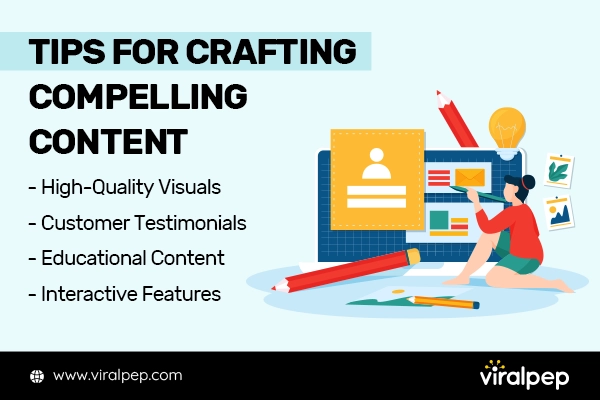
Tips For Crafting Compelling Content

  • High-Quality Visuals: Showcase your inventory through captivating photos and videos. Highlight each vehicle’s unique features and benefits, making potential customers envision themselves behind the wheel.
  • Customer Testimonials: Share positive reviews and testimonials from satisfied customers. Authentic feedback builds trust and social proof, making it easier to convert leads into buyers.
  • Educational Content: Provide valuable information about car maintenance, industry trends, and tips for making informed purchasing decisions. Establish yourself as a trusted resource, which can lead to increased credibility and customer loyalty.
  • Interactive Features: Encourage audience engagement through contests, polls, quizzes, or live Q&A sessions. Interactive content sparks conversations and helps build a community around your brand.

Utilize Social Advertising

Social media advertising allows you to target specific demographics, interests, and behaviors, ensuring your ads reach the right people. Experiment with different ad formats, such as carousel ads, video ads, or lead generation forms, to drive traffic to your website or dealership.

Leverage Influencer Marketing

Collaborating with influencers in the automotive industry can expand your reach and boost brand awareness.

Influence the Sales Game

Look for influencers with a significant following and a genuine interest in cars. They can help showcase your vehicles, provide reviews, and share their experiences, influencing their followers’ purchasing decisions.

Showcase Your Inventory

Utilize high-quality visuals, including captivating photos and videos, to showcase your cars’ unique features and benefits. Make potential customers envision themselves behind the wheel.

Engage and Respond to Customers

Social media is a two-way communication channel. Regularly monitor your social media accounts for comments, messages, and mentions.

Customer Engagement

Promptly respond to inquiries, provide helpful information, and address any concerns. Building a responsive and customer-centric online presence can significantly impact your reputation and drive sales.

Create an Inspiring Introduction Video

You can customize and adapt it to suit your dealership’s branding, target audience, and specific inventory. Use captivating visuals, dynamic transitions, and an engaging voiceover to make a lasting impression on your audience and ignite their excitement for finding their dream car through your social media channels.

Use Twitter For Driving Sales Conversions

Twitter plays a significant role in driving sales conversions for businesses, including car dealerships. Here are some key reasons why Twitter is essential for driving sales conversions:

  • Real-Time Engagement
  • Targeted Advertising
  • Promotional Campaigns and Offers
  • Influencer Marketing and Partnerships
  • Customer Testimonials and Social Proof
  • Hashtag Campaigns and Trending Topics
  • Analytics and Measurement

Twitter’s real-time engagement, targeted advertising capabilities, promotional opportunities, influencer partnerships, social proof, trending topics, and analytics make it an essential platform for driving sales conversions. By leveraging Twitter effectively, car dealerships can increase brand awareness, engage with potential customers, and ultimately convert them into satisfied buyers.

Do Posting on Instagram Regularly

Regular posting on Instagram is crucial for businesses, including car dealerships, for several important reasons:

  • Consistent Presence
  • Audience Engagement
  • Algorithm Favorability
  • Showcase Inventory and Brand Identity
  • Storytelling and Storytelling
  • Stay Ahead of Competitors
  • Data Analysis and Optimization

So, regular posting on Instagram is vital for maintaining a consistent presence, engaging with your audience, gaining algorithm favorability, showcasing your inventory and brand, storytelling, staying competitive, and optimizing your strategies. By making regular posting a priority, you can leverage the power of Instagram to drive brand awareness and customer engagement and ultimately increase sales conversions for your car dealership.

Analyze and Optimize

Track the performance of your social media campaigns using analytics tools provided by the platforms or third-party software. Monitor key metrics such as reach, engagement, click-through rates, and conversions. Use this data to identify what works best for your audience and refine your strategies accordingly.

Conclusion

Social media has transformed how businesses market their products; the automotive industry is no exception. By understanding your target audience, creating engaging content, leveraging social advertising, collaborating with influencers, and engaging with customers, you can effectively utilize social media to sell cars. Stay up-to-date with the latest trends and adapt your strategies to stay ahead in this ever-evolving digital landscape. Start your engines and embrace the power of social media to accelerate your car sales like never before.

FAQs

How effective are social media campaigns in selling cars compared to traditional marketing methods?

Social media campaigns have proven highly effective in selling cars, often outperforming traditional marketing methods in several key aspects.

  • Reach and Targeting: Social media campaigns offer unparalleled reach and targeting capabilities. Traditional marketing methods often have limited space and may not provide the same targeting precision.
  • Cost-effectiveness: Social media campaigns are more cost-effective than traditional marketing. Traditional marketing methods like TV or print ads are more expensive and may not provide the same detailed performance tracking and optimization opportunities.
  • Engagement and Interaction: Social media campaigns excel in driving engagement and interaction with potential car buyers. Traditional marketing methods are often one-way communication channels, lacking social media’s immediate and interactive nature.

What common mistakes to avoid when using social media to sell cars?

When using social media to sell cars, it’s essential to avoid common mistakes that can hinder your success. Here are some errors to be aware of and avoid:

  • Focusing on Quantity over Quality
  • Neglecting to Define Your Target Audience
  • Lack of Consistency
  • Ignoring Customer Interactions
  • Overlooking Analytics and Data
  • Being Overly Promotional
  • Neglecting Visual Quality

How can smaller car dealerships with limited resources effectively utilize social media for their marketing efforts?

Smaller car dealerships with limited resources can still effectively utilize social media for marketing. Here are some strategies tailored to smaller dealerships:

  • Define Clear Goals
  • Choose the Right Platforms
  • Develop a Content Strategy
  • Leverage User-Generated Content
  • Collaborate with Local Influencers
  • Utilize Targeted Advertising
  • Engage with Your Audience

Which social media platforms should I focus on for selling cars?

The choice of social media platforms depends on your target audience. Facebook, Instagram, and YouTube are popular for automotive sales due to their extensive user base and diverse advertising options. LinkedIn can be valuable for connecting with business professionals and fleet managers.

What type of content should I create for social media?

Creating engaging content is crucial. Showcase your inventory with high-quality photos and videos, share customer testimonials, provide educational content about car maintenance and industry trends, and incorporate interactive features like contests or live Q&A sessions.

How can I target my ads effectively on social media?

Social media platforms offer robust advertising tools that allow you to target specific demographics, interests, and behaviors. Take advantage of these features to ensure your ads reach the right people and drive traffic to your website or dealership.

Should I collaborate with influencers in the automotive industry?

Collaborating with influencers can expand your reach and boost brand awareness. Look for influencers with a significant following and a genuine interest in cars. They can help showcase your vehicles, provide reviews, and influence their followers’ purchasing decisions.

How important is engaging with customers on social media?

Engaging with customers is essential for building relationships and trust. Respond promptly to inquiries, provide helpful information, and address any concerns. This customer-centric approach can significantly impact your reputation and drive sales.

How can I measure the effectiveness of my social media campaigns?

Utilize analytics tools provided by social media platforms or third-party software to track key metrics such as reach, engagement, click-through rates, and conversions. Analyze this data to identify what works best for your audience and optimize your strategies accordingly.

Crafting a Picture-Perfect Social Media Content Calendar for Photographers

Introduction

In today’s digital age, social media has become a powerful tool for photographers to showcase their work, connect with potential clients, and build a strong online presence. Platforms like Instagram, Facebook, and Pinterest provide a visually-driven space where photographers can share their artistry, attract followers, and gain exposure to a wider audience.

With millions of users scrolling through their feeds daily, social media offers photographers an unprecedented opportunity to showcase their talent, engage with their audience, and establish themselves as professionals in their field. A well-organized content calendar lets you plan and schedule your social media posts in advance, ensuring you have consistent content to share with your audience.

This blog post will equip any aspiring photographer wanting to kickstart their social media journey with the knowledge and tools to effectively plan and organize their social media content, elevate their photography brand, and attract their target audience.

Know Your Target Audience

Know Your Target Audience

  1. Define Your Target Audience

    When creating a successful social media content calendar as a photographer, one of the most crucial steps is to know your target audience. By understanding your audience, you can create content that resonates with them, captures their attention, and ultimately drives engagement.

    Start by defining the demographics of your target audience, such as their age, gender, location, and profession. This information will provide a foundation for understanding their needs, interests, and preferences.

    Identify Their Demographics and Interests

    Dig deeper into your target audience’s demographics and interests. Consider factors like their education level, income range, hobbies, and other relevant details.

    For example, if you specialize in portrait photography, your target audience might include individuals interested in fashion, beauty, or personal branding. Understanding these interests will help you tailor your content to their needs and desires.

    Read also: Why Invest in Social Media for Brand Marketing

    Understand Their Preferences and Pain Points

    Identifying your target audience’s preferences and pain points is crucial to engage with them effectively. What are the challenges they face in their photography journey? What are the common questions or problems they encounter?

    By understanding their pain points, you can create content that addresses those challenges and provides solutions. This can include sharing tips, tutorials, and advice that cater to their needs, positioning yourself as a valuable resource.

    Explore: Harnessing user-generated content to leverage your business

  2. Research Popular Photography Topics Among Your Audience

    Explore Trending Photography Styles, Techniques, and Genres

    Stay up-to-date with the latest trends in the photography industry. Research popular photography styles, techniques, and genres that resonate with your target audience.

    For example, if you primarily cater to landscape photographers, explore trends in landscape photography, such as drone photography or long exposure techniques. This knowledge will help you create content that aligns with current interests and captures your audience’s attention.

    Analyze Popular Hashtags and Keywords

    Take advantage of social media platforms to analyze trending hashtags and keywords related to photography. This will give you insights into the topics and themes currently trending among your target audience.

    Look for frequently used recurring hashtags and keywords by photographers in your niche. Incorporate these hashtags and keywords into your content to increase its visibility and reach.

    By knowing your target audience and researching popular photography topics, you can create a content calendar tailored to their interests, preferences, and needs. This approach will help you establish a strong connection with your audience, boost engagement, and ultimately grow your photography business.

    You May Also Read: How Instagram #Hashtags Can Be a Game Changer for Your Business

Setting Social Media Goals

Setting Social Media Goals

  1. Define Your Social Media Objectives

    Increase Brand Visibility and Reach

    One of the primary goals for photographers on social media is to increase brand visibility and reach. This means expanding your online presence and getting your work in front of a larger audience. Increasing your brand visibility can attract potential clients, collaborators, and opportunities.

    Drive Traffic to Your Website or Portfolio

    Another important objective is to drive traffic to your website or portfolio. Your website is a central hub where potential clients can view your portfolio, learn more about your services, and contact you. Directing social media users to your website can convert them into paying clients or leads.

    Generate Leads or Bookings

    Social media can be a powerful tool for generating leads and bookings. The goal is to attract potential clients interested in your photography services and convert them into paying customers. By showcasing your work, sharing testimonials, and providing clear calls to action, you can encourage users to reach out and book your services.

  2. Determine Key Performance Indicators (KPIs)

    Metrics to Measure Success

    Determining key performance indicators (KPIs) aligning with your objectives is important to track the effectiveness of your social media efforts. These metrics include follower growth, engagement rates (likes, comments, shares), reach or impressions, website clicks, and conversions (such as inquiries or bookings).

    Related Blog: Most Important Social Media Metrics for Your Business

  3. Establish Realistic Goals for Each Platform

    Different social media platforms have unique characteristics and audience behaviors. Setting realistic goals for each platform based on its strengths and your target audience’s preferences is important.

    Example:

    Instagram

    Increase follower count, engagement rate, and website clicks.

    Facebook

    Expand reach through boosted posts or targeted advertising campaigns.

    Twitter

    Drive engagement through retweets, replies, and hashtag usage.

    Setting specific and realistic goals for each platform allows you to tailor your content and strategies to maximize results and make the most of each social media channel.

    Setting clear social media goals will provide a roadmap for your content calendar and help you measure your progress over time. By aligning your objectives, KPIs, and platform-specific goals, you can create a strategic and effective social media presence that supports your overall business growth as a photographer.

Content Types and Themes

Resonate with Your Audience with Premium Themes and Content

  1. Identify Content Types that Resonate with Your Audience

    Showcasing Your Photography Portfolio

    Share your best and most captivating photographs to showcase your skills and unique style. Use high-quality images that reflect your expertise and highlight the type of photography you specialize in.

    Behind-the-Scenes Glimpses into Your Creative Process

    Give your audience a behind-the-scenes look at your creative process. This could include sharing images or videos of your setup, editing techniques, or behind-the-scenes moments during photoshoots. This helps humanize your brand and build a connection with your audience.

    Read also: Build Brand Trust Using Social Media

    Client Testimonials and Success Stories

    Share testimonials and success stories from satisfied clients. Highlight their positive experiences working with you and your photography’s impact on their lives or businesses. This helps build trust and credibility with potential clients.

    Photography Tips and Tutorials

    Offer valuable insights and educational content by sharing photography tips and tutorials. This could include composition techniques, lighting tips, editing tricks, or advice on capturing specific subjects. Providing helpful information positions you as an expert in your field and encourages audience engagement.

  2. Define Recurring Themes for Your Content Calendar

    Seasonal or Holiday-Related Posts

    Align your content with seasonal events, holidays, or special occasions. For example, share photography tips for capturing holiday lights, showcase autumn-themed images, or offer a special promotion during Valentine’s Day. This keeps your content fresh and relevant.

    Throwback or #TBT Posts Featuring Past Work

    Engage your audience by sharing throwback posts featuring your previous work. Use the hashtag #TBT (Throwback Thursday) to join the conversation and provide context or stories behind the images. This allows you to showcase your portfolio while adding a nostalgic touch.

    Collaboration or Feature Posts with Other Photographers or Brands

    Collaborate with other industry photographers or brands to create content. This could include featuring their work on your platform, participating in photography challenges, or hosting joint giveaways. Collaborations help expand your reach and introduce you to new audiences.

    By incorporating these content types and themes into your social media content calendar, you can offer engaging and valuable posts that resonate with your target audience. Remember to tailor your content to their interests and preferences, keeping them informed, inspired, and entertained.

Planning the Content Calendar

Planning the Content Calendar for Photographers

  1. Choose a Calendar Tool or Platform

    Select a calendar tool or platform that suits your needs and preferences. Popular options include Google Calendar, Trello, or social media scheduling tools like Viralpep, Hootsuite, or Buffer. Find a tool that allows you to organize and schedule your content easily.

  2. Decide on a Posting Frequency and Schedule

    Determine how often you post on each social media platform. Consider your resources and capacity to create and share high-quality content consistently. Maintaining a regular posting schedule is important to keep your audience engaged. Additionally, research the best times to reach your target audience on each platform to optimize visibility and engagement.

  3. Allocate Content Types and Themes to Specific Dates

    Assign specific content types and themes to dates in your content calendar. This will help you plan and diversify your content effectively. Consider your target audience’s preferences, seasonal events, and marketing objectives.

    Plan Your Portfolio Showcases, Behind-the-Scenes Posts, and Tips/Tutorials Strategically

    Spread your portfolio showcases, behind-the-scenes posts, and tips/tutorials throughout your content calendar. This ensures a balanced mix of content and provides your audience with valuable insights into your work and creative process.

    Align Seasonal or Holiday-Related Posts with Relevant Dates

    Identify important dates or holidays aligning with your target audience’s interests or photography niche. Plan seasonal or holiday-related posts accordingly. For example, if you specialize in outdoor photography, schedule posts showcasing spring blooms or fall foliage during peak seasons. This keeps your content timely and relevant.

    By planning your content calendar, you can maintain consistency, ensure a diverse range of content, and strategically align your posts with relevant dates and themes. Regularly review and adjust your content calendar based on feedback, analytics, and emerging trends to optimize your social media presence.

    You May Like: How to Write Meaningful and Clickable Content

Creating Engaging Visuals

  1. Emphasize the Importance of High-Quality Visuals in Photography Social Media Posts

    Highlight the significance of captivating visuals in attracting and engaging your audience. As a photographer, your images serve as the main content and should be of exceptional quality. Share the value of investing time and effort into creating visually stunning posts.

  2. Use Professional Photo Editing Software to Enhance Your Images

    Utilize professional photo editing software like Adobe Photoshop or Lightroom to enhance the quality of your images. Adjust brightness, contrast, saturation, and sharpness to make your photos visually appealing and impactful. Experiment with editing techniques to achieve your desired aesthetic.

    Related Blog: Top 6 Image Editing Tools That Make You Look Like a Pro

  3. Optimize Your Visuals for Each Social Media Platform

    Understand the Ideal Image Dimensions and Formats for Instagram, Facebook, Twitter, etc.

    Different social media platforms have specific image dimension requirements to ensure optimal display. Research and understand the recommended image sizes for each platform to avoid cropping or distortion. Adhering to these guidelines will result in visually pleasing and properly displayed visuals.

    Consider Using Tools like Canva or Adobe Spark to Create Eye-Catching Graphics or Collages

    Utilize graphic design tools like Canva or Adobe Spark to create visually appealing graphics, collages, or quote cards. These tools provide pre-designed templates and user-friendly interfaces, allowing you to showcase your images creatively and add text or graphics for additional impact.

    Emphasizing the importance of high-quality visuals, enhancing your images with professional editing software, and optimizing your visuals for each platform, allows you to create visually stunning and engaging social media posts capturing your audience’s attention and effectively showcasing your photography skills.

Engaging with Your Audience

Engaging with Your Audience

  1. Respond to Comments and Direct Messages Promptly

    Make it a priority to respond to comments and direct messages from your audience promptly. Engaging with your audience shows you value their feedback and creates a sense of connection. Take the time to address their questions, provide insights, or express gratitude for their support.

  2. Ask Questions or Create Polls to Encourage Interaction

    Encourage audience participation by asking questions about your photography or industry. This can be done through captions, Stories, or dedicated posts. Polls are another effective way to gather opinions or preferences from your audience. Their responses not only provide valuable insights but also generate conversation and engagement.

  3. Organize Photo Contests or Challenges to Involve Your Audience

    Organize photo contests or challenges encouraging your audience to participate and showcase their photography skills. Set specific entry themes or criteria, and offer prizes or recognition for the best submissions. This fosters engagement and builds a sense of community among your followers.

    By promptly responding to comments and direct messages, asking questions or creating polls, and organizing photo contests or challenges, you actively involve your audience in your social media content. This fosters a sense of community, increases engagement, and strengthens the connection between you and your followers.

Analyzing and Adjusting

Analyzing and Adjusting Your Performance

  1. Track and Analyze Your Social Media Performance

    Utilize the built-in analytics provided by each social media platform, or consider using third-party analytics tools to track and analyze your social media performance. Monitor follower growth, engagement rates, reach, and website clicks. These insights will help you understand which platforms and content types resonate with your audience.

    Evaluate the Success of Different Content Types and Themes

    Regularly evaluate the performance of your content types and themes. Look at the engagement levels, comments, likes, and shares to identify which types of posts are generating the most interest and interaction from your audience.

    Additionally, pay attention to the feedback you receive, both positive and constructive, to gain insights into what your audience values and wants to see more of.

  2. Make Adjustments to Your Content Calendar

    Based on the data and insights gathered, adjust your content calendar. Optimize the frequency and timing of your posts to align with the periods when your audience is most active.

    Prioritize the content types and themes that have shown the highest levels of engagement and adjust or eliminate those that haven’t performed as well. Continuously refine and adapt your content strategy to ensure it remains relevant and engaging for your audience.

    You can optimize your social media strategy by tracking and analyzing your social media performance, evaluating the success of different content types and themes, and adjusting your content calendar based on audience engagement and performance metrics. This iterative process allows you to effectively refine your approach, maximize audience engagement, and achieve your social media goals.

Staying Consistent

Staying Consistent to Maintain a Strong Online Presence

  1. Emphasize the Importance of Consistency

    Consistency is key to maintaining a strong online presence. Regularly posting high-quality content helps establish your brand and build trust with your audience. Consistency also ensures that your followers know what to expect from you and keeps them engaged and interested in your photography.

  2. Create a Style Guide

    Develop a style guide for your social media posts to maintain a cohesive and recognizable brand. This guide should include elements such as color schemes, fonts, and a consistent tone of voice that aligns with your photography style and brand identity. These guidelines will give your social media profiles a polished and professional look.

  3. Set Reminders and Notifications

    Set reminders and notifications to stay on track with your content creation and posting. Use calendar apps or social media scheduling platforms to schedule content in advance. This ensures that you consistently publish posts at the optimal times and maintain a steady flow of engaging content.

    You can establish a consistent and recognizable presence on social media by emphasizing the importance of consistency, creating a style guide, and setting reminders and notifications. This consistency builds trust, strengthens your brand, and keeps your audience engaged and connected to your photography.

    You May Find Interesting: Reasons Why Content Scheduling Makes Social Media Marketing Efficient

Conclusion

A social media content calendar is valuable for photographers looking to enhance their online presence and engage with their audience effectively. By planning and organizing your content in advance, you can ensure a consistent flow of high-quality posts that align with your brand and resonate with your target audience.

Throughout this blog post, we have highlighted the importance of social media for photographers, the benefits of having a content calendar, and provided practical tips and ideas for creating engaging content. We discussed the significance of knowing your target audience, setting goals, and identifying content types and themes that resonate with your followers.

We also covered the importance of engaging with your audience, analyzing performance, staying consistent, and adjusting your strategies.

Now is the time to start planning your social media content calendar. Take the knowledge and insights gained from this blog post and apply them to your photography business. Remember to set realistic goals, track your performance, and adjust your content strategies based on audience feedback and analytics.

In addition, we encourage you to stay up-to-date with the latest social media trends and best practices for photographers. Experiment with new ideas, stay engaged with your audience, and continuously refine your approach to create a compelling and successful social media presence.

By implementing a well-thought-out content calendar and following the tips and best practices shared in this blog post, you can take your social media marketing efforts to the next level and effectively showcase your photography skills to a wider audience.

We wish you all the best on your social media journey, and may your photography business thrive in the digital realm!

FAQs

Why is social media important for photographers?

Social media provides photographers a powerful platform to showcase their work, connect with their audience, and attract potential clients. It allows them to build their brand, share their portfolio, and engage with a wider community of photography enthusiasts.

What are the benefits of having a content calendar for social media?

A content calendar helps photographers stay organized and consistent with their social media posts. It allows them to plan, maintain a cohesive brand image, and ensure a steady stream of engaging content. It also saves time and helps them stay focused on their marketing goals.

How often should I post on social media as a photographer?

The frequency of posting on social media depends on various factors, including your platform and your target audience’s behavior. It is recommended to post consistently but not overwhelm your audience. Aim for a balance between quality and quantity, and consider posting at least a few times a week on each platform.

How can I determine my target audience as a photographer?

To define your target audience, consider the type of photography you specialize in and the demographics and interests of your ideal clients. Conduct market research, analyze your existing client base, and use social media analytics to gain insights into the demographics and preferences of your engaged audience.

How do I develop engaging content ideas for my social media posts?

You can find inspiration for content ideas by understanding your target audience’s interests, following photography trends, and researching popular topics in the photography community. Consider sharing behind-the-scenes glimpses, client testimonials, and photography tips and showcasing your portfolio to keep your audience engaged.

Should I use scheduling tools for my social media content calendar?

Scheduling tools can greatly benefit photographers in managing their social media content calendar. Tools like Hootsuite, Buffer, or Sprout Social allow you to schedule posts in advance, maintain consistency, and save time. However, balancing scheduled content with real-time engagement is important to keep your social media presence authentic.

How can I measure the success of my social media posts?

Social media analytics provide valuable insights into the performance of your posts. You can track metrics like engagement rate, follower growth, reach, website clicks, and post impressions.

Analyzing these metrics helps you understand what type of content resonates with your audience and allows you to make data-driven decisions for future posts.

How often should I review and adjust my social media content calendar?

Regularly checking your social media content calendar, such as monthly or quarterly, is recommended. This allows you to evaluate the performance of your posts, identify patterns, and make necessary adjustments to optimize your content strategy. Stay flexible and adapt to changes in your audience’s preferences and the evolving social media landscape.

What are some best practices for successful social media marketing as a photographer?

  • Consistently showcase your best work to maintain a strong portfolio.
  • Engage with your audience by responding to comments and messages promptly.
  • Utilize relevant hashtags to reach a wider audience and increase discoverability.
  • Collaborate with other photographers or brands to expand your reach.
  • Stay up-to-date with photography trends and share your insights and expertise.
  • Maintain a consistent visual style and brand identity across your social media platforms.

How to See Who Someone Recently Followed on Instagram

Are you curious to know who has recently followed you on Instagram? Keeping track of who recently followed me on instagram and to see your new followers can be an exciting way to stay connected with your audience and engage with them.

In this comprehensive guide, we will walk you through the step-by-step process of how to see who recently followed you on instagram. By the end of this article, you’ll have all the knowledge you need to uncover your latest followers and strengthen your social media presence.

Viewing Recent Instagram Followers on an iPhone

If you are using an iPhone, follow these steps to view your recent followers on Instagram:

  1. Open the Instagram app on your iPhone and log in to your account.
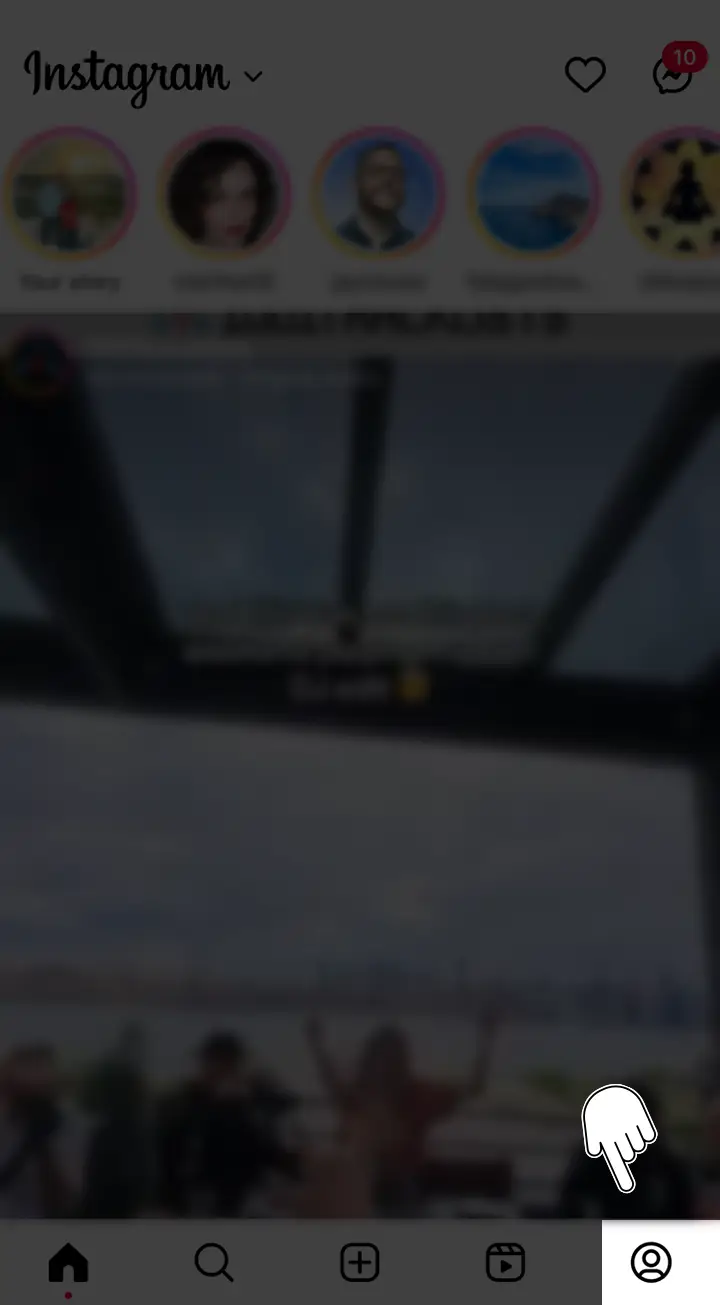
  2. Tap on your profile icon located at the bottom right corner of the screen to access your profile page.Click on profile icon to access profile page on instagram
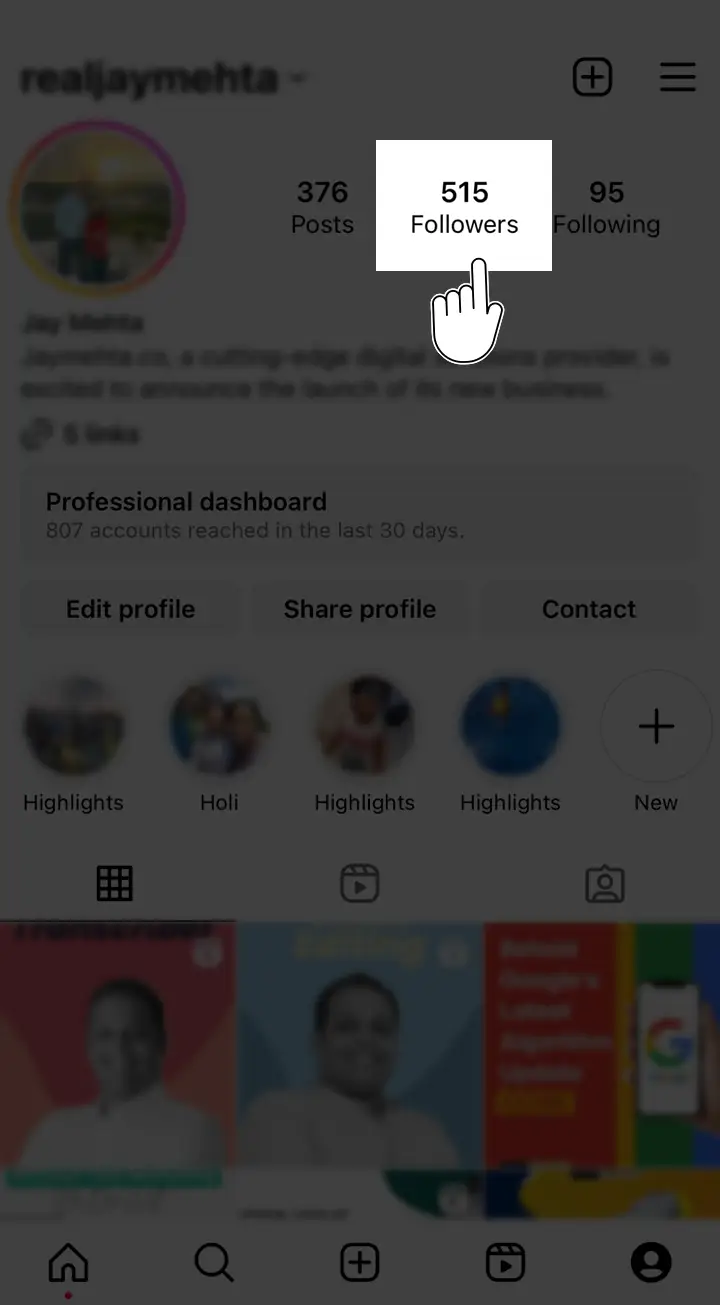
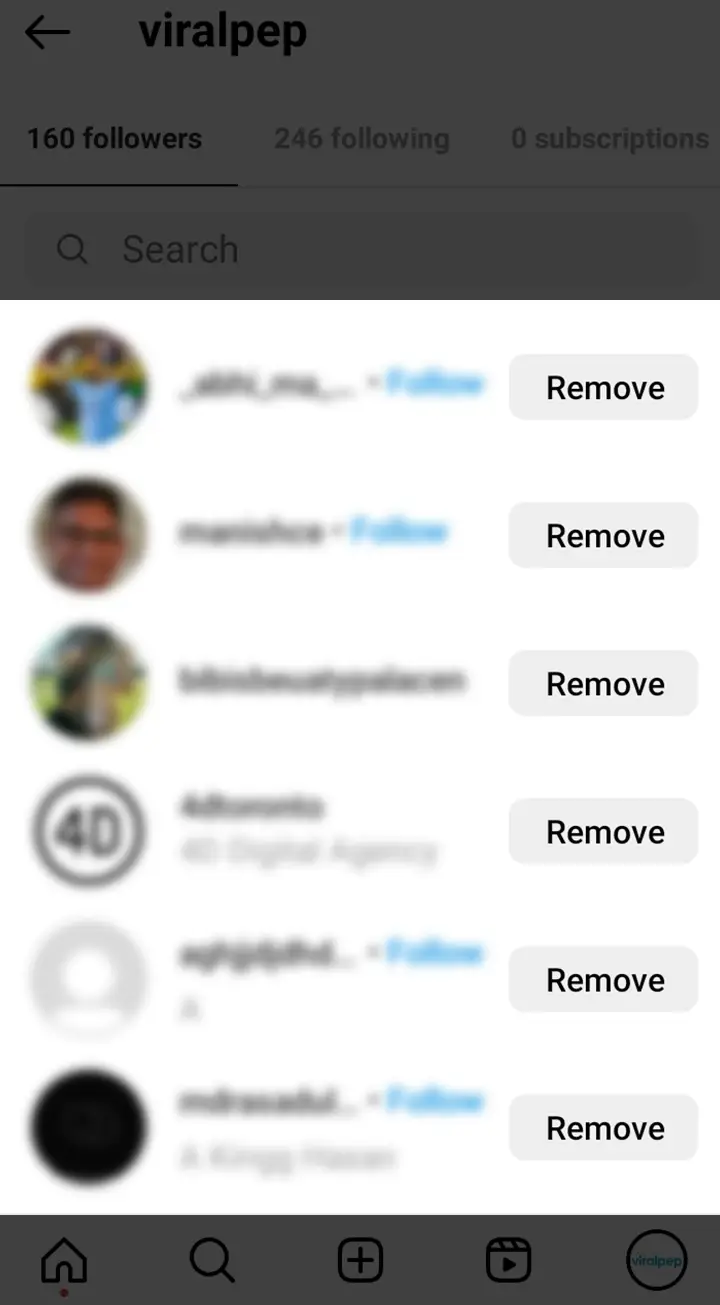
  3. Next, tap on the number of followers displayed below your bio to view your list of followers.Click on number of followers to view list of your followers
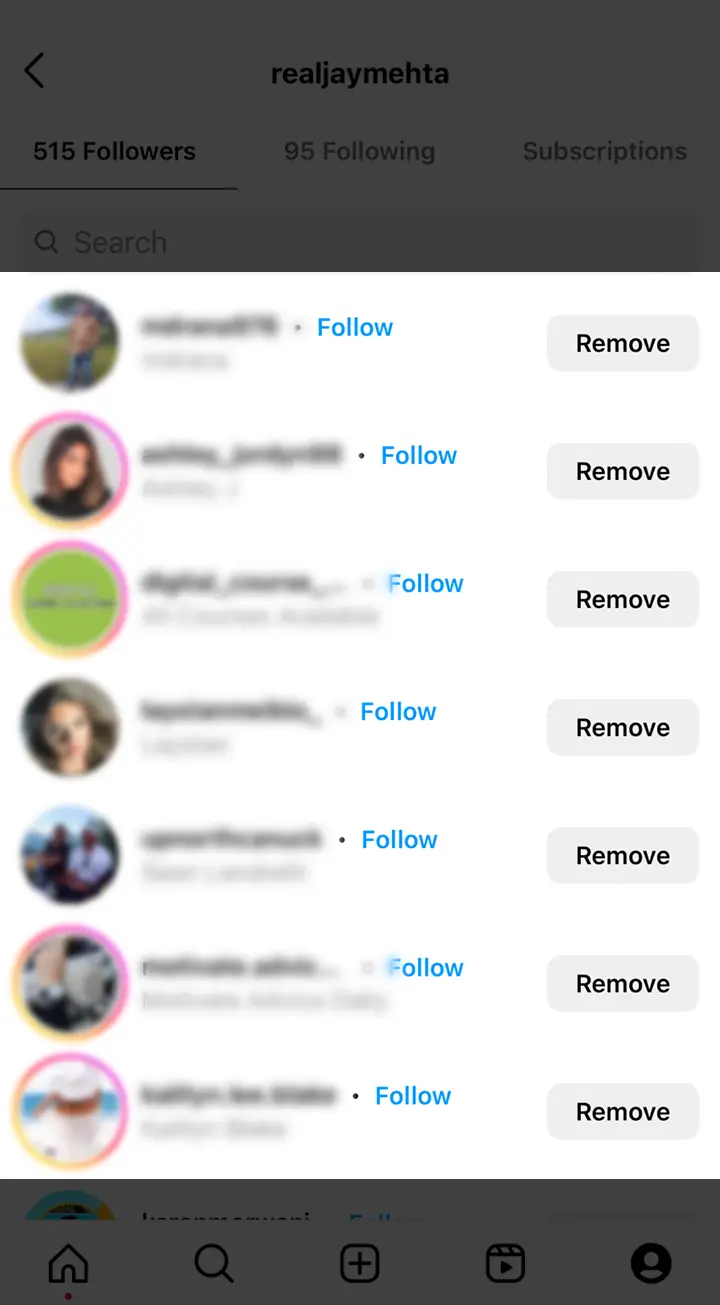
  4. Scroll through the list to see the usernames of your followers. The followers at the top are the most recent ones who have followed you.List of followers in instagram in Iphone

Viewing Recent Instagram Followers on an Android Device

For Android users, the process of viewing recent followers on Instagram is similar:

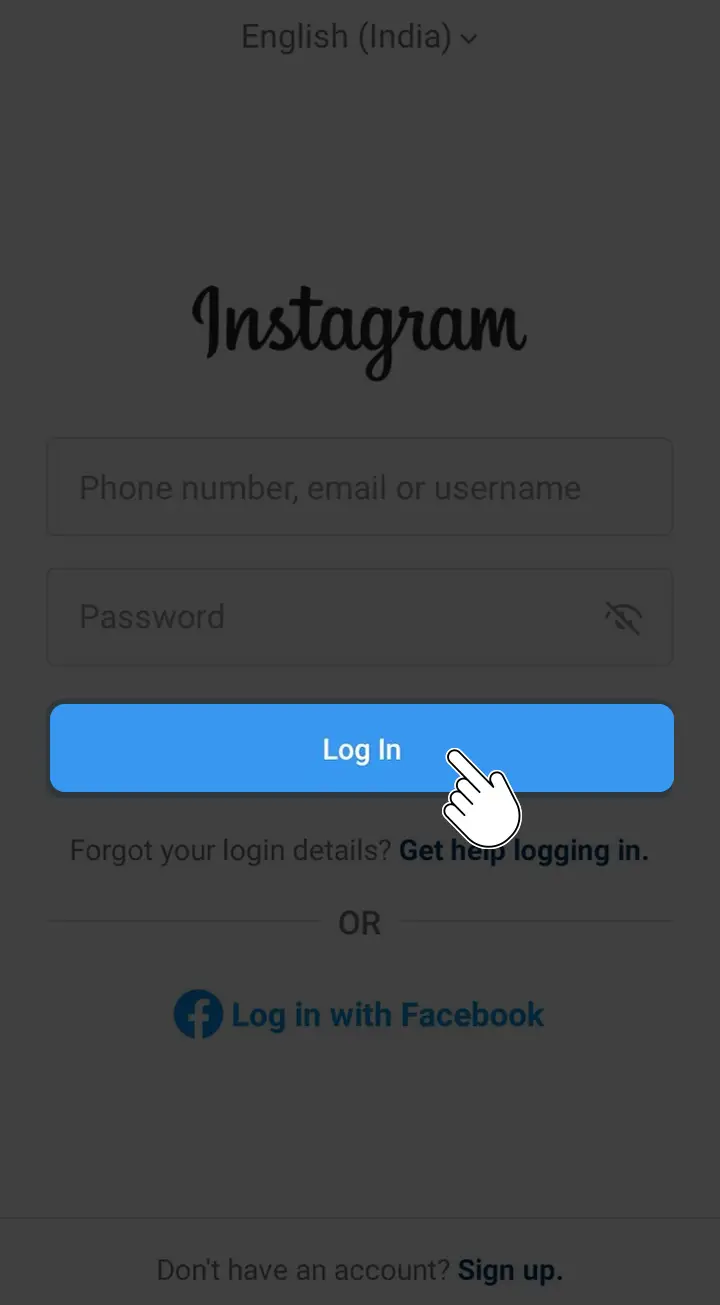
  1. Launch the Instagram app on your Android device and log in to your account.Login to Instagram
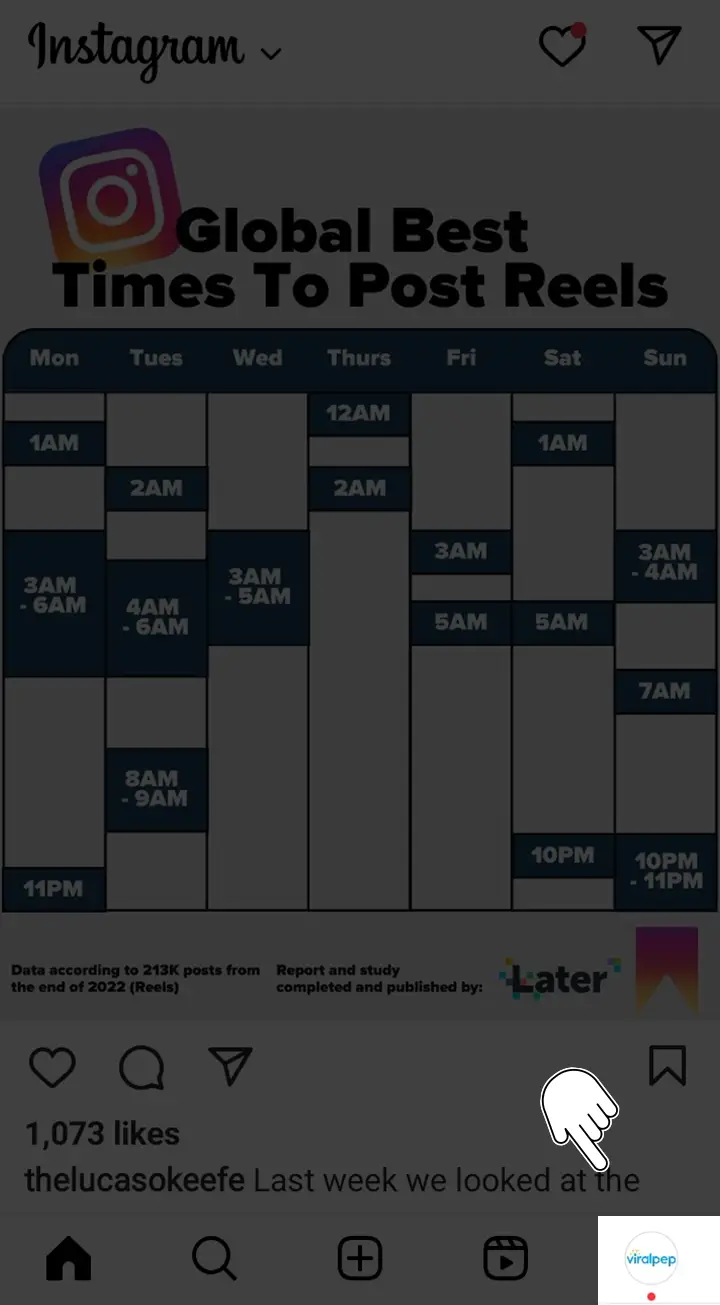
  2. Tap on your profile icon at the bottom right corner of the screen to go to your profile.Click on profile icon to access profile page on instagram in Android
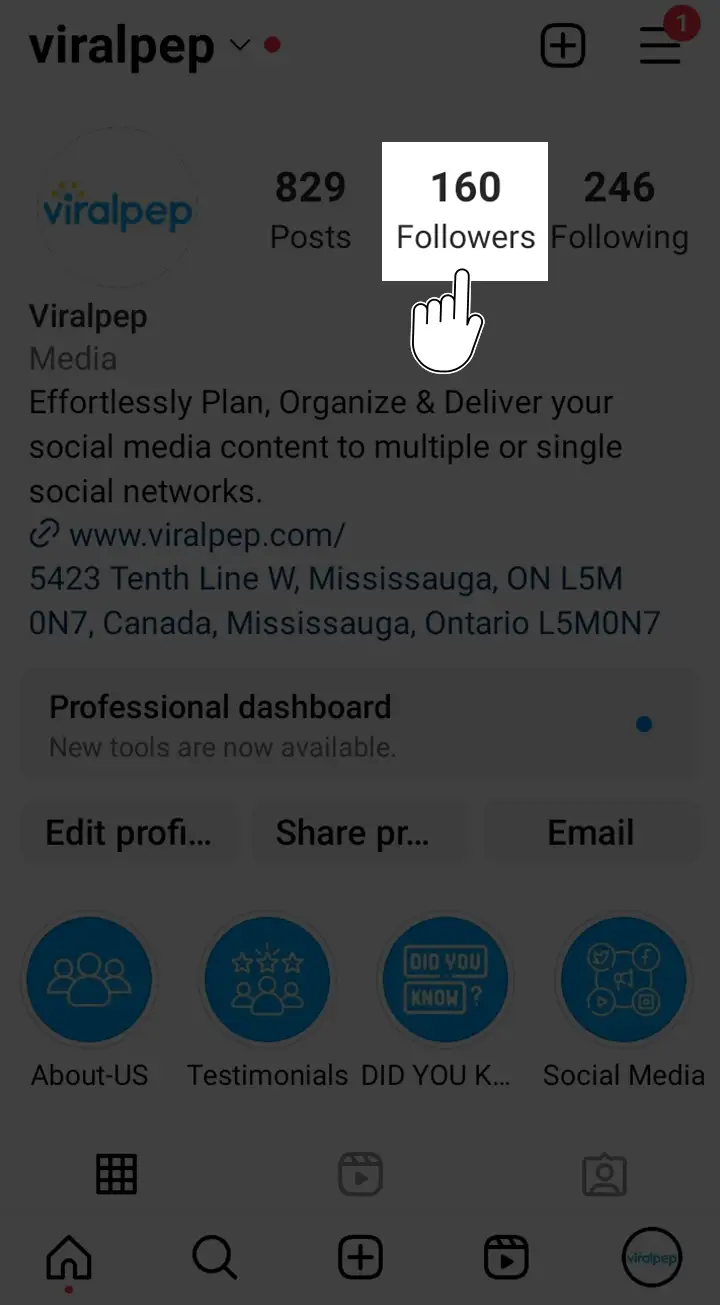
  3. Locate the number of followers displayed below your bio and tap on it.Click on number of followers to view list of your followers in android
  4. Scroll through the list of followers to see the usernames of those who have recently followed you. The most recent followers will appear at the top.List of followers in instagram in Android

By following these steps, you can easily see who recently followed you on Instagram using either an iPhone or an Android device.

Read aslo: An Overview of the Most Important Social Media Metrics for Your Business

Conclusion

In conclusion, staying informed about your recent Instagram followers can help you stay engaged with your audience and enhance your social media presence. By following the simple steps provided in this guide, you can easily find out who recently followed you on Instagram.

Remember, social media management tools like Viralpep.com can offer additional insights and features to further optimize your Instagram experience. Sign up for Viralpep today and take control of your Instagram followers, while also gaining access to content scheduling and more.

FAQs

  1. Can I use the Instagram app to see who recently followed me?

    Yes, the Instagram app allows you to view your recent followers. Simply navigate to your profile and tap on the number of followers to see the list.

  2. Are the steps to view recent followers the same for both iPhones and Android devices?

    Yes, the steps to view recent followers on Instagram are similar for both iPhones and Android devices. Simply access your profile and tap on the number of followers to see the list.

    Please note that the availability of features may vary depending on the version of the Instagram app and the device you are using.

How to Find Facebook Reels You’ve Watched

Are you eager to rediscover the captivating Facebook reels you’ve watched? Look no further! In this comprehensive guide, we will walk you through the step-by-step process of finding and organizing the reels you’ve enjoyed on Facebook.

How to Find Facebook Reels You’ve Watched

It can be easy to discover engaging Facebook Reels you’ve seen before that you found helpful or entertaining. Well, fret not! Viralpep have got you covered with these simple steps that will guide you to rediscover your favorite reels:

How to Find Facebook Reels You’ve Watched on iPhone

  1. Launch the Facebook app on your iPhone.
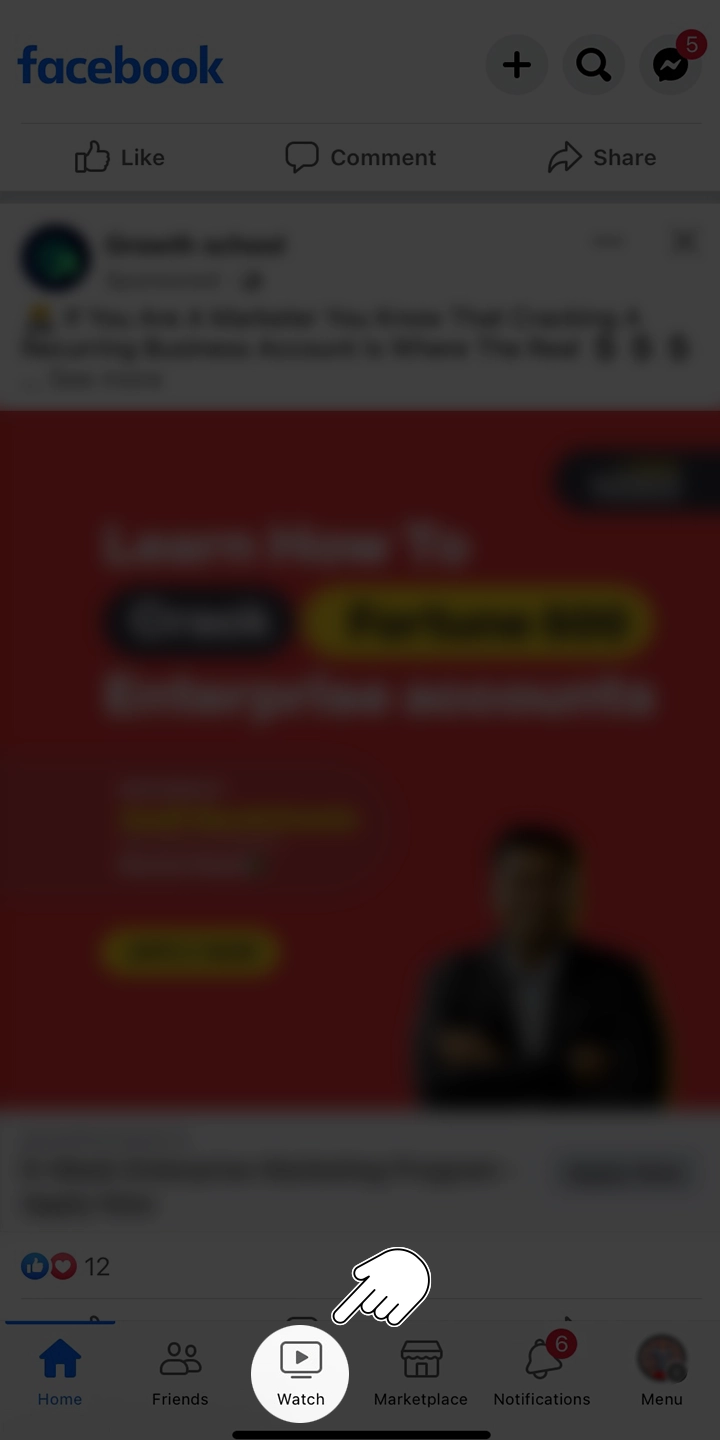
  2. At the bottom of the app, look for the “Watch” option on the tab bar.

    Watch option in facebook app in Iphone

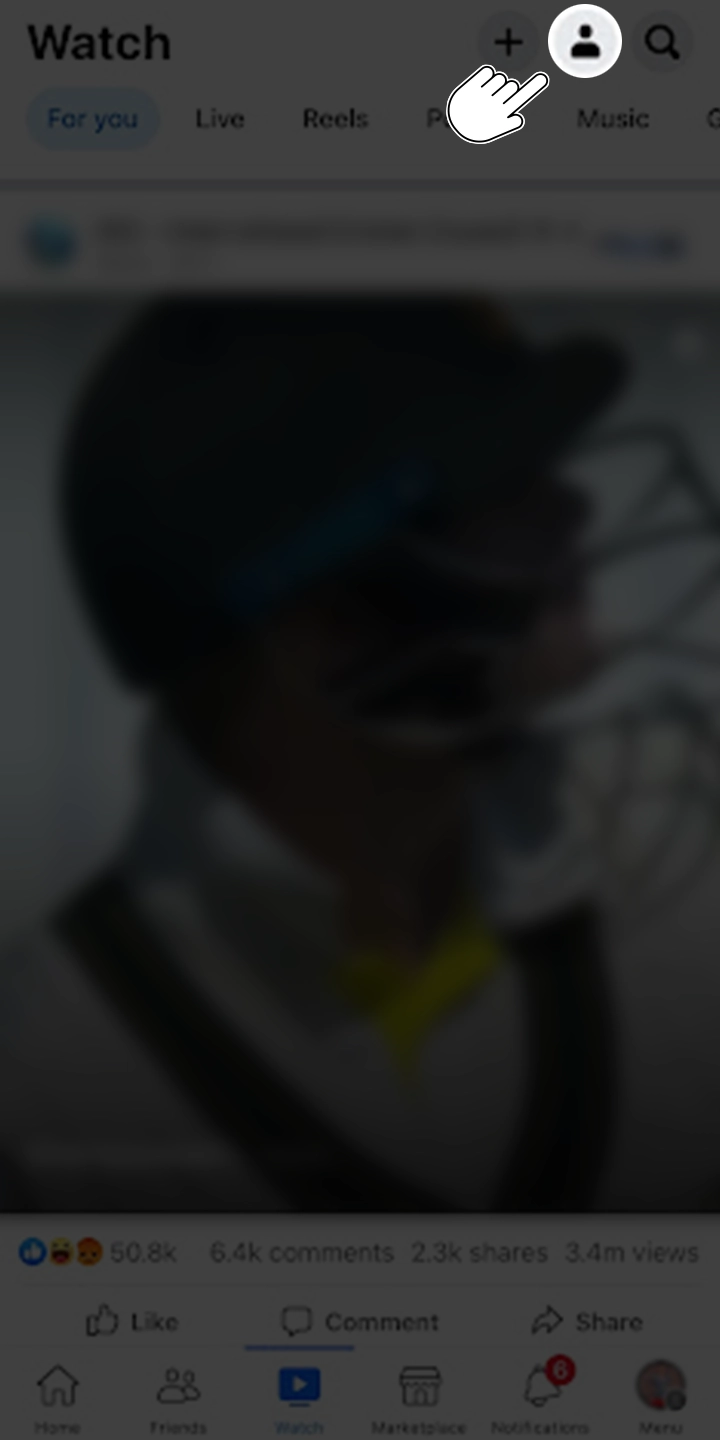
  3. Then, look for the profile icon, which is located at the top-right corner of the page. Tap on the profile icon, and “Your Watch” will appear.

    Click on Profile icon to get to your watch history option in facebook iphone app

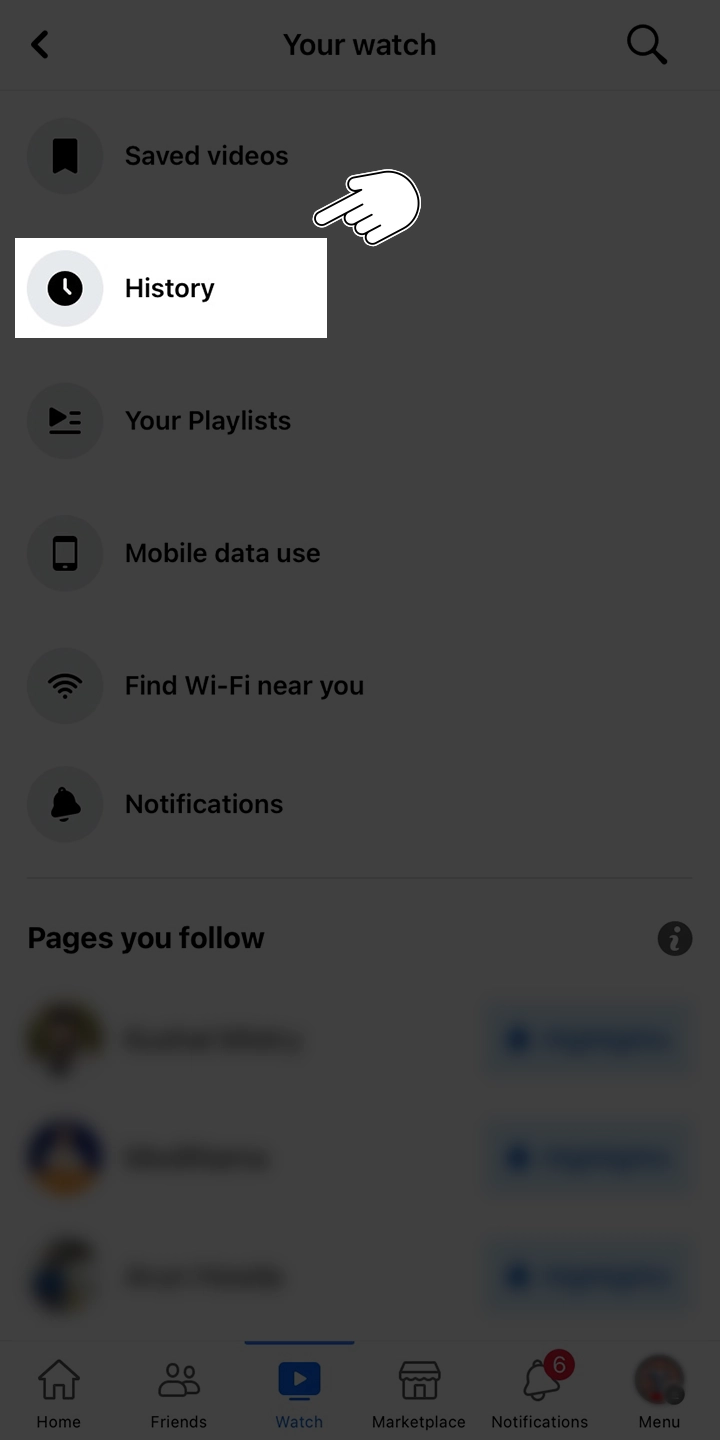
  4. Inside the “Your Watch” menu, find and tap “History”. This will display a list of all the videos you’ve watched, including the Reels you’re looking for.

    Watch History option in facebook iphone app

  5. Take your time to browse through the list and relish the joy of rediscovery. If you want to watch a specific reel again, just tap on it to watch it again.

How to Find Facebook Reels You’ve Watched on Android

To find Facebook Reels, you’ve watched on your Android device, follow these steps:

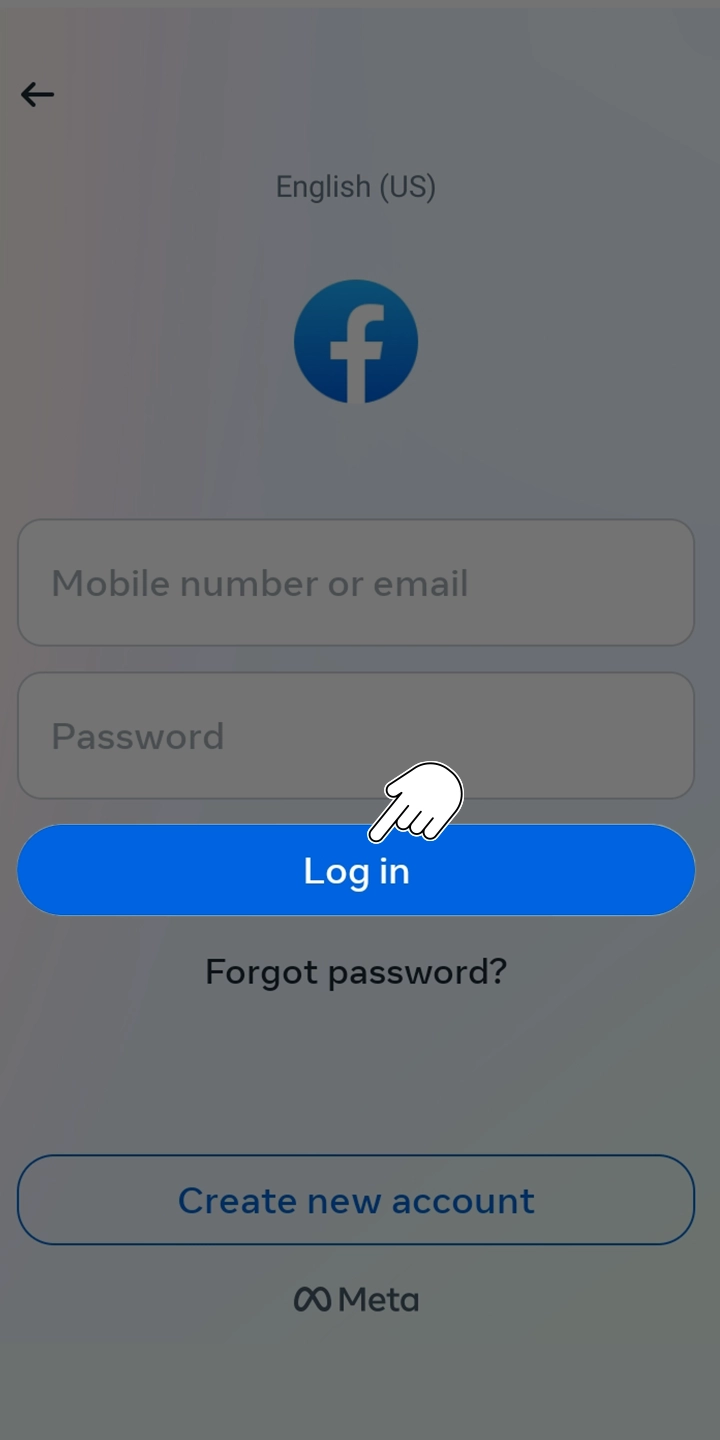
  1. Open the Facebook app on your Android device and log in to your account.

    Login to facebook in android phone

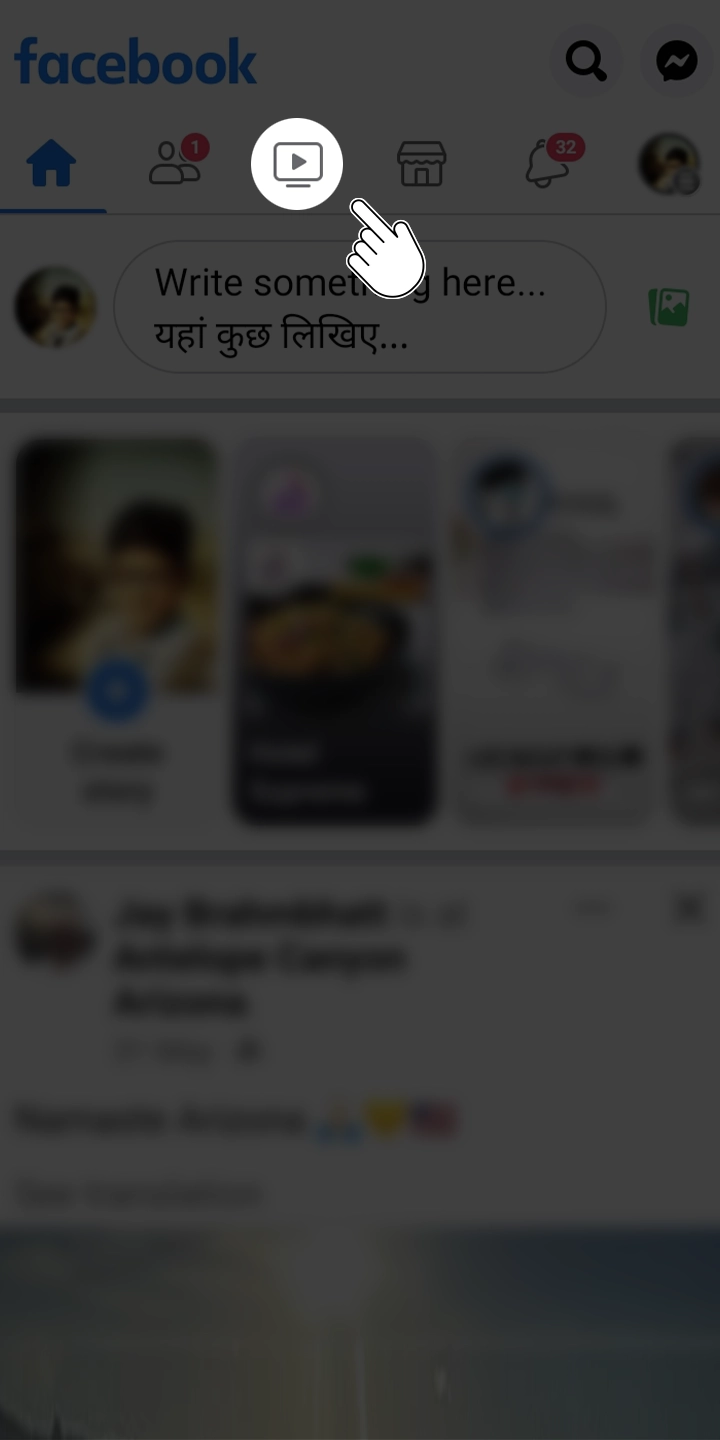
  2. Click on the “Watch” icon, which appears at the top-center of the page. This will expand the menu.

    Watch icon in facebook in android phone

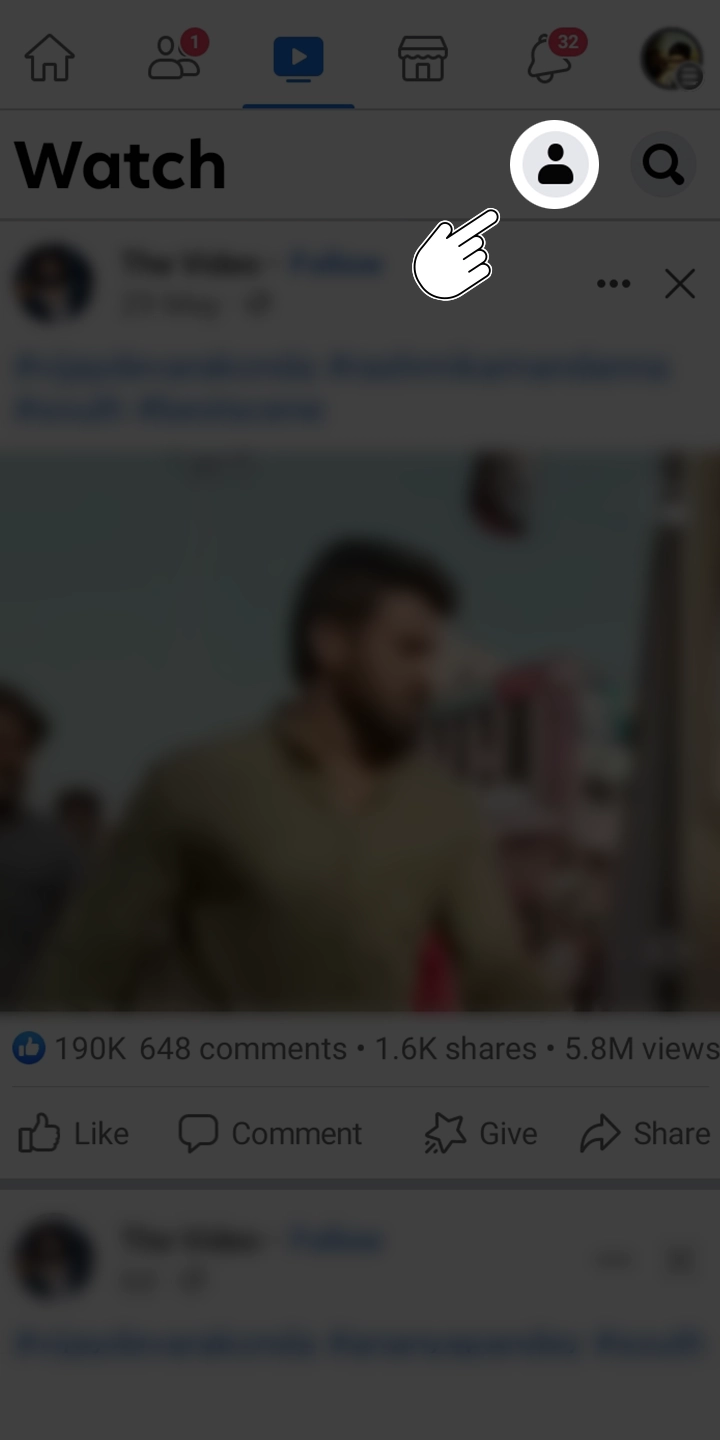
  3. Look for the “profile” icon within the Menu and tap on it. This will grant you access to the “Your Watch” section.

    Click on Profile icon to get to your watch history option in android facebook app

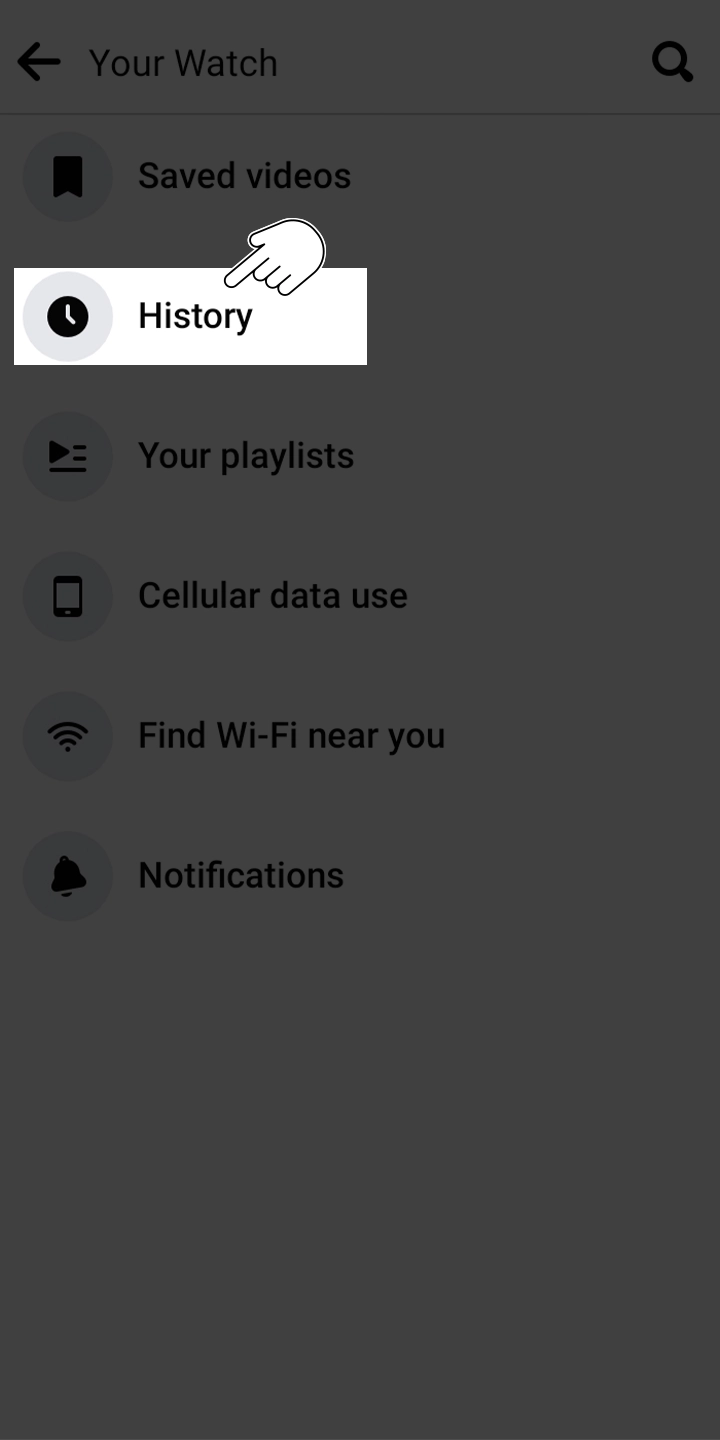
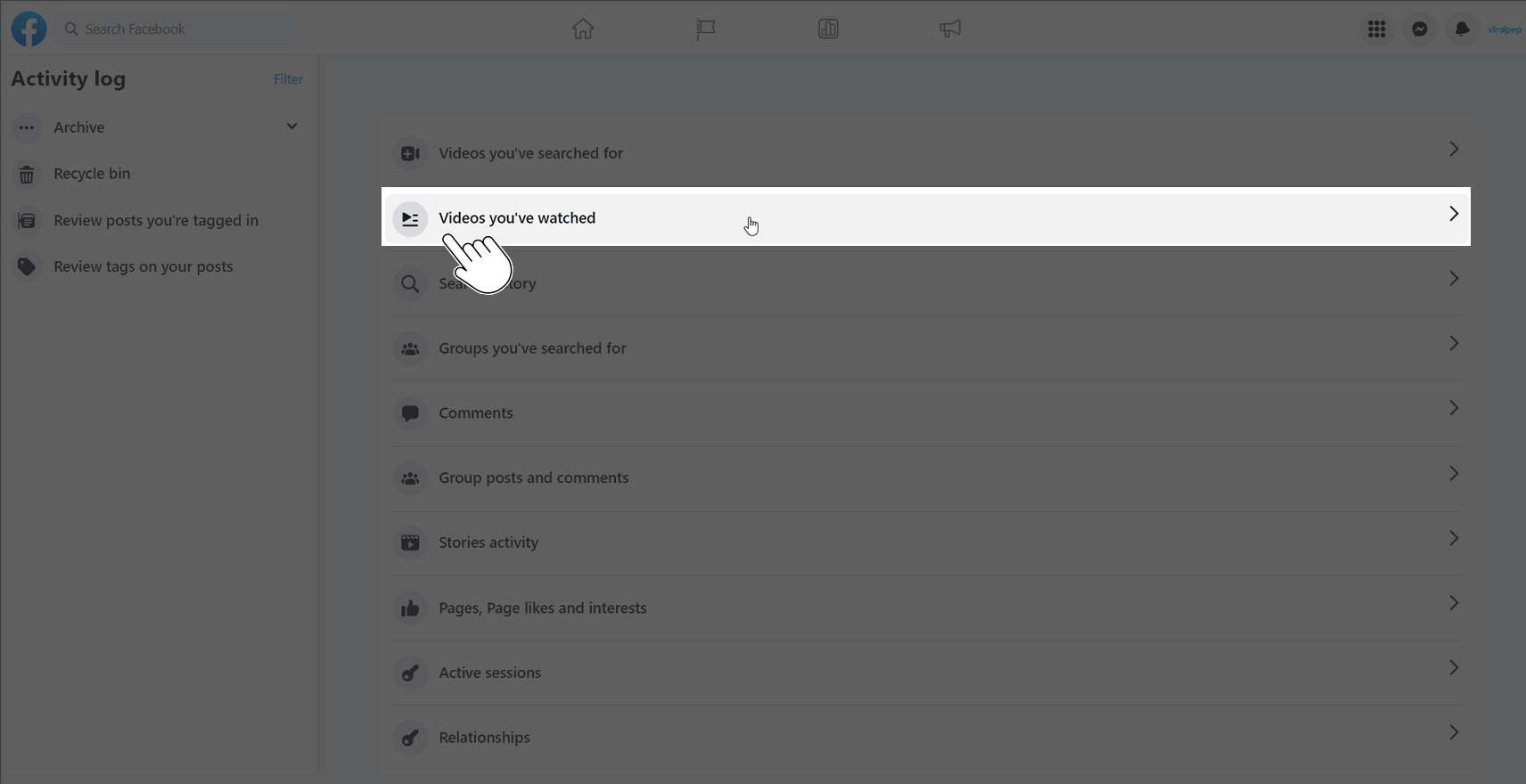
  4. Within the Watch menu, locate the category labeled “History” and tap on it. This will display all the videos you’ve watched, including the Reels you’ve viewed.

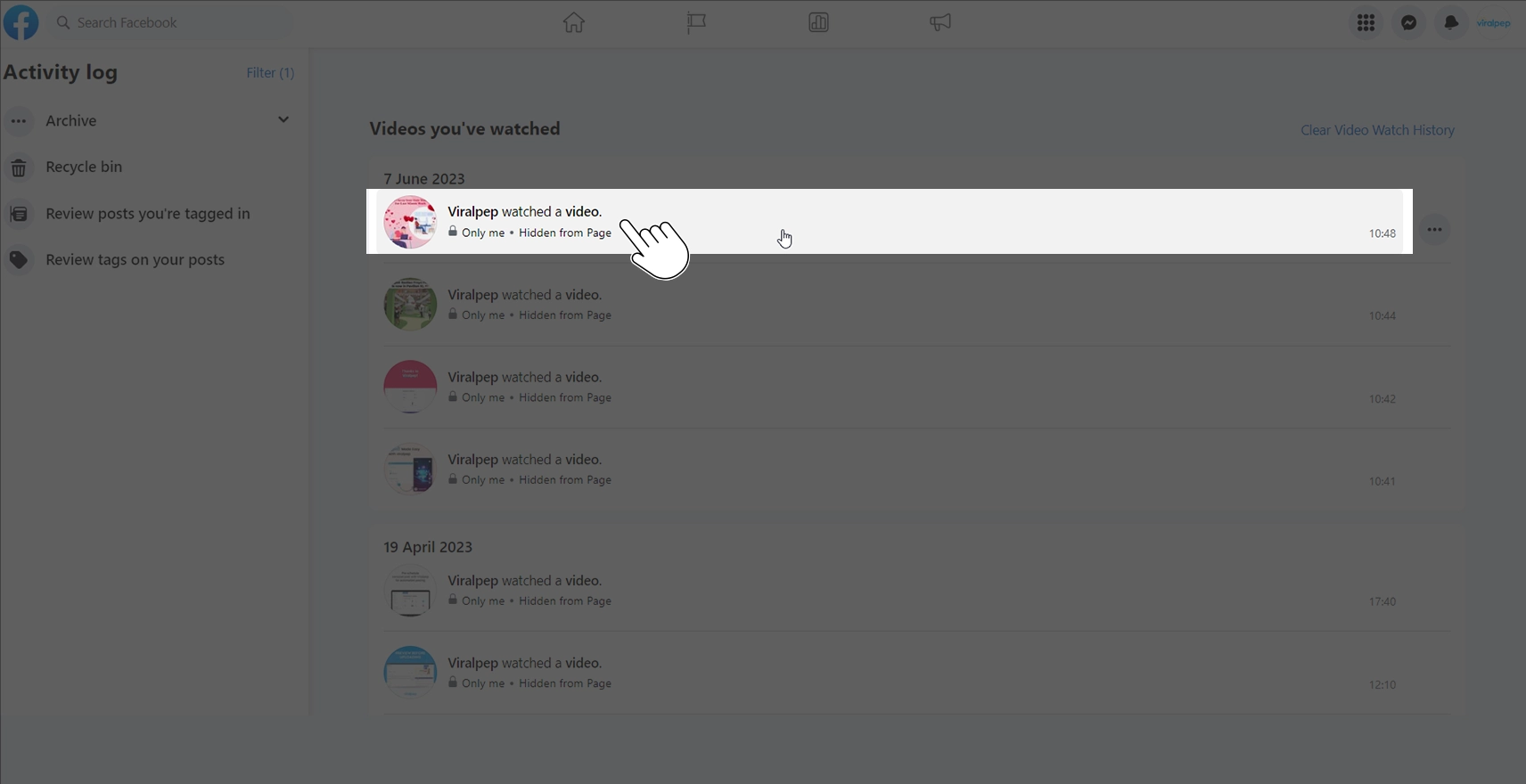
    Watch History option in facebook in android app

  5. Scroll through the list to find the specific reels you’re looking for. If you want to watch the reel again, just tap on it, and it will start playing.

By following these steps, you should be able to locate the Reels you’ve watched on the Facebook app for Android.

How to Find Facebook Reels You’ve Watched on Your Desktop

To find Facebook Reels, you’ve watched on your Android device, follow these steps:

  1. Open a web browser on your computer and navigate to www.facebook.com.
  2. Click on the menu icon, represented by your profile picture or your name, located at the top-right corner of the page. This will expand the menu.

    Click profile icon in facebook desktop app

  3. In the expanded menu, click on “Settings & Privacy” to open a window with additional options.

    Select settings and privacy option in facebook desktop app

  4. This will open the ‘Settings & Privacy’ menu. Look for ‘Activity Log’ within that menu and click on it.

    Select activity log options in facebook desktop app

  5. In the Activity Log window, find and click on “Videos You’ve Watched”. This will display a list of all the videos you have watched, including Reels.

    Click on videos You have watched in facebook desktop app

  6. Scroll through the list of videos to find the Reels you have watched. You can identify the Reels by their thumbnail images.

    Saved videos section in facebook desktop app

  7. If you want to watch a specific Reel again, simply click on it, and it will start playing.

By following these steps on your iPhone, Android device, or Facebook website, you can easily find and revisit Facebook Reels you’ve watched. This lets you relive your favorite moments and enjoy rediscovering the reels that interest you. Have fun exploring and liking your favorite Reels on Facebook!

Read also: Simple Ways to Increase Facebook Engagement

Organizing Watched Reels on Facebook

Do you struggle with finding the reels you’ve watched due to clutter and disorganization? Nothing to worry about! You can streamline your Organizing and effectively manage your viewed reels by following these easy steps:

How to organize watched Facebook Reels on iPhone

  1. Open the Facebook app on your iPhone.
  2. Tap the “Watch” icon at the bottom of the screen.

    Watch option in facebook app in Iphone

  3. Next, tap on the profile icon at the top-right corner of the screen. On your profile, you’ll see an option called “Your Watch”. Tap on it.

    Click on Profile icon to get to your watch history option in facebook iphone app

  4. Within “Your Watch,” tap on “History” to access your past history list, which includes the videos you have watched, including Reels.

    Watch History option in facebook

  5. To organize a specific reel or video, find and tap on the three dots appearing on the right side of it.

    Tap on the three dots appearing on the right side to organize reel

  6. This will open a menu at the bottom of your screen. Look for the “Save to Watch Later” option and tap on it.

    Save to Watch Later option to save reels in facebook

  7. A “Save to” menu will open, where you’ll see the option “New Collection”. Tap on it to create a new collection.

    Add new collection option to save reels in facebook

  8. A pop-up will appear on your screen, prompting you to add a name for your collection. Enter a name and then tap “Create”.

    Give name to collection in facebook app

  9. And there you have it! You can follow these steps to manage and organize the Facebook Reels you’ve watched for your convenience.

How to organize watched Facebook Reels on Desktop

  1. Open a web browser on your computer and navigate to www.facebook.com.
  2. Click on the menu icon, which is usually represented by your profile picture or your name, located at the top-right corner of the page. This will expand the men.

    Click profile icon in facebook desktop app

  3. In the expanded menu, locate and click on “Settings & Privacy” to explore further options.

    Select settings and privacy option in facebook desktop app

  4. Another menu will appear. Look for and click on “Activity Log” to access your activity history.

    Select activity log options in facebook desktop app

  5. In the Activity Log window, find and click on “Videos You’ve Watched”. This will display a list of all the videos you have watched, including Reels.

    Click on videos You have watched in facebook desktop app

  6. Scroll through the list to find the specific Reel you want to organize. Select the one you want to add to your desired collection, click it and open it.

    Saved videos section in facebook desktop app

  7. Hover your mouse over the Reel, typically at the right corner, until three dots appear.

    Click on three dots on right side to save reels in facebook desktop app

  8. Click on it and select “Save videos” to access further options.

    Click on save video option to add video to saved collection

  9. A “Save videos” option will open a “Add to Collection” pop-up. Click on the existing collection or create a new collection to save your Facebook Reels.

    Give desired name to your collection in facebook desktop app

By following these steps on your iPhone, Android device, or desktop, you can easily organize the watched reels on Facebook. Utilize the “Save” feature to create your personalized collection of favorite reels for easy access and enjoyment.

Conclusion

Finding and organizing the Facebook reels you’ve watched is now a breeze with the simple steps outlined in this guide. Whether you choose to explore your watched reels directly on the Facebook app or on the website, you can easily rediscover your favorite content and stay engaged with the reels that captivate you. Don’t miss out on the opportunity to optimize your Facebook experience—sign up for Viralpep.com today and unlock a world of social media management possibilities. Sign up for Viralpep.com now and elevate your social media game!

How to Change Order of Photos in Facebook Post – Viralpep

If you’re also experimenting with visuals created by an AI image generator, you’ll find that organizing those creative assets properly can make a huge difference in how your audience perceives your content. In this step-by-step guide, we will show you how to change the order of photos in a Facebook post using the powerful tools provided by Viralpep.com. With Viralpep, you can easily manage and schedule your Facebook posts and other social media accounts. Let’s dive in and discover how you can take control of your photo arrangement on Facebook!

Introduction

Facebook has become a hub for sharing memorable moments, stories, and experiences through photos. However, by default, Facebook arranges the photos in a post based on the order of upload. This may not always be ideal if you want to present your photos in a specific sequence or create a visually appealing layout. Fortunately, with Viralpep.com, you can easily change the order of photos in your Facebook posts, allowing you to have complete control over your visual storytelling.

Why Change the Order of Photos in a Facebook Post?

Changing the order of photos in a Facebook post offers several benefits. Here are a few reasons why you might consider rearranging your photos:

  • Enhanced storytelling

    By organizing your photos in a particular order, you can create a more compelling narrative and engage your audience.

  • Visual appeal

    Rearranging the photos lets you design a visually appealing layout, making your post more eye-catching and shareable.

  • Highlighting key moments

    You can prioritize important photos by featuring them at the beginning or end of your post, ensuring they receive the attention they deserve.

Related Blog: Simple Ways to Increase Facebook Engagement

How to change the order of photos in a Facebook post directly on the Facebook platform:

To get started Log in to your Facebook account. If you don’t have an account, you can sign up for free.

  1. Once you’re logged in, navigate to your Facebook profile or the page where you want to create the post.
  2. Click on the “Create Post” option. This can usually be found at the top of your profile or page, or in the “What’s on your mind?” section.Click on create post section in facebook to add post
  3. In the post composer, click on the “Photo/Video” option. This will allow you to upload photos from your device.Click on Add Photo/Video option to add media in facebook
  4. Choose the photos you want to include in your Facebook post by clicking on the “Add Photos/Video” button. You can select multiple photos at once.Selece posts to add in post composer in facebook
  5. After the photos are uploaded, you will see thumbnails of the photos in the post composer. Then, click on the ‘Edit All’ option, which will enable you to arrange your photos.Click on Edit All option to organize and add a caption to each post in facebook
  6. To change the order of the photos, simply click and drag a photo to the desired position within the thumbnail display. As you drag the photo, you will see a placeholder indicating where the photo will be placed.Drag posts to the desired location in Facebook to organize
  7. Continue rearranging the photos until you are satisfied with the desired order.
  8. To include captions or descriptions for your photos, simply click on the thumbnail of each photo and enter the text you wish to add.edit caption or descriptions of each image in Facebook
  9. Once you have arranged the photos and added any necessary captions, you can proceed to add any additional text or tags to your Facebook post.Add a caption of the post in the text area in Facebook
  10. Finally, click on the “Post” button to publish your Facebook post with the new order of photos. >Click on post button to post the post

For a detailed visual guide, you can refer to the attached video for instructions on how to change order of photos in facebook post.

Conclusion

In this comprehensive guide, we have explored the step-by-step process of changing the order of photos in a Facebook post. By utilizing the powerful tools provided by Viralpep.com, you can easily rearrange your photos, create captivating visual stories, and engage your audience more effectively. Sign up for Viralpep.com today and unlock the full potential of your social media management. Take control of your Facebook posts and other social media accounts, and streamline your content creation and scheduling process.

FAQs

  1. Can I change the order of photos in an existing Facebook post?

    No, once a Facebook post is published, you cannot directly change the order of photos within that post. However, you can delete the post and create a new one, following the steps provided, to arrange the photos in the desired order.

  2. Is there a limit to the number of photos I can rearrange in a Facebook post?

    Facebook allows you to upload multiple photos to a single post, and you can rearrange them as needed. However, there may be a limit to the total file size of the photos you upload, so ensure your photos meet the platform’s requirements.

  3. Can I change the order of photos on the Facebook mobile app?

    Yes, the process of changing the order of photos in a Facebook post is also available on the Facebook mobile app. Simply open the app, navigate to your profile or page, and follow the same steps outlined in the previous instructions.

  4. Do the photos need to be uploaded in a specific order to arrange them on Facebook?

    No, the order in which you upload the photos does not determine the order they will appear in the Facebook post. You have the flexibility to rearrange the photos within the post composer, allowing you to create a visually appealing sequence.

  5. Will changing the order of photos in a Facebook post affect the engagement or visibility of the post?

    The order of photos in a Facebook post can impact how users engage with the content. By arranging the photos in a visually appealing and storytelling manner, you may enhance the overall impact and engagement of the post. However, Facebook’s algorithms prioritize various factors, such as user interactions and post relevance, when determining visibility in users’ feeds.

  6. Can I change the order of photos in an existing Facebook post?

    No, once a Facebook post is published, you cannot directly change the order of photos. However, by using Viralpep.com, you can create a new post with the desired photo arrangement and publish it accordingly.

How to View Saved Reels on Facebook

Are you an avid Facebook user who loves to explore and engage with captivating video content? If so, you’ve probably come across the fascinating world of Facebook Reels. These short, attention-grabbing videos are a fantastic way to discover entertaining and informative content.

In this comprehensive guide, brought to you by Viralpep.com, we will delve into the art of finding and curating Saved and Liked Reels on Facebook, empowering you to make the most of your Reel collection. So, let’s dive right in!

Finding Saved Reels on Facebook: Unlocking a Treasure Trove of Inspiration

When you stumble upon a Reel that captures your attention, you might want to save it for later enjoyment or reference. Thankfully, Facebook offers a convenient feature that allows you to save Reels effortlessly. Let’s explore how you can discover and access your collection of Saved Reels:

  1. Accessing Your Saved Reels

    On Computer:

    To access the Reels you’ve saved on Facebook, follow these simple steps:

    1. To view saved reels on your profile page, click on the menu icon on the right side of the screen.Menu icon in facebook
    2. Click on the menu icon; This will open a dropdown menu, scroll down and click on the “Saved” button.Saved button in facebook
    3. This will open a window containing all the saved items. Click on the Filter icon on the left side of the screen.Filter option in saved section in facebook
    4. This will open a dropdown menu, so click on the “Reel” option.Filter reel option in saved section in facebook
    5. You get all saved reels.Saved reels section in facebook

    For a detailed visual guide, you can refer to the attached video for instructions on how to view saved reels on facebook.

    On iPhone App:

    To view saved reels on the Facebook app for iPhone, you can follow these steps:

    1. Open the Facebook app on your iPhone. Ensure that you are logged in to your account.
    2. On the app’s home screen, tap on the three horizontal lines  menuin the bottom-right corner. This will open the menu options.Menu option in iPhone facebook app
    3. Scroll down the menu and find the “Saved” option. Tap on it to proceed.Saved Option in iPhone facebook app
    4. In the “Saved” section, look for the “All” tab, tap on it, scroll through the list of saved content. Find the specific Reel you want to watch, and tap on it to open and engage with it by liking, commenting or sharing it, just like any other regular Facebook post.saved post section in iPhone facebook app

    On Android App:

    If you’re using the Facebook Android app and want to access your saved Reels, simply follow these steps:

    1. Launch the Facebook app on your Android device. Make sure that you have logged in to your account using your credentials.
    2. Tap on the three horizontal lines menu in the upper-right corner to open the Facebook menu.Menu option in android phone facebook app
    3. Look for the “Saved” tab in the “All shortcuts” section of the “Menu” and tap to open your saved posts.Saved Option in android phone facebook app
    4. In the “Saved” section, locate your saved content and tap on the desired Reels post to open it in full screen.saved post section in android phone facebook app
  2. Watch Your Saved Reels

    Once you’re on the Saved Reels page, you can easily watch the Reels you’ve saved by following these steps:

    Browse through the list of Saved Reels and find the one you’d like to watch.

    Click on the desired Reel to open and start playing it. Sit back, relax, and enjoy the captivating video content.

    Note: Remember, your Saved Reels page is private and can only be viewed by you. It’s your personal collection of favorite Reels!

  3. Organizing Your Saved Reels

    As your collection of Saved Reels grows, it’s important to keep it organized for easy retrieval. Facebook allows you to create personalized collections to categorize your Saved Reels based on themes, interests, or any other criteria you prefer.

    1. To create a collection, click on the “Create new Collection” button.Create new collection option in facebook to organize or save post
    2. Give your collection a name that reflects its content.Give name to new collection in facebook to organize or save post
    3. Add Saved Reels to your collection by selecting the Reel and choosing the appropriate collection from the provided options.Add to collection option in facebook to move saved post to desired collectionSelect desired collection from options in facebook to move saved post to desired collection
  4. Browsing and Rediscovering Saved Reels

    1. With your Saved Reels neatly organized, it’s time to browse and rediscover your favorite videos.
    2. Scroll through your collections and browse the Reels at your leisure.
    3. If a particular Reel catches your eye, simply click on it to relish the joy of revisiting those memorable moments.

By following these steps, you can effortlessly organize and rediscover your Saved Reels on Facebook. Enjoy the convenience of a well-organized collection and relish the pleasure of revisiting your favorite videos whenever you desire.

Related Blog: The Basic Guide to understanding Clipboard on Facebook

Conclusion: Unleash the Potential of Your Reel Collection

With the power to find, curate, and organize your Saved and Liked Reels on Facebook, you can create a personalized gallery of captivating videos. By utilizing Viralpep’s social media scheduling features, you can streamline your content management and make the most of your social media presence, including Facebook Reels. Sign up for Viralpep.com today and witness the difference it makes in your social media strategy. Sign up for Viralpep here.

Embrace the joy of discovery as you browse through your Saved and Liked Reels, reliving cherished moments and exploring new interests. Engage with creators, stay updated with the latest trends, and let the reels on Facebook become a source of inspiration, laughter, and joy in your life.

As you embark on your journey of maximizing your Reel collection, remember the importance of organization and engagement. Utilize the steps provided to find and curate your Saved and Liked Reels, creating personalized collections that reflect your interests.

Take advantage of Viralpep’s social media scheduling capabilities to streamline your content management and ensure a consistent presence across platforms, including Facebook Reels. Sign up for Viralpep.com today and simplify your social media scheduling. Sign up for Viralpep here.

For further insights into optimizing your Facebook experience, read our recent blog post, A Basic Guide to Understanding Clipboard on Facebook. Discover the potential of Clipboard for efficient content management and stay ahead of the curve.

Explore our range of Viralpep plans to unlock additional features and take your social media scheduling to the next level. Whether you’re a solopreneur, small business, or enterprise, we have a plan that suits your needs. Visit Viralpep Plans to discover the perfect plan for you.

Harnessing the Power of User-Generated Content: Why It’s Important and How to Leverage It for Your Business
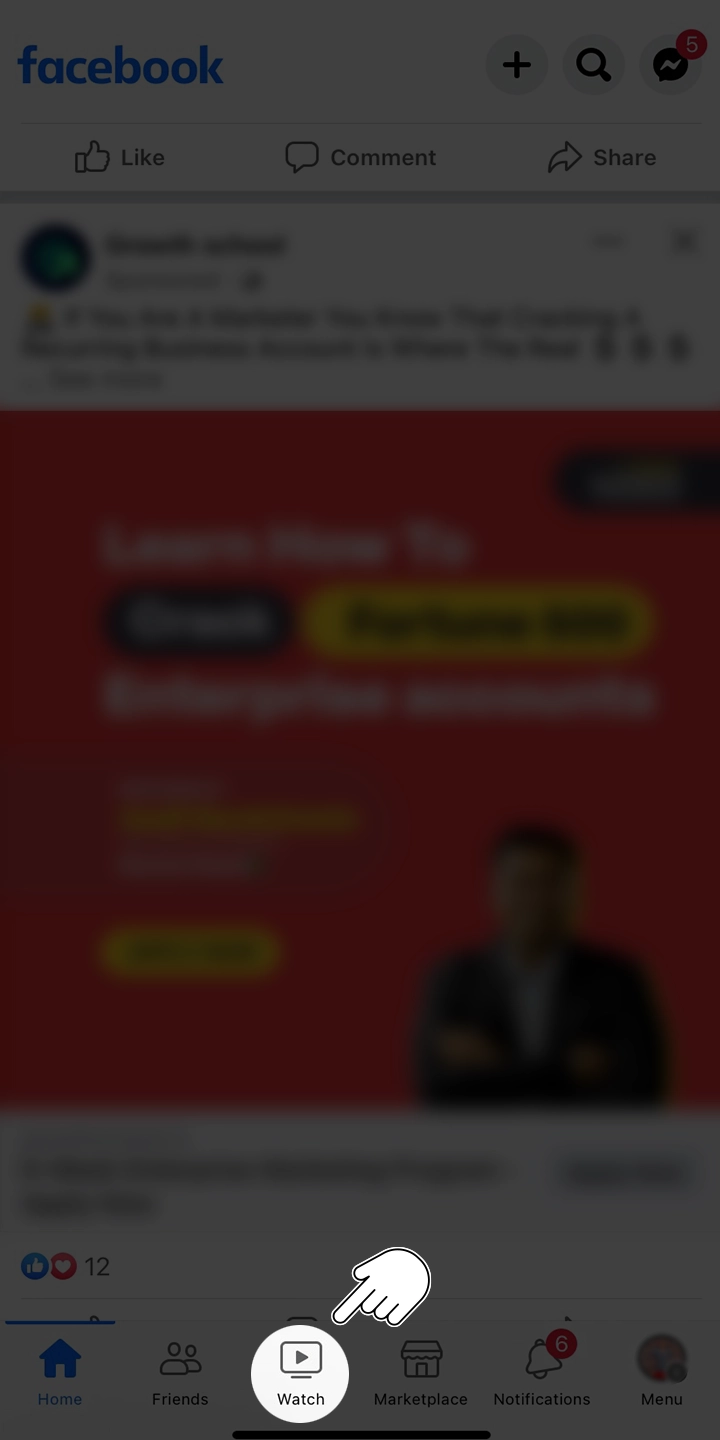
The rise of social media and online communities has transformed the way businesses market their products and services. User-generated content (UGC) has emerged as an influential marketing tool that can boost brand credibility, enhance customer engagement, and drive sales.

In this article, we will explore the importance of user-generated content and how your business can leverage it to create a more engaging and successful marketing strategy. Learn how Viralpep.com can help you harness the power of UGC and propel your brand to new heights.

What is User-Generated Content?

User-generated content refers to any form of content created by customers, fans, or users of a product or service, as opposed to content created by the brand itself.

Examples of UGC include social media posts, reviews, testimonials, videos, images, and blog comments. This type of content is considered more authentic and trustworthy, as it comes directly from the people who have experienced the product or service first-hand.

The Importance of User-Generated Content

Importance of User-Generated Content

User-generated content offers several benefits to businesses:
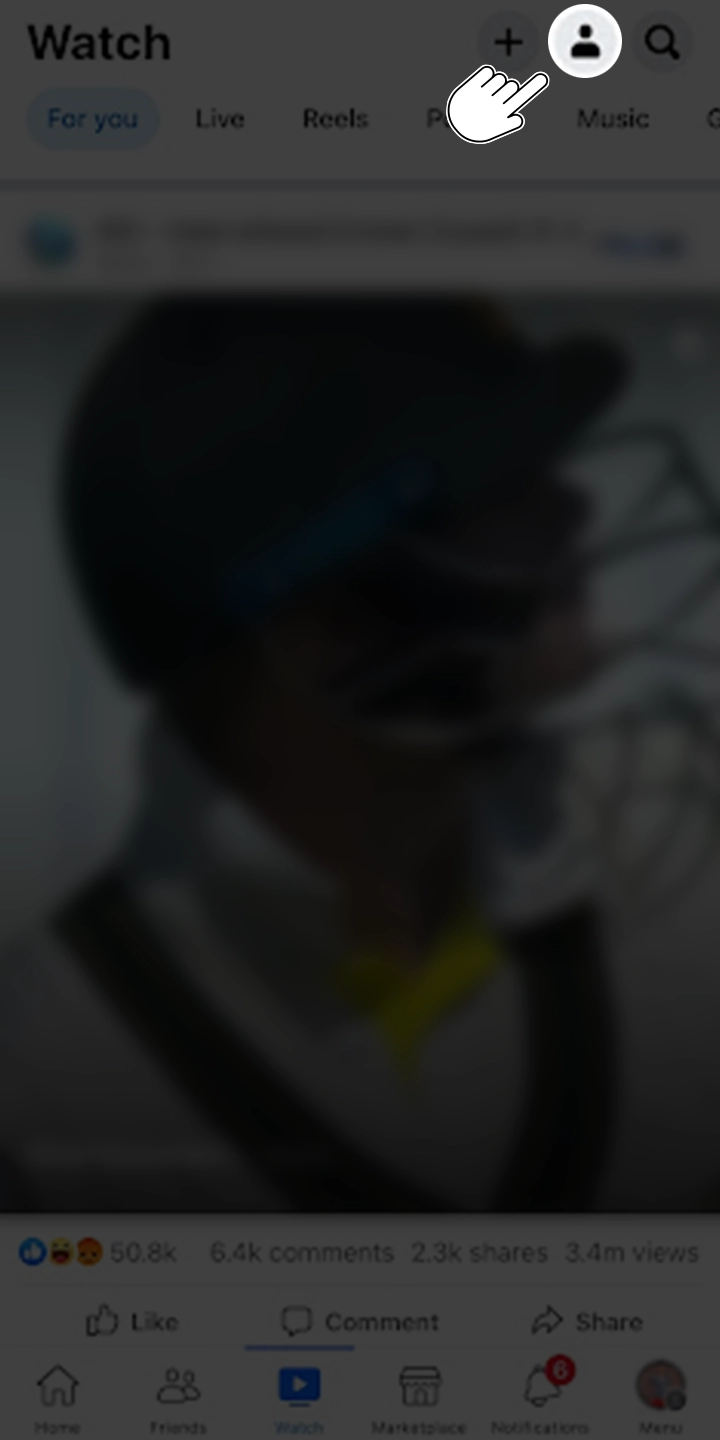
  1. Builds trust and credibility

    People trust the opinions of their peers more than advertisements or promotional content from brands. Featuring UGC on your website or social media channels can help establish your brand as trustworthy and credible in the eyes of potential customers.

  2. Boosts customer engagement

    UGC encourages interaction and engagement between your brand and its customers. By sharing and promoting user-generated content, you can create a sense of community and foster a deeper connection with your audience.

  3. Drives sales and conversions

    User-generated content can have a direct impact on sales and conversions. When people see their peers using and endorsing a product, they are more likely to make a purchase themselves.

  4. Improves SEO and online visibility

    UGC can help improve your website’s search engine rankings by generating fresh, relevant, and keyword-rich content. Search engines often prioritize user-generated content, as it is considered more valuable and authentic.

How to Leverage User-Generated Content for Your Business

  1. Encourage UGC creation

    Develop campaigns or contests that motivate your customers to create and share their own content related to your brand. Offer incentives, such as discounts, giveaways, or features on your social media channels to encourage participation.

  2. Curate and promote UGC

    Regularly monitor social media and other online platforms for user-generated content related to your brand. Share the best content on your website, blog, or social media channels, and give credit to the original creators.

  3. Integrate UGC into your marketing materials

    Use testimonials, reviews, or social media posts in your marketing materials, such as email newsletters, website banners, or print advertisements.

  4. Utilize Viralpep.com to manage your UGC campaign

    Viralpep.com offers a comprehensive platform for managing, scheduling, and analyzing your social media marketing efforts, including the curation and promotion of user-generated content.

FAQs for User Generated Content

We have compiled a list of frequently asked questions to help you better understand user-generated content and its significance in today’s digital landscape:

What is user-generated content marketing?

User-generated content marketing is a strategy that involves leveraging content created by customers, fans, or users of a product or service to promote a brand. This content can include social media posts, reviews, testimonials, videos, and images.

By incorporating UGC into their marketing efforts, businesses can build trust, credibility, and customer engagement. Viralpep.com offers a comprehensive platform for managing, scheduling, and analyzing your UGC marketing efforts across various social media channels.

What is user-generated content?

User-generated content (UGC) refers to any form of content created by customers, fans, or users of a product or service, as opposed to content created by the brand itself.

Examples of UGC include social media posts, reviews, testimonials, videos, images, and blog comments. Viralpep.com enables businesses to manage and promote UGC effectively across multiple social media platforms.

Are platforms responsible for user-generated content?

In general, platforms are not held responsible for user-generated content, as they act as intermediaries hosting the content created by users.

However, platforms may be required to take down specific content if it violates the law or their terms of service. Viralpep.com encourages businesses to adhere to ethical guidelines and best practices when promoting user-generated content.

What is the future of user-generated content?

The future of user-generated content is expected to involve increased personalization, integration of new technologies, and a greater emphasis on authenticity.

As consumers become more discerning and tech-savvy, brands will need to adapt and innovate to stay relevant. Viralpep.com is committed to staying at the forefront of UGC trends, offering businesses a powerful platform to manage and promote user-generated content effectively across multiple social media channels.

Simple CMS for user-generated content?

Viralpep.com offers a simple yet powerful content management system (CMS) designed specifically for managing user-generated content across multiple social media platforms.

The platform streamlines the process of monitoring, scheduling, and analyzing social media marketing efforts, including the curation and promotion of UGC.

What is brand-generated content?

Brand-generated content refers to any form of content created by a brand to promote its products or services. Unlike user-generated content, which is created by customers, fans, or users, brand-generated content is created and controlled by the brand itself.

Examples of brand-generated content include promotional videos, advertisements, blog posts, and social media updates. Viralpep.com can help businesses manage both brand-generated and user-generated content through its comprehensive social media management platform.

What are the different types of user-generated content?

There are various types of user-generated content, including:

  1. Social media posts, such as photos, videos, and status updates.
  2. Reviews and testimonials from customers.
  3. Blog comments and forum discussions.
  4. Visual content, such as images and videos.
  5. User-generated articles or guest blog posts.

Viralpep.com provides a platform to manage and promote these different types of user-generated content effectively across multiple social media channels.

Why do brands use user-generated content?

Brands use user-generated content for several reasons:

  1. To build trust and credibility with potential customers.
  2. To boost customer engagement and create a sense of community.
  3. To drive sales and conversions by showcasing positive UGC.
  4. To improve SEO and online visibility.

How does user-generated content really affect brands?

User-generated content affects brands by:

  1. Enhancing trust and credibility with potential customers.
  2. Boosting customer engagement and interaction.
  3. Driving sales and conversions by showcasing positive UGC.
  4. Improving SEO and online visibility through fresh, relevant, and keyword-rich content.

What are the pros & cons of user-generated content?

Pros of user-generated content include:

  1. Building trust and credibility with potential customers.
  2. Boosting customer engagement and interaction.
  3. Driving sales and conversions by showcasing positive UGC.
  4. Improving SEO and online visibility.

Cons of user-generated content include:

  1. Negative or misleading content that can harm your brand’s reputation.
  2. Legal issues, such as copyright infringement or defamation.
  3. Difficulty in moderating and controlling the quality of the content.
  4. Potential misuse of your brand’s intellectual property.

How quickly is user-generated content growing?

User-generated content is growing at an exponential rate, driven by the increasing popularity of social media platforms, smartphones, and other digital technologies that make it easier for users to create and share content.

As a result, businesses need to stay updated on trends and best practices to effectively leverage UGC in their marketing efforts. Viralpep.com offers businesses a comprehensive platform to manage and promote user-generated content across multiple social media channels.

What are methods for attracting user-generated content?

Some methods for attracting user-generated content include:

  1. Encouraging customers to share their experiences with your product or service through social media, reviews, or testimonials.
  2. Hosting contests or giveaways that require users to create and submit content.
  3. Collaborating with influencers to promote user-generated content campaigns.
  4. Using hashtags to encourage user-generated content submissions on social media platforms.

Viralpep.com can help businesses implement these strategies effectively by providing a platform for managing, scheduling, and analyzing social media marketing efforts, including the curation and promotion of user-generated content.

Why do people contribute to user-generated content sites?

People contribute to user-generated content sites for several reasons, including:

  1. The desire to share their experiences, opinions, or expertise with others.
  2. The opportunity to gain recognition, followers, or even monetary rewards.
  3. The sense of community and belonging that comes from participating in a shared experience.
  4. The enjoyment of creating content and engaging with others who share similar interests.

What companies filter user-generated content as a service?

Several companies offer user-generated content filtering and moderation services to help businesses manage the quality and legality of the content shared on their platforms.

What’s the best way to monetize user-generated content?

The best way to monetize user-generated content is by leveraging it in your marketing efforts to drive sales, boost customer engagement, and enhance your brand’s reputation. You can also monetize UGC by partnering with influencers or running sponsored content campaigns.

What are the laws around user-generated content?

Laws around user-generated content vary by jurisdiction and can involve issues such as copyright infringement, defamation, privacy, and trademark violations.

It’s essential for businesses to be aware of the legal implications of using UGC and to ensure that they have the necessary permissions and safeguards in place.

How to start up user-generated content moderation?

To start up user-generated content moderation, businesses can:

  1. Develop a clear set of guidelines and policies for acceptable content.
  2. Assign a dedicated team or individual to monitor and review user-generated content submissions.
  3. Utilize content moderation tools, such as automated filters or AI-powered moderation systems.
  4. Collaborate with third-party content moderation services if needed.
  5. Encourage users to report inappropriate or offensive content.

While Viralpep.com does not provide content moderation services, it offers businesses a platform for managing, scheduling, and analyzing their social media marketing efforts, including the curation and promotion of user-generated content.

Is there a simple way to translate user-generated content?

There are several tools and services available for translating user-generated content, such as Google Translate or professional translation services.

Businesses can integrate these tools into their content management systems or social media platforms to provide translations for a diverse audience.

Keep in mind that automated translation tools may not always provide accurate translations, so using professional translation services may be necessary for critical or sensitive content.

How important is user-generated content in e-commerce?

User-generated content is extremely important in e-commerce, as it:

  1. Builds trust and credibility with potential customers by showcasing authentic experiences with products or services.
  2. Drives sales and conversions by providing social proof and positive endorsements from real users.
  3. Enhances SEO and online visibility, as search engines prioritize fresh, relevant, and user-generated content.
  4. Boosts customer engagement and interaction, leading to higher customer retention and loyalty.

Conclusion

User-generated content is growing at an exponential rate, driven by the increasing popularity of social media platforms, smartphones, and other digital technologies that make it easier for users to create and share content.

As a result, businesses need to stay updated on trends and best practices to effectively leverage UGC in their marketing efforts. Viralpep.com offers businesses a comprehensive platform to manage and promote user-generated content across multiple social media channels, emphasizing the importance of social media for business growth.

To help businesses stay competitive, Viralpep.com has recently announced the launch of new powerful features for their platform. These features are designed to make it even easier for businesses to manage their social media presence and promote user-generated content effectively.

One of the most effective ways to promote user-generated content is through social media platforms such as LinkedIn. Viralpep.com offers guidance on how to harness the power of LinkedIn groups to boost your business growth and capitalize on user-generated content.

Instagram is another excellent platform for promoting user-generated content. Viralpep.com provides insights on using Instagram hashtags for business, helping businesses discover the best hashtags to increase engagement and drive user-generated content creation.

Viralpep.com understands the need for effective team management when dealing with user-generated content. Their team management feature allows businesses to collaborate efficiently and manage social media marketing efforts, including the curation and promotion of user-generated content.

To make their platform accessible to businesses of all sizes, Viralpep.com offers a range of cost-effective plans. These plans cater to different business needs, allowing companies to choose the plan that best suits their user-generated content marketing efforts and budget.

By incorporating these links as anchor text and hyperlinks, the blog post now provides valuable resources and information on how Viralpep.com can support businesses in promoting and managing user-generated content effectively.