Boost Social Media Engagement with ChatGPT: 10 Quick & Easy Examples

ChatGPT, an advanced AI model, excels in generating text with remarkable accuracy. Whether you’re looking for social media content, coding help, or an AI essay writer, ChatGPT can assist with impressive flexibility and precision.. With an astounding growth from 1 million users in its first week to over 50 million within the same month, its popularity underscores its capability to facilitate users effectively. Despite its impressive 175 billion neural parameters, ChatGPT’s potential is unlocked only with the right prompts. Social media remains a critical tool for engaging specific audiences, and ChatGPT can significantly enhance this process—provided you use it correctly. To simplify things, we’ve compiled ten straightforward ways to leverage ChatGPT to create social media content and build a dedicated fanbase for your brand.

Navigating ChatGPT Prompts for Social Media Success

ChatGPT prompts are more than just questions; they act as the starting point for interacting with AI. Think of them like the key that starts a conversation with a machine. When you input a specific prompt into a ChatGPT model, you guide how the AI responds, tailoring it to meet your needs. Whether you’re seeking a joke, a detailed explanation, or a compelling social media post, the right prompt makes it possible. However, the art lies in crafting prompts that are not just questions but smart directives. Prompts are significant because they can generate specific outputs, making them invaluable for marketers, writers, and anyone utilizing AI. In essence, ChatGPT prompts serve as your portal to intelligent and customized communication—simple yet incredibly powerful. To maximize their effectiveness, it’s essential to follow a basic formula when interacting with ChatGPT:

  • Define Your Objective: Start with a clear goal. Are you informing, entertaining, engaging, or prompting action?
  • Specify Your Audience: Identify your target audience—Millennials, parents, fitness enthusiasts, or tech enthusiasts?
  • Highlight Your Brand’s Voice: Define your brand’s tone—is it playful, formal, inspirational, or quirky? This helps ChatGPT align with your brand’s personality.
  • Detail the Content-Type: Specify if you need a catchy caption, a detailed post, or a quick poll.
  • Mention Desired Engagement: Do you aim for likes, shares, comments, or clicks? This guides the AI in creating actionable content.
  • Incorporate Keywords: Include relevant keywords you want the content to focus on, like “sustainable fashion” or “gourmet coffee”.
  • Set Length Constraints: Specify any word limits, especially for platforms like Twitter.
  • Ask for Variations: Request multiple options to choose from, allowing flexibility and choice.
  • Review and Refine: Always review the generated content to ensure it aligns with your brand and message.

By following this formula, ChatGPT can help produce engaging content that resonates perfectly with your brand and audience. Let’s use this knowledge for deeper understanding…

How to Use ChatGPT Prompts for Social Media

Interested in harnessing the power of ChatGPT for your social media strategy? These 9 essential tips will help you create engaging and innovative content using this potent AI tool. effective use of chatgpt prompts for social media
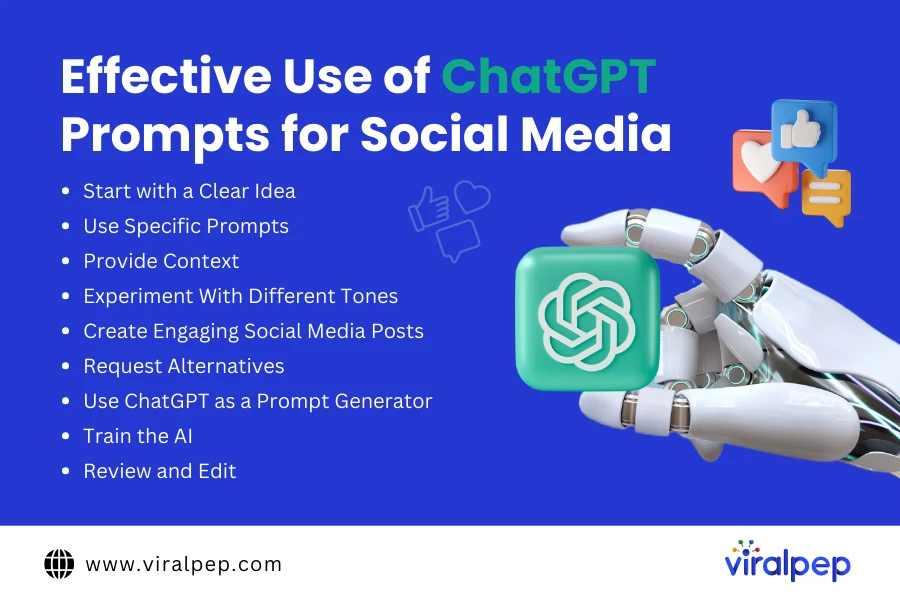
  1. Start With a Clear Idea

    Before using ChatGPT to generate content, ensure you have a clear concept of your message. For example, ChatGPT can assist in brainstorming new posts, crafting compelling headlines, and refining content on LinkedIn. Specific prompts guide the AI in generating ideas that keep your feed fresh and exciting. This initial clarity lays the foundation for coherent and impactful social media content.

  2. Use Specific Prompts

    Precision in your prompts is crucial. The more detailed and targeted your prompts, the more tailored the output will be. Instead of asking for generic “marketing tips”, request specific guidance like “content marketing strategies for a small online business”. This specificity directs ChatGPT to create content aligned precisely with your social media campaign goals, ensuring relevance and uniqueness in your brand voice. In addition to specificity, also…

  3. Provide Context

    Giving context to ChatGPT is like providing a roadmap to your destination. Include details such as the platform targeted, audience demographics, desired post length, and intended tone. This contextual understanding enables ChatGPT to craft content seamlessly integrated into your social media strategy. The result is posts that resonate with your followers and align with your brand identity.

  4. Experiment With Different Tones

    ChatGPT’s ability to adapt to various tones is akin to having a versatile writer at your disposal. Whether you need a playful tone for an Instagram post or a formal tone for a LinkedIn article, ChatGPT can adjust to suit your needs. Experimenting with different tones helps you connect with diverse audience segments, adding dynamic flair to your social media presence and enhancing engagement.

  5. Create Engaging Social Media Posts

    Engagement is key on social media platforms. ChatGPT can assist in crafting fun and engaging content. For instance, Facebook can generate witty copy to capture attention, spark conversations, and boost engagement. It can also help create compelling calls to action that encourage interaction with your posts. Injecting creativity can transform ordinary content into shareable posts that resonate with your audience. Not satisfied with the initial results? In that case…

  6. Request Alternatives

    ChatGPT’s ability to generate alternatives allows for iterative refinement. If the first response doesn’t meet expectations, request another, exploring different angles and ideas. This iterative process enables you to fine-tune your content to align perfectly with your vision. It’s akin to having multiple drafts and revisions instantly available, facilitating the creation of polished social media posts without time constraints. Outsmarting ChatGPT? Here’s how…

  7. Use ChatGPT as a Prompt Generator

    Think creatively! Task ChatGPT with generating specific prompts for different campaigns. This approach fosters originality in your copy, offering a fresh perspective to your social media marketing strategy.

  8. Train the AI

    Transform ChatGPT into your personalized assistant by training it with examples and guidelines tailored to your needs. For example, on Twitter, use it to craft engaging polls, develop themed content series, and engage followers on relevant topics. It’s invaluable for drafting niche-specific questions and maintaining a consistent brand voice. Most importantly…

  9. Review and Edit

    ChatGPT serves as a starting point, not the final product. Always review and edit content before publication. Use tools like Quetext to ensure originality and alignment with your brand voice. This step is crucial to transforming good content into outstanding content that reflects your brand’s unique personality. With all the benefits come challenges, too. Let’s see how you can become…

Avoid These Pitfalls While Using ChatGPT

ChatGPT’s natural language processing capabilities make it a seamless tool for creating social media content. However, to ensure error-free and valuable results, consider these precautions:

  • Be Specific with Prompts: The quality of ChatGPT’s output depends heavily on the specificity of your prompts. Avoid generic commands and provide relevant examples to guide its responses effectively.
  • Avoid Math Problems: The free ChatGPT excels in language tasks but struggles with complex math. Use the paid version for advanced calculations, focusing ChatGPT on its strength in generating text-based content.
  • Multitask Effectively: ChatGPT can handle multiple tasks simultaneously. Optimize your prompts to maximize efficiency and avoid wasting time on single-task commands.
  • Iterate and Improve: Continuously refine your prompts and allow ChatGPT to learn and improve its outputs over time. Experiment with different approaches to enhance the quality of results.
  • Use Personas for Context: Provide context by using personas in your prompts. For example, instead of a generic command like “Write me a social media ad copy,” specify, “Act as a professional copywriter and create a social media ad copy.” This helps ChatGPT tailor its response more accurately.
  • Verify Facts Independently: While ChatGPT provides useful information, especially in written content, it’s essential to independently verify facts for accuracy. Recent reports suggest that errors can occur, so cross-checking information remains crucial.

Following these guidelines, you can effectively use ChatGPT to generate engaging and accurate social media content while mitigating potential pitfalls.

10 Quick Examples of Using ChatGPT for Social Media Posts

As the world continues to move quickly in the digital era, maintaining an active presence on social media is crucial for engaging with your audience and expanding your brand. However, consistently producing fresh, captivating content can pose a significant challenge. This is where ChatGPT comes into play. This AI-powered tool is designed to assist you in generating innovative and compelling social media posts quickly and effortlessly. Here’s how you can make the most of ChatGPT for your social media strategy, along with ten prompt examples to help kickstart your creativity.

  1. Instagram Post for a Fitness Brand

    Prompt: “Create an engaging Instagram post for a fitness brand promoting a new workout routine.” Output: Ready to take your fitness to the next level? ? Try our new HIIT workout routine designed to burn fat and build muscle in just 20 minutes a day! #FitnessGoals #HIITWorkout #GetFit

  2. Twitter Update for a Tech Company

    Prompt: “Write a tweet announcing the launch of a new AI-powered product.” Output: We’re excited to introduce our latest innovation – an AI-powered assistant that revolutionizes the way you work! ? Say hello to increased productivity and smarter solutions. #TechInnovation #AI #ProductLaunch

  3. Facebook Post for a Restaurant

    Prompt: “Create a Facebook post promoting a new seasonal menu at a restaurant.” Output: ? Fall flavors have arrived! Come savor our new seasonal menu featuring pumpkin spice lattes, roasted butternut squash soup, and more. Perfect for cozying up as the weather cools down. Reserve your table today! #SeasonalMenu #Foodie #FallFlavors

  4. LinkedIn Update for a Marketing Agency

    Prompt: “Write a LinkedIn post sharing tips on digital marketing trends for 2024.” Output: Stay ahead of the curve with these top digital marketing trends for 2024! ? From AI-driven insights to immersive AR experiences, discover how to elevate your marketing strategy. Read our latest blog for more insights. #DigitalMarketing #MarketingTrends #2024Insights

  5. Pinterest Pin for a DIY Blog

    Prompt: “Generate a Pinterest description for a DIY home decor project.” Output: Transform your space with this easy DIY macrame wall hanging!?✨ Follow our step-by-step guide to add a touch of boho charm to any room. Perfect for beginners and seasoned crafters alike. #DIYHomeDecor #Macrame #Crafting

  6. Instagram Story for a Travel Agency

    Prompt: “Create an Instagram Story promoting a holiday package to Hawaii.” Output: ? Dreaming of a tropical getaway? ? Swipe up to explore our exclusive holiday package to Hawaii – includes flights, accommodation, and guided tours. Limited spots available! #HawaiiVacation #TravelGoals #Paradise

  7. Twitter Thread for a Financial Advisor

    Prompt: “Write a Twitter thread offering financial advice for young professionals.” Output: ? Financial tips for young professionals! Start by creating a budget to track your income and expenses. #FinanceTips #Budgeting Invest in your future by contributing to a retirement account early. The power of compound interest is your friend! #Investing #RetirementPlanning Pay off high-interest debt first to save money in the long run. #DebtFree Build an emergency fund with 3-6 months’ worth of expenses. #Savings Continuously educate yourself on financial literacy. Knowledge is power! #FinancialLiteracy #YoungProfessionals

  8. Facebook Ad for an Online Course

    Prompt: “Create a Facebook ad copy for an online course on graphic design.” Output: ? Ready to unleash your creativity? Enroll in our online graphic design course and master the skills to create stunning visuals. Limited-time discount available! Sign up now. #GraphicDesign #OnlineLearning #CreativeSkills

  9. LinkedIn Article Summary for a Health Blog

    Prompt: “Write a summary for a LinkedIn article about the benefits of mindfulness meditation.” Output: Discover the transformative power of mindfulness meditation. ?‍♂️ Our latest article delves into the numerous health benefits, including reduced stress, improved focus, and enhanced emotional well-being. Learn practical tips to incorporate mindfulness into your daily routine. #Mindfulness #Meditation #HealthWellness

  10. Instagram Reel Caption for a Fashion Brand

    Prompt: “Generate a caption for an Instagram Reel showcasing a new summer collection.” Output: ☀️Step into summer with our latest collection! From breezy dresses to chic accessories, find your perfect look for sunny days ahead. Watch our reel for some style inspiration! #SummerFashion #OOTD #NewCollection

How ChatGPT Can Personalize Your Social Media Strategies

ChatGPT is more than just another AI writing assistant it’s a powerful tool for personalizing your social media content and boosting social media engagement. By understanding and adapting to your audience’s preferences and behaviors, ChatGPT helps you craft content that resonates deeply. Whether you need fresh content ideas, creative themes, or unique angles, ChatGPT offers a wealth of suggestions to keep your social media presence vibrant and relevant. Overcome creative blocks and consistently produce engaging posts with ease.

  1. Analyze Engagement Patterns

    Combine ChatGPT with Viralpep’s advanced analytics to gain valuable insights into how your content performs. By analyzing engagement patterns and user interactions, you can identify what types of content resonate most with your audience. This data-driven approach enables you to refine your strategy and create posts that drive better results.

  2. Predict Trends and Adapt Quickly

    Stay ahead of the curve by using ChatGPT to predict emerging social media trends and shifts in user behavior. This foresight allows you to proactively adjust your content strategy, ensuring your posts are always timely and relevant. Leverage these insights to craft content that aligns with current trends and captures your audience’s attention.

  3. Establish Thought Leadership

    Elevate your brand’s authority using ChatGPT to generate insightful and authoritative content. From high-quality blog posts to in-depth industry analyses, ChatGPT helps you position your brand as a thought leader. Pair this with Viralpep’s scheduling tools to effectively distribute your content across social media channels and build a strong, credible presence.

  4. Streamline Content Creation and Scheduling

    Integrate ChatGPT with Viralpep to streamline your content workflow from creation to publication. Use ChatGPT to generate engaging posts and Viralpep to automate social media scheduling and publishing. This seamless integration helps you maintain a consistent content calendar and reach your audience with timely, well-crafted posts.

  5. Monitor and Adjust Your Strategy

    Continuously refine your social media strategy by combining Viralpep’s analytics with ChatGPT’s content capabilities. Monitor performance metrics, adjust your content approach based on insights, and optimize your posting schedule. This iterative process ensures your strategy remains dynamic and responsive to your audience’s needs.

You & AI in Social Media Marketing!

Utilizing ChatGPT for social media is about efficiency and creativity. It’s akin to having a knowledgeable assistant at your disposal, ready to assist at any moment. Whether you’re a solo social media manager or part of a larger marketing team, ChatGPT can streamline your workflow and enhance your social media strategies. The key is seamlessly integrating AI into your approach, leveraging its capabilities to boost creativity and effectiveness without losing the personal touch. It’s not about replacing human effort but maximizing it. Combining AI with social media management tools like Viralpep can significantly elevate your social media presence. Experience the benefits firsthand with a 15-day free trial of Viralpep!
The Power of Facebook Marketing: A Must-Have in Your Toolkit

In today’s digital environment ignoring Facebook as a marketing means is a missed opportunity. With over 3 billion active users, Facebook offers unparalleled reach and targeting capabilities. Whether it’s creating brand awareness, nurturing leads, or boosting sales, Facebook enables you to engage with your audience at every stage of the buyer’s journey. The key to unlocking Facebook’s marketing potential lies in developing a strategic approach. This includes crafting targeted campaigns, creating engaging content, and analyzing data to optimize your efforts. Tools like Viralpep can be valuable assets in this process, helping you track key metrics and gain valuable insights to refine your strategy. Don’t allow your competitors to steal the limelight on Facebook. Take the first step by creating your Facebook business page and exploring the advertising options available. Remember, by leveraging the power of Facebook marketing, you can connect with a massive audience, build brand loyalty, and ultimately achieve your business goals.

What is Facebook Marketing?

Facebook marketing involves promoting a business or brand and its products or services through a Facebook business Page. These Pages act as a secondary website, where brands can directly advertise and sell to their target audience. Facebook’s advertising platform allows for organic promotion and paid posts, including photos, carousels, videos, and links, to maximize facebook engagement. With a well-planned strategy, Facebook can support the entire customer journey, from awareness to purchase and loyalty.

Benefits of Facebook Marketing for Your Business

Including Facebook in your social media strategy can enhance brand awareness, increase customer engagement, and reach new audiences. With over 62% of U.S. social commerce buyers using Facebook regularly, it offers significant potential for brand amplification and a high return on investment. benefits of facebook marketing Here are five reasons why Facebook marketing should be part of your strategy:
  1. Improve Your Brand’s Visibility

    While many users visit Facebook to connect with friends and family, a significant number also use it for customer service, entertainment, and following brands. This provides an opportunity to present your brand to visitors with varying motivations, from curiosity to active engagement, including purchases. The average conversion rate on Facebook for sales is 8.25% across industries.

  2. Create More Engaging Content

    Facebook provides ongoing opportunities to engage your target audience with diverse content. Retailers can use Carousels or Stories to showcase new products or user-generated content, B2B brands might share video testimonials, and food brands can poll followers about new flavors. Beyond organic facebook posts, Facebook supports ad content in four formats: images, video, carousel, and collections, allowing you to engage prospective customers with captivating visuals.

  3. Appeal to Your Target Audience

    Facebook analytics offers detailed data about your performance and audience preferences, enabling you to tailor your content to meet your audience’s needs and improve engagement. Facebook ads also provide sophisticated tools for market segmentation, including geographic, demographic, behavioral, income, lifestyle, and interests. Using these parameters ensures you get the best return on ad spend (ROAS).

  4. Incorporate E-commerce Directly

    Create online stores within Facebook and make them visible on Instagram to reach more audiences. You’ll need business accounts on both sites, but the setup process is straightforward. Once set up, refine your online catalog to target new and returning customers, creating a Page that blends news, articles, offers, and competitions.

  5. Easily Measure Your Results

    Facebook offers one of the best suites of social media analytics, providing metrics on likes, comments, shares, Page views, and other key performance indicators (KPIs). Track each customer’s journey to your Page to determine the most effective strategies. Facebook’s analytics suite helps you understand reach, engagement, likes, video stats, and e-commerce performance.

You can track user interactions and conversions beyond the platform and onto your website using Facebook Pixel.

How to Use Facebook Marketing for Your Business

You’ll need a business Page and a Facebook ad account to implement Facebook marketing effectively. A Facebook Ad Account via Meta Ads Manager enables you to create and manage campaigns on Facebook and Instagram that raise brand awareness and convert prospects into customers. Here’s a step-by-step guide to get started:

  • Create a Facebook Business Page

    A well-developed Facebook Business Page is essential for your marketing efforts. It represents your brand, provides important information to your customers, and can significantly impact first impressions.

    1. Step 1: Set Up a New Page

      On your main Facebook profile, click on “Pages” and then “Create New Page”. Name the Page to match your brand or business and select the appropriate category.

    2. Step 2: Add Biographical Information

      Use the “bio” section to describe your business, what it offers, and what makes it unique. Click “Create Page” once you’re done.

    3. Step 3: Provide Business Details

      Include contact information to ensure customers can reach you easily.

    4. Step 4: Design Your Page’s Look

      Choose a cover image and a profile picture that align with your brand’s visual identity. The cover image spans the top of your Page, while the profile picture is circular. Some brands use a founder or CEO’s photo for the profile picture, while others use their logo.

    5. Optional Features:

      Add action buttons like “Book now” or “View shop”. Set up direct messaging options, including Facebook messages, WhatsApp, and email. Following these steps will create a Facebook Business Page that effectively promotes your brand and engages your audience.

  • Create a Facebook Ad Account

    Once your Facebook Page is set up, the next step is to create an ad account. This is done through Meta Business Suite (formerly Facebook Business Manager). If you don’t have a Business Manager account, you can follow a detailed guide to set one up. To complete the following steps, you must be a page administrator or have been assigned an admin, editor, or advertiser Page role by an existing Page administrator. Set up an ad account from your Meta Business Suite dashboard by following these steps:

    1. Step 1: Link Your New Page

      Navigate to “Pages” and click “Add Page”. Your new Page will appear in Business Manager.

    2. Step 2: Create a New Ad Account

      Under “Ad accounts”, click “Create Ad Account” (or “Add Ad Account” if you already have an existing account). Note: Facebook sets a limit on the number of ad accounts a business can have, which can increase with advertising spend. You can check your ad account limit in Business Manager.

    3. Step 3: Name the New Account

      Provide a name for your new ad account and complete the required details such as time zone, currency, and payment method. Link the Business Page you added earlier to this new ad account. By following these steps, you’ll be able to create and manage ad campaigns effectively, leveraging Facebook’s advertising platform to enhance your marketing efforts.

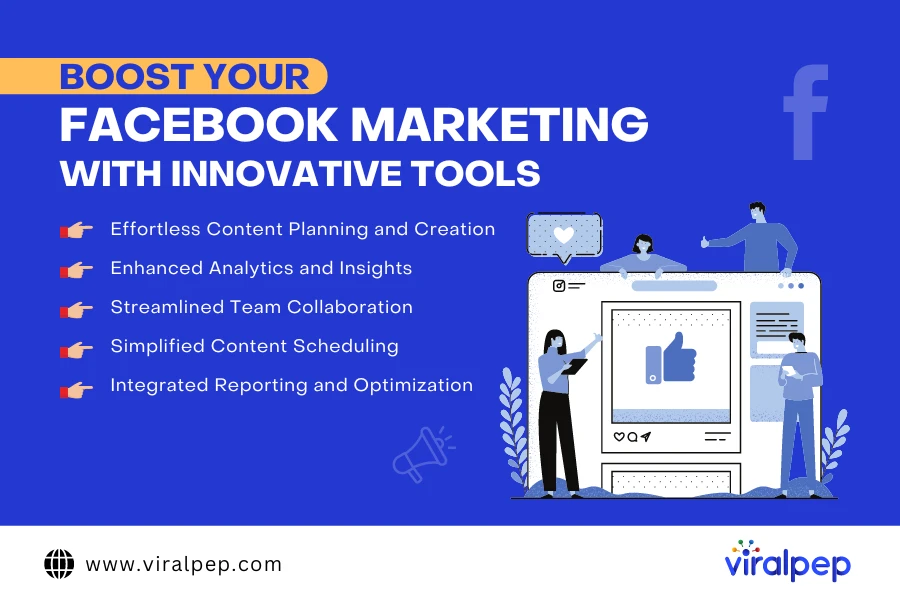
Boost Your Facebook Marketing with Innovative Tools

As you dive into Facebook marketing, having the right tools can significantly enhance your efficiency and results. One such tool is Viralpep, which seamlessly integrates with Facebook to streamline your marketing efforts and boost your overall strategy. boost facebook marketing with innovative tools

  1. Effortless Content Planning and Creation

    Viralpep offers an intuitive platform for planning and creating engaging social media content. With features that allow you to draft, schedule, and publish posts across your Facebook Page and other social media channels, you can maintain a consistent and engaging presence without the hassle. This ensures that your content aligns with your marketing goals and reaches your audience optimally.

  2. Enhanced Analytics and Insights

    Tracking performance is crucial for refining your Facebook marketing strategy. Viralpep’s robust social media analytics tools provide in-depth insights into your posts’ performance. By monitoring metrics like engagement rates, click-through rates, and conversion statistics, you can make data-driven decisions to enhance your content strategy and improve ROI.

  3. Streamlined Team Collaboration

    Effective collaboration is key to successful marketing. Viralpep facilitates smooth team coordination by allowing you to manage roles and permissions, ensuring your team works efficiently. Whether you’re coordinating with content creators, designers, or marketing strategists, Viralpep helps streamline the process.

  4. Simplified Content Scheduling

    Consistency is critical for maintaining audience engagement. Viralpep’s social media scheduling feature lets you plan your posts in advance, ensuring your content is published regularly without requiring constant manual effort. This saves time and helps you stay organized and on top of your marketing calendar.

  5. Integrated Reporting and Optimization

    With Viralpep, you can easily generate reports to analyze the success of your campaigns. These reports provide actionable insights into what’s working and what needs adjustment. By continuously optimizing your approach based on these insights, you can enhance your Facebook marketing strategy and achieve better results.

Final Thoughts

In 2024, Facebook remains a dominant force in social media, making it essential to develop your best Facebook marketing strategy. Are you ready to compete with posts showcasing delicious food and picturesque vacation shots? You can do this! By taking strategic steps and using the right Facebook marketing tools, you’re on track to fill your social media calendar with captivating posts that will engage your followers and boost your brand’s presence. Remember, Viralpep is here to support your successful Facebook presence with a user-friendly interface that simplifies content planning, creation, scheduling, and analysis. It also facilitates team and client collaboration with the team management feature. Give it a try with our 15-day free trial!

Top 6 Social Media Marketing Challenges of 2024

With over 3 billion users online, ignoring social media is an unaffordable luxury for marketers. Yet, even seasoned marketers can struggle to reach a significant portion of this vast audience. The social media landscape is constantly evolving, making it feel chaotic even when you follow best practices.

Here’s a startling statistic: 42% of marketers plan to stop working with social media in the next 2 years. 49% of marketers have difficulty identifying and responding to trends.

You might think that major brands have it all figured out, but they face challenges too. Viralpep constantly overcomes modern challenges in the field of social media marketing and wants to share its experience. We have prepared a list of the most common social media marketing challenges, as well as ways to overcome them. Let’s complement each other’s knowledge, so we can minimize mistakes and overcome difficulties and challenges painlessly. Remember, Viralpep is here to help.

Social Media Marketing Challenges 2024

  1. Finding Social Talent

    Hiring social media professionals is tougher than ever. The demands on social marketers have soared. Today, brands need experts who can strategize, write compelling copy, and create engaging content across multiple formats—all while understanding internet culture.

    Research reveals that over half (52%) of marketers find hiring experienced talent to be their biggest challenge. This shortage of skilled social media managers makes it difficult for brands to build effective teams.

    If you’re navigating the job boards, you’re not alone. Finding the right talent is a growing challenge in our fast-paced industry.

  2. Running Out of Creative Content Ideas

    Coming up with fresh content ideas can be one of the most frustrating social media challenges. A creative rut can disrupt your entire workflow.

    Growing your social media presence is a continuous effort. Whether a campaign flops or goes viral, you need to keep the momentum going with engaging content.

    Take inspiration from success stories like Duolingo on TikTok, where creative content has propelled the brand to new heights. Experiment with different platforms and social networks. Unexpected platforms like Kodi can enhance your marketing efforts and help you reach your target audience. Of course, you need to do some research first, consider the Kodi Firestick update, and regularly track the results of your advertising campaign. It’s also useful to analyze competitors from other regions, but this may require a VPN.

    Don’t get bogged down by what your competitors or legacy brands are doing. Creativity often ebbs and flows, even for social marketers. Stay proactive by engaging in regular brainstorming sessions to keep your content ideas flowing.

  3. Controlling Hard-Selling

    Promoting your brand or offerings is important, but moderation is key. While it’s good to highlight what you bring to the table, avoid overwhelming your audience with constant self-promotion.

    Excessive self-hype, whether for a brand or individual, can turn off your audience quickly. The result? They might leave before you can even say “Buy now!”

    As Matt Kohut, managing partner of KNP Communications, says: “Pay careful attention to the ratio of audience-oriented versus self-oriented posts.” In other words, focus more on what your audience will find meaningful or useful, rather than on yourself. Share information that matters to them, connect people, and learn based on their interests. This approach will help others see you as humble, resourceful, and sincere. Whether you’re showcasing your corporate or personal brand, find the right balance. Aggressive, ad-style promotions are outdated.

  4. Establishing Strong Relationships With Influencers

    Building strong relationships with influencers is more important than it seems. According to a HubSpot study, 50% of millennials trust influencers for product recommendations. This trust creates a bond between influencers and their followers, something brands often struggle to achieve.

    Influencers can bridge the trust gap between consumers and brands, making them essential partners in modern marketing strategies. It could even be international connections. If your product or service is broadly specialized and international, involve international influencers or those who specialize in your niche abroad. You can conduct research on your niche in a specific region using VeePN VPN, which allows you to fake your virtual location. For example, collaborating with an Asian influencer can bear fruit even in other countries if your product is associated with Asia.

    The 2017 Pepsi and Kendall Jenner ad is a textbook case of influencer marketing gone wrong. The commercial staged a Black Lives Matter protest for Pepsi’s global diversity campaign, featuring Jenner leaving a photoshoot to join the protest and offering a Pepsi to a police officer. This act was intended to symbolize unity but was widely criticized for trivializing a serious movement.

    Bernice King, daughter of Martin Luther King Jr., mocked up an ad with a tweet of her father confronting police, captioned, “If only Daddy would have known about the power of #Pepsi.” After the backlash, Pepsi pulled the ad and apologized, highlighting the importance of choosing the right influencer and message alignment to avoid damaging your brand.

  5. Over-Reliance on Marketing Automation Tools

    Relying too much on automation and AI tools for social media marketing? Be cautious! While they’re great for tasks like scheduling posts and tracking performance, they can strip away the human touch that makes social media engaging.

    Imagine you run a restaurant and have all your posts scheduled. A famous food critic drops by unexpectedly and trashes your best dish online. Suddenly, everyone is talking about you. But because you depend entirely on automation, you miss the chance to engage with the buzz, whether it’s negative or positive. You’re left in the dust, unable to respond, clarify, or capitalize on the attention. Don’t let automation trap you in the slow lane—keep the human element alive.

  6. Falling Engagement Rates

    This five-word question has ignited numerous discussions across webinars, LinkedIn posts, and think pieces. It’s no surprise—constantly shifting social media algorithms can make chasing organic traffic feel like a game of whack-a-mole, where hitting one target means missing the next.

    In our latest quarterly survey, marketers ranked keeping up with rapidly changing algorithms and features as their second biggest social media challenge. While earning reach and interactions can be tough without paid promotions, it’s not an impossible battle. With strategic planning and consistent effort, organic social traffic can still thrive.

Conclusion

Social media marketing will always be about challenges and difficulties. How marketers overcome them is much more important. The challenges vary, but the key to overcoming them is having a proactive plan. By engaging experienced specialists, interacting with influencers and creating interesting content, you will be able to overcome stagnation and break through to the next level. Viralpep is ready to help you with this: indirectly, with the help of our blog articles, or directly in the form of a service for promotion or vision of social networks.

How To Increase Your Social Media Engagement In 2024

Imagine yourself on a wildlife safari, seeking the perfect snapshot of a rare bird. A flurry of movement catches your eye—a flock of these elusive creatures! Do you cautiously approach them, trying to capture their natural behavior? Perhaps you strategically offer them food to gain their trust. Or maybe you decide to observe from a distance without disturbing their habitat. This dilemma mirrors the challenges faced by social media marketers in their quest to engage with their audience.

Much like encountering rare birds in the wild, social media engagement can be powerful and nuanced, depending on the strategies employed. Marketers worldwide experiment with various tactics to attract and maintain engagement.

If social media marketing is a jungle and engagement is an endangered species, think of us as your guide to the jungle. Today, we will reveal the strategies successful marketers use to grow and maximize social media engagement effectively.

But first, what exactly is social media engagement?

Social media engagement encompasses all interactions with your content, including likes, comments, and shares. It also encompasses:

  • Shares or retweets
  • Shares or retweets
  • Likes
  • Growth in followers and audience
  • Click-through rates
  • Mentions, both tagged and untagged
  • Use of branded hashtags

Let’s check your social media engagement checklists to better understand the definition of social media engagement.

How to Measure the Impact of Your Social Media Engagement

Assessing the impact of social media engagement on your business involves tracking key metrics that reflect audience interaction and content effectiveness:

  • Engagement Rate

    This metric helps determine how actively your audience interacts with your content. Engagement rate is typically calculated by dividing the total post interactions by the number of followers, reach, or impressions, then multiplying by 100%. The formula can vary depending on the platform, but it generally provides a good gauge of audience activity.

  • Reach and Impressions

    Reach refers to the number of unique users who view your post, while impressions denote the total number of times your post is displayed. These metrics are crucial for understanding the overall visibility and potential audience of your content.

  • Click-Through Rate (CTR)

    This is the percentage of users who click on a link in your post. CTR is essential for assessing the effectiveness of calls to action in your content, whether you’re directing users to a website, blog post, or product page.

  • Shares and Brand Mentions

    Monitoring the number of shares and mentions your posts receive can give insights into how well your content resonates with your audience. Content that is frequently shared often indicates higher engagement and wider reach.

  • Video Views and Watch Time

    For platforms like YouTube, Instagram, and TikTok, it’s important to track how many users watch your video content and the duration of their viewing. These metrics can indicate the appeal and relevance of your videos to your audience.

  • Conversion Rate

    This measures the frequency at which users take a desired action—such as signing up for a newsletter or making a purchase—after engaging with your content. It connects your social media efforts directly to business results.

High engagement on your posts and account not only boosts visibility due to algorithm preferences but also builds a community of active and engaged followers. These followers are more likely to interact with your brand and convert into customers.

Another significant benefit of an engaged audience is the opportunity for direct interaction. An engaged audience provides more insights into their preferences, needs, and challenges, making it easier to tailor your content and services. Comments on your posts, for example, can be a valuable source of feedback and ideas for new content, helping you continuously refine your strategy.

Social Media Frequency Checklist

How often should you follow a social media checklist? Should it be daily, weekly, or monthly? While doing everything daily would be ideal, it’s not practical for most brands.

Social Media Frequency Guide

To help clients determine the optimal frequency, we categorize our checklists into two main categories — inbound and outbound social media activities.

  1. Inbound Social Media Engagement

    This involves responding to comments and messages received by your brand on social media platforms, such as replying to direct messages on Facebook. Inbound engagement includes managing positive feedback and addressing customer concerns or complaints.

    Ideal Frequency: This type of engagement is critical and should ideally be monitored daily. Allocating a few minutes each day to interact with your audience is recommended as they are actively engaging with your brand.

  2. Outbound Social Media Engagement

    This refers to actively seeking and participating in social media conversations, like joining discussions around trending hashtags. Unlike inbound engagement, which is essential for maintaining your brand’s reputation, outbound activities are more flexible and can be pursued based on available resources.

    Ideal Frequency: These activities can be scheduled in advance. For brands aiming to cultivate an engaged social media presence, dedicating time 2-3 times a week to outbound engagement is advisable.

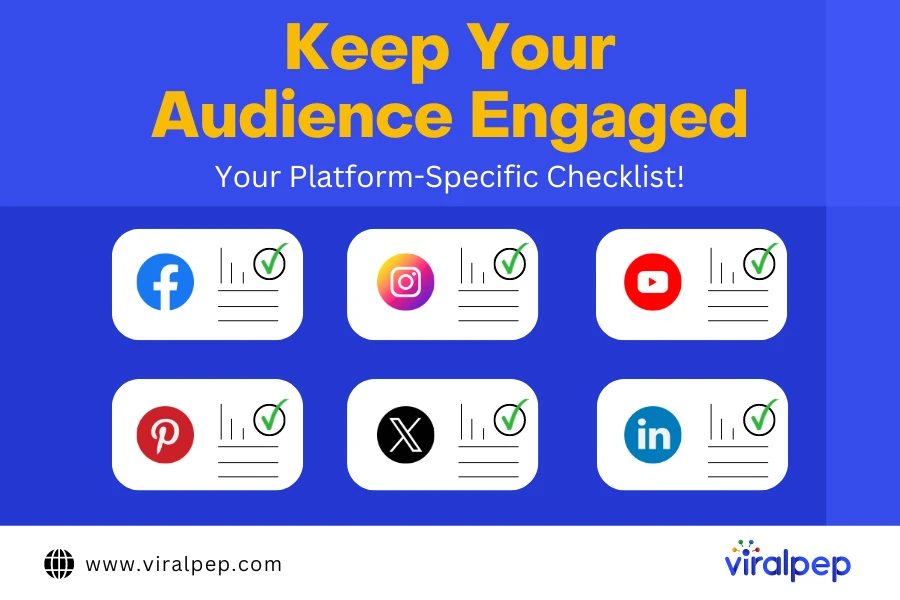
Your Social Media Engagement Checklist by Platform

  1. Facebook Engagement Checklist

    Facebook is a dominant platform among social advertisers, with 97% choosing it as their primary platform. Due to its widespread adoption and robust targeting capabilities, integrating Facebook into your social engagement strategy is vital.

    Social Media Platform Checklist

    • Inbound Facebook – Social Media Actions

      Handling incoming direct messages to your Facebook page, whether daily, every other day, or weekly (depending on message volume).

      • Review and respond promptly to customer service issues and complaints.
      • Acknowledge and thank customers for positive messages.
      • Provide pre-written responses to common inquiries.
      • Monitor and manage public comments daily, every other day, or weekly as per comment volume.
      • Engage with positive comments using brand-appropriate responses.
      • Respond to questions with accurate information and relevant links.
      • Address negative comments promptly and discreetly via direct messages.
      • Manage spam and inappropriate comments by hiding or deleting them.
    • Outbound Facebook – Social Media Actions

      • Encourage users who have liked your content to follow your page for ongoing updates.
      • Engage with content from partner brands to foster relationships.
      • Create a set of branded posts designed for general engagement.
      • Utilize Facebook’s search feature to monitor trending topics in real-time using relevant keywords, events, or locations.
      • Leverage audience insights to refine targeting for ads and engage potential customers like your existing audience.
  2. Instagram Engagement Checklist

    Instagram is known for its emphasis on visual content, such as photos and videos. Just like on Facebook, it’s crucial to promptly address customer service issues and pay attention to positive comments, tagged posts, and especially Instagram Stories.

    • Inbound Instagram – Social Media Actions

      • Review and respond promptly to customer service inquiries and issues.
      • Acknowledge and thank customers for positive or friendly messages.
      • Provide pre-written responses to common questions or issues.
      • Monitor comments daily, every other day, or weekly depending on comment volume.
        • Respond to positive comments using brand-appropriate responses.
        • Like and engage with other comments.
        • Address questions or concerns in comments with the correct information.
      • Handle negative comments discreetly via direct messages.
      • Manage spam or inappropriate comments by flagging or deleting them.
      • Monitor tagged or mentioned user content and seek permission before re-sharing, ensuring proper credit for user-generated content (UGC).
    • Outbound Instagram – Social Media Actions

      • Monitor posts and stories under company-specific or use instagram hashtags in social media marketing.
      • Analyze competitor Instagram accounts to identify effective strategies.
      • Engage with influencers in your industry to expand reach and influence.
      • Interact with users within your target audience by following, liking, and commenting on their content.
  3. Twitter Engagement Checklist

    Using Twitter effectively for your brand may not suit every company, as not everyone can achieve the playful engagement style of brands like Wendy’s. However, achieving significant impact on your Twitter channel requires consistent engagement and a strong brand personality. Here are some examples of brands excelling on Twitter for inspiration.

    • Inbound Twitter – Social Media Tasks

      Monitor incoming direct messages to your Twitter account daily, every other day, or weekly, depending on the volume of messages.

      • Quickly flag or ignore spam or inappropriate messages to maintain a positive user experience.
      • Respond promptly to customer service inquiries or issues, ensuring quick resolution.
      • Thank customers for positive or friendly messages to foster a positive brand image.
      • Use prepared responses to address common questions or issues effectively.

      Regularly check @mentions daily, every other day, or weekly, depending on volume, and engage with positive mentions or retweets.

      • Like or reply to positive tweets or retweets with a genuine and brand-appropriate response.
      • Provide accurate information in response to questions to support your audience.
      • Respond to negative tweets or complaints promptly and discreetly via direct message for resolution.
      • Flag or delete spam or inappropriate tweets to uphold community standards.
    • Outbound Twitter – Social Media Tasks

      • Retweet relevant posts from other accounts to showcase valuable content within your industry.
      • @mention partners, complementary brands, new followers, or members of your target audience to foster connections.
      • Follow and engage with users within your target audience to build relationships and increase visibility.
      • Monitor and participate in conversations under relevant hashtags to stay informed and engage with trending topics effectively.
  4. LinkedIn Engagement Checklist

    LinkedIn can be a powerful platform for B2Bs and brands targeting professional audiences to enhance awareness and generate leads. While the capabilities of a “brand” page on LinkedIn are limited, leveraging the personal profiles of key stakeholders is crucial. Many brands focus on thought leadership and utilize tools like LinkedIn Navigator for outbound programs, but a robust engagement strategy is essential to support these initiatives effectively.

    • Inbound LinkedIn – Social Media Actions

      • Monitor direct messages daily, every other day, or weekly based on volume.
      • Promptly handle spam and inappropriate messages for professionalism.
      • Respond to hiring or sales inquiries with appropriate information.
      • Address questions or issues with friendliness and respect.
      • Respond to customer service issues promptly and escalate as needed.
      • Evaluate and accept connections aligned with network criteria (location, industry, audience).
      • Review Company Profile comments regularly and respond positively.
      • Provide accurate information and site links in responses.
      • Address negative comments discreetly via direct messages.
      • Remove spam or inappropriate comments to maintain professional standards.
    • Outbound LinkedIn – Social Media Actions

      • Tag relevant individuals and use hashtags in posts.
      • Engage by liking and commenting on relevant newsfeed updates.
      • Join industry groups and interact by liking, reacting, and commenting on posts.
      • Prioritize brand guidelines in contentious discussions.
      • Utilize LinkedIn Navigator or messaging services for effective prospecting.
      • Focus on relationship-building through valuable content rather than direct sales pitches.
  5. Pinterest Engagement Checklist

    Pinterest is a visual discovery platform where users find inspiration and ideas for their interests and projects. For brands looking to connect with an audience through creative and visually appealing content, Pinterest offers unique opportunities to drive engagement and brand awareness.

    • Inbound Pinterest – Social Media Actions

      • Check direct messages daily, every other day, or weekly based on volume.
      • Quickly handle spam and inappropriate messages.
      • Respond promptly to customer inquiries with helpful information.
      • Thank users for positive feedback to build brand positivity.
      • Address common questions with friendly and informative responses.
      • Monitor pin comments regularly and engage positively.
      • Resolve negative comments privately via direct messages.
      • Remove spam or inappropriate comments to maintain quality interactions.
    • Outbound Pinterest – Social Media Actions

      • Share visually appealing pins reflecting your brand’s image.
      • Like and comment on follower and industry pins to foster engagement.
      • Stay updated on Pinterest trends and use relevant keywords.
      • Collaborate with influencers to create resonant content.
      • Use Rich Pins to enhance product or service information.
      • Analyze Pinterest Analytics to optimize future pin strategies.

    All in all, here we aim to provide you with the necessary checklist to enhance your social media marketing. To encourage better interaction, authenticity, consistent brand voice, responsiveness, and innovative community engagement are important. It’s advisable to use social media management tool to streamline and boost your efforts for better outcomes.

To Wrap Up

Effective social media engagement requires vigilant monitoring. Understanding your starting point is essential before attempting to enhance performance. Utilize Viralpep’s robust social media analytics tool to monitor and optimize your engagement strategies closely.

With our analytics, you can assess key engagement metrics across Instagram, Facebook, Twitter/X, and LinkedIn, identifying top-performing content that resonates best with your audience:

Our social media management tool enable you to manage interactions effectively, and cultivate a loyal following—all accessible through Viralpep’s intuitive dashboard.

Start maximizing your social media efforts by consistently engaging with your followers authentically. Take advantage of Viralpep’s 15-day trial to explore our engagement and analytics tools firsthand!

FAQs about Social Media Engagement

What is social media engagement?

Social media engagement refers to the interactions and activities users have with your social media content. These interactions include actions like liking, sharing, commenting on posts, and more, depending on the specific platform.

How do you measure social media engagement?

To measure social media engagement, businesses often track the following key metrics:

  • Likes
  • Comments
  • Shares
  • Follows
  • Mentions
  • Impressions
  • Use of branded hashtags

Typically, the focus is on organic engagement, which grows naturally rather than through paid advertising or partnerships. Using social media engagement tools can help streamline the process of tracking and analyzing these metrics.

What are some of the best social media engagement tools?

Some top social media engagement tools include Viralpep, TweetDeck, Sprout Social, and Sprinklr. These tools allow you to monitor and measure engagement across various social media platforms and leverage the data to enhance your social media strategies, potentially improving your return on investment.

How To Add a Collaborator on Instagram After Posting?

Introduction

Instagram has evolved from just a platform for sharing photos to a powerful tool for businesses, influencers, and content creators to connect with their audience.

Collaborations, a dynamic strategy used by many successful Instagrammers, have the potential to skyrocket your online presence and engagement. While most collaborations are planned, there are times when you want to add collaborators to your posts after they’ve been published.

In this guide, we’ll walk you through adding collaborators to your Instagram posts after posting them.

11 Easy Steps for Adding Collaborators on Instagram After Posting

Adding collaborators to your Instagram posts after they’ve been posted might not be as intuitive as during the initial posting process, but it’s certainly possible. Here’s a step-by-step guide to help you achieve this:

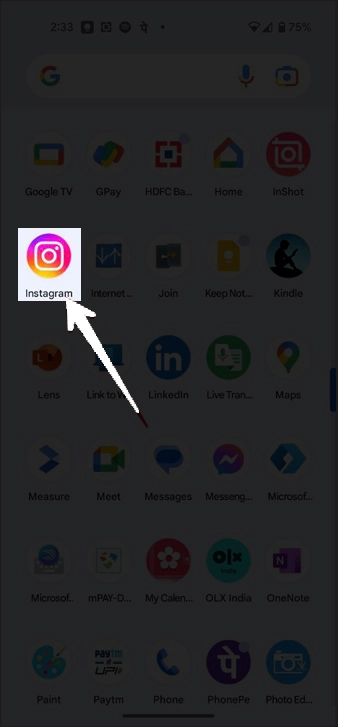
  1. Step 1: Open Instagram

    Launch the Instagram app on your mobile device. Ensure you’re logged into the account where you want to add collaborators to a post.

    Open the instagram

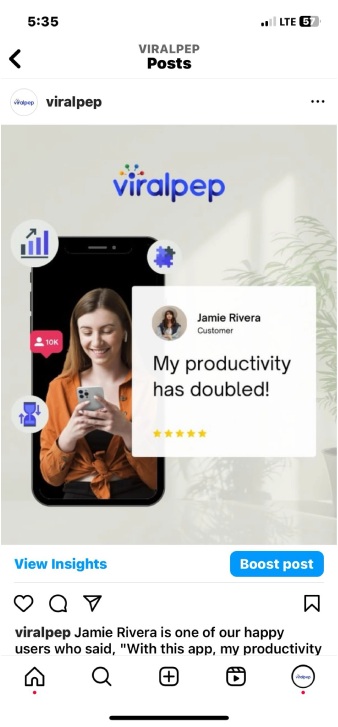
  2. Step 2: Locate the Post

    Navigate to the post to which you want to add collaborators. You can do this by scrolling through your profile or using the search function.

    viralpep instagram post

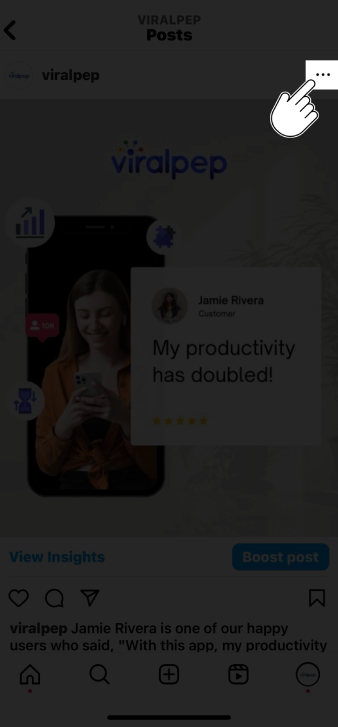
  3. Step 3: Access Post Options

    Once you’ve located the post, tap on it to open it. Look for the three dots (…) at the post’s top-right corner. These dots represent the post options.

    access post options

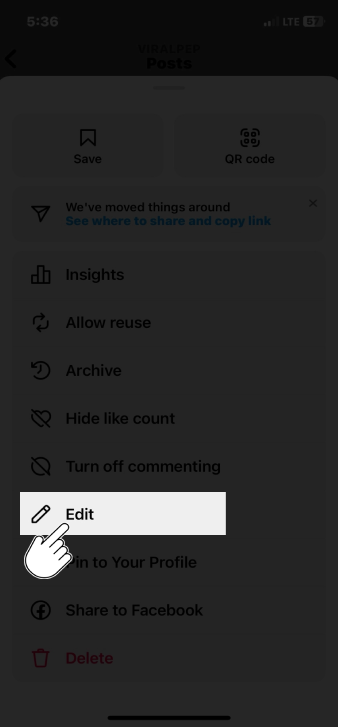
  4. Step 4: Edit the Caption

    From the post options menu, tap on the “Edit” option. This will allow you to make changes to the post, including adding collaborators.

    In the editing mode, you can edit the post’s caption. Go ahead and make any changes you want to the caption. This is where you will mention or tag your collaborators.

    edit the caption

  5. Step 5: Tag the Collaborators

    To tag your collaborators in the caption, use the “@” symbol followed by their Instagram username.

    As you type, Instagram will suggest usernames matching your typing. Select the appropriate username from the suggestions.

    • Add the “@” symbol in the caption field followed by the collaborator’s username (e.g., @collaboratorusername).

    • Instagram will automatically suggest usernames as you type, making finding and tagging your collaborator easier.

    • Write a brief mention, such as “Collaboration with the talented [Collaborator’s Name] 🎉” to acknowledge their contribution.

    Tag Collaborators

  6. Step 6: Verify Collaboration

    Before proceeding, ensure that the collaborator you want to add is aware and agrees to be tagged or mentioned in your post. It’s essential to maintain transparent and respectful communication throughout the process.

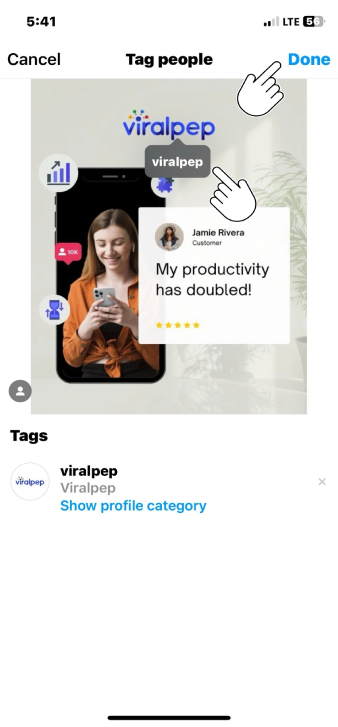
  7. Step 7: Add Collaborators to the Photo

    • If your collaborator is visible in the photo, you can also tag them directly on the image.

    • Tap on the photo where you want to add the tag.

    • Tap the “Tag People” option.

    • Type your collaborator’s username; once again, Instagram will suggest usernames as you type.

    • Position the tag over your collaborator’s image in the photo.

    • Save the tag placement.

    Add Collaborators

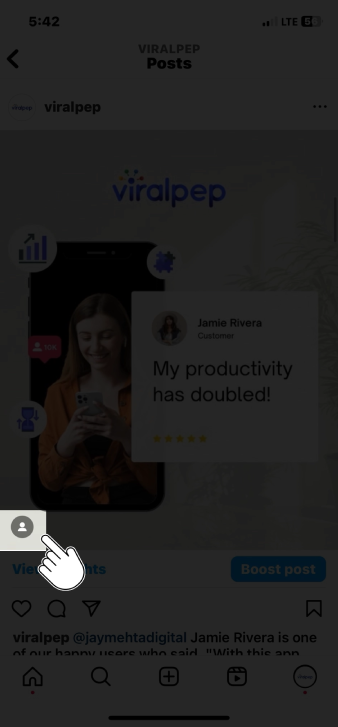
  8. Step 8: Save Changes

    Review the changes you’ve made after you’ve added the collaborators’ usernames to the caption. Double-check the usernames to ensure accuracy. Once satisfied, tap the “Done” button to save your changes.

  9. Step 9: Engage with Collaborators

    Now that you’ve successfully added collaborators to your post, engage with them. Like and respond to their comments, and encourage them to interact with the post. This collaborative engagement boosts the post’s visibility to your audiences.

  10. Step 10: Notify Collaborators

    It’s a good practice to notify your collaborators that you’ve added them to the post. Send them a direct message or tag them in a comment to let them know. This shows courtesy and ensures they know their inclusion in the post.

  11. Step 11: Engage with Collaborator

    After making the necessary changes, engage with your collaborator by responding to their comments and encouraging them to interact with the post.

    Collaborators’ engagement can boost the visibility of your post to their audience as well.

Tips for Successful Collaborations on Instagram

  • Plan Ahead: Whenever possible, plan your collaborations to ensure a smooth process and avoid last-minute adjustments.

  • Communication: Maintain open and clear communication with your collaborators to ensure mutual understanding and agreement.

  • Tagging Etiquette: Be respectful when tagging collaborators in your posts, ensuring they are comfortable with their association.

  • Mutual Promotion: Encourage your collaborator to share the post with their audience, expanding the reach of the collaboration.

  • Quality Content: Create social media post content is engaging, visually appealing, and aligns with both your and your collaborator’s brand.

Conclusion

Adding collaborators to your Instagram posts after publication is a straightforward process that can enhance your content and expand your reach.

Following these steps and maintaining respectful communication with your collaborators, you can seamlessly integrate their contributions into your posts and create meaningful connections with your audience.

Remember, successful collaborations can lead to increased engagement, new followers, and a stronger presence on Instagram.

For more effective social media management and to streamline your collaborations, consider using platforms like Viralpep, which offers comprehensive tools for scheduling, posting, and analyzing your social media post. Learn more about its features and benefits here and explore how it can help enhance your social media strategy here.

FAQs

Can I add collaborators to my Instagram posts even if they weren't part of the original content creation?

Yes, you can! Our guide outlines a step-by-step process to seamlessly add collaborators to your existing Instagram posts after sharing them.

Do I need special permission from collaborators to add them to my posts after publishing?

While it’s courteous to inform collaborators, specific permissions may vary. It’s best practice to communicate openly and ensure everyone is comfortable with their inclusion in your post.

Can I tag collaborators directly on the image itself?

Absolutely! Our guide covers tagging collaborators within the photo, enhancing visibility and engagement with your collaborative partners.

Will editing the caption of a post affect its performance or engagement?

Generally, minor edits like adding collaborators shouldn’t significantly impact a post’s performance. Engaging with collaborators and your audience can actually boost engagement.

How can I encourage my collaborators to promote the post to their audience?

In our guide, we share tips on fostering mutual promotion. Engage with your collaborators and encourage them to share the post with their followers to maximize reach.

Can I add multiple collaborators to a single post?

Absolutely! You can add multiple collaborators to a post using the same process outlined in our guide. Just ensure that everyone is comfortable with their inclusion.

Is there a time limit for adding collaborators after posting a photo?

There’s no strict time limit, but it’s best to add collaborators relatively soon after posting for optimal engagement and visibility benefits.

Yes, the process is similar for carousel posts. You can edit the caption and tag collaborators within the post, just as you would with a single-image post.

What if a collaborator doesn't want to be added to my post after it's published?

Respect their decision. Collaboration should be mutually beneficial and respectful. Communicate openly and consider their preferences.

Are there any etiquette guidelines for adding collaborators post-publishing?

Communication and respect are key. Always communicate with collaborators, give proper credit, and ensure your post aligns with your and their brand values.

How to View Instagram Memories: A Step-by-Step Guide

Introduction

Instagram is not just a platform for sharing your daily moments but also a repository of cherished memories.

In 2018, Instagram introduced a feature called “Memories” (similar to Facebook’s “On This Day”) that allows you to revisit and relive your old posts.

If you’re curious about how to view Instagram Memories, you’re in the right place. In this step-by-step guide, we’ll walk you through accessing and enjoying your past moments on Instagram.

9 Easy Steps on How To View Instagram Memories

Let’s highlight easy steps that will help you to view Instagram memories.

  • Step 1: Open the Instagram App

    Start by opening the Instagram app on your smartphone. Ensure you are logged in to the account you want to access memories.

    open instagram app

  • Step 2: Go to Your Profile

    Tap on your profile picture or the silhouette icon in the bottom right corner to access your profile page. This is where you’ll find all the posts you’ve ever shared on Instagram.

    go to profile

  • Step 3: Access Memories

    Now, on your profile page, you’ll notice a clock-like icon with an arrow around it at the top right corner of the screen. This is the “Memories” icon. Tap on it.

    Access Memories

  • Step 4: Explore Your Memories

    After tapping the Memories icon, Instagram will take you to the “On This Day” page. Here, you’ll see a collage of posts you shared on the same date in previous years. Scroll down to explore different memories from various years.

    Tip: If you’d like to create your own custom memories, try using collage generator to combine your favorite moments.

    Explore Your Memories

  • Step 5: Interact with Your Memories

    Instagram Memories allows you to interact with your old posts just like you would with current ones. You can like, comment, and share these memories with your followers if your privacy settings permit.

    Interact with Memories

  • Step 6: Share Memories in Your Story

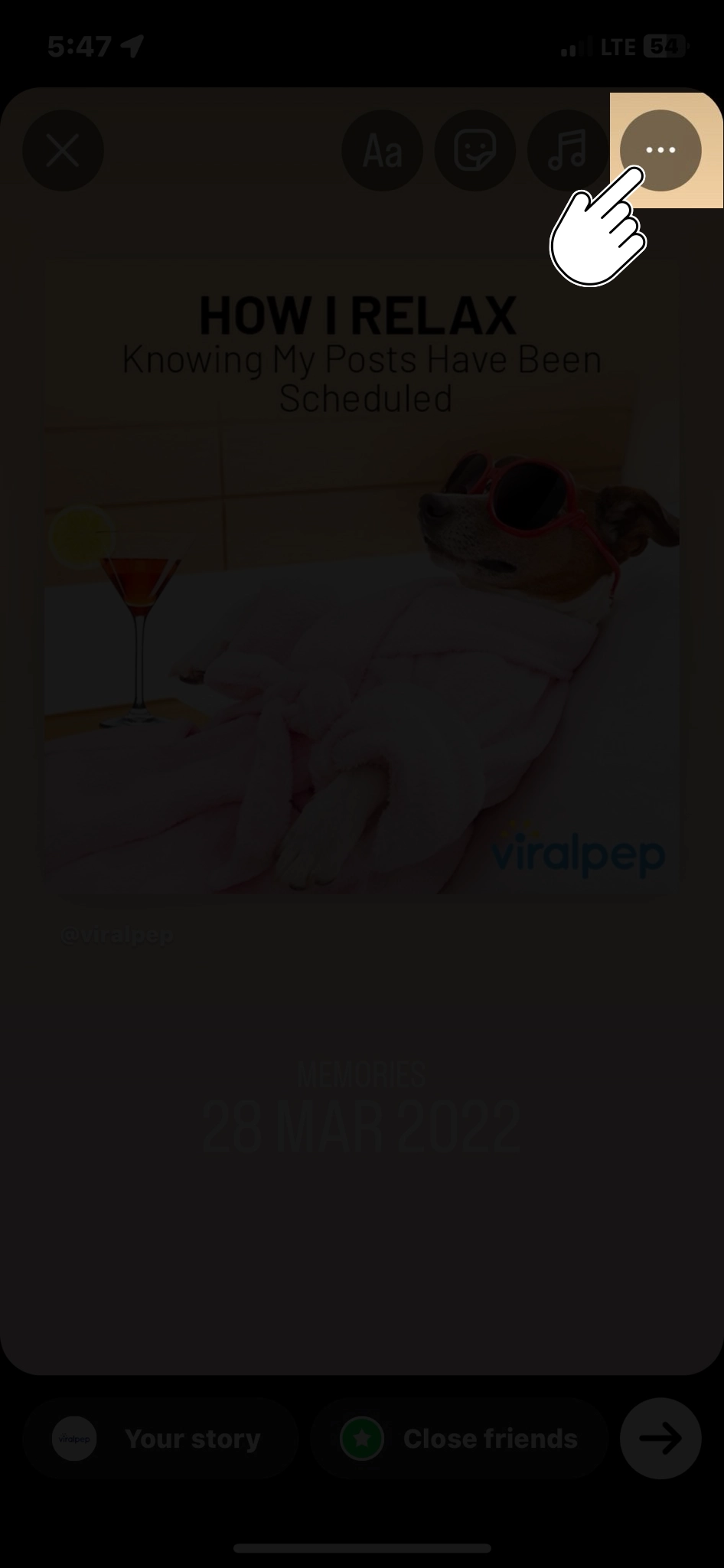
    If you want to share a specific memory with your Instagram story, tap the Share icon (a paper airplane) beneath the post. You can add stickers, text, or drawings to make it more personalized before sharing it with your story.

    share memories in story

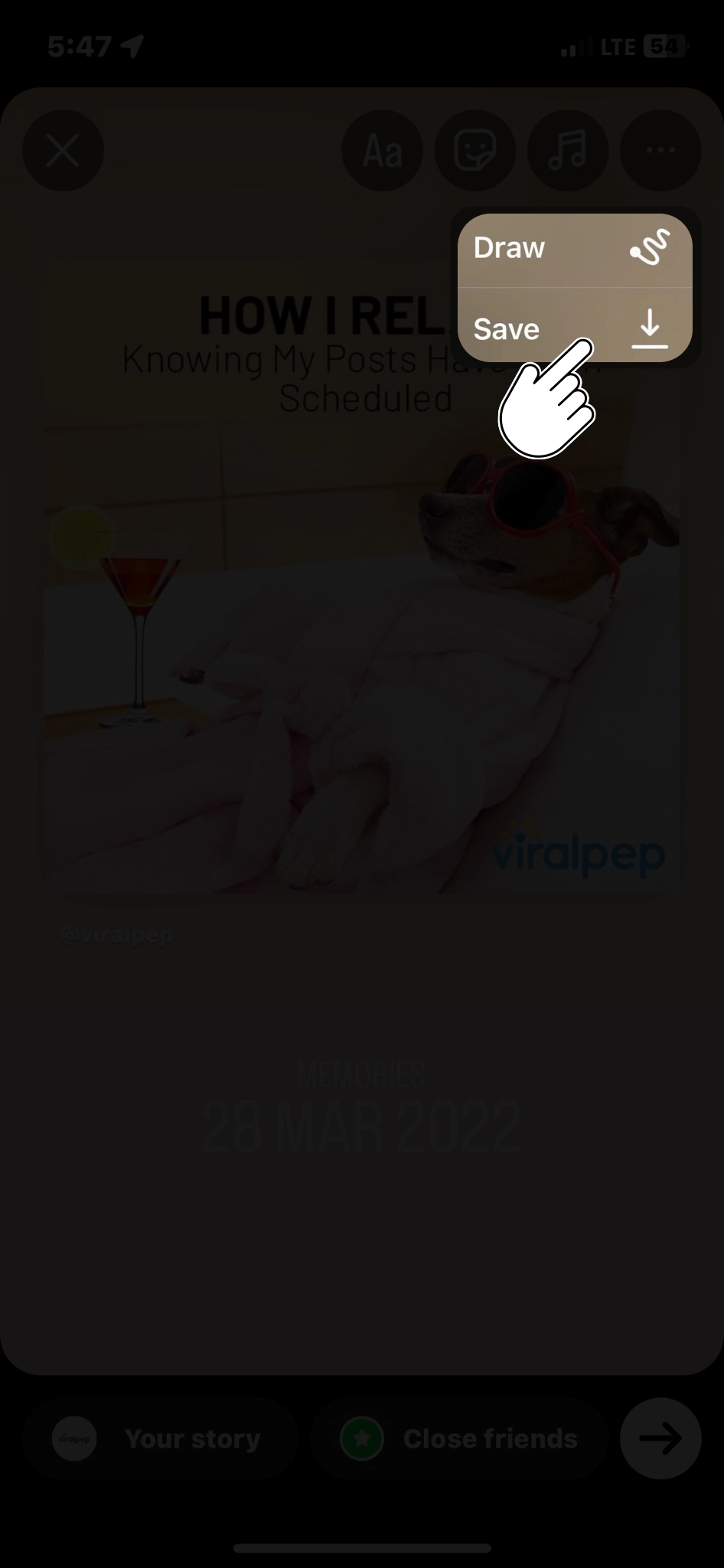
  • Step 7: Save Memories

    Tap the Save icon (a downward arrow) below the post to save memory to your device’s photo library. This way, you can keep a copy of your cherished moments offline.

    Save Memories

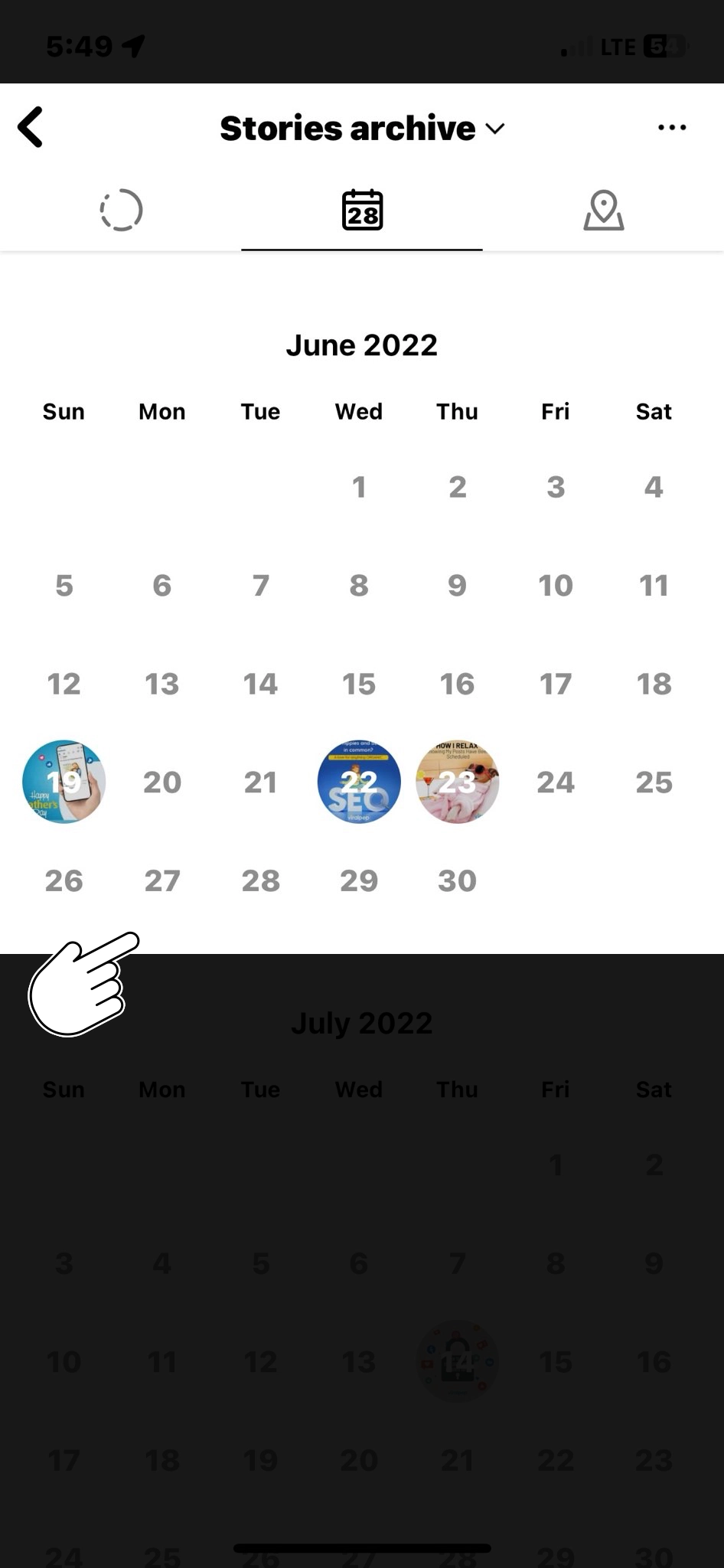
  • Step 8: Access Older Memories

    To explore memories from earlier years, tap the calendar icon at the top right of the “On This Day” page. This will allow you to select a specific date and see memories from that day in the past.

    access older memories

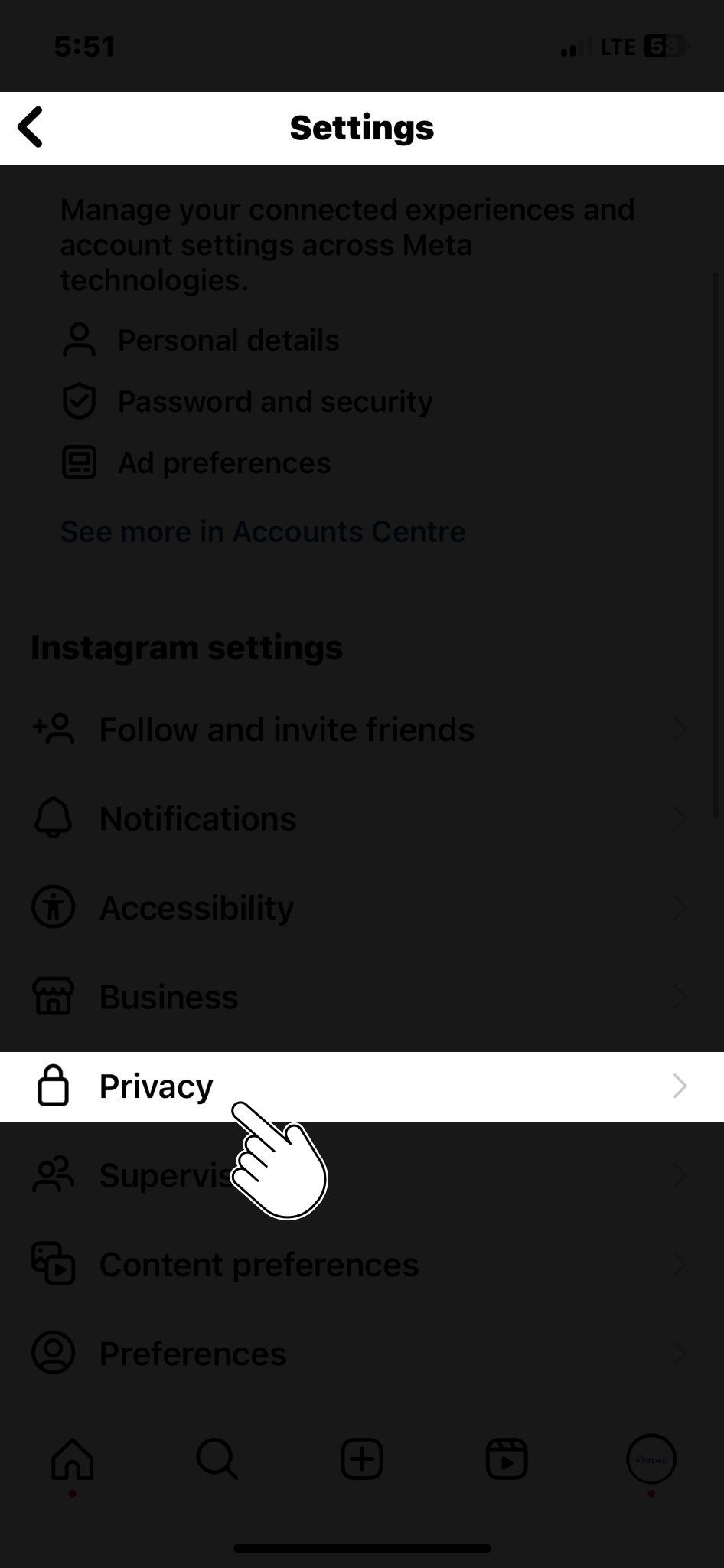
  • Step 9: Adjust Your Memory Notifications

    Instagram also lets you set up notifications to receive daily reminders of your past posts. To do this, tap the three horizontal lines at the top right corner of your profile, go to “Settings,” then select “Privacy,” and finally, “Memories.” From here, you can adjust your memory notification preferences.

    Go to Privacy

Conclusion

Instagram Memories is a wonderful feature that helps you relive the moments you’ve shared on the platform.

Whether it’s a special vacation, a milestone event, or a random moment, this feature lets you reconnect with your past digitally.

Follow these simple steps, and you can easily view, share, and save your Instagram memories. So, take a trip down memory lane and rediscover the magic of your past Instagram posts.

Visit Viralpep for more insights and strategies to help you schedule and publish posts seamlessly across multiple platforms from one place.

FAQs

What are Instagram Memories?

Instagram Memories is a feature that allows users to revisit and relive their old posts. It’s a way to see what you posted on the same date in previous years.

Can I access Instagram Memories from a computer?

Currently, Instagram Memories is primarily designed for mobile devices. You can access it through the Instagram app on your smartphone, but it may not be available on the web version.

How far back in time can I go with Instagram Memories?

You can explore memories from previous years as long as you have posts on Instagram from those years. The exact range will depend on when you started using the platform.

Can I edit my old posts in Instagram Memories?

No, you cannot directly edit old posts through Instagram Memories. If you want to edit or delete an old post, you’ll need to locate and edit it in your profile as you would with any current post.

Are Instagram Memories visible to my followers?

Your Instagram Memories are private by default. You can share them with your followers by selecting the “Share to Story” option for specific memories, but they won’t be visible on your main profile unless you manually repost them.

How do I turn off Instagram Memories notifications?

Educational posts can cover gemstone properties, jewelry care, and the latest trends. Use visually appealing graphics, informative videos, and easy-to-understand language to captivate your audience.

Can I view Instagram Memories for multiple accounts if I manage more than one?

Yes, if you manage multiple Instagram accounts and are logged into them on the same device, you can access Instagram Memories for each account separately.

Is there a way to search for specific memories or posts within Instagram Memories?

You can use the search bar at the top of the “On This Day” page in Instagram Memories to search for specific memories using keywords, usernames, or hashtags.

Can I see memories from a specific date that are not today?

Absolutely. To access memories from a specific date, tap the calendar icon at the top right corner of the “On This Day” page, and select the date you’re interested in.

Is there a limit to how many memories I can view or share daily?

There isn’t a specified limit to the number of memories you can view or share daily. You can explore and share memories as much as you like, depending on your preferences and the content you want to revisit.

15 Pre-Launch Instagram Posts Ideas to Spice Up Your Account

Introduction

Launching a new product, service, or venture is exciting for any business or individual. However, the key to a successful launch is creating buzz and anticipation around your offering even before it hits the market. With its vast user base and engagement potential, Instagram is the perfect platform to build excitement. In this blog, we’ll explore some creative pre-launch Instagram post ideas to help you generate anticipation for your big launch.

Exploring Pre-Launch Instagram Post Ideas

  1. Teasers and Countdowns

    Create a sense of urgency by posting teaser images or videos about your upcoming launch. Include a countdown timer in your post or caption to keep your audience engaged and constantly aware of the approaching launch date. countdown begin For example, you can post daily countdown updates with intriguing captions like “7 days until something big is coming!” or “Get ready for the reveal in 10 days!”

  2. Behind-the-Scenes Sneak Peeks

    People love to get a glimpse behind the curtain. Share behind-the-scenes photos and videos that offer a sneak peek into the making of your product or the process behind your service. Behind the scenes This not only humanizes your brand but also builds curiosity among your followers.
  3. User-Generated Content (UGC)

    Encourage existing customers or followers to create content about your upcoming launch. You can organize a UGC contest with a unique hashtag and repost the best entries on your profile. This not only builds excitement but also leverages the power of social proof.
  4. Interactive Q&A Sessions

    Host live Q&A sessions or use Instagram’s Stories feature to answer questions related to your upcoming launch. This allows you to address any doubts or concerns your audience may have and provides an opportunity to create a direct connection with your followers.
  5. Product Teasers

    Gradually unveil your product or service by sharing teaser images or videos focusing on specific features or aspects. Highlight the benefits and unique selling points that make your offering stand out.
  6. Testimonials and Reviews

    If you have early adopters or beta testers, showcase their testimonials and reviews. Hearing positive feedback from others can build trust and excitement around your launch.
  7. Collaborations and Partnerships

    Leverage collaborations with influencers or other brands that align with your product or service. Teaming up with someone influential can help you reach a broader audience and add credibility to your launch.
  8. Storytelling

    Craft a compelling narrative around your launch. Share the story of how your idea came to be, the challenges you’ve overcome, and the vision behind your product or service. Instagram’s carousel feature is perfect for this.
  9. Limited-Time Offers or Exclusive Access

    Create a sense of urgency by offering limited-time promotions or exclusive access to your launch for your Instagram followers. Make sure to communicate the value of these offers clearly.
  10. Interactive Polls and Quizzes

    Engage your audience using interactive elements like polls, quizzes, or surveys related to your launch. This not only keeps your followers involved but also provides you with valuable insights.
  11. Progress Updates

    Regularly update your followers on the progress of your launch preparations. Share your milestones, challenges, and successes. This transparency can make your audience feel like they are part of the journey.
  12. Virtual Events

    Host virtual launch parties, webinars, or live demos on Instagram Live. These events can be great opportunities to showcase your product or service and interact with your audience in real-time.
  13. Instagram Ads

    Consider running targeted Instagram ads to reach a broader audience and create awareness about your upcoming launch. Use compelling visuals and copy to pique interest.
  14. Hashtag Campaigns

    Create a unique and catchy hashtag for your launch and encourage your followers to use it in their posts. This can help create a buzz and make your launch more discoverable.
  15. Story Highlights

    Organize your pre-launch content into Instagram Story Highlights. This makes it easy for new followers to catch up on the excitement leading to your launch.

Conclusion

Building anticipation for your big launch on Instagram requires creativity, consistency, and engagement. By implementing these pre-launch Instagram post ideas, you can create a buzz that drives interest and sets the stage for a successful launch. Remember to tailor your approach to your specific audience and brand personality, and don’t forget to measure the impact of your pre-launch efforts to refine your strategy for future launches. Get ready to see your hard work pay off as you unveil your exciting new venture to the world!

FAQs

Why is it important to create pre-launch buzz on Instagram?

Building anticipation on Instagram can help create excitement and awareness about your upcoming launch, leading to a more successful launch day. It can also help you engage with your audience and generate interest early on.

How far in advance should I start posting pre-launch content on Instagram?

The timing depends on your specific product or service and audience. However, it’s generally a good idea to start at least a few weeks to a month before the launch to build up anticipation gradually.

What types of content work best for pre-launch Instagram posts?

Content like teasers, behind-the-scenes shots, user-generated content, and product sneak peeks work well. However, it ultimately depends on your brand and what resonates with your audience.

Should I use Instagram Stories for pre-launch content?

Absolutely. Instagram Stories can be a highly engaging way to share pre-launch content, as they’re temporary and create a sense of urgency. You can use them for countdowns, Q&A sessions, and behind-the-scenes glimpses.
Encourage your followers to create content by hosting a UGC contest with a unique hashtag. Offer incentives or rewards for the best entries and showcase them on your profile.

What are some tips for running successful Instagram ads to promote my pre-launch?

Ensure your ad visuals are compelling, target the right audience, and use engaging ad copy. A/B testing can help you refine your ads for better performance.

Should I collaborate with influencers for my pre-launch strategy?

Collaborating with influencers can be a powerful way to reach a broader audience. Ensure that the influencer aligns with your brand and target demographic.

How can I measure the success of my pre-launch Instagram strategy?

Track key metrics like engagement, follower growth, website traffic, and conversions. You can use Instagram Insights and other analytics tools to monitor your progress.

Is it essential to have a dedicated hashtag for my pre-launch campaign?

A unique and catchy hashtag can make your campaign more discoverable and cohesive. It helps users find all related content easily.

What are some common mistakes to avoid in a pre-launch Instagram strategy?

Some common mistakes include overpromoting, not engaging with your audience, neglecting to plan a content calendar, and ignoring feedback from followers.

How to Create Engaging Instagram Carousel Posts: A Step-by-Step Guide

Introduction

Instagram has become a powerhouse platform for sharing visual content with over a billion monthly active users.

One of its engaging features is the carousel post, allowing users to share a collection of photos or videos within a single post. Scheduling carousel posts can be a game-changer to maintain a consistent and strategic presence on Instagram.

In this blog post, we’ll show you how to schedule carousel posts on Instagram. You’ll learn how to create stunning carousel posts, plan them ahead of time, and publish them automatically at the best times for your audience. Let’s get started!

What is an Instagram Carousel Post?

An Instagram Carousel Post is multimedia content that allows users to share multiple photos and videos within a single post.

Unlike a regular Instagram post that typically features just one image or video, a carousel post lets you swipe through a series of images or videos horizontally, similar to a slideshow.

Here are the key features and characteristics of an Instagram Carousel Post:

  • Multiple Content Pieces: Carousel posts can include up to 10 photos or videos in a single post. Each image or video is considered a separate content piece.
  • Swipeable Format: Users can swipe left or right to navigate the images or videos within the carousel.
  • Individual Captions and Hashtags: You can assign unique captions, emojis, and hashtags to each image or video in the carousel. This allows you to provide context, tell a story, or share specific information related to each piece of content.
  • Variety and Creativity: Carousel posts offer an opportunity to showcase various content, such as product images, behind-the-scenes glimpses, step-by-step tutorials, customer testimonials, event highlights, and more.
  • Engagement and Interaction: Followers can engage with each piece of content within the carousel by liking, commenting, or sharing. This can encourage more interaction and discussions compared to a single-image post.
  • Increased Visibility: Carousel posts have the potential to reach a larger audience and gain higher engagement due to the multiple images or videos they contain. They also provide an opportunity to incorporate a diverse range of hashtags, which can enhance discoverability.
  • Storytelling and Narrative: Carousel posts are often used for storytelling, allowing users to present a sequence of images that tell a complete narrative or convey a specific message.

Carousel posts provide a versatile and engaging way to share content on Instagram, allowing you to showcase your creativity, tell stories, and connect with your audience more interactively.

When Should We Opt For Instagram Carousel Post?

Instagram Carousel Posts are a versatile and engaging format that can be strategically used in various situations to enhance your content and connect with your audience.

Let’s explore some of the best scenarios when you should consider opting for an Instagram Carousel Post:

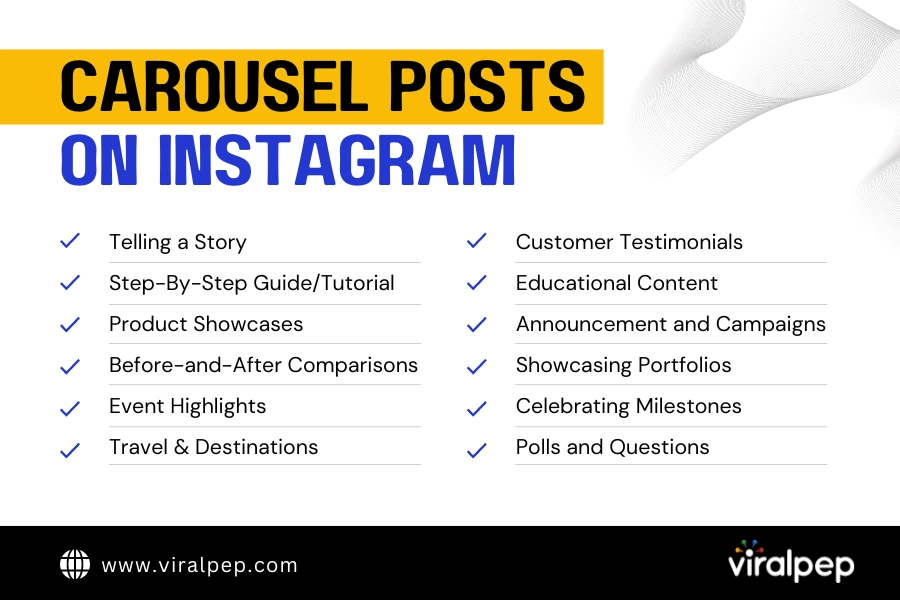
  • Telling a Story: A carousel post is a great choice if you have a narrative to share that involves multiple images or videos. It allows you to present a sequence of content pieces that tell a compelling story together.
  • Step-by-Step Guides or Tutorials: If you want to provide your followers with a detailed step-by-step guide, tutorial, or DIY project, a carousel post can help you break down the process into easy-to-follow visuals.
  • Product Showcases: For businesses, carousel posts can effectively showcase a collection of products from the same line or category. Each image can highlight a different product, and the captions provide details about features, benefits, and usage.
  • Before-and-After Comparisons: If you want to demonstrate the transformation achieved through your product or service, a carousel post can effectively showcase before-and-after images or videos.
  • Event Highlights: If you’ve hosted an event, such as a workshop, conference, or party, a carousel post can capture different moments, speakers, or activities from the event.
  • Travel and Destinations: If you’re sharing travel experiences or highlighting a specific destination, a carousel post can showcase various aspects of the location, such as landmarks, local cuisine, and cultural experiences.
  • Customer Testimonials: For businesses, carousel posts can feature customer testimonials or reviews, where each slide highlights a different customer’s experience or feedback.
  • Educational Content: Carousel posts are an excellent way to share educational or informative content, such as fun facts, trivia, or tips related to your niche.
  • Announcements and Campaigns: If you’re launching a new product, service, or marketing campaign, a carousel post can help you present different aspects or features of your promotion.
  • Highlighting Portfolios: If you’re an artist, photographer, designer, or creative professional, carousel posts can showcase a series of your work in a single post, allowing followers to see various creations.
  • Celebrating Milestones: Use carousel posts to celebrate achievements, milestones, or anniversaries. Each slide can represent a different stage of your journey.
  • Engaging with Polls or Questions: You can use carousel posts to engage your audience with polls, questions, or interactive content. Each slide can present a question or option for your followers to respond to.

Remember, the key to a successful carousel post is coherence and relevance. Ensure that the images or videos within the carousel contribute to a unified message, theme, or story.

Why Schedule Carousel Posts?

Scheduling carousel posts on Instagram offers several important benefits that can significantly enhance your social media marketing strategy and overall online presence.

schedule Carousel posts

  • Consistency: Consistency is key to building a strong online presence. Scheduling carousel posts ensures that your content is consistently delivered to your audience, which helps build brand recognition and trust.
  • Time Efficiency: Planning and scheduling content in advance allows you to allocate your time more efficiently, reducing the daily stress of creating and posting content.
  • Strategic Planning: Scheduling enables you to align your carousel posts with specific marketing campaigns, events, or product launches, ensuring that your content is timely and relevant.
  • Optimal Posting Times: Analyzing your audience’s engagement patterns can help you determine the best times to post on Instagram. Scheduling tools often provide insights into your followers’ activity, allowing you to schedule carousel posts for peak engagement hours and maximize your reach.
  • Global Reach: Scheduling carousel posts accommodates different time zones, helping you reach a wider and more diverse audience.
  • Enhanced Creativity: Scheduling in advance allows you to plan and create more cohesive and visually appealing carousel posts. You can experiment with different themes, styles, and narratives, producing more creative and impactful content.
  • Reduced Stress: The pressure of daily posting can lead to burnout and subpar content quality. Scheduling carousel posts alleviates this stress and allows you to focus on creating exceptional content rather than scrambling for last-minute ideas.

Scheduling carousel posts on Instagram is a strategic approach that offers numerous advantages for individuals, businesses, and influencers.

Step-by-Step Guide to Scheduling Carousel Posts

Follow these steps to schedule carousel posts on Instagram effectively:

carousel post on instagram

  1. Step 1: Choose a Scheduling Tool

    There are various third-party scheduling tools available in the market. When selecting a scheduling tool, consider your specific needs and preferences.

    Most of these tools offer free plans with limited features and paid plans with more advanced options.

  2. Step 2: Connect Your Instagram Account

    Once you’ve selected a scheduling tool, create an account and connect your Instagram business profile.

    This typically involves the following steps:

    • Log in to the scheduling tool using your Instagram credentials.
    • Grant necessary permissions to the tool to access your Instagram account.
    • Follow the on-screen instructions to complete the account connection process.

    This usually involves granting permissions and authorizing the tool to access your Instagram account.

  3. Step 3: Create Your Carousel Post

    Gather the images or videos you want to include in your carousel post. Ensure these visuals are relevant to your brand, message, or campaign.

    Maintaining a cohesive theme or story throughout the carousel is essential to engage your audience effectively.

  4. Step 4: Arrange and Edit Content

    Use the scheduling tool’s interface to arrange your images or videos in the desired order.

    Edit each element, applying filters, captions, and hashtags to enhance your carousel’s overall visual appeal and message.

    Moreover, you’ll come across many tools that offer a drag-and-drop interface, allowing you to reorder your content easily.

    • Edit each element: Apply filters, adjust brightness, contrast, and saturation to maintain a consistent look throughout the carousel.
    • Write captions: Craft engaging captions for each image or video. Consider telling a story, sharing a tip, or asking questions to encourage interaction.
    • Add hashtags: Include relevant hashtags to increase the discoverability of your carousel post. Use a mix of popular and niche-specific hashtags.
  5. Step 5: Schedule Your Post

    Select the date and time you want your carousel post to be published.This step requires careful consideration of your audience’s time zones and peak engagement times.

    Consider your audience’s peak engagement times and time zones for maximum reach. Most scheduling tools provide insights into the best posting times based on your audience analytics.

  6. Step 6: Review and Confirm

    Before finalizing your schedule, review the carousel post, captions, hashtags, and publishing time.

    • Check captions for accuracy and clarity.
    • Ensure hashtags are relevant and properly formatted.
    • Verify that images or videos are correctly arranged and edited.
    • Double-check the scheduled date and time.

    Re-verify that everything aligns with your branding and marketing goals.

  7. Step 7: Publish or Queue

    Once satisfied with your scheduled carousel post, you can either queue it for publishing at the designated time or directly publish it, depending on your scheduling tool’s features.

  8. Step 8: Monitor and Engage

    After your carousel post goes live, monitor its performance using the analytics provided by the scheduling tool. Track metrics such as likes, comments, shares, and profile visits to gauge its effectiveness.

    Engage with comments, respond to messages, and interact with your audience to foster meaningful connections.

Conclusion

You’ve just learned how to schedule carousel posts on Instagram.

Now you can create stunning carousel posts, plan them ahead of time, and publish them automatically at the best times for your audience.

Scheduling carousel posts on Instagram is a powerful strategy for maintaining a consistent, engaging, and well-planned content calendar.

Effective engagement and interaction are key to building meaningful relationships and achieving marketing goals on this visually driven platform.

FAQs

What is a carousel post on Instagram?

A carousel post on Instagram is multimedia content that allows you to share multiple photos or videos within a single post. Users can swipe left or right to view the different images or videos in the carousel.
Scheduling carousel posts offers benefits such as maintaining consistency, saving time, strategic planning, optimal posting times, global reach, and enhanced creativity in your content.
To schedule carousel posts, you can use third-party scheduling tools. These tools allow you to upload and arrange your content, add captions and hashtags, choose a posting time, and schedule the post to be published automatically.

Can I edit a scheduled carousel post after it's been scheduled?

Most scheduling tools allow you to edit scheduled posts before they are published. You can adjust captions, hashtags, posting times, and even the order of images or videos within the carousel.
Many scheduling tools provide insights and analytics on your audience’s engagement patterns. Use these insights to determine the best times to schedule your carousel posts based on when your followers are most active.
Yes, scheduling tools typically allow you to schedule carousel posts for multiple days, weeks, or even months in advance. This feature is especially useful for planning and executing long-term content strategies.
Scheduled carousel posts can receive similar engagement levels as manually posted ones, especially if you optimize posting times based on audience behavior. Factors like content quality, captions, hashtags, and relevance to your audience influence engagement.
While scheduling carousel posts offers numerous benefits, it’s important to note that unforeseen events or changes in your content strategy might require adjustments to your scheduled posts. Additionally, Instagram’s algorithm may prioritize real-time interactions, affecting the visibility of scheduled posts.

How to Delete Drafts Reel on Instagram

Introduction

Have you ever found yourself scrolling through your Instagram Reels, only to stumble upon drafts you completely forgot about? We’ve all been there.

Those half-finished, abandoned creations can clutter your creative space and make finding the content you want to share difficult. But fear not!

In this blog post, we’ll guide you through the simple process of deleting draft Reels on Instagram, helping you tidy up your profile and make room for fresh, polished content.

Easy Steps For Deleting Draft Reels on Instagram

So, if you’re ready to reclaim your creative space and say goodbye to those forgotten drafts, let’s dive in and learn how to delete draft Reels on Instagram!

  1. Understanding Instagram Reels Drafts

    Before diving into the deletion process, let’s first understand what Instagram Reels drafts are. When you create a Reel but decide not to publish it immediately, Instagram allows you to save it as a draft.

    This feature is handy if you want to continue editing or refining your video before sharing it with your audience. Drafts are unfinished Reels that are saved privately to your account, visible only to you.

  2. Locating and Accessing Your Reel Drafts

    To delete your Reel drafts, you must identify and access them within the Instagram app. Follow these steps:

    • Open the Instagram app on your mobile device.

      open instagram app
    • Tap on your profile picture at the bottom right corner to access your profile.

      Tap profile picture
    • Tap the “+” icon at the top right corner to create a new post.

      create new post
    • Select the “Reel” option at the bottom of the screen.

      click on reel
    • Tap on the “Library” option on the left side of the screen.

      tap on library
    • Scroll down until you find the “Drafts” section. Tap on it to view your saved Reel drafts.

      Instagram draft section
  3. Deleting Reel Drafts

    Once you have located your Reel drafts, deleting them is straightforward. Here’s how you can delete drafts on Instagram:

    To delete draft reels on Instagram, you can follow these easy steps:

    • Open the Instagram app on your mobile device.

      open instagram app
    • Tap on your profile icon at the screen’s bottom right corner. This will take you to your profile page.

      Tap profile picture
    • On your profile page, tap the “+” icon at the bottom middle of the screen to create a new post.

      create new post
    • You will see the “Reels” option at the bottom of the screen. Tap on it to access your draft reels.

      choose the reel option
    • In the top left corner of the screen, you will find a back arrow (“<") and the word "Drafts" below it. Tap on it to view your draft reels.

      Select on draft
    • Your draft reels will appear on the screen. Tap and hold on to the reel you want to delete. This will bring up a menu.

      Click on three dot
    • From the menu options, select “Delete” or “Discard.” The exact wording may vary slightly depending on your device.

      Select on delete option
    • A confirmation message asking if you want to delete the draft reel. Tap “Delete” or “Discard” to confirm and delete the reel.

      Click on delete

    Following these steps, you can delete draft reels from your Instagram account.

  4. Keeping Your Profile Clean and Organized

    Deleting your Reel drafts helps declutter your account and ensures that only your best and most relevant content is shared with your audience.

    By removing drafts, you no longer need to create space for new and exciting Reels. Additionally, a clean and organized profile can enhance your personal or brand image, making it easier for visitors to navigate and enjoy your content.

  5. When to Keep Drafts

    While deleting drafts can be beneficial, there may be instances where you want to keep certain drafts for future use.

    For example, saving it as a draft can be advantageous if you have a partially completed Reel that you still intend to finish or publish later.

    However, it’s important to periodically review your drafts and delete those that no longer serve a purpose or align with your content strategy.

Conclusion

Cleaning up your Reels by deleting drafts on Instagram is a simple yet effective way to maintain an organized and visually appealing profile.

Implementing the best Instagram marketing secrets, as outlined in this blog post, you can easily locate and remove unnecessary drafts, ensuring that only your finest content is shared with your followers.

Remember, a tidy profile reflects your dedication to quality and helps captivate and engage your audience more effectively. So, take a few minutes to delete those outdated drafts and unleash your creativity with fresh and engaging Instagram Reels!

FAQs

Can I delete multiple draft Reels at once on Instagram?

Unfortunately, there is currently no option to delete multiple draft Reels at once on Instagram.

Will deleting a draft Reel remove it from my account permanently?

Deleting a draft Reel will permanently remove it from your account. Once deleted, you won’t be able to recover the draft or reaccess it.

Why can't I find the "Drafts" section on my Reels tab?

It might be because you haven’t saved any draft Reels if you can’t find the “Drafts” section on your Reels tab. The “Drafts” section only appears when you have one or more draft Reels available.

Can I delete a draft Reel from the web version of Instagram?

The web version of Instagram does not support creating or managing Reels, including deleting draft Reels. You will need to use the Instagram mobile app to delete draft Reels. However, Instagram’s features and interface may change over time, so it’s always a good idea to check the latest version of the app for any updates.

Can I recover a deleted draft Reel on Instagram?

No, it cannot be retrieved once you delete a draft Reel on Instagram. Ensure you have selected the correct draft for deletion, as the action is permanent and irreversible.

Is there a limit to the number of draft Reels I can have on Instagram?

Instagram does not specify a specific limit on the number of draft Reels you can have. However, there might be a practical limit based on factors such as available storage on your device or Instagram’s server capacity.

Can I edit a draft Reel and save the changes instead of deleting it?

Yes, you can edit a draft Reel on Instagram before posting it. Open the draft Reel, make the necessary changes, and save the updated version. The changes you make will replace the previous version of the draft Reel.

How to Get Verified on Facebook: A Detailed Guide

Introduction

Welcome, social media enthusiasts and aspiring verified Facebook users! Are you ready to unlock the secrets of obtaining the elusive blue verification checkmark on Facebook?

We’re thrilled to present to you an interactive guide that will take you on an exciting journey toward boosting your online credibility and standing out in the virtual crowd.

While obtaining a blue verification checkmark on Facebook is not easy, it is achievable with the right approach.

So fasten your seatbelts and prepare to embark on an interactive adventure toward getting the blue verification checkmark on Facebook. Unlock your authenticity and set you on the path to digital success! Are you ready? Let’s dive in!

What is a Blue Tick on Facebook?

The blue tick on Facebook is a verification badge that appears next to the name of a profile or page. It symbolizes authenticity and credibility, indicating that the account represents a real person, registered business, or entity of public interest.

The blue tick helps users identify legitimate profiles or pages from impersonators, fan accounts, or unofficial entities. It adds more trust and credibility to the verified account, particularly for public figures, brands, and businesses on the platform.

Steps To Get a Blue Tick on Facebook

While Facebook does not provide a publicly disclosed, step-by-step process for obtaining a blue verification checkmark, you can take several general steps to increase your chances.

  1. Establish a Presence

    Before pursuing verification, it’s important to ensure that your Facebook presence is well-established and meets the criteria for verification.

    Build a genuine following, engage with your audience, and maintain an active presence by consistently sharing high-quality content that aligns with Facebook’s community guidelines.

  2. Meet the Eligibility Requirements

    Facebook has specific eligibility criteria for verification. While the exact details are not publicly disclosed, meeting the following general requirements will increase your chances:

    Authentication Confirmation
    • Authenticity and Uniqueness: Your profile must represent a real person, a registered business, or an entity of public interest.

    • Completeness: Ensure your profile or page has a complete and up-to-date “About” section, including a detailed bio, relevant contact information, and links to your official website or social media platforms.

    • Popularity: Demonstrate a significant public following and engagement on Facebook. This can be achieved through many followers, post interactions, press coverage, and overall online presence.

  3. Building External Credibility

    Creating a strong online presence outside of Facebook can greatly enhance your chances of verification. Consider the following steps:

    confirm notability
    • Establish a website: An official website adds credibility to your profile or business. Make sure it contains accurate and up-to-date information.

    • Cross-platform verification: Connect your Facebook profile with other verified social media accounts, such as Twitter, Instagram, or LinkedIn. This interlinking demonstrates your authenticity and can positively impact the verification process.

    • Press and media coverage: Actively seek media coverage or press mentions. Being featured in reputable publications or interviewing well-known journalists can bolster your credentials.

  4. Submit a Verification Request

    Once you have fulfilled the eligibility requirements and established a strong online presence, you can submit a verification request to Facebook. Follow these steps:

    Submit a Verification Request
    1. Go to the Facebook Verification Request page.

    2. Select the type of account you wish to verify (personal or business).

    3. Provide the required personal or business identification information, including official documents like government-issued ID, business licenses, or articles of incorporation.

    4. Include additional information to support your verification request, such as press articles, awards, or notable achievements.

  5. Be Patient and Persistent

    The verification process on Facebook can be lengthy and selective. It’s important to be patient and understand that Facebook receives numerous daily requests.

    While waiting for a response, continue to focus on building your online presence, engaging with your audience, and sharing valuable content.

Conclusion

Obtaining the blue verification checkmark on Facebook is a testament to your authenticity and credibility. While it may not be easy, following the above guidelines can significantly improve your chances.

Remember to build a strong online presence, meet the eligibility requirements, establish external credibility, and submit a comprehensive verification request using a reliable social media scheduling tool.

However, it’s essential to note that verification is ultimately at Facebook’s discretion, and meeting all the criteria does not guarantee approval.

Stay persistent, continue to grow your presence, and focus on delivering value to your audience, whether or not you receive the coveted blue checkmark.

FAQs

How can I increase my chances of getting the blue verification checkmark on Facebook?

To increase your chances, build a strong online presence, meet the eligibility requirements (authenticity, completeness, and popularity), establish external credibility (such as a website and cross-platform verification), and submit a comprehensive verification request.

What are the eligibility requirements for the blue verification checkmark on Facebook?

While Facebook doesn’t disclose the exact requirements, key factors include authenticity, uniqueness, completeness of profile information, and a significant public following with engagement. Meeting these criteria increases your chances of verification.

Do I need to have a website to get verified on Facebook?

While having an official website is not mandatory, it adds credibility to your profile or business and can positively impact the verification process. Ensure your website contains accurate and up-to-date information.

How do I submit a verification request on Facebook?

To submit a verification request, go to the Facebook Verification Request page, select the type of account (personal or business), provide the required identification information, and include additional supporting materials like press articles or notable achievements.

How long does it take to get verified on Facebook?

The verification process on Facebook can be lengthy and selective. Facebook receives numerous requests daily, so it’s important to be patient. There is no fixed timeline for approval, but you can continue building your online presence while waiting.

Is getting verified on Facebook guaranteed if I meet all the criteria?

Meeting all the eligibility requirements does not guarantee verification on Facebook. The verification process is at Facebook’s discretion, and they consider various factors before granting the blue checkmark.

What should I do if my verification request is denied?

If your verification request is denied, you can wait for some time and then consider reapplying. In the meantime, focus on building your online presence, engaging with your audience, and sharing valuable content.

Can I hire a service or pay to get verified on Facebook?

Facebook does not accept payment or offer services to expedite or guarantee verification. Beware of scams or third-party services claiming to provide guaranteed verification.

Is the blue verification checkmark available for personal profiles or only for businesses and public figures?

The blue verification checkmark can be obtained by both personal profiles and business/public figure pages as long as they meet the eligibility requirements and demonstrate authenticity, uniqueness, and public interest.