Step-by-Step Guide on How to Get More Views on YouTube

In 2024, YouTube remains one of the most powerful platforms for video creators, but with over 500 hours of content uploaded every minute, standing out and growing your channel is more challenging than ever. It’s not just about creating great content—it’s about ensuring your videos reach the right audience and get noticed.

To achieve long-term success on YouTube, it’s crucial to focus on social media marketing strategies that drive engagement, visibility, and consistent growth. In this article, we’ll share 18 proven tactics to help you grow your YouTube channel and maximize your viewership, whether you’re just starting or aiming to take your channel to new heights.

What Counts as a View on YouTube?

Before we dive into how to increase views on YouTube, it’s important to understand what counts as a view on YouTube. YouTube has specific rules for what counts as a view, and these are important because they affect how your content is ranked and recommended to others.

A view is counted when a user clicks on your video and watches it for at least 30 seconds. For YouTube Shorts, however, the rules are slightly different—views are counted as soon as someone starts watching your short video.

It’s also important to note that YouTube uses watch time (the total time users spend watching your video) as a key metric for recommending videos. The longer viewers watch your videos, the more likely YouTube will promote your content in search results and recommendations.

Why Are Views on YouTube Important?

Views aren’t just a vanity metric—they’re a sign of your content’s success. Here’s why they matter:

  1. Increased Exposure: More views mean more people see your content. The more views you have, the more likely your video will show up in search results and recommendations, which means greater exposure for your channel.
  2. Higher Revenue: YouTube monetization, through ads, requires a certain number of views. For YouTube Partners, the higher your view count, the greater your earning potential. How can you make money on YouTube? Start by boosting your views consistently.
  3. Improved Engagement: Videos that receive more views often attract more likes, shares, and comments, which can help build a community around your channel.
  4. Better Rankings: YouTube’s algorithm favors videos with high engagement. More views lead to better rankings, which means more people are likely to find and watch your videos.

Now that you understand why views are crucial let’s dive into some practical strategies for increasing them.

How to grow your YouTube channel: Best Tips and Tricks

Views are the cornerstone of success on YouTube. When your videos get more views, YouTube’s algorithm is more likely to recommend your content to a larger audience. This creates a positive feedback loop: more views → more engagement → greater visibility → faster channel growth.

Beyond visibility, more views mean more potential for ad revenue, brand partnerships, and greater reach for your content, whether you’re building a personal brand or marketing your business. The importance of social media content creation plays a key role in achieving this growth. Here’s how you can grow your YouTube channel organically and strategically.

Growing a YouTube channel can feel like a challenging task, but with the right strategies and a consistent approach, you can significantly boost your channel’s visibility and subscriber count.
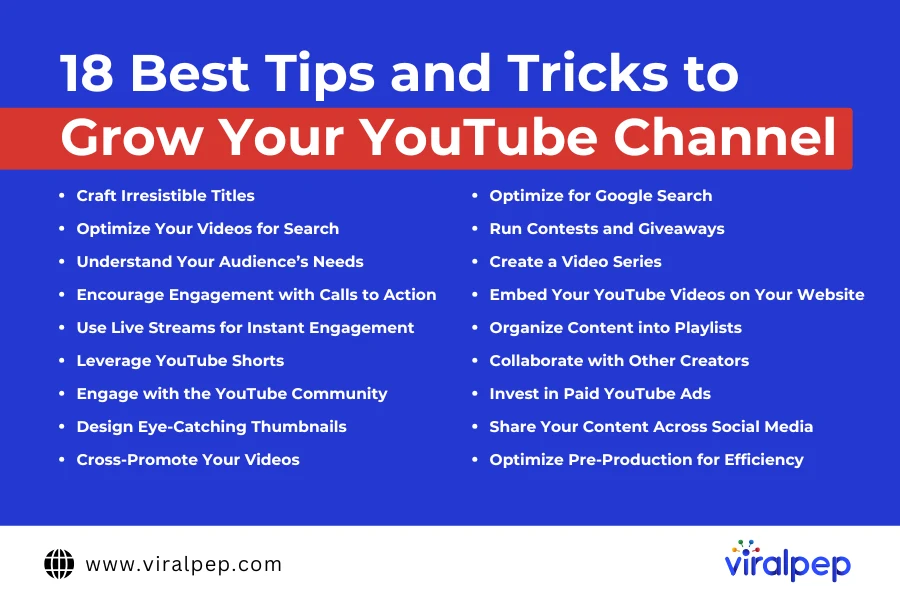
Best tips to Grow Youtube Channel

Here are some of the best tips and tricks to help you grow your YouTube channel effectively.

  1. Craft Irresistible Titles

    Your title is the first thing potential viewers see, so make sure it’s compelling and gives a clear idea of what your video is about. Avoid clickbait, but use attention-grabbing techniques like listicles, how-to’s, or intriguing questions. For example, “How to Make a YouTube Video in 5 Easy Steps” can grab viewers’ attention instantly.

    Pro Tip: Keep your titles around 70 characters, and always aim to include relevant keywords for better searchability. For example, instead of “How to Bake a Cake,” try “How to Bake the Perfect Cake in 5 Easy Steps.”

  2. Optimize Your Videos for Search

    Since YouTube is the second-largest search engine in the world, optimizing your videos for search is crucial. Use relevant keywords in your video titles, descriptions, and tags to improve your chances of appearing in search results.

    Pro Tip: Mention your target keywords in your video itself, as YouTube’s algorithm can detect spoken words and use them for indexing.

  3. Understand Your Audience’s Needs

    Creating content that resonates with your target audience is vital for growth. Research what types of videos are already performing well in your niche and analyze the topics, format, and style that attract the most engagement.

    Pro Tip: Dive into YouTube Analytics to learn more about your audience’s demographics, watch time, and engagement metrics. This data will guide your content strategy moving forward.

  4. Encourage Engagement with Calls to Action

    Engagement signals to YouTube that your content is valuable. Ask your viewers to like, comment, and subscribe at the beginning and end of your videos. You can even encourage comments by asking questions related to the video content.

  5. Use Live Streams for Instant Engagement

    Live streaming is one of the fastest-growing trends on YouTube, and it’s a great way to build real-time engagement with your audience. Hosting live Q&As, tutorials, or product demos can boost interaction and attract new subscribers.

  6. Leverage YouTube Shorts

    How to get more views on YouTube Shorts is a key question for creators, and YouTube Shorts can quickly help you grow your audience. These short, snappy videos can quickly go viral and attract a new audience. Use Shorts for quick tips, behind-the-scenes moments, or trending challenges.

    Pro Tip: Repurpose segments from your longer videos into Shorts to extend your reach and drive more traffic to your full-length content.

  7. Engage with the YouTube Community

    YouTube is not just a place for passive viewing—it’s a community. Respond to comments, like your subscribers’ comments, and even pin the most insightful ones. Active interaction helps build a loyal audience who feels more connected to your channel.

  8. Design Eye-Catching Thumbnails

    Thumbnails are essential for getting viewers to click on your videos. YouTube automatically generates thumbnails, but creating your own custom thumbnails will make your videos stand out. Use bold, clear images, and ensure the thumbnail aligns with the video’s content.

  9. Cross-Promote Your Videos

    Maximize the impact of your existing videos by cross-promoting them. Highlight the impact on social media of your content by linking to other relevant videos in your descriptions or end screens. This helps keep viewers on your channel and encourages them to watch more content.

  10. Optimize for Google Search

    YouTube videos often rank in Google’s search results, so it’s important to optimize your content for SEO. Focus on creating valuable content like tutorials, product reviews, or in-depth guides that answer common search queries in your niche.

  11. Run Contests and Giveaways

    Giveaways are a great way to increase social media engagement and attract new subscribers. Host contests where viewers must like your video, comment, and subscribe to enter. Make sure the prize aligns with your audience’s interests to attract genuine followers.

  12. Create a Video Series

    Building a video series keeps your audience coming back for more. A series on a specific topic gives your channel structure, and viewers will have a reason to subscribe and return for future episodes.

  13. Embed Your YouTube Videos on Your Website

    Embed videos on your website or blog to promote your YouTube channel to a wider audience. This not only boosts views but also keeps visitors on your site longer.

  14. Organize Content into Playlists

    Playlists help organize your content and make it easier for viewers to binge-watch your videos. Group related videos into themed playlists, which can boost your channel’s watch time—a key ranking factor on YouTube.

  15. Collaborate with Other Creators

    Partnering with other creators is a great way to tap into their audience and gain exposure to new viewers. Find creators with similar interests or niches and collaborate on videos that bring value to both audiences.

  16. Invest in Paid YouTube Ads

    Paid YouTube ads can be a powerful way to increase visibility for your videos. YouTube offers different ad formats such as skippable and non-skippable video ads, display ads, and bumper ads, allowing you to tailor your campaigns to your goals.

  17. Share Your Content Across Social Media

    Promote your videos on all your social media channels to increase views and engagement. Share snippets or teaser clips, and include a call to action to watch the full video on YouTube. This helps you tap into your existing social media following.

  18. Optimize Pre-Production for Efficiency

    Planning is key to creating social media content consistently. Use storyboards, shot lists, and contingency plans to streamline your production process. When you plan ahead, you’ll have more time to focus on the creative aspects and produce better content.

How Viralpep Helps You Grow on YouTube

For creators looking to get more views on YouTube and streamline their social media management, Viralpep is a powerful tool. With Viralpep, you can schedule social media posts across multiple platforms, including YouTube, to keep your audience engaged and consistently promote your content. Using Viralpep, you can:

  • Plan and schedule your YouTube content in advance, ensuring a steady stream of videos that reach your audience at optimal times.
  • Track engagement metrics to help improve your content strategy and better understand what drives views and interactions.
  • Cross-promote your YouTube videos across other platforms like Instagram, Facebook, Linkedin and Twitter to drive more traffic.

By implementing the steps outlined in this post and integrating Viralpep into your strategy, you’ll be well on your way to building a thriving YouTube channel.

For more tips on how to optimize your content and grow your online presence, check out our resources at Viralpep.

Conclusion

Increasing your views on YouTube takes time and effort, but by consistently applying the right strategies, you can see significant growth. Focus on creating high-quality content, optimizing your videos, engaging with your audience, and promoting your work through various channels. Remember, there’s no one-size-fits-all approach, so experiment with different techniques and track your progress.

By implementing the steps outlined in this post, you’ll be well on your way to building a thriving YouTube channel.
How to Sell on Instagram: A Complete Guide to Boost Your Sales

Instagram has transformed into a powerful e-commerce platform, allowing businesses to connect with audiences, showcase products, and drive sales with ease. Download Instagram Reels to share engaging content that captures your audience’s attention while promoting your products. If you’re looking to sell on Instagram, this guide will help you succeed by walking you through the key steps and strategies.

Did you know Instagram boasts over a billion active monthly users? That’s right—billion. With such a vast audience, Instagram has become a global marketplace, and in the U.S., 37% of adults are active on the platform.

As a visually-driven platform, Instagram is ideal for businesses eager to present their products and services in a captivating manner.

While staying top-of-mind and reinforcing your brand identity is important, simply doing that alone won’t unlock Instagram’s full sales potential.

The good news? There are multiple ways to set up your shop and start selling on Instagram. Even better, you can begin using Viralpep for free today to manage your Instagram presence like a pro and boost your sales.

This guide will walk you through the steps to set up your shop and sell on Instagram, while showing how Viralpep streamlines and elevates the process

Steps to Start Selling on Instagram

Get your clients started on the path to selling on Instagram with these essential steps.

  1. Verify Your Business Eligibility

    Selling on Instagram is possible without an Instagram Shop, but using the built-in Instagram Shopping feature is the most effective way to showcase products and simplify the customer shopping experience. To sell on Instagram, ensure your clients meet these eligibility requirements:

    To set up an Instagram Shop, ensure your clients meet these eligibility requirements:

    • Compliance with Meta’s Commerce Policies: Your clients must follow Meta’s commerce eligibility standards.
    • Verified Website Domain: This allows purchases to be completed on their official websites.
    • Instagram Business or Creator Account: This is required to access Instagram Shopping features.

    How to Submit an Account for Review:

    1. Go to your client’s Instagram Business profile.
    2. Tap Menu (☰) > Sign Up for Shopping > Get Started.
    3. Submit the account for review.

    Once approved, you can activate shopping features on Instagram.

    Set Up Meta Business Manager:
    Clients also need a Meta Business Manager account, a central hub for managing Instagram and Facebook Shops, Ads, Pages, and user permissions. Here, you can customize their shops by editing product listings, catalogs, descriptions, and special offers for a seamless selling experience.

  2. Set Up Your Instagram Shop

    Just like physical stores need products on their shelves, your clients’ Instagram shops need well-stocked product catalogs.

    Here’s how you can help clients fill their Instagram shop catalogs:

    1. Sync with Facebook Product Catalogs: Pull products directly from your clients’ existing Facebook catalogs.
    2. Connect E-commerce Websites: Link clients’ Instagram shops to their e-commerce websites.
    3. Create a New Catalog: Build a catalog from scratch if needed.

    If your clients already have Facebook shops, this process is simple. Visit Catalog Manager and navigate to Settings > Business Assets > Instagram > Add Instagram Account.

    For Shopify store owners, follow Facebook and Instagram integration guides for seamless setup.

    Ready to build a catalog from scratch? Start here and complete the prompts to set up your clients’ Instagram product catalogs.

  3. Leverage Shoppable Features

    Instagram offers multiple shoppable features that make it easy for users to explore and purchase products:

    Enhance your clients’ Instagram presence by adding product tags to branded content. These tags display product names and prices, allowing shoppers to tap them or the shopping bag icon to visit your clients’ Instagram Shop or e-commerce site.

    How to Add Shopping Tags:

    1. Open the Instagram App: Tap the post icon.
    2. Upload Content: Choose a photo or video featuring your clients’ products. Add captions, filters, and effects, then tap Next. Consider including a creative Instagram caption idea to attract more engagement.
    3. Tag Products: Tap Tag Products, select the items, and position the tags.
    4. Share: Tap Done or Share.

    You can tag products in Reels, Stories, and in-feed posts to maximize reach and drive sales.This is an excellent way to sell on Instagram.

  4. Promote Your Products Effectively

    Promote Your Clients’ Products on Instagram and Boost Sales

    To draw attention to your clients’ products and drive sales, use these proven Instagram promotion strategies:

    1. Create Instagram Stories: Share sneak peeks, product demos, and flash sales to build urgency and encourage instant purchases.
    2. Use High-Quality Visuals: Post eye-catching videos and images to build trust and showcase product value.
    3. Partner with Influencers: Collaborate with influencers who can promote your clients’ products and expand brand visibility.
    4. Leverage User-Generated Content (UGC): Share customer-created content to provide social proof and inspire potential buyers.

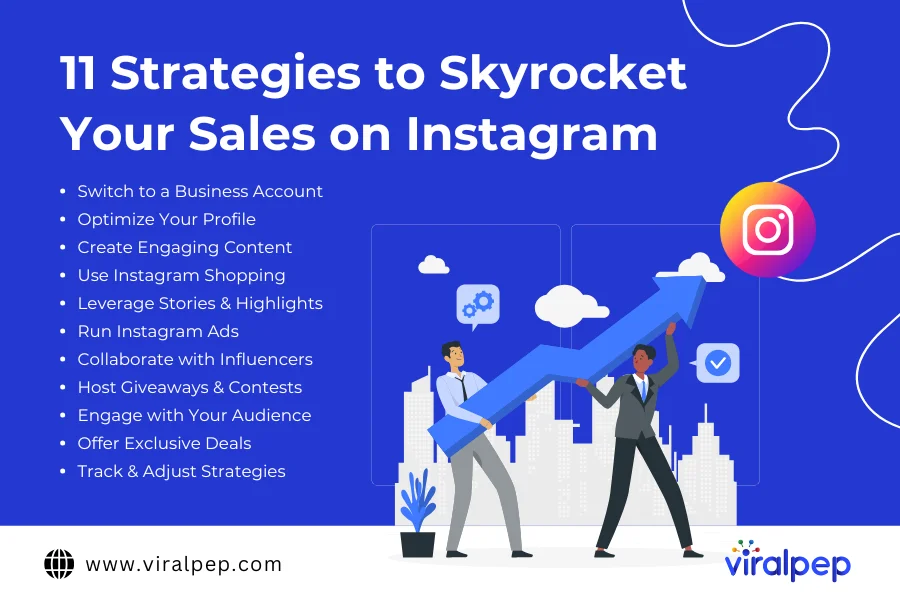
11 Tips to Sell More on Instagram

Instagram has become a powerful platform for businesses to connect with customers, make money on Instagram and increase sales. With the right strategies, you can transform your Instagram profile into a thriving online shop.

best strategies to sales on instagram

Here are 11 tips to help you sell more on Instagram:

  1. Switch to a Business Account

    • Unlock Instagram’s advanced features like analytics, Instagram Shopping, and paid advertising.
    • Track performance metrics and target specific audiences to boost sales.

    Tip: Use Instagram’s Insights to track engagement metrics and create your social media strategy accordingly.

    Example: A clothing brand switches to a Business Account and starts running product-specific ads, leading to a 30% increase in sales.

  2. Optimize Your Profile

    • Use a recognizable profile picture.
    • Write a compelling bio highlighting unique selling points.
    • Include a clear call-to-action link directing visitors to your online store or product page.

    Tip: Keep your bio concise but informative, with relevant keywords.

    Example: A jewelry brand’s bio reads: “Handcrafted elegance ✨ Free shipping on orders over $50! Shop now 👇.”

  3. Create Engaging Content

    • Post high-quality photos and videos showcasing your products creatively.
    • Include behind-the-scenes footage, product demos, and customer testimonials.

    Tip: Use consistent filters and branding elements for a cohesive look.

    Example: A bakery shares time-lapse videos of cake decorating, attracting more followers and orders.

  4. Use Instagram Shopping

    • Enable Instagram Shopping and tag products in posts, stories, and reels.
    • Simplify the purchase process by allowing users to shop directly from your content.

    Tip: Ensure product descriptions are clear and visually appealing.

    Example: A tech gadget company tags new products in their reels, driving instant traffic to their store.

  5. Leverage Stories & Highlights

    • Share time-sensitive promotions, product launches, and flash sales via Stories.
    • Organize key stories into Highlights for easy access.

    Tip: Use interactive stickers like polls and countdowns to boost your social media engagement.

    Example: A skincare brand runs a “Weekend Sale” story with a countdown timer, boosting purchases.

  6. Run Instagram Ads

    • Use targeted ads to promote products and drive traffic to your website.
    • Test different ad formats like carousel, video, and stories.

    Tip: Test different ad formats like carousel, video, and stories.

    Example: A fitness gear company runs video ads showing workouts with their equipment, increasing website visits.

  7. Collaborate with Influencers

    • Partner with influencers whose followers align with your target audience.
    • Choose micro-influencers for niche markets with higher engagement rates.

    Tip: Choose the right micro-influencers for niche markets with higher engagement rates.

    Example: A handmade candle brand partners with home decor influencers, driving substantial sales.

  8. Host Giveaways & Contests

    • Organize giveaways to increase visibility and build a loyal following.
    • Ask participants to follow, like, and tag friends.

    Tip: Offer products as prizes to create buzz.

    Example: A fashion boutique’s giveaway of a trendy outfit generates thousands of new followers.

  9. Engage with Your Audience

    • Stay active by responding to comments, messages, and mentions.
    • Personalize your responses to create a stronger connection.

    Tip: Use personalized responses to create a stronger connection.

    Example: A pet supply store responds with helpful tips to customer questions, earning repeat buyers.

  10. Offer Exclusive Deals

    • Create urgency with time-sensitive promotions and exclusive deals.
    • Use phrases like “Limited-Time Offer” or “While Supplies Last.

    Tip: Announce sales ahead of time to build anticipation.

    Example: A home decor store runs a “Weekend Only Sale,” generating record-breaking sales.

  11. Track & Adjust Strategies

    • Review Instagram Insights regularly to monitor metrics like engagement, reach, and sales conversions.
    • Use data insights to refine marketing strategies.

    Tip: Identify top-performing content and replicate its format.

    Example: An online bookstore notices increased sales from carousel posts and schedules more of them.

How Viralpep Enhances Your Instagram Selling Journey

Viralpep is a robust social media management tool tailored to help businesses optimize their Instagram sales strategies. Here’s how Viralpep makes a difference:

  1. Seamless Post Scheduling

    Plan and schedule social media posts, Stories, and Reels effortlessly. Viralpep ensures your content reaches your audience at the right time, consistently.

  2. In-Depth Performance Analytics

    Track the performance of your Instagram Shop and campaigns using Viralpep’s advanced social media analytics tool. Gain insights into your audience’s preferences and refine your strategies accordingly.

  3. Team Collaboration Simplified

    Viralpep’s social media collaboration tool make it easy for your team to work together. Assign tasks, share ideas, and maintain alignment for a smoother workflow.

  4. Centralized Content Management

    Manage all your Instagram content, from product catalogs to promotional campaigns, within Viralpep’s intuitive interface, saving time and effort.

  5. Time Efficiency

    Automate repetitive tasks such as post-scheduling and analytics tracking. With Viralpep, you can focus on developing creative strategies to grow your brand.

Promotional Strategies for Instagram Success

To stand out in the competitive Instagram marketplace, consider these strategies:

  • Exclusive Offers: Create limited-time deals to generate excitement and urgency among followers.
  • Interactive Content: Use polls, quizzes, and question stickers to engage your audience and gather valuable feedback.
  • Hashtag Optimization: Incorporate trending and relevant hashtags to expand your reach.
  • Live Sessions: Host live shopping events to interact with your audience and showcase products in real-time.

Conclusion

Selling on Instagram doesn’t have to be complex. By using Instagram’s built-in features and integrating Viralpep’s innovative tools, you can transform your social media presence into a powerful sales channel. Viralpep empowers businesses to manage, analyze, and optimize their Instagram strategies, helping them unlock their true potential.

Take the next step toward Instagram success—let Viralpep simplify and supercharge your selling journey today.

How to Sell on Instagram FAQs

Need more information on how to sell on Instagram? We’ve got all the answers for you.

Can you sell directly on Instagram?

Yes, you can! Simply connect a product catalog and enable Instagram Checkout to allow customers to buy directly from your Instagram profile.

Can I sell on Instagram without a website?

No. To sell things on Instagram, your account must be linked to a verified website domain that represents your business.

Does it cost to sell on Instagram?

Generally, no. You can create a shop and use shoppable posts for free. However, Instagram charges a fee for transactions through Checkout, and you’ll need to pay for any ads you run.

How do I set up selling on Instagram?

First, convert your Instagram account to a business account, link it to a product catalog, and start creating shoppable posts to begin selling.

Top Christmas Marketing Ideas for 2024

As winter’s chill blankets the world in festive hues of red and green, marketers everywhere are preparing for the most magical season of all: Christmas!

Christmas isn’t just a holiday—it’s a global celebration that sparks joy and inspires connection. Picture the soft glow of a fireplace, the scent of freshly baked cookies, and the sound of loved ones’ laughter. It’s a time for giving, sharing, and celebrating together.

For marketers, it’s the perfect moment to build meaningful connections, craft unforgettable experiences, and boost sales with Christmas marketing ideas that truly resonate. But with holiday buzz in full swing, how can your brand shine and become part of the Christmas magic?

We’ve compiled a list of creative and impactful Christmas social media campaigns designed to delight your audience and drive engagement.

Pro Tip: Use our social media management tool to schedule all your holiday campaigns in advance and stay ahead of the festive rush!

Plan Your Christmas Marketing Strategy for 2024 – Tips & Guide

Planning the perfect Christmas social media campaign requires staying ahead of trends all year long. But if you’ve missed out on the latest, don’t worry—we’ve got you covered with a quick guide to get you on track!

  1. Create Engaging Video Content

    • Wondering how to capture your audience’s attention this holiday season? Reels, Shorts, and TikTok videos are the answer!
    • This year, short-form videos dominated social media, making them the ideal way to showcase your Christmas offerings.
    • Got a new product? Create a reel.
    • Launching an exclusive campaign? Reel it in.
    • Introducing limited-edition holiday products? You know what to do!
  2. Choose the Right Platform

    • The holidays are about fun and connection, so focus on the platform that best fits your audience.
    • Instead of spreading yourself thin across multiple platforms, pick the one that resonates most with your target market.
    • With so many new platforms emerging in 2024, there’s no need to tire yourself out creating content everywhere—stick to what works!
  3. Stories for the Win

    • Are you guilty of mindlessly scrolling through social media during the holidays? Your audience is too!
    • Use Stories to land directly in their feed and become part of their daily routine.
    • Add some festive Christmas music, showcase behind-the-scenes content, or highlight holiday specials. Your Stories are a chance to engage and entertain!

Best Christmas Marketing Ideas: Take Inspiration From These Creative Campaigns

The holiday season has already started, and it’s the perfect time to spread cheer while boosting your brand. 

Christmas Marketing Ideas

Here are some of the best Christmas marketing ideas that are sure to inspire your next campaign!

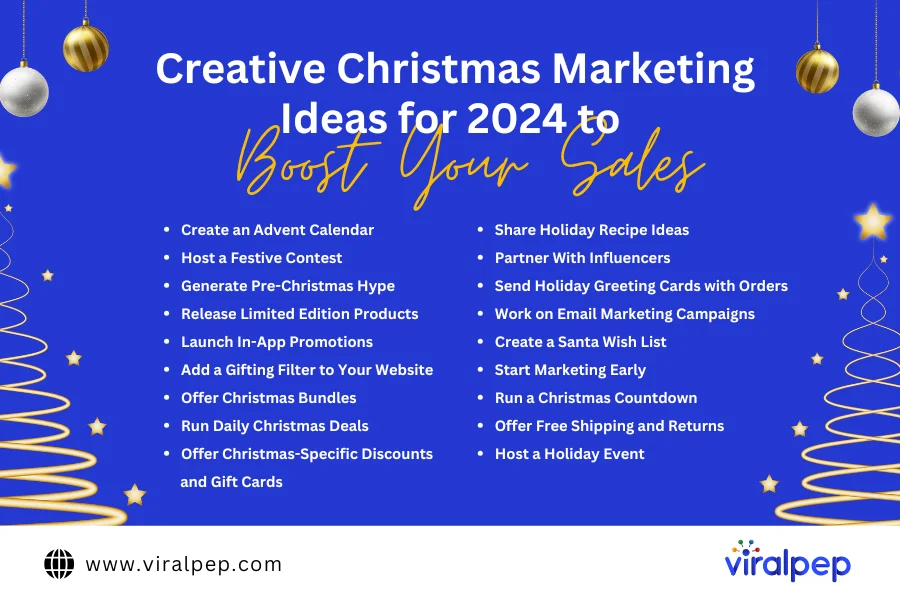
  1. Create an Advent Calendar

    Christmas is the season of gifting, so beautifully packaged or well-marketed products are sure to stand out. Consider launching an advent calendar, like Sephora does each year. You can bundle your best-selling products from the year to surprise your customers each day. Creating a social media calendar around your holiday promotions can help keep your audience engaged and excited about your brand. This is one of the best Christmas marketing ideas to engage your audience in the holiday spirit.

  2. Host a Festive Contest

    Holiday contests are perfect for Instagram and require minimal effort on your part. Introduce a Christmas-themed hashtag or filter and ask your followers to share photos wearing your products. You don’t have to choose just one winner—multiple prizes can keep the fun going! You can even partner with micro-influencers to extend the campaign’s reach, adding a social media campaign element to your marketing strategy.

  3. Generate Pre-Christmas Hype

    Start spreading the Christmas cheer early by posting festive updates on your social media and website. Whether it’s a sneak peek of your Christmas collection or a fun GIF featuring a Santa hat, creating excitement before the season kicks off will keep your audience engaged. This is key for your Christmas social media campaigns.

  4. Release Limited Edition Products

    People love collecting exclusive Christmas items, so why not create limited edition products for the holidays? Offer them as gifts with purchases or as standalone items. Big brands like Starbucks and Krispy Kreme use this strategy successfully—get creative and make something special!

  5. Launch In-App Promotions

    Give your app customers a reason to celebrate this season by offering exclusive discounts through your app. This is a great way to boost app downloads and increase sales, all while rewarding loyal customers with special deals. Use this in your Christmas business ideas brainstorm session to tap into engagement.

  6. Add a Gifting Filter to Your Website

    Help last-minute shoppers by adding a gifting filter to your site. It’ll make finding the perfect gift easier and quicker. For in-store shopping, display discounted gifts right at the front or near the checkout counter to encourage impulse buys.

  7. Offer Christmas Bundles

    Gift-giving is at the heart of Christmas, so offer ready-made bundles filled with your best products. A beautifully wrapped gift set makes for a perfect present, and if you add a gift-wrapping service, your customers will appreciate the added convenience. Creative Christmas post ideas showcasing bundles can generate interest.

  8. Run Daily Christmas Deals

    Create excitement with a daily deal campaign, such as “12 Days of Christmas” offers. Each day, feature a different product at a discount, offer free shipping, or launch a buy-one-get-one-free deal. These limited-time promotions are perfect for driving traffic and converting leads into sales. Incorporate this strategy just how OpenAI did this year.

  9. Offer Christmas-Specific Discounts and Gift Cards

    Spread holiday cheer with themed discounts and gift cards. You can offer special deals on select products or create a “product of the day” promotion. For those who prefer more consistent discounts, a month-long sale could keep your customers engaged throughout the season. This is perfect for your Christmas social media campaign.

  10. Share Holiday Recipe Ideas

    If your business is food-related, share holiday recipes that resonate with Christmas traditions. Whether it’s a festive dish or a unique treat, this is a great way to engage your audience and encourage them to try new products or share your recipes with friends and family.

  11. Partner With Influencers

    Influencer marketing is a great way to amplify your Christmas social media campaign. Choosing the right influencers can make a significant difference in showcasing your products creatively, whether through sponsored posts or holiday-themed content. Influencers can help spread your message to a wider audience and bring authenticity to your brand.

  12. Send Holiday Greeting Cards with Orders

    In the digital age, sending holiday greetings is easier than ever. Why not send personalized digital greeting cards to your customers? Thank them for their support throughout the year and offer a small discount on their next purchase as a token of appreciation. This can tie into your Christmas email marketing ideas.

  13. Work on Email Marketing Campaigns

    Create a holiday newsletter with festive promotions, product highlights, or exclusive offers. Keep your email content engaging by featuring new items or offering sneak peeks into upcoming holiday deals. A well-crafted email marketing campaign can drive sales and keep your brand top-of-mind. These kinds of Christmas email marketing ideas can increase your holiday sales.

  14. Create a Santa Wish List

    Compile a wish list of your best products and showcase them in a fun, interactive way. Use a carousel of product images on social media or create a dedicated section on your website. A Santa wish list is an excellent way to encourage customers to make their holiday wish come true with your products.

  15. Start Marketing Early

    Plan your holiday campaigns ahead of time. The best time to start promoting Christmas content ideas is right after Halloween when you can also explore Halloween social media post ideas. This gives you enough space to execute your ideas without the pressure of last-minute decisions.

  16. Run a Christmas Countdown

    Build anticipation by running a countdown to Christmas. Share festive content daily, engage your audience with interactive posts, and create excitement around special offers. A countdown helps boost engagement and keeps your feed lively throughout the season. This is a great tactic for Christmas social media campaign.

  17. Offer Free Shipping and Returns

    For a hassle-free shopping experience, offer free shipping and returns during the holiday season. This will help attract more customers and give them peace of mind while shopping for their Christmas gifts.

  18. Host a Holiday Event

    Bring the holiday spirit to life by hosting an in-store event. Set up a festive space for customers to enjoy, with games, activities, and special promotions. Events like this create a fun, memorable experience that customers will associate with your brand, a perfect addition to your Christmas marketing ideas.

    With these ideas, you can keep your customers excited, engaged, and ready to celebrate the season with your brand. Start planning today, and watch your holiday campaign shine!

Final Thoughts

The holiday season presents an exciting opportunity for businesses to connect with their audience and create memorable experiences. From festive contests and limited edition products to creative Christmas email marketing ideas and influencer partnerships, there are countless social media Christmas campaigns out there to inspire your next campaign.

At Viralpep, we understand how important it is to stand out during the busy holiday season. Our comprehensive social media management platform helps you streamline your Christmas marketing efforts, from scheduling posts in advance to tracking engagement and performance across platforms. Whether managing your holiday contests or using our platform to schedule social media post, we’ve got you covered. Get ready to spread some holiday cheer and watch your brand shine this Christmas season with Viralpep!

How to Download Instagram Reels: Step-by-Step Guide

Introduced in 2020, Instagram Reels have quickly become one of the platform’s most engaging and popular content formats. Instagram’s algorithm prioritizes video content like Reels, making them more likely to reach wider audiences compared to static posts.

Reels have taken the social media world by storm, offering users a fun and creative way to share short-form videos. Whether it’s an inspiring video, a funny clip, or a dance routine, you might want to download Instagram Reels to save, share, or enjoy offline.

In this guide, we’ll show you how to download Instagram Reels on iPhone, Android, or desktop, using both direct methods and third-party tools.

Can you Download Instagram Reels?

Yes, you can download your favorite trending Instagram Reels! Whether you’re using an iPhone, Android, or desktop, there are simple ways to save Reels from your own feed.

Until recently, Instagram didn’t allow users to download Reels from other public accounts using its native tools. However, this feature has now been introduced for users in the U.S.

If you’re located outside the U.S. or the feature isn’t available to you yet, you may face limitations when downloading Reels from other accounts. Fortunately, there are still easy workarounds to download Instagram Reels.

Why Download Instagram Reels?

Before diving into the methods of downloading Instagram Reels, let’s understand why you might want to save these videos:

  • Offline Viewing: Downloading Instagram Reels allows you to watch them even when you don’t have internet access, saving both time and data usage.
  • Content Inspiration: Whether you’re a marketer, content creator, or business owner, saving Instagram Reels can provide endless inspiration for your own posts. For tips on growing your presence, check out our blog on How to Make Money on Instagram.
  • Repurposing Content: Downloading Reels allows you to repurpose videos for your own content (with permission) to fit into your social media strategy. Explore our Instagram marketing tips guide for effective strategies.
  • Archiving Favorites: Sometimes Instagram removes Reels after a while, so downloading your favorite videos ensures you’ll always have them.

How Can You Download a Reel from Instagram?

Downloading Instagram Reels can be tricky because the app doesn’t offer a built-in download feature for most videos. However, there are several workarounds, such as:

  • Using Instagram’s in-app save feature.
  • Third-party Instagram Reel downloader tools.
  • Screen recording options.

Let’s dive into the detailed steps for each method.

Steps to Download Instagram Reels

Here’s a breakdown of how you can download Reels

  1. Download Reels Directly Within the Instagram App

    Instagram currently offers a direct download option for Reels only to users in the United States, allowing them to save videos directly to their device. However, for users in other countries, this feature is unavailable. Instead, Instagram provides a Save feature that allows users to save Reels to their profile. While this method doesn’t download the video to your device, it helps you organize and access your favorite Reels easily within the app.

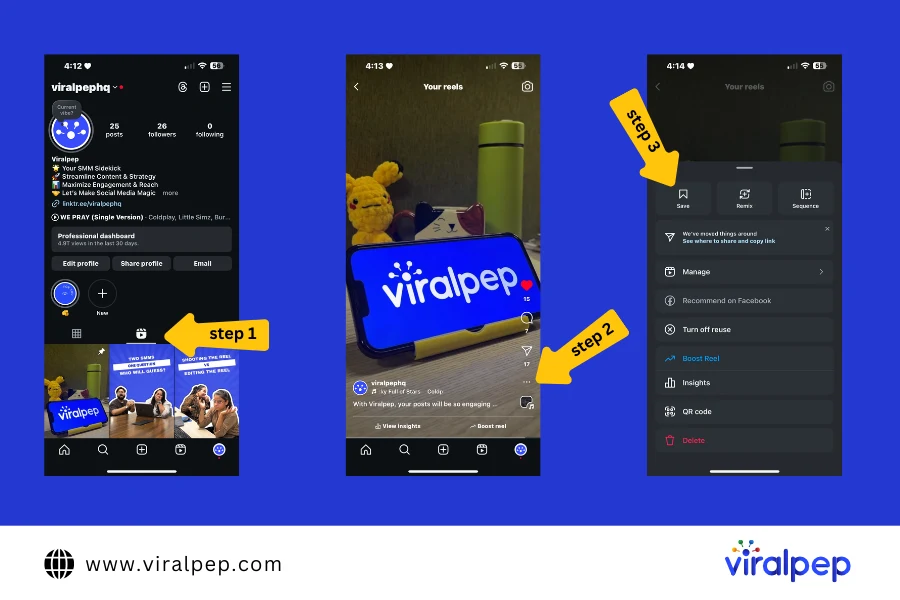
    Steps to Save a Reel on Instagram (Available for All Countries):

      1. Open Instagram and find the Reel you want to save.
      2. Tap the three dots on the top right of the Reel.
      3. From the menu, select Save to Collection.

    Step to Save Instagram Reels

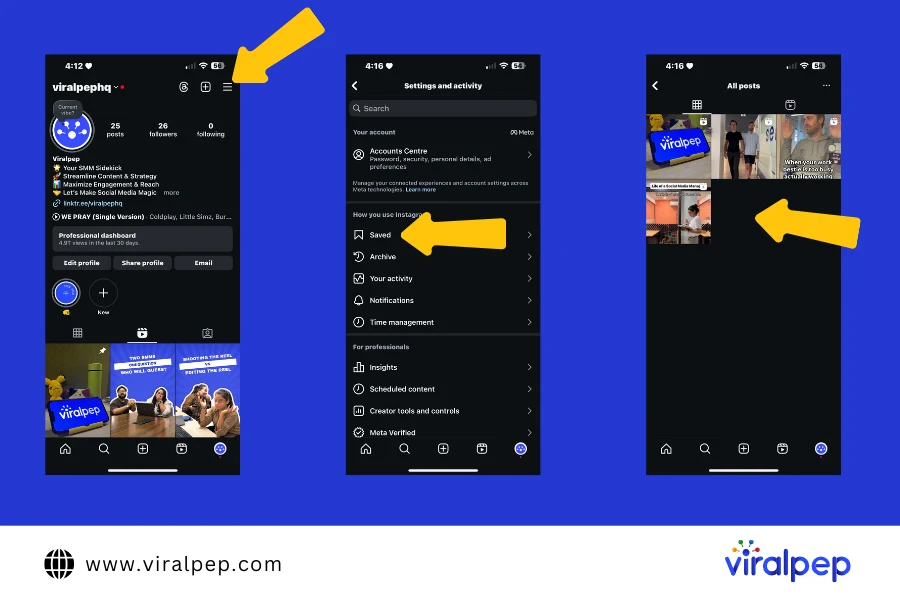
    1. You can view your saved Reels by going to your profile, tapping on the three lines in the top-right corner, and selecting Saved

    Step to View Instagram Reels

    Steps to Download Instagram Reels in the US:

    1. Open Instagram and find the Reel you wish to save.
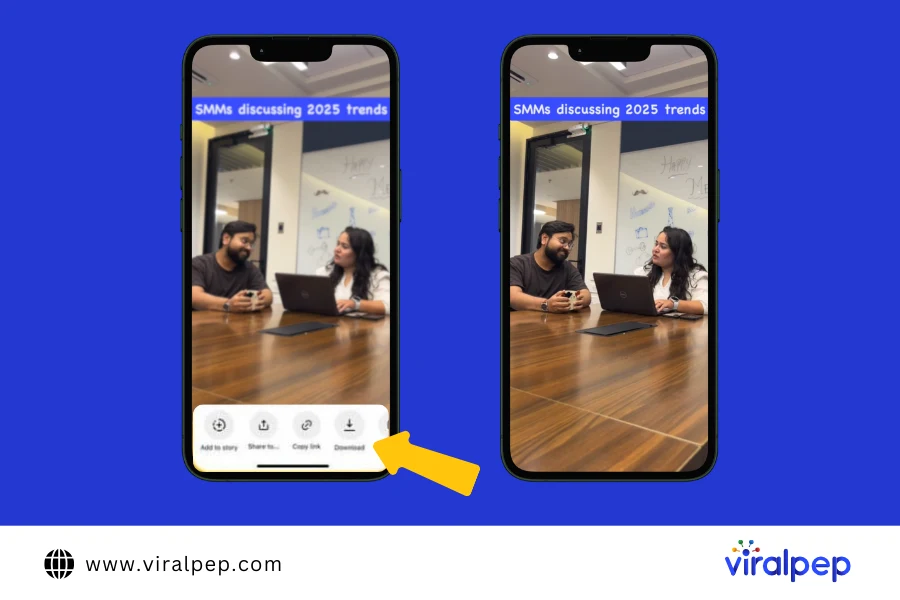
    2. Tap the Share icon located in the bottom-right corner.
    3. From the menu that appears, choose “Download.”The Reel will be saved directly to your device’s gallery or camera roll.

    Steps to Download Instagram Reels in the US

    This option is currently available only for users in the US and makes saving Reels for offline use quick and hassle-free. For users outside the US, alternative methods like the Save feature or third-party tools can be utilized.

  2. How to Download Instagram Reel Videos on iPhone

    There are two main methods for downloading Instagram Reels on iPhone: using screen recording or downloading through third-party apps like InSaver.

    • Method 1: Screen Recording

      While not the most ideal method, screen recording on your iPhone is a free and quick way to save Instagram Reels to your device.

      Steps to Record a Reel:

      1. Enable Screen Recording: Go to Settings > Control Center > Customize Controls, and add Screen Recording.
      2. Open Instagram and find the Reel you want to save.
      3. Swipe down from the top-right corner of your iPhone (or swipe up on older models) to access Control Center.
      4. Tap the Record button (a red circle) to start recording.
      5. Play the Instagram Reel.
      6. Stop recording by tapping the red bar at the top of your screen when the video is finished.
      7. The recording will be saved to your Photos app.

      While this method is simple, it may result in a decrease in video quality, and you will need to manually trim the video to remove unwanted sections.

    • Method 2: Using Third-Party Apps

      Apps like InSaver or Repost for Instagram allow you to download Instagram Reels directly to your iPhone in higher quality.

      Steps for Using InSaver:

      1. Copy the URL of the Reel by tapping the three dots and selecting Copy Link.
      2. Open the InSaver app (available on the App Store).
      3. Paste the link into the app.
      4. Tap Download, and the Reel will be saved to your iPhone.

      These apps provide a more efficient way to download Instagram videos and Reels compared to screen recording.

  3. How to Download Instagram Reels on Android

    Downloading Instagram Reels on Android devices is even easier, thanks to various third-party apps and browser tools like Video Downloader for Instagram.

    • Method 1: Using Video Downloader for Instagram

      One of the most popular Android apps for downloading Instagram Reels is Video Downloader for Instagram. This app lets you quickly save Reels to your gallery.

      Steps:

      1. Download Video Downloader for Instagram from the Google Play Store.
      2. Open Instagram and find the Reel you want to download.
      3. Tap the three dots on the Reel and select Copy Link.
      4. Open the Video Downloader for Instagram app.
      5. Paste the link, and tap Download to save the Reel directly to your Android device.

      This app is simple to use and ensures the video is saved in the original quality.

    • Method 2: Using Online Tools

      You can also download Instagram Reels without installing any apps by using browser-based downloaders like instasave.io or downloadgram.com.

      Steps:

      1. Copy the URL of the Instagram Reel you want to download.
      2. Visit a site like instasave.io or downloadgram.com.
      3. Paste the copied link into the input field and click Download.
      4. The Reel will be saved directly to your Android device.

      These tools offer an easy way to download Instagram videos without requiring additional software.

  4. How to Download Instagram Reels on Desktop

    If you prefer downloading Instagram Reels on your computer, you can use browser extensions or online tools.

    • Method 1: Using Browser Extensions

      Install browser extensions like Video Downloader Plus or Downloader for Instagram to download Instagram Reels directly to your desktop.

      Steps

      1. Install a browser extension from the Chrome Web Store.
      2. Once installed, navigate to Instagram and find the Reel you want to download.
      3. Click on the extension icon in your browser and select Download.
      4. The Reel will be saved to your computer.

      These extensions offer a quick way to download Instagram videos, but make sure to use trusted extensions to avoid potential security risks.

    • Method 2: Using Online Download Websites

      Alternatively, you can use websites like IGDownloader or SaveFrom.net to download Instagram Reels directly to your desktop.

      Steps:

      1. Copy the URL of the Instagram Reel.
      2. Visit a website like IGDownloader or Smallseotools.com.
      3. Paste the copied URL in the input field and click Download.
      4. The video will be downloaded to your desktop.

      These online tools are simple and effective for downloading Instagram videos, including Reels, directly to your computer.

Best Tools to Download Instagram Reels

Here are some reliable Instagram video downloaders

  • Smallseotools.com: Simple and fast for all devices.
  • SnapInsta: Download Reels in high quality.
  • Video Downloader for Instagram: A user-friendly Android app.

Conclusion

Now you know how to download Instagram Reels on various devices. Whether for offline enjoyment or inspiration, these steps and tools make it easy to save your favorite content. Always remember to respect copyright and privacy guidelines when downloading and sharing videos.

Downloading Instagram Reels is a great way to save your favorite videos for offline viewing, inspiration, or repurposing. Whether you’re using an iPhone, Android device, or desktop, there are multiple ways to download Instagram Reels and Instagram videos. Tools like Instagram video downloader, Reels downloader apps, and online websites make it easy to get Instagram Reels onto your devices.

If you’re looking for even more social media tools to boost your content management, check out Viralpep, which offers a full suite of features like content scheduling, real-time collaboration, and social media analytics.

FAQs

Can I download Instagram Reels without using an app?

Yes, websites like instasave.io or downloadgram.com allow you to download Instagram videos directly from your browser.

How can I download Instagram Reels in high quality?

To download Reels in HD quality, use third-party apps like InSaver or Repost for Instagram, which provide better quality than screen recording.

Is downloading Instagram Reels legal?

It is legal to download Instagram Reels for personal use. However, using someone else’s content for commercial purposes without permission can violate copyright laws.

Can I download Instagram Reels that are set to private?

No, you can only download Reels from public profiles or accounts that have shared their Reels with you.

Can I download Instagram Reels with music?

Yes, you can download Instagram videos with music intact using apps like InSaver or by screen recording.

How to Get More Followers on Facebook: A Complete Guide

With billions of active users, Facebook is still one of the most powerful platforms for engaging with your audience. Whether you’re a social media manager, a business owner, or a digital marketer, learning how to grow your Facebook following should be at the top of your marketing checklist. After all, Facebook is where your target audience spends a significant amount of time, and if you’re not reaching them, you’re missing valuable opportunities to connect, convert, and expand your brand’s reach.

In this guide, we’ll explore how to boost your Facebook following in 2025 using the most effective organic strategies and paid tactics. Let’s dive into actionable tips that can help you gain followers, engage your community, and improve your marketing strategy.

Who are Facebook followers and how to get followers on Facebook?

Facebook followers are individuals who choose to receive updates from a Facebook page or profile without needing mutual consent, unlike Facebook friends. These followers can interact with the posts, comments, and activities of the page they follow, helping to boost engagement and visibility.

  1. Public vs. Private: Anyone can follow a public profile or page, even if they don’t have a direct connection with the account owner. This is crucial for creators and businesses looking to expand their reach.
  2. Engagement: Following someone on Facebook allows users to engage with their content (liking, commenting, sharing) and interact in real-time without the need for a mutual connection.
  3. Notifications: Followers receive updates about posts, events, or activities from the accounts they follow, depending on their notification settings.
  4. Distinguishing Between Friends and Followers: Facebook distinguishes between friends (people you’ve accepted into your network) and followers (people who can see your public posts without being friends). This feature helps businesses and content creators expand their reach without necessarily connecting with people directly.

Understanding how to get more followers on Facebook is crucial for businesses, influencers, and content creators who wish to expand their reach. By utilizing strategies such as tailoring content to your target audience, optimizing your page, engaging actively with followers, and leveraging Facebook’s ad tools, you can effectively increase your follower count and build a stronger presence on the platform.

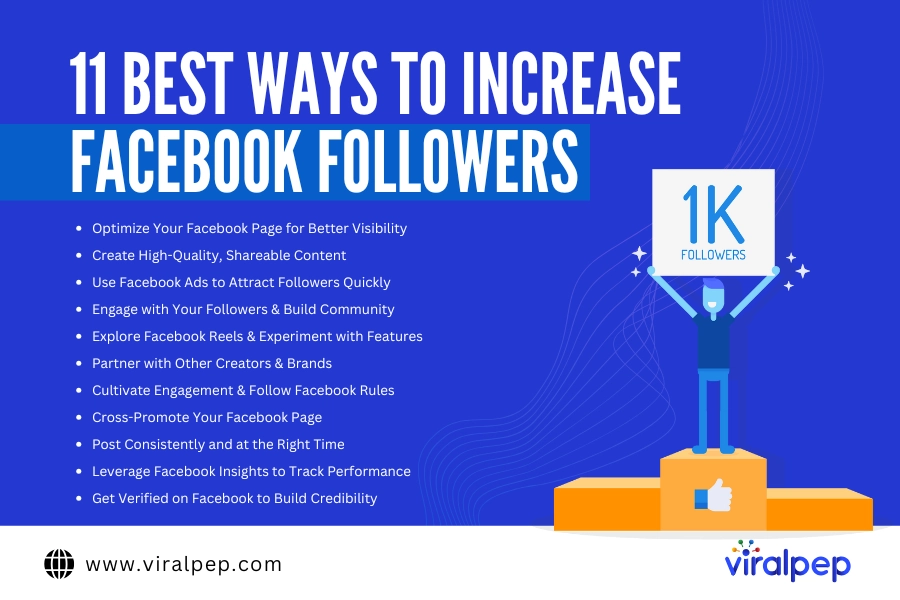
Here are the 11 best strategies you can implement to grow your follower base effectively.

Best way to increase facebook followers

  1. Optimize Your Facebook Page for Better Visibility

    To attract more followers, it’s crucial that your Facebook page is well-optimized. Here’s how you can set up your page for success:

    • Profile $ Cover Photos: These are the first elements users see when they visit your page. Use high-quality images that clearly represent your brand and are visually appealing to attract potential followers.
    • About Section: Your page’s description should clearly explain what your business is about. Include relevant keywords to improve visibility and make sure you have an engaging call-to-action, like “Shop Now” or “Contact Us.”
    • Engagement: Actively engage with visitors by responding to comments and messages. Facebook’s algorithm favors active pages, so this can help increase your chances of showing up in users’ feeds and attract more followers.
  2. Create High-Quality, Shareable Content

    The key to how to get more followers on Facebook lies in the content you post. High-quality, engaging content encourages users to follow and share your page. Here are some content ideas:

    • Videos: Facebook prioritizes video content, so use it to your advantage. Post videos that are informative, entertaining, or behind-the-scenes. Live videos are also a great way to build real-time engagement.
    • Memes $ Infographics: These visual formats perform well on Facebook. Memes can be funny, relatable, and shareable, while infographics are informative and easy to digest, making them perfect for engagement.
    • Polls $ Questions: Facebook users love to engage with interactive content. Polls, quizzes, and questions encourage followers to interact with your posts and help you build a community around your page.

    Tip: Create posts in advance and use the best social media scheduling tool like Viralpep to schedule your posts and keep your audience engaged with your page on a regular basis.

  3. Use Facebook Ads to Attract Followers Quickly

    While organic growth is important, Facebook ads are one of the most effective ways to increase followers quickly. Here’s how you can use ads strategically:

    • Targeted Ads: With Facebook’s advanced targeting tools, you can reach people based on their interests, location, age, and behaviors. Running targeted ads will help ensure your content reaches the right audience, driving more followers to your page.
    • Like Ads: Facebook offers “Page Like” ads specifically designed to help businesses increase their followers. These ads encourage users to follow your page in exchange for relevant content.
    • Ad Testing: Experiment with different ad formats (video, carousel, single image) to see which resonates the most with your target audience. A/B testing will help optimize your campaigns for better results.
  4. Engage with Your Followers $ Build Community

    Engagement is critical for long-term follower growth. Here’s how to foster genuine connections:

    • Respond to Comments: Always engage with users who comment on your posts. A simple like, reply, or thank you message goes a long way in building rapport and encouraging more interaction.
    • Host Live Sessions: Facebook Live is an excellent way to interact with your audience in real-time. Hosting Q$As or behind-the-scenes streams is a great way to increase social media engagement and loyalty among your followers.
    • Create a Facebook Group: A Facebook group is a great way to deepen relationships with your followers. Invite them to join and participate in discussions, ask questions, and share insights. It’s a fantastic way to build a community around your brand.
  5. Explore Facebook Reels $ Experiment with Features

    With the growing popularity of short-form content, Facebook Reels has become a highly effective tool to boost your social media reach and increase engagement. Just like Instagram Reels, Facebook’s short-form video feature allows you to create and share quick, engaging videos that have the potential to reach a wide audience.

    • Experiment with Features: Don’t be afraid to try out new features like Reels, polls, and new content formats. Facebook favors innovative content, and experimenting with all available features can help you attract more followers.
    • Leverage Shorts: As short-form content continues to dominate, creating Reels and similar content is an excellent way to grow your follower base. These posts are highly discoverable and more likely to be shared by users. If you’re wondering how to find Facebook Reels, simply navigate to the Reels tab on your Facebook app to explore trending videos and create your own!
  6. Partner with Other Creators $ Brands

    Collaborating with other influencers or brands in your niche can rapidly increase your followers by exposing your page to their audiences.

    • Collaborate with Influencers: Find the right influencers for your brand or content creators who align with your brand’s values and audience. Collaborating on campaigns, shout-outs, or content co-creation can attract their followers to your page.
    • Brand Partnerships: Partnering with other brands for joint promotions or giveaways can help you tap into a new audience. A thoughtful giveaway idea could be high-quality branded merchandise, such as leak-resistant tumblers and water bottles, which not only promotes your brand but also reflects a commitment to quality that resonates with potential new followers. Share each other’s posts, collaborate on content, or host a giveaway to encourage new followers.
  7. Cultivate Engagement $ Follow Facebook Rules

    Building a loyal community is a key aspect of how to get more followers on Facebook. Consistent and genuine engagement is crucial for long-term success:

    • Foster Authentic Engagement: Always aim to build real, meaningful relationships with your followers. Respond to comments, engage in conversations, and show that you genuinely care about your audience.
    • Follow Facebook’s Guidelines: To avoid penalties and keep your follower growth organic, ensure you are following Facebook’s community guidelines. Violating the rules can result in penalties that can hinder your page’s reach and follower growth.
  8. Cross-Promote Your Facebook Page

    Utilizing your other social media platforms to promote your Facebook page is a great way to grow your followers quickly.

    • Instagram: Add your Facebook link to your Instagram bio, and share posts promoting your Facebook content. Use Instagram Stories to encourage followers to join your Facebook community for more exclusive content.
    • Email Campaigns: In your email newsletters, include links to your Facebook page and encourage subscribers to follow for updates, promotions, or news.
    • Twitter $ LinkedIn: Don’t forget to include your Facebook link in your Twitter and LinkedIn profiles. Direct followers on these platforms to your Facebook page for a deeper connection.
  9. Post Consistently and at the Right Time

    Consistency is key to growing your Facebook following. Posting regularly ensures that your audience remains engaged and aware of your brand. Use a social media scheduling tool like Viralpep to schedule your posts in advance and maintain a consistent presence.

    • Post When Your Audience is Active: Use Facebook Insights to determine when your followers are most active. By posting during these peak times, you’ll increase Facebook engagement, which can lead to more followers. If you’re wondering how to find the best time to post on Facebook, analyze your audience’s activity patterns using Insights, or experiment with different posting times to see when your content performs best.
  10. Leverage Facebook Insights to Track Performance

    Monitoring your performance is crucial to ensuring that your efforts are paying off. Use Facebook Insights to track the success of your posts and understand what’s working.

    • Track Engagement Metrics: Look at likes, comments, shares, and click-through rates to understand how well your content is performing. Use this data to tweak your strategy.
    • Understand Audience Demographics: Facebook Insights also helps you learn more about your followers—such as their age, gender, and location—which can help you tailor your content to their preferences.
  11. Get Verified on Facebook to Build Credibility

    The blue verification badge on your Facebook page or profile can significantly enhance your credibility and attract more followers. Knowing how to get verified on Facebook is essential, as a verified account assures users that your page is authentic and trustworthy, making it more likely for people to follow and engage with your content.

    Here’s how to apply for verification on Facebook:

    • Complete Your Page Details: Ensure your page is fully optimized with accurate information, including a profile picture, cover photo, and comprehensive “About” section.
    • Provide Necessary Documents: Facebook may require official documents to prove your authenticity, such as a government-issued ID (for individuals) or business-related documents (for organizations).
    • Consistent Branding: Maintain consistent branding across your social media channels to reinforce your legitimacy.
    • Engagement Matters: Build a strong presence by regularly posting engaging and high-quality content. Facebook is more likely to verify accounts that actively contribute to the platform.
    • Apply for Verification: Go to the verification request section in your Facebook settings and follow the prompts. Provide all necessary details and documents, and submit your application.

    Tip: A verified account not only increases trust but also boosts visibility as Facebook’s algorithm prioritizes verified pages in search results.

    By getting verified, you’ll make your page stand out from competitors and build stronger connections with your audience, making it a valuable step in your strategy to grow your Facebook following in 2025.

How to See Your Facebook Followers

As you continue to grow your Facebook page, it’s important to know how to keep track of your followers. To see who is following you on Facebook, follow these steps:

  • Go to your Facebook profile or Page.
  • Click on Friends or Page Followers.
  • Select See All Followers to view the list of people following you.

This can help you track who’s engaging with your content, and also gives you insight into your community’s preferences.

If you’re wondering, how can I see my Facebook followers or how do I see my Facebook followers on a personal account, you can simply visit the Followers tab under your profile, where you’ll find a list of individuals who are following your updates. This provides an easy way to track your follower growth over time.

For those wondering how do I see my followers on Facebook: just head over to your followers section on your Facebook profile to view and manage your growing follower list.

Final Thoughts

Growing your Facebook following in 2025 requires a blend of smart strategy, consistent effort, and targeted advertising. By following the steps outlined in this guide, you can build a robust presence on the platform, engage with your audience meaningfully, and ultimately turn followers into loyal customers.

If you’re looking for a comprehensive social media management platform to help you grow your Facebook following, consider using Viralpep. With tools for scheduling, content creation, engagement tracking, and analytics, Viralpep helps you streamline your social media marketing efforts so you can focus on what really matters—building relationships with your audience.

Start your 15 free trials with Viralpep today and watch your social media growth soar!

FAQs About Growing Facebook Followers

Black Friday Marketing Ideas to Boost Sales and Maximize Conversions

Black Friday, held annually, is one of the most anticipated shopping days of the year. It’s a day when customers eagerly await massive discounts across a wide range of brands. With almost every brand offering special deals on products and services, it’s a golden opportunity to engage with your audience and drive sales. To make the most of this retail holiday, it’s essential to have a solid Black Friday marketing strategy in place. Whether you’re an e-commerce brand or a brick-and-mortar store, effective Black Friday sale advertisements, online ads, and promotions can help you stand out from the competition.

The term “Black Friday” was coined in 1869 following a major financial crisis in the United States, and its impact on brand marketing has been immense ever since. Today, Black Friday remains a cornerstone of modern marketing, with brands leveraging various strategies to maximize their reach and sales, especially on social media platforms.

In this blog, we’ll dive into Black Friday marketing ideas to boost sales and maximize conversions. From creative campaigns like gamified promotions and gift cards to leveraging Black Friday coupon code ideas, these strategies are guaranteed to bring in results. Plus, we’ll share how Viralpep’s social media management tool can help streamline and optimize your Black Friday efforts.
.

Top Black Friday Social Media Marketing Ideas

Creating engaging Black Friday Facebook ads and social media content can take some time, so it’s essential to focus on crafting content that aligns with your products and services. Keep in mind that different industries have unique needs. For example, Black Friday marketing for SaaS businesses differs from campaigns for consumer goods. It’s important to tailor your social media campaigns to fit the specific nature of your offering.

One key point to remember is to notify your followers about upcoming discounts well before Black Friday. As the event approaches, shoppers are actively looking for Black Friday deals and tips to help them save. Sharing informative posts in advance—whether a few weeks or even a month ahead—can build anticipation. Let your audience know which products and services will be discounted so they can plan accordingly.

Keep reading for more helpful Black Friday social media tips!

  1. Start Your Planning Early

    When it comes to Black Friday marketing, the earlier you start, the better. Black Friday sale posts should be scheduled social media post in advance across all your social media platforms. Early planning allows you to focus on social media content creation, ensuring you have compelling Black Friday advertisements, engaging Black Friday promotion content, and a seamless execution strategy.

    Pre-scheduling posts with a tool like Viralpep, which offers best social media scheduling tool and management features, allows you to plan your campaign well ahead of time. You can automate your posts, track engagement in real-time, and make sure your promotions go live exactly when you want them to. Viralpep simplifies social media planning, allowing you to engage with your audience effectively during the hustle and bustle of the Black Friday weekend.

    Tip: The earlier you start planning, the better. Pre-schedule your Black Friday posts well in advance. Let Viralpep help you stay ahead in the game.

  2. Offer a Reward for Shopping

    One of the most popular Black Friday marketing strategies is offering a reward to incentivize purchases. This could be in the form of discounts, free shipping, or gifts with purchase. A Black Friday coupon code can be an excellent way to create a sense of exclusivity and urgency. For example, To create a successful social media marketing strategy, consider offering a ‘Buy More, Save More’ discount or a percentage-off coupon that encourages customers to spend more to unlock greater rewards.

    Black Friday marketing strategies

    To maximize engagement, consider offering a free gift or special perk for customers who make a purchase during your Black Friday sale. Free gifts like branded items, samples, or exclusive products not only increase the perceived value of the offer but also create goodwill with your customers. By promoting these rewards in your Black Friday sale advertisements, you’ll see an uptick in both conversions and customer loyalty.

    Example: Create a “Buy More, Save More” deal or a percentage-off coupon. For example, “Spend $100, get 10% off your next order.”

  3. Partner With Influencers

    Influencer marketing is one of the most effective ways to promote your Black Friday sale online. By partnering with influencers who align with your brand, you can amplify your reach and tap into their established audience. Influencers can help spread the word about your Black Friday promotion through posts, stories, and videos, which will significantly increase brand visibility.

    Black Friday promotion with Influencers

    In addition, choosing the right influencers can significantly enhance your Black Friday sale posts to make your offers even more appealing. Work with influencers who are relevant to your target market and encourage them to promote your Black Friday deals using custom affiliate codes, which can drive traffic and sales. Influencers can also help with more authentic, engaging Black Friday sale advertisements that resonate better with potential buyers.

    Tip: Influencers can amplify your message and help increase brand visibility during Black Friday sales.

  4. Use Hashtags to Expand Your Reach

    Hashtags are a simple but powerful tool for increasing the visibility of your Black Friday promotions. By using trending and relevant hashtags like #BlackFriday, #BlackFridayDeals, or #BlackFridaySales, including an Instagram hashtag strategy, you can extend the reach of your Black Friday marketing strategies across social platforms like Instagram, Twitter, and Facebook. Hashtags also help you tap into niche markets by targeting specific audiences interested in your deals.

    Consider creating a custom hashtag for your Black Friday sale that reflects your brand or the theme of your promotion. This way, you can track engagement and encourage your customers to share their shopping experience using your hashtag. A branded hashtag is a great way to build community around your campaign and create buzz.

    Example: Include hashtags like #BlackFridayDeals or #BlackFridaySale and create a custom branded hashtag to track customer engagement.

  5. Offer Gift Cards as an Incentive

    Gift cards are a fantastic way to drive both immediate and future sales. Offer gift cards with a minimum purchase—such as “Spend $100 and get a $20 gift card”—to encourage higher spending. Not only do gift cards increase sales during Black Friday, but they also encourage repeat business, as customers are likely to return to redeem their cards.

    Incorporate gift card offers into your Black Friday sale advertisements, making sure to highlight the added value of purchasing during the event. Gift cards can be promoted via Black Friday online ads, email campaigns, and social media posts, ensuring customers know they are getting more than just a discount.

    Example: “Spend $100, get a $20 gift card” promotes higher spending and brings customers back.

  6. Engage Customers with a Wheel of Fortune Promotion

    Gamify your Black Friday campaign with a “Wheel of Fortune” promotion. This fun and interactive promotion allows customers to spin a virtual wheel for a chance to win discounts, free products, or exclusive deals. It adds excitement to the shopping experience and creates a sense of urgency, as customers will want to take part in the game while your Black Friday promotion is still live.

    Promote your Black Friday advertisements through your website and social media, offering a chance to win with every purchase. This tactic not only drives conversions but also boosts engagement with your audience, encouraging them to share their prizes on social media.

    Tip: Gamify your Black Friday campaign with a virtual “Wheel of Fortune.”

  7. Launch New Products to Capture Attention

    Black Friday is the perfect time to introduce new products to your customers. Whether it’s a limited edition product, an exclusive collection, or a major product launch, you can create excitement around your new offerings by promoting them heavily in your Black Friday sale posts and advertisements. Use countdowns and sneak peeks to build anticipation in the weeks leading up to the sale.

    Tip: Black Friday is the perfect time to introduce new products and offer introductory discounts.

  8. Leverage Referrals to Drive Word-of-Mouth Marketing

    Referral programs are a great way to encourage your current customers to spread the word about your Black Friday sale. Offer rewards, discounts, or free products to customers who refer friends or family members. This kind of word-of-mouth marketing can significantly extend your reach and increase conversions during the holiday rush.

    Encourage your referral program participants to share their experiences on social media using your custom Black Friday hashtags. This will help spread the word about your Black Friday promotions and bring in new customers who might not have otherwise found your store.

    Example: “Refer a friend and both receive 10% off your next purchase” can increase your customer base and drive sales.

  9. Use Buy One, Get One Free (BOGOF) Deals

    Offering Black Friday sale deals like Buy One, Get One Free (BOGOF) is a tried-and-tested way to increase sales. Customers are more likely to make a purchase if they feel they are getting an extra item for free. This works well in various industries, from fashion and beauty to tech and home goods.

    Black Friday BOGO deals

    Promote these offers in your Black Friday online ads and across all your social media channels to attract more customers and increase your average order value. BOGO deals not only incentivize immediate purchases but also encourage customers to buy more, driving sales up significantly during the Black Friday weekend.

    Example: Offer BOGO deals on popular items, such as “Buy one sweater, get a second one free.”

  10. Add Free Gifts to Sweeten the Deal

    Free gifts with purchase are another effective strategy for driving conversions. By offering a free product or a branded item, you make the shopping experience feel more rewarding for your customers. Promote free gifts across your Black Friday advertisements to ensure that customers are aware of this added value.

    Tip: Free gifts with purchase can create a more rewarding shopping experience.

  11. Build Anticipation with Pre-Black Friday Teasers

    Pre-Black Friday teasers are a great way to stir up excitement in advance of the big day. Use a well-planned social media calendar to schedule sneak peeks of the deals. Release sneak peeks of the deals, countdowns, or exclusive offers that will be available during the sale. Teasers on your social media platforms will help create buzz and build anticipation, encouraging customers to mark their calendars for the start of the sale.

    Black Friday Email Marketing Strategies

    By using Black Friday marketing strategies such as teaser videos and exclusive early-bird offers, you can drive traffic to your site even before the official Black Friday rush begins.

    Suggestion: Use email marketing to send out exclusive previews or early access to loyal subscribers to keep them engaged.

  12. Create Limited-Time Bundles and Product Deals

    Limited-time bundles are a fantastic way to offer more value and create a sense of urgency. Bundle related products together at a discounted price, and promote them heavily in your Black Friday sale advertisements. You can also create exclusive bundles only available during the Black Friday promotion, encouraging customers to purchase now before the offer ends.

    Example: Bundle related items together at a discounted price, such as “Get a hoodie, scarf, and hat for 20% off during Black Friday only.”

  13. Use Urgency Tactics with Countdown Timers and Limited Stock Alerts

    Urgency is a key tactic in driving conversions during Black Friday. Use countdown timers on your website and in Black Friday sale posts to emphasize the limited-time nature of your deals. Displaying limited stock alerts or “only X left in stock” messages on your product pages will encourage customers to act quickly before they miss out on the deal.

    Example: Display countdown timers on product pages and social media to indicate the time left for Black Friday deals.

  14. Free Shipping and Easy Returns to Enhance the Experience

    Offering free shipping is one of the most effective ways to drive conversions, as shipping costs are a significant barrier to online purchases. Combine this with an easy returns policy, and you’ve got a winning formula. Highlight free shipping in your Black Friday advertisements to attract more customers, knowing that their purchases won’t come with extra hidden costs.

    Example: Offer free shipping and clearly advertise your easy returns policy to make customers feel confident in their purchase.

  15. Engage with Live Streaming on Social Media

    Live streaming offers an exciting opportunity to engage with your audience in real-time. You can host live product demonstrations, behind-the-scenes looks, or Q&A sessions to build excitement for your Black Friday sale. Use platforms like Instagram, Facebook, or TikTok to interact with customers, answer questions, and showcase your deals live.

    Example: Host a live event where you showcase new products, demonstrate best-sellers, or answer customer questions about Black Friday deals.

Conclusion

Implementing these Black Friday marketing ideas can help your business stand out, drive more traffic, and maximize conversions during the holiday season. From offering gift cards and gamified promotions to leveraging influencer partnerships and referral programs, there are plenty of ways to attract and engage customers. Don’t forget to use tools like Viralpep to manage your social media campaigns, schedule posts, and track performance—all of which will ensure your Black Friday promotion runs smoothly.

As you plan your Black Friday marketing strategies , remember to tailor your campaigns to your audience’s preferences, track your results, and adjust your approach based on what works best. By implementing these tactics and using the right tools, your business will be positioned for success this Black Friday and beyond.

Best Time to Post on Social Media: Key Insights for Every Platform

When is the best time to post on social media? It’s a question that every marketer faces when developing their strategy. However, there’s no universal answer, as the best time to post on social media can vary depending on the platform, the audience, and the industry. After analyzing data from 50,000 accounts across various sectors, we’ve pinpointed optimal times that can help boost engagement.

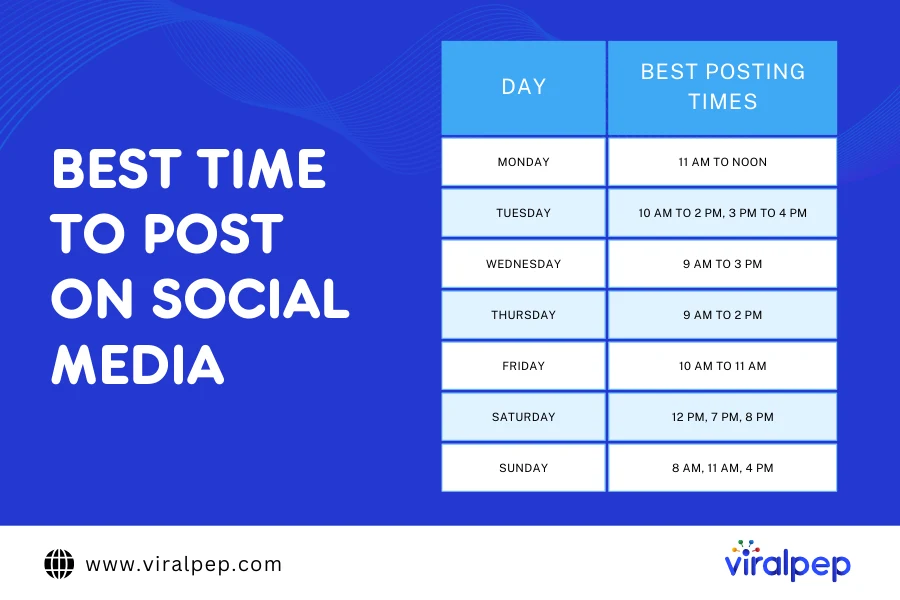
To ensure your posts reach your target audience, it’s critical to align your schedule with the platform’s usage trends. Let’s take a closer look at the best time to post on social media across different days of the week:

Best Time to Post on Social Media

The ideal times to post on social media are mid-week, specifically on Wednesday and Thursday, during mornings (7 am to 9 am), early afternoons (1 pm to 3 pm), and evenings (7 pm to 9 pm). This conclusion comes from analyzing engagement data from over 50,000 accounts across various industries and locations.

Best Time to Post on Social Media

Each social media platform offers unique advantages based on your goals, campaigns, content types, and target audience. To enhance engagement, it’s important to review your social media KPIs. Does your current strategy support achieving these KPIs? For instance, if boosting likes and comments is a priority, understanding which days yield the most engagement can help you meet those objectives.

When analyzing data from each social network, we consistently find that peak engagement times fall between Tuesday and Thursday, generally from 9 AM to 2 PM. Midweek mornings tend to perform well across platforms like Facebook, Instagram, Twitter, and LinkedIn, while Pinterest and TikTok experience higher engagement in the afternoons.

However, posting on social media involves more than just these statistics. Engagement varies significantly throughout the week and across different times on each network. Additionally, when considering specific industries, engagement patterns can differ even more. Therefore, while Tuesday through Thursday, between 9 AM and 2 PM, are typically the best times to post, be sure to take other factors into account before scheduling your content.

  1. Best Time to Post on Social Media on Monday

    The best time to post on social media on Monday is from 11 am to noon. This time frame is ideal as people are settling into their workweek, checking emails, and taking frequent breaks. Posting during this window allows you to capture their attention when they are ready to engage with content.

  2. Best Time to Post on Social Media on Tuesday

    The best time to post on social media on Tuesday is between 10 am to 2 pm and 3 pm to 4 pm. During these hours, people are fully immersed in their workweek, taking breaks, and seeking quick distractions, making them more likely to interact with your content.

  3. Best Time to Post on Social Media on Wednesday

    The best time to post on social media on Wednesday is from 9 am to 3 pm. This period is ideal as individuals are in the midweek flow, looking for productive breaks and engaging content during these hours.

  4. Best Time to Post on Social Media on Thursday

    The best time to post on social media on Thursday is between 9 am and 2 pm. By this point in the week, people are wrapping up their tasks and seeking brief distractions, making this time effective for capturing their attention when they are most active online.

  5. Best Time to Post on Social Media on Friday

    The best time to post on social media on Friday is from 10 am to 11 am. This hour is ideal as individuals are winding down their week, catching up on tasks, and planning their weekends, allowing you to engage them when they are most active and receptive.

  6. Best Time to Post on Social Media on Saturday

    The best time to post on social media on Saturday is at 12 pm, 7 pm, and 8 pm. These times help capture the audience during their leisurely weekend activities and evening downtime, maximizing engagement.

  7. Best Time to Post on Social Media on Sunday

    The best time to post on social media on Sunday is at 8 am, 11 am, and 4 pm. These times align with when people are most likely to check their feeds, such as during morning routines, late morning breaks, and late afternoon relaxation.

What’s the Best Time to Post on Social Media Across all Platforms?

Choosing the right platform is the first step toward a successful social media strategy. Once you have the appropriate platform, the next critical step is optimizing your posting times.

Best Time to Post on Social Media All Platforms

Each social media platform has its own unique dynamics, and knowing when to share your content is essential for maximizing its impact. Whether you aim to spark conversations, drive clicks, or simply increase visibility for your message, timing plays a crucial role. By aligning your posts with your audience’s online habits, you can unlock new levels of engagement and growth.

In this section, we’ll outline the ideal posting times for seven major social media platforms.

Let’s dive into the best times to post on each platform to ensure your content reaches its audience at the optimal moment.

  1. What are the Best Times to Post on Facebook

    ? Key Times: Weekdays: 9 AM – 11 AM, 1 PM – 3 PM; Engagement is higher on Thursdays and Fridays.

    ? Reason: Users often check their feeds during work breaks and are more active as the weekend approaches.

    ? Best For: Retail, consumer services, entertainment.

    ? Outcome: Expect steady engagement with higher likes and comments, especially for posts shared in the mid-morning and mid-afternoon.

  2. What are the Best Times to Post on Instagram

    ? Key Times: Weekdays: 11 AM – 1 PM, 7 PM – 9 PM; Wednesdays are particularly effective.

    ? Reason: Users are most active during lunch and in the evening, with mid-week being peak engagement time.

    ? Best For: Fashion, lifestyle, travel, food.

    ? Outcome: High visual engagement with numerous likes and shares, particularly effective for brand visibility and interaction.

  3. What are the Best Times to Post on X

    ? Key Times: Weekdays: 10 AM – 11 AM, 6 PM – 7 PM; Wednesday and Thursday show increased activity.

    ? Reason: The fast-paced nature of X requires timely posts; late mornings and early evenings catch users during peak engagement periods.

    ? Best For: News, technology, sports, entertainment.

    ? Outcome: Quick and frequent interactions, ideal for real-time updates and engagement.

  4. What are the Best Times to Post on LinkedIn

    ? Key Times: Weekdays: 10 AM – 11 AM, 12 PM – 1 PM; Tuesday is the most active day.

    ? Reason: Professionals are most engaged during mid-morning and lunch breaks on business days.

    ? Best For: B2B/B2C marketing, professional services, career development.

    ? Outcome: Strong engagement with higher levels of shares and professional interactions.

  5. What are the Best Times to Post on Pinterest

    ? Key Times: Evenings: 8 PM – 11 PM; Saturday is the busiest day.

    ? Reason: Users browse for inspiration and ideas in the evenings and on weekends when they have more free time.

    ? Best For: Home decor, fashion, DIY, recipes.

    ? Outcome: High engagement with repins and saves, particularly for visually appealing and inspirational content.

  6. What are the Best Times to Post on TikTok

    ? Key Times: Weekdays: 6 AM – 10 AM and 7 PM – 11 PM; Most effective on Tuesday, Thursday, and Friday.

    ? Reason: Users are most active in the mornings and evenings, exploring content before starting their day and after winding down from work or school. Tuesdays, Thursdays, and Fridays see particularly high engagement.

    ? Best For: Viral content, trends, music, dance challenges.

    ? Outcome: High levels of engagement and virality, ideal for reaching a younger audience with creative content.

  7. What are the Best Times to Post on YouTube

    ? Key Times: Weekdays: 2 PM – 4 PM, 7 PM – 9 PM; weekends are also effective, with Sunday being the best day to post (9 AM – 11 AM).

    ? Reason: Users watch videos in the late afternoon and evening when they’re home from work or school, with weekends offering more flexibility.

    ? Best For: Long-form content, tutorials, vlogs, educational videos.

    ? Outcome: Strong viewership and engagement, particularly for in-depth content and educational material.

Best time to Post on Social Media by Content Type

Every type of content experiences unique peak engagement periods influenced by user habits and platform algorithms. In this section, we’ll examine the best posting times for various content types, empowering you to tailor your strategy for enhanced visibility, interaction, and success across social media platforms. Ensure each post makes an impact!

Best Time to Post on Social Media By Content Type

  1. Images/Graphics

    ? Key Time: 1 PM – 3 PM on weekdays

    ? Reason: Engagement peaks during lunch hours when users take breaks and scroll through their feeds.

    ? Best For: Instagram, Facebook, Pinterest

    ? Outcome: Higher engagement rates, increased shares, and better visibility in user feeds.

  2. Videos

    ? Key Time: 9 AM – 12 PM on weekdays

    ? Reason: Morning is when users are more likely to engage with video content, especially short clips.

    ? Best For: Facebook, Instagram, YouTube

    ? Outcome: Increased views and shares, driving higher interaction and potential leads.

  3. Text Posts/Status Updates

    ? Key Time: 3 PM – 5 PM on weekdays

    ? Reason: Users are winding down their workday and may look for relatable or engaging content.

    ? Best For: Facebook, Twitter

    ? Outcome: Enhanced user interaction, with more comments and shares.

  4. Links/Articles

    ? Key Time: 8 AM – 10 AM on weekdays

    ? Reason: Early in the day, users are more inclined to share informative content as they prepare for their day.

    ? Best For: LinkedIn, Twitter, Facebook

    ? Outcome: Increased click-through rates and improved traffic to your website or blog.

  5. Stories (Instagram/Facebook)

    ? Key Time: 6 PM – 9 PM on weekdays and weekends

    ? Reason: Users are more active during evenings, seeking entertainment and updates from their connections.

    ? Best For: Instagram, Facebook

    ? Outcome: Greater engagement with viewers, leading to more interactions and brand awareness.

  6. Polls/Engagement Questions

    ? Key Time: 12 PM – 2 PM on weekdays

    ? Reason: Lunchtime engagement encourages users to interact with quick, bite-sized content.

    ? Best For: Instagram, Twitter, Facebook

    ? Outcome: Increased interaction rates, fostering a sense of community and feedback from followers.

  7. Webinars/Live Streams

    ? Key Time: 1 PM – 3 PM on weekdays

    ? Reason: Midday sessions allow attendees to take breaks from work and engage with informative content.

    ? Best For: YouTube, Facebook Live, LinkedIn Live

    ? Outcome: Higher attendance rates, increased engagement during sessions, and post-event views.

What Factors Are Important for Determining the Best Time to Post on Social Media?

Several factors influence the best times to post on social media. Understanding these can help you optimize your posting schedule for maximum social media engagement. Here are the key factors to consider:

  1. Audience Demographics

    • Location: Time zones play a significant role. Posting when your audience is most active can vary based on their geographical location.

    • Age Group: Different age groups have varying online behaviors. For instance, younger audiences may be more active late at night, while older demographics may engage earlier in the day.

  2. Platform Specifics

    • Each social media platform has its own peak times for user activity. For example, professionals may use LinkedIn during business hours, while platforms like Instagram and TikTok may see more engagement during evenings and weekends.

  3. Content Type

    • The nature of the content can dictate the best posting times. Informational content might perform better during weekdays, while entertaining or casual content may thrive on weekends.

  4. Industry and Niche

    • Different industries may have unique engagement patterns. For instance, retail brands may see higher engagement on weekends, while B2B companies might find weekdays more effective.

  5. Seasonality and Events

    • Seasonal trends and holidays can influence social media activity. For example, posts related to holidays may perform better during specific times leading up to or during the holiday.

  6. User Behavior

    • Users’ habits, such as checking social media during breaks or after work, can affect engagement. Monitoring how and when your specific audience interacts with content is crucial.

  7. Previous Engagement Data

    • Analyzing your past performance metrics can provide insights into when your audience is most responsive. Use this data to refine your posting schedule.

  8. Competitor Activity

    • Observing when competitors post and the engagement they receive can inform your strategy. It might reveal gaps or opportunities for posting when less competition exists.

  9. Algorithm Changes

    • Social media algorithms frequently change, affecting how content is distributed. Staying updated with these changes can help you adapt your posting strategy accordingly.

  10. Engagement Trends

    • Keep an eye on current engagement trends. For instance, trends in viral content or popular hashtags may dictate when to post for maximum reach.

  • How to Identify the Best Posting Times Using Viralpep

    1. Use Social Media Analytics

      To pinpoint the best times for posting and optimize your schedule, analyze the following data from your social media analytics:

      • Engagement Metrics:

        • Likes, Comments, Shares: Identify when your posts garner the most engagement.

        • Views and Impressions: Check when your content receives the highest views.

    2. Review Audience Insights

      • Social Media Demographics: Understand the age, location, and interests of your audience.

    3. Track Post Performance

      • Top-Performing Posts: Note the times and days when your best posts were published.

      • Content Type Analysis: Determine which types of social media content perform best at various times.

    4. Utilize Platform Analytics Tools

      • Viralpep Analytics: Use built-in tools to gather data on post performance and audience behavior.

      • Third-Party Tools: Consider using comprehensive social media analytics tools like Viralpep for deeper insights.

    5. Experiment and Adjust

      • Social Media A/B Testing: Try posting at different times and compare results.

      • Continuous Monitoring: Regularly review your analytics and modify your posting schedule based on the latest data.

    6. Consider Industry Trends

      • Benchmarking: Compare your data against industry standards to see if your posting times align with general trends.

      • Seasonal Variations: Be mindful of how engagement might fluctuate during holidays or special events.

    By consistently analyzing and interpreting your social media analytics with Viralpep, you can refine your posting times to maximize engagement and reach.

  • Use an All-in-One Tool Like Viralpep

    In the fast-paced world of social media management, efficiency and organization are crucial for success. That’s where an all-in-one tool like Viralpep comes into play. By consolidating multiple functionalities into a single platform, Viralpep streamlines your social media workflow, allowing you to manage social media content creation, scheduling, analytics, and collaboration all in one place.

    Viralpep Tool

    Why Choose Viralpep?

    1. Comprehensive Features: Viralpep offers a robust suite of tools, including social media scheduling, performance analytics, and real-time collaboration, eliminating the need for multiple apps. This integration saves time and minimizes the risk of errors, making it easier to stay organized.

    2. User-Friendly Interface: With a clean and intuitive design, Viralpep is accessible for both beginners and seasoned social media managers. It’s easy-to-navigate dashboard ensures that you can quickly find the tools you need to optimize your campaigns.

    3. Analytics and Insights: Understanding your audience is key to creating effective content. Viralpep’s advanced social media analytics feature provides in-depth insights into your social media performance, helping you refine your strategy and maximize engagement.

    4. Seamless Collaboration: For teams, Viralpep enhances collaboration through shared calendars and approval workflows. This means that everyone stays on the same page, and content can be reviewed and approved without hassle.

    By choosing Viralpep, you’re not just selecting a tool; you’re investing in a comprehensive solution that empowers your social media strategy. Save time, improve efficiency, and achieve your goals with Viralpep’s all-in-one platform.

Ready to Post on Social Media at the Best Time?

The timing of your social media posts can significantly impact your return on investment. By understanding when your audience is most engaged and active, you can enhance your content’s visibility and foster deeper conversations. Remember to adjust your posting schedule based on your target market and industry. Staying flexible and regularly reviewing your data will help you stay ahead in the fast-paced world of social media and maximize your ROI.

With Viralpep, you can effortlessly engage customers across all popular social media platforms. Our integrated scheduling tool allows you to participate in relevant conversations that may not directly involve your brand. Viralpep is designed specifically to help businesses expand their reach, accelerate content creation, and improve their ROI. Ready to give Viralpep a shot? Skip the 15-Day free-trial and receive an extra 20% off today.

Social Media Content Creation: Importance, Benefits & 13 Essential Tips

In today’s fast-paced digital world, social media content creation is not just an option—it’s a necessity. Businesses and individuals alike use platforms like Facebook, Instagram, and Twitter to engage with their audiences and promote their brands. But what exactly is social media content creation? Why is it so important, and how can you develop a smart content strategy? In this blog post, we’ll delve into the fundamentals of social media content creation, explore various content formats, and provide 13 actionable tips to help you craft effective social media content plans. Whether you’re a beginner or a seasoned marketer, this guide will equip you with the knowledge and tools needed to enhance your social media presence.

What is Social Media Content Creation?

Social media content creation involves developing and producing engaging materials designed to be shared on social platforms. This can include anything from images and videos to articles and memes. The main goal is to create content that resonates with your audience, encouraging interactions such as likes, shares, comments, and ultimately driving traffic to your website or business. One important aspect of content creation is staying on top of viral social media trends, which can significantly boost the visibility and reach of your posts. By aligning your content with these trends, you can increase engagement and tap into a larger audience.

At its core, what is content creation in social media? It is the process of brainstorming, developing, and curating content tailored to specific platforms and audiences. It requires understanding your audience’s preferences, current trends, and the unique characteristics of each social media platform.

For instance, Instagram thrives on visual storytelling, while Twitter favors concise, impactful messages. A well-rounded social media content strategy integrates these different formats, ensuring that your brand remains relevant across various channels.

Why is Social Media Content Creation Important?

Have you ever wondered why some brands excel on social media while others struggle? The key lies in one crucial element — smart content creation. Social media content creation is the gateway to building genuine connections, engaging with audiences worldwide, and leaving a lasting impression.

Effective Content Creation for Social Media Strategy

If you’re thinking, “But why does it matter?” Here are some of the top reasons.

  1. Building Brand Awareness

    In a crowded marketplace, standing out is crucial. Effective social media content creation helps businesses communicate their unique value propositions and enhances brand visibility. By consistently producing high-quality content, you foster brand recognition and loyalty among your audience.

  2. Engaging Your Audience

    Creating relatable and engaging content encourages audience interaction. When followers comment, share, or react to your posts, it not only boosts your visibility but also cultivates a community around your brand.

  3. Driving Traffic and Conversions

    Social media platforms serve as valuable channels for driving traffic to your website. Engaging content can lead users to your landing pages, increasing the chances of conversions—whether that means signing up for a newsletter, making a purchase, or engaging with your services.

  4. Improving SEO

    Social media plays a significant role in search engine optimization. Search engines consider social signals—such as likes and shares—when determining page ranking. By effectively promoting your content on social media, you enhance your overall SEO strategy.

  5. Staying Competitive

    As businesses increasingly recognize the value of social media, a robust content creation strategy is vital for staying ahead. Regularly updated, engaging content positions you as a thought leader in your industry.

Benefits of Content Creation for Customer Interactions

  1. Real-Time Communication

    Social media offers the ability to engage in conversations as they happen. Whether it’s responding to trending topics, addressing breaking news, or quickly answering customer inquiries, you can stay relevant and part of the most current discussions.

  2. Direct Engagement and Interaction

    Social platforms create a direct line of communication between your brand and your audience. Through likes, comments, shares, and messages, you can foster genuine interactions. This not only strengthens your relationship with followers but also gives you valuable insight into their preferences and sentiments.

  3. Influencer Collaboration and Storytelling

    Partnering with influencers can boost your content’s reach and credibility. Social media is also an ideal platform for sharing your brand’s story in a way that resonates with your audience, helping to create a personal connection.

  4. Frequent Updates and Community Building

    Regular content updates keep your brand top of mind and help build a loyal community around your business. By posting consistently, you foster a sense of belonging that encourages repeat engagement and loyalty.

  5. Feedback and Lead Generation

    Engaging with comments and messages provides instant feedback from your audience, helping you better understand their needs and preferences. Additionally, strategic content can drive traffic to your website, supporting lead generation and potential sales conversions.

Overview of Different Social Media Content Formats

Effective content is key to driving business growth—it’s a fundamental truth, right? To craft engaging social media content, it’s essential to familiarize yourself with various dynamic content formats and understand how to utilize them effectively in your social media strategy. Let’s take a quick look at these formats:

  1. Text Posts

    • Share updates, announcements, and thought-provoking questions.
    • Keep your text concise, clear, and engaging.
    • Use relevant hashtags to boost discoverability.
    • Encourage audience participation by inviting opinions or experiences.
  2. Images

    • Post visually appealing images related to your brand, products, or services.
    • Use high-quality images that resonate with your target audience.
    • Incorporate your brand’s color palette and style for consistency.
    • Add captions that enhance the image and provide context.
  3. Videos

    • Create short, engaging videos for quick consumption (e.g., product demos, behind-the-scenes, tips).
    • Use storytelling techniques to connect emotionally with viewers.
    • Optimize videos for mobile viewing, including subtitles and clear visuals.
    • Experiment with live streaming to interact with your audience in real time.
  4. Infographics

    • Simplify complex information into visually engaging graphics.
    • Use bold colors, icons, and concise text to highlight key points.
    • Ensure the information is easily digestible at a glance.
    • Include your logo and branding for better recognition.
  5. Carousel Posts

    • Use multiple images or slides to tell a story or provide a step-by-step guide.
    • Maintain visual consistency and connectivity across slides.
    • Include a compelling call-to-action (CTA) to encourage users to swipe through.
  6. User-Generated Content

    • Share content created by your customers or followers.
    • Highlight customer successes, testimonials, and reviews.
    • Encourage users to tag your brand and use a specific hashtag for a chance to be featured.
  7. Stories

    • Take advantage of the temporary nature of stories for timely updates.
    • Share behind-the-scenes content, polls, quizzes, and day-in-the-life snippets.
    • Use interactive features like polls, questions, and countdowns.
  8. Animated GIFs and Memes

    • Use humor and relatable content to engage your audience.
    • Create GIFs or memes that align with your brand’s tone and messaging.
    • Ensure your content is relevant and inoffensive.
  9. Podcasts and Audio Clips

    • Share audio content such as podcasts, interviews, or motivational clips.
    • Promote your podcast episodes or audio content with visually appealing graphics.
    • Include a brief description or teaser to attract listeners.
  10. Interactive Content

    • Organize contests, giveaways, and challenges to encourage participation.
    • Create quizzes, polls, and interactive posts that spark engagement.
    • Reward participants with exclusive offers, discounts, or recognition.

By integrating these diverse formats into your social media strategy, you can create a vibrant and engaging online presence that resonates with your audience.

13 Tips for a Smart Content Creation Strategy

Creating effective social media content requires a thoughtful strategy. Here are 13 tips to enhance your approach:

  1. Know Your Audience

    Understanding your audience is the foundation of effective content creation. Conduct surveys, analyze engagement metrics, and use social listening tools to gather insights about your audience’s interests and preferences.

  2. Set Clear Goals

    Determine what you want to achieve with your content. Are you aiming to increase brand awareness, drive traffic, or generate leads? Clear goals will guide your content strategy.

  3. Create a Content Calendar

    Planning your content in advance helps maintain consistency and ensures that you’re covering a variety of topics. A content calendar also allows for better collaboration within teams.

  4. Focus on Quality Over Quantity

    While it’s important to post regularly, prioritizing quality will yield better results. High-quality content is more likely to be shared and engaged with.

  5. Utilize Social Media Content Creation Tools

    Consider using social media content creation tools like Viralpep to streamline your workflow and improve your content’s visual appeal.

  6. Leverage Analytics

    Monitor your performance through analytics tools. Assess what types of content perform best and adjust your strategy accordingly.

  7. Stay Current with Trends

    Keeping up with viral social media trends will help you create relevant content that resonates with your audience.

  8. Use Hashtags Wisely

    Hashtags can increase your content’s visibility but use them strategically. Research popular and relevant hashtags within your niche to expand your reach.

  9. Engage with Your Audience

    Respond to comments and messages promptly. Engaging with your audience fosters loyalty and encourages further interaction.

  10. Test Different Formats

    Experiment with various content formats to see what resonates best with your audience. A/B testing can help identify the most effective approaches.

  11. Collaborate with Influencers

    Partnering with influencers can extend your reach and lend credibility to your brand. Ensure that the influencer aligns with your brand values for authenticity.

  12. Include a Call-to-Action (CTA)

    Encourage your audience to take action, whether it’s visiting your website, signing up for a newsletter, or following your social media accounts.

  13. Repurpose Content

    Maximize the value of your content by repurposing it across different platforms. For example, a blog post can be turned into an infographic, video, or series of social media posts.

Conclusion

Mastering social media content creation is a dynamic process that can significantly enhance your brand’s online presence. By understanding the importance of engaging content, utilizing diverse formats, and implementing smart strategies, you can create impactful social media content that resonates with your audience.

For those seeking to elevate their social media game, exploring platforms like Viralpep can provide valuable resources and insights.

Ready to take your social media content to the next level? Start creating compelling content that connects, engages, and converts today!

FAQs

What is social media content creation?

Social media content creation involves producing engaging content for platforms like Facebook, Instagram, Twitter, etc aimed at connecting with audiences and promoting brands.

Why is social media content creation important?

It builds brand awareness, engages audiences, drives traffic, and improves SEO, making it essential for businesses looking to succeed online.

What are the different social media content formats?

Formats include images, videos, text posts, stories, live streams, and user-generated content, each catering to specific audience preferences.

How can I create a content calendar?

Use tools like Viralpep to plan your content in advance, ensuring variety and consistency in your posting schedule.

What are some social media content creation tools?

Viralpep is a powerful tool for creating and managing social media content. It allows users to design, schedule, and publish posts across multiple platforms from a single dashboard. With Viralpep, you can streamline your content creation process by utilizing customizable templates, manage campaigns efficiently, and track engagement through detailed analytics. It’s an all-in-one solution for simplifying social media management while ensuring consistent, high-quality posts.

How often should I post on social media?

Posting frequency depends on the platform and audience; aim for consistency while prioritizing quality over quantity.

How can I measure the success of my social media content?

Utilize analytics tools like Viralpep to monitor engagement metrics, such as likes, shares, comments, and website traffic, to gauge performance.

How to Create Buyer Personas: A Comprehensive Guide

In today’s fast-paced digital landscape, understanding your audience is more crucial than ever. As a social marketer (or any marketer, for that matter), it’s easy to get lost in the details of tracking your latest engagement rates and marketing campaigns. Buyer personas remind you to prioritize your audience’s wants and needs over your own and help you create content that better targets your ideal customer.

This guide will break down everything you need to know about how to create buyer personas, the benefits they bring to your business, and practical steps to develop them. Read on for a buyer persona definition, examples, and a free buyer persona template. Whether you’re a seasoned marketer or just starting out, let’s dive into the world of buyer personas and see how they can transform your marketing strategies!

What is a Buyer Persona?

Before we explore how to create buyer personas, it’s essential to understand what a buyer persona is. A buyer persona is a semi-fictional representation of your ideal customer, based on real data and some educated guesses about customer demographics, behaviors, motivations, and goals. It encapsulates who your customers are, what they want, and how they prefer to interact with brands.

  • Key Characteristics of Buyer Personas

    • Demographics: This includes age, gender, location, education level, and income. These basic details help you understand who your audience is at a glance.
    • Psychographics: These are deeper insights, including interests, values, lifestyle, and purchasing motivations. Psychographics help you understand why your audience makes certain decisions.
    • Behavior Patterns: How do your ideal customers engage with your brand? What channels do they use for communication? Understanding this can guide your marketing strategy.
  • Example of Buyer Persona

    Let’s consider an example of a buyer persona. Imagine you run a software company targeting small businesses. A potential buyer persona might look like this:

    • Name: Small Business Sam
    • Age: 35-50
    • Location: Suburban areas in the U.S.
    • Occupation: Owner of a small retail store
    • Goals: Streamline operations, improve customer engagement
    • Challenges: Limited budget, lack of tech expertise
    • Preferred Communication Channels: Email, social media

Creating personas like “Small Business Sam” allows you to tailor your marketing messages more effectively, making it easier to connect with your audience.

Why Are Buyer Personas Important to Your Business?

Buyer personas are essential for several reasons, serving as a foundation for your marketing strategies.

importance of buyer personas in marketing strategy

  • Enhanced Targeting

    By understanding who your customers are, you can tailor your marketing efforts to speak directly to them. For instance, if you know your target audience prefers email over social media, you can focus your efforts there, increasing engagement and conversion rates.

  • Improved Product Development

    How to create a marketing persona also provides insights into what your customers need and want. By aligning your product development with the preferences and pain points of your personas, you create products that resonate more strongly with your target audience. This could mean refining features, improving customer support, or even launching entirely new offerings.

  • Increased Customer Loyalty

    When you understand your customers deeply, you can create a better experience for them. Personalization leads to increased customer satisfaction, which fosters loyalty. Happy customers are more likely to return, recommend your business, and leave positive reviews.

  • Data-Driven Decisions

    According to the Market, 71% of companies that exceed their revenue and lead goals have documented buyer personas. How to create buyer personas allows businesses to make data-driven decisions rather than relying on guesswork.

Benefits of Buyer Personas

Creating buyer personas offers several key benefits that can positively impact your business.

  1. Data-Driven Decisions

    By relying on real data to develop your personas, you make informed decisions rather than guessing what your audience might want. This reduces risk and increases the likelihood of success in your marketing campaigns.

  2. More Effective Marketing Strategies

    With buyer personas, your marketing strategies become more focused. You can create targeted content, select appropriate channels, and personalize messaging. This leads to higher engagement and conversion rates.

  3. Cost Efficiency

    When you know your audience well, you can allocate your marketing budget more effectively. This means investing in channels and strategies that yield the best return on investment, rather than wasting resources on broad, unfocused campaigns.

  4. Enhanced Team Alignment

    Buyer personas help align your marketing, sales, and product development teams. When everyone understands who the target audience is, it fosters better collaboration and ensures everyone is working toward the same goals.

    Better Customer Relationships

    Creating personas allows you to empathize with your customers, leading to stronger relationships. When your audience feels understood, they are more likely to engage with your brand and share their experiences with others.

  5. Clearer Content Strategy

    Understanding buyer personas helps in crafting content that resonates with your audience. For example, if your persona is a tech-savvy millennial, you might focus on creating more video content and using platforms like TikTok or Instagram.

How Can Buyer Personas Be Used in Marketing?

Buyer personas play a pivotal role in shaping various aspects of your marketing strategy.

buyer personas used in marketing

Content Creation

When you create social media content, knowing your buyer personas helps you determine what topics to cover, what tone to use, and which formats to employ. For instance, if your persona prefers video content, you might invest more in creating engaging videos rather than blog posts.

  • Social Media Strategy

    Understanding where your personas hang out online allows you to select the right social media platforms. If your target audience is primarily on Instagram and TikTok, you can focus your efforts there rather than spreading yourself thin across multiple platforms.

  • Email Marketing

    Buyer personas help you segment your email lists effectively. You can create tailored messages for different personas, increasing the relevance and impact of your campaigns. Personalized emails lead to higher open rates and conversions.

  • Customer Journey Mapping

    By analyzing the buyer personas, you can map out the customer journey from awareness to purchase. This allows you to identify the touchpoints where your audience interacts with your brand, helping you optimize the experience at each stage.

  • Ad Targeting

    With clear buyer personas, you can create targeted ads that speak directly to your audience’s needs and preferences. This improves your return on ad spend (ROAS) by ensuring that your ads resonate with those most likely to convert.

How to Create a Buyer Persona in 5 Steps

Now that you understand the importance of buyer personas, let’s explore how to create buyer personas effectively. Follow these five steps to develop effective personas that will guide your marketing efforts.

Step 1: Conduct Research

Begin by gathering data about your existing customers. Utilize surveys, interviews, and analytics tools to collect information. Look for patterns in demographics, behaviors, and preferences. This research will form the backbone of your personas.

  • Surveys: Use online tools like Google Forms to create surveys that gather insights from your customers.
  • Interviews: Conduct one-on-one interviews to dive deeper into customer motivations and pain points.
  • Analytics: Utilize website and social media analytics to understand user behavior and preferences.

Step 2: Identify Common Traits

Once you’ve gathered your data, analyze it to identify common traits among your customers. Look for similarities in demographics, needs, goals, and challenges. This will help you group your audience into distinct personas.

  • Create spreadsheets or charts to visualize the common traits you discover.
  • Group customers with similar needs or behaviors together for easier persona creation.

Step 3: Create Persona Profiles

Using the insights from your research, create detailed persona profiles. Include the key characteristics we discussed earlier, such as demographics, psychographics, and behaviors.

  • Give Each Persona a Name: This makes it easier to reference and humanizes the persona.
  • Add a Picture: Including a photo helps your team visualize the persona, fostering empathy.

Step 4: Validate and Refine

Before finalizing your personas, validate them with actual customers. Share your personas with existing customers and ask for their feedback. This ensures your personas accurately represent your audience.

  • Conduct additional interviews to refine your personas based on feedback.
  • Continuously update your personas as you gather more data and insights.

Step 5: Integrate into Your Strategy

Finally, integrate your buyer personas into your marketing strategy. Use them to inform your content creation, advertising, social media, and customer service approaches.

  • Share the personas with your entire team to ensure everyone is on the same page.
  • Regularly review and update your personas as your business and audience evolve.

Conclusion

Creating buyer personas is a vital step in developing a successful marketing strategy. By understanding who your customers are, what they want, and how they behave, you can tailor your efforts to resonate with them more effectively. This not only improves engagement but also fosters long-term relationships, ultimately driving business growth.

How to create buyer personas is not just about building a list; it’s about creating a strategic asset that informs every aspect of your marketing approach. Start your journey of creating impactful buyer personas today and see how they can transform your marketing strategy!

For further insights into optimizing your marketing strategy through effective use of buyer personas or other digital marketing tactics, visit ViralPep.

Frequently Asked Questions

Is it better to post on Instagram at night or in the morning?

It’s usually better to post in the morning, around 7 a.m., when users are most active. This is often the best time to post on Instagram for higher engagement.

What’s the worst time to post on Instagram?

Late afternoons on Saturdays and Sundays are the worst times to post, as engagement is lower. Weekday mornings or evenings are the best time to post on Instagram today.

What is the best time to post on Instagram?

The best time to post on Instagram is generally around 7 a.m. on weekdays, based on engagement data. Track your own audience to confirm when is the best time to post on Instagram for you.

When is the best day to post on Instagram?

Monday and Friday are the best days to post on Instagram, with higher engagement. If you’re wondering what is the best time to post on Instagram, weekdays outperform weekends.

Does the time you post on Instagram matter?

Yes, the time you post matters. Posting at the best time to post on Instagram can boost visibility and engagement. Aim for peak activity times for better results.

When is the best time to post Reels and Stories on Instagram?

For Reels, the best time to post on Instagram is 7 a.m. to 8 a.m. on weekdays. For Stories, evening posts work best, as users are winding down before bed.

Should I post twice a day on Instagram?

Posting twice a day can work, but it’s crucial to know when is the best time to post on Instagram. Start with once a day during peak times and adjust based on engagement.

What are the Average Best Times to Post on Instagram?

The average best time to post on Instagram is 7 a.m. on weekdays. Specific times are:

  • Monday to Thursday: 7 a.m.
  • Friday: 4 p.m.
  • Saturday: 7 a.m.
  • Sunday: 7 p.m.

The Ultimate Guide to Instagram Caption Ideas: From Seasonal to Promotional Captions

Instagram has become a vital platform for personal expression and business marketing. With over 1 billion active users, crafting the perfect caption can significantly enhance your posts’ visibility and engagement. But what exactly is an Instagram caption?

An Instagram caption is the text accompanying your photo or video on the platform. It provides context, adds personality, and encourages interaction from your followers. A well-thought-out caption can elevate your content, making it more relatable and shareable.

In this blog post, we’ll explore various Instagram caption ideas tailored to different occasions and purposes. Whether you’re promoting a product, celebrating a holiday, or simply wanting to connect with your audience, these ideas will help you stand out in the crowded feed.

What is an Instagram Caption?

An Instagram caption is a textual description accompanying a photo or video on your Instagram post. It can include anything from a simple description of what’s happening in the image to a profound thought or a fun joke. The best Instagram captions can be up to 2,200 characters long and can include hashtags, emojis, and even mentions of other users.

Captions play a crucial role in shaping your audience’s perception and encouraging interaction. They can drive engagement through likes, comments, and shares, ultimately contributing to your brand’s growth.

Importance of Instagram Captions

Captions can significantly impact how your audience interacts with your content. A well-crafted caption can:

  • Enhance Understanding: Provide context or background for the photo or video.
  • Encourage Engagement: Ask questions or invite followers to share their thoughts.
  • Promote Brand Personality: Convey your brand’s tone and voice, making your posts more relatable.

Benefits of Engaging Instagram Captions

Engaging captions are more than just filler text; they play a crucial role in how your audience interacts with your content.

Here are some key benefits of Instagram Captions:

Benefits of Instagram Captions Ideas

  1. Boost Engagement: Captions that ask questions or encourage comments can significantly increase interaction rates. Posts with high engagement are more likely to be featured in users’ feeds.
  2. Storytelling: Captions allow you to share your brand’s story, values, and personality. A well-crafted narrative can resonate with your audience, building a deeper connection.
  3. Enhance Brand Voice: A consistent tone in your captions helps establish your brand identity. Whether you choose to be humorous, inspirational, or informative, maintaining a distinct voice can attract followers who resonate with your style.
  4. Drive Traffic: Captions can include calls-to-action (CTAs) that direct followers to your website or other platforms. This is particularly useful for businesses looking to convert followers into customers.
  5. Increase Interaction: Engaging captions can spark comments and likes, increasing the visibility of your post through the Instagram algorithm.
  6. Create Connection: Personal anecdotes or relatable content in captions foster a sense of community among followers. When people feel connected to your brand, they’re more likely to engage and share your posts.
  7. Build Community: By encouraging dialogue and interaction, you foster a sense of community among your followers.
  8. Call to Action (CTA): Captions can guide your followers to take specific actions, such as visiting your website, participating in a contest, or checking out a new product.

Good Instagram Caption Examples

Creating the perfect Instagram caption can sometimes feel daunting. To help spark your creativity, here are various ideas tailored to different moods and occasions.

  1. General Promotional Instagram Captions

    Promotional captions are essential for businesses looking to market their products or services effectively. Here are some ideas:

    • “✨ Discover our latest collection! Tap the link in bio to shop now! #NewArrivals”
    • “🚀 Ready to elevate your style? Check out our exclusive offers today!”
    • “🌟 Join our community and enjoy 20% off your first purchase! Use code WELCOME20.”
    • “📦 Free shipping on orders over $50! Don’t miss out—shop now!”
    • “🎉 Celebrate with us! For every purchase this week, we’ll donate $1 to charity.”

    These captions not only promote products but also create a sense of urgency and exclusivity that can drive sales.

  2. Sale Instagram Captions

    Sales are exciting events that deserve attention-grabbing captions:

    • “🔥 Flash Sale Alert! 50% off everything for the next 24 hours only!”
    • “🛍️ Stock up and save! Our biggest sale of the season starts now!”
    • “🎈 Price drop! Get your favorites at unbeatable prices!”
    • “💥 Don’t wait! Limited stock available—grab yours before it’s gone!”
    • “✨ Treat yourself without breaking the bank—shop our sale today!”

    Using emojis adds visual interest and helps convey excitement about the sale.

  3. Contest and Giveaway Instagram Captions

    Contests and giveaways are excellent ways to engage followers and increase brand awareness:

    • “🎉 GIVEAWAY TIME! Tag a friend and follow us for a chance to win [prize]!”
    • “🌟 Want to win [prize]? Share this post in your story and tag us!”
    • “💖 We’re celebrating [milestone] with a special giveaway! Enter now!”
    • “📣 Contest Alert! Show us how you use our product for a chance to win [prize]!”
    • “✨ Double-tap if you want to enter our giveaway for [prize]! Winner announced on [date].”

    These captions encourage participation while spreading the word about your brand.

  4. Event Instagram Captions

    Whether you’re hosting an event or attending one, these captions can help you capture the moment:

    • “🎊 Excited for [event]! Join us for an unforgettable experience!”
    • “📅 Mark your calendars! We’re hosting [event] on [date]. Don’t miss out!”
    • “🌟 Behind the scenes at [event]! Can’t wait to share all the fun moments!”
    • “✨ What a fantastic day at [event]! Thank you all for joining us!”
    • “📸 Snapshots from [event]! Swipe left to see all the highlights!”

    Event captions help create buzz and encourage followers to participate or engage with content related to the event.

  5. Product Launch Instagram Captions

    Launching a new product? Here’s how to create excitement:

    • “🚀 Introducing our latest innovation: [product name]! Available now—link in bio!”
    • “🌟 The wait is over! Meet [product name], designed just for you.”
    • “🎉 We’re thrilled to unveil [product name]! Get yours today!”
    • “💥 Say hello to [product name]! Experience the difference today.”
    • “✨ Launch day is here! Grab [product name] before it sells out!”

    These captions build anticipation and excitement around new offerings.

  6. Brand Partnership Instagram Captions

    Collaborating with another brand? Use these captions:

    • “🤝 Thrilled to partner with [brand name]! Together, we bring you something special.”
    • “🌟 Exciting news! We’ve teamed up with [brand name] for an exclusive offer.”
    • “✨ Collaboration alert! Check out what we’ve created with [brand name].”
    • “🎉 Together with [brand name], we’re bringing you the best of both worlds!”
    • “💖 Proud to collaborate with [brand name]—stay tuned for amazing things ahead!”

    Brand partnership captions highlight collaboration while appealing to both audiences.

  7. Employee Appreciation Instagram Captions

    Recognizing employees fosters a positive workplace culture:

    • “👏 Shoutout to our amazing team! Your hard work makes all the difference.”
    • “🌟 Celebrating our stars this week—thank you for all that you do!”
    • “💼 Meet our team members who make magic happen every day!”
    • “🎉 Cheers to our incredible staff—your dedication inspires us all!”
    • “❤️ We couldn’t do it without you! Thank you for being part of our journey.”

    These captions show appreciation while humanizing your brand.

  8. Celebrating a Milestone Instagram Captions

    Milestones deserve recognition:

    • “🎉 We did it! Celebrating [milestone] thanks to all of you!”
    • “🌟 Cheers to another year of growth and success—thank you for being part of our journey!”
    • “👏 Milestone achieved! Here’s to many more adventures together.”
    • “❤️ Celebrating [number] years of making memories—thank you for being part of our story!”
    • “🥳 What an incredible journey it’s been—here’s to reaching new heights!”

    Milestone captions reflect gratitude and encourage community involvement.

  9. Podcast Promotion Instagram Captions

    Promoting podcasts requires engaging content:

    • “🎙️ New episode alert! Tune in as we discuss [topic]. Link in bio!”
    • “🌟 Don’t miss our latest podcast episode featuring [guest name]. Listen now!”
    • “💬 Join us as we dive deep into [topic] on this week’s episode!”
    • “📅 Mark your calendars for our upcoming podcast episode on [date]!”
    • “✨ Catch up on past episodes while waiting for our next release!”

    These captions encourage listeners while promoting upcoming content.

  10. Blog Promotion Instagram Captions

    Drive traffic to your blog with these captivating captions:

    • “📝 New blog post live! Discover tips on [topic]. Link in bio!”
    • “🌟 Just published: Our latest insights on [topic]. Check it out now!”
    • “💡 Want more? Head over to our blog for exclusive content on [topic]!”
    • “📣 Dive deeper into [topic] by reading our latest blog post—link in bio!”
    • “✨ Explore fresh perspectives on [topic] in our new blog post!”

    Blog promotion captions entice followers while providing valuable information.

  11. Instagram Captions to Generate Engagement

    To foster interaction, consider these strategies:

    1. Ask Questions: Encourage comments by asking open-ended questions.
      • Example: “What’s your favorite way to unwind after a long day?”
    2. Use Emojis: Emojis add personality and visual appeal.
      • Example: “Feeling grateful today! 🌼✨ What are you thankful for?”
    3. Create Polls: Use stories or posts that invite followers to vote.
      • Example: “Beach or mountains? 🏖️🏔️ Let us know below!”
    4. Share Personal Stories: Relatable experiences resonate well.
      • Example: “Last weekend was all about family time—what did you do?”
    5. Encourage Tagging: Prompt followers to tag friends.
      • Example: “Tag someone who inspires you every day!”

    These tactics can significantly boost engagement levels on your posts.

  12. Reposting User-generated Content Instagram Captions

    User-generated content (UGC) showcases community involvement:

    1. Show Appreciation:
      • “❤️ Thank you @user for sharing this amazing moment with us!”
    2. Highlight Community:
      • “🌟 Our community rocks! Check out this stunning shot by @user!”
    3. Encourage More UGC:
      • “📸 Want a chance to be featured? Tag us in your photos!”
    4. Create Connection:
      • “💖 Love seeing how you use our products! Keep sharing!”
    5. Celebrate Followers:
      • “👏 Shoutout to @user for capturing this beautiful moment!”

    Reposting UGC not only engages existing followers but also attracts new ones through shared experiences.

  13. Seasonal Instagram Caption Ideas

    • Winter Instagram Captions

      Capture the magic of winter with these cozy ideas:

      1. “❄️ Winter wonderland vibes!”
      2. “☕ Hot cocoa weather is here!”
      3. “⛄ Let it snow!”
    • Spring Instagram Captions

      Celebrate spring’s arrival:

      1. “🌸 Spring has sprung!”
      2. “🐣 New beginnings are blooming.”
      3. “🌼 Hello sunshine!”
    • Summer Instagram Captions

      Embrace summer fun:

      1. “☀️ Life’s better at the beach!”
      2. “🍦 Ice cream days are here again!”
      3. “🏖️ Summer state of mind.”
    • Fall Instagram Captions

      Capture autumn’s beauty:

      1. “🍂 Falling into autumn.”
      2. “🎃 Pumpkin spice everything!”
      3. “🍁 Sweater weather is better together.”
  14. Holiday-Specific Captions

    Celebrate various holidays throughout the year:

    • New Year’s Instagram Captions

      1. “🥳 Cheers to new beginnings!”
      2. “🎆 Here’s to 2024!”
    • Valentine’s Day Instagram Captions

      1. “💖 Love is in the air!”
      2. “💕 You make my heart smile.”
    • Independence Day Instagram Captions

      1. “🇺🇸 Stars, stripes, and summer nights!”
      2. “🎇 Celebrating freedom!”
    • Halloween Instagram Captions

      1. “🎃 Trick or treat yourself!”
      2. “👻 Spooktacular vibes only!”
    • Thanksgiving Instagram Captions

      1. “🦃 Grateful hearts gather here.”
      2. “🍂 Thankful for family & friends.”
    • Christmas Instagram Captions

      1. “🎄 Tis’ the season of joy!”
      2. “❄️ Let it snow, let it glow!”
    • Kwanzaa Instagram Captions

      1. “🕯️ Celebrating unity & heritage.”
      2. “✨ Kwanzaa blessings!”

      These seasonal captions keep your content fresh and relevant throughout the year.

  15. Short Instagram Captions

    Sometimes less is more; short captions can be impactful:

    1. “✨ Just vibes.”
    2. “❤️ Love this life.”
    3. “☀️ Sunshine state of mind.”

    Short captions can be just as engaging as longer ones when used effectively!

  16. Funny Instagram Captions

    Humor resonates well on social media; try these funny options:

    1. “🍕 I’m on a seafood diet—I see food, I eat it.”
    2. “😜 My bed is a magical place; I suddenly remember everything I forgot.”
    3. “😂 I followed my heart, and it led me back to the fridge.”

    Funny captions add personality and relatability!

  17. Cute Instagram Captions

    Cute captions evoke warmth and connection:

    1. “🐾 Life is better with furry friends.”
    2. “💕 Just me being me.”
    3. “🌈 Chasing rainbows.”

    Cute captions resonate well across various audiences!

How To Write an Instagram Caption?

When crafting effective Instagram captions, it’s essential to prioritize your target audience. Consider who you’re addressing and how you want them to feel when they engage with your post or read your caption. What specific actions do you hope they’ll take after seeing your content?

Here are additional tips to help you create Instagram captions that truly resonate with your audience.

  1. Start with a Strong Opening

    The first sentence of your caption is crucial. Since only a few lines are visible before users must click “more,” make sure to front-load important information or ask a compelling question. This approach grabs attention immediately.

    Example: “Ever wondered how to elevate your Instagram game? Here’s how!”

  2. Tell a Story

    Engage your audience by sharing a story related to the image or video. This adds depth and allows followers to connect with you on a personal level.

    Example: “Last summer, I traveled to Italy and fell in love with the local cuisine. Here’s my favorite dish!”

  3. Use Humor

    Humor can make your captions more relatable and enjoyable. A funny caption can lighten the mood and encourage shares.

    Example: “I followed my heart, and it led me to the fridge.”

  4. Include a Call-to-Action (CTA)

    Encourage interaction by including a clear CTA. Ask followers to comment, share, or visit a link in your bio.

    Example: “What’s your go-to comfort food? Let me know in the comments!”

  5. Add Value

    Your captions should provide value to your audience—whether through tips, insights, or inspiration. This builds trust and keeps followers coming back for more.

    Example: “Did you know that drinking water first thing in the morning boosts metabolism? Stay hydrated!”

  6. Use Quotes

    Incorporating quotes can add inspiration or humor while also resonating with your audience’s feelings.

    Example: “As Maya Angelou said, ‘You will face many defeats in life, but never let yourself be defeated.'”

  7. Engage with Questions

    Asking questions encourages followers to interact with your posts and share their thoughts.

    Example: “What’s one thing you wish you could tell your younger self?”

  8. Utilize Emojis Wisely

    Emojis can add personality and break up text visually, making captions more engaging. However, use them sparingly to maintain clarity.

    Example: “Feeling grateful today! 🌟✨ What are you thankful for?”

  9. Keep It Short and Sweet

    While Instagram allows for longer captions (up to 2,200 characters), brevity often works best. Aim for concise yet impactful messages that get straight to the point.

  10. Draft Several Versions

    Don’t settle for the first draft! Write multiple versions of your caption and choose the one that resonates most with your audience.

Conclusion

Crafting Instagram captions that resonate with your audience is key to enhancing engagement and strengthening your brand presence. By adding context, being concise, and staying true to your brand voice, you can create captions that not only catch attention but also invite interaction. Don’t be afraid to inject some personality with emojis, relevant hashtags, and timely themes, especially around holidays. Remember, the most successful captions are those that encourage followers to take action, fostering a deeper connection with your brand. So, start experimenting, analyzing what works, and keep refining your approach for better results on Instagram!

For more tools and resources to optimize your social media strategy, visit Viralpep to explore solutions designed to elevate your online presence.

FAQs

What should I include in my Instagram caption?

Include context about the image, emotions you’re feeling, hashtags, emojis, and a call-to-action if applicable.

How long should my caption be?

While there’s no strict limit, aim for 125–150 characters for optimal engagement without losing impact.

Can I use hashtags in my caption?

Yes! Hashtags improve discoverability; however, use them strategically without cluttering your message.

What types of emojis should I use?

Use emojis that complement your message; they should enhance rather than distract from your caption’s meaning.

How often should I post on Instagram?

Consistency matters more than frequency; aim for at least 3–5 posts per week while maintaining quality content.

Should I respond to comments on my posts?

Absolutely! Engaging with comments fosters community connection and encourages further interaction.

How can I improve my caption writing skills?

Practice regularly by experimenting with different styles; analyze which types resonate most with your audience.