How to Build Authority on Social Media: Strategies for Trust & Engagement

The number of active users on social media platforms is increasing constantly. It is one of the reasons why many businesses leverage them to connect with existing and potential customers.

According to a Forbes post, social media is a powerful tool in modern marketing. It can help cultivate a positive brand reputation that goes a long way. For instance, promptly monitoring and responding to customer feedback can demonstrate your dedication to their satisfaction.

Building authority on social media doesn’t depend on having the loudest voice. It depends on consistency, credibility, and creating a space where audiences feel informed and heard. Whether you’re a small or large business owner, your online presence can either support your brand’s reputation or leave it looking unsure and inconsistent.

Authority isn’t something you claim. It’s something your audience grants you over time based on how helpful, relevant, and reliable your posts are. When people trust that your brand delivers value, they’re more likely to return, refer others, and even defend your credibility when challenged.

So, how does a brand earn that level of trust in a space as fast-moving as social media?

Consistency Without Repetition

According to Supply House Times, consistently posting on social media is crucial because it enhances engagement and boosts brand recognition. It helps boost your brand’s visibility and build trust and loyalty among followers.

Even a Shopify article recommends posting three to five times a week on platforms like Instagram. This is an ideal number to start your social media strategy. You can then adjust the frequency according to your audience and engagement levels. Striving for three to five posts initially will offer you benefits such as:

  • Showing up on the Explore page
  • Appearing in top search results
  • Improves your visibility across different content types
  • Let you test what works with your audience

However, this does not mean you have to post similar content every day. While publishing regularly shows reliability, repeating the same types of posts week after week can lead to audience fatigue.

To establish long-term authority, content should be steady yet flexible. It should be capable of responding to seasonal shifts, current events, or changes in audience behavior.

A small business in the health and wellness space, for instance, might post daily tips about nutrition and exercise. However, to hold the audience’s attention, they might also explore adjacent themes, such as work-life balance, digital well-being, or sleep habits.

This variation allows them to stay relevant and helpful without feeling like a content loop. In contrast, when a brand stops posting for weeks and then suddenly returns with a string of self-promotional updates, it creates a disconnect.

How do you maintain a consistent schedule without a dedicated team?

Start by batching content creation during slower work periods and use free scheduling tools like Buffer or Meta Business Suite. Repurpose high-performing posts by updating the visuals or captions to keep your feed active without reinventing the wheel every week.

Focus on Topics That Matter Beyond Sales

Social selling is essential for improving your sales process, whether you are selling products or services. According to Business.com, social media can provide visibility and increase web traffic. With this, you can establish a higher-caliber network that not only increases sales but also provides you with constant feedback.

While important, social selling is not the only thing you should focus on. Building authority requires talking about more than just what you offer. While promotional posts have their place, brands earn respect by addressing genuine concerns and speaking to the broader context of their industries.

For example, law firms can expand their following by discussing recent lawsuits and providing guidance on how people can access legal support. Consider the example of the harm of playing video games for extended hours daily.

According to TorHoerman Law, many game developers employ psychological tactics, such as loot boxes and reward systems, to keep gamers engaged. This can keep the players hooked for more extended periods, leading to video game addiction. Many parents have even filed lawsuits against game developers for using such tactics.

It is evident that potential plaintiffs will want legal support to file a video game lawsuit. Lawyers can help collect evidence, calculate damages, and negotiate with insurance companies. Additionally, they can also represent their clients in court if necessary.

This means that discussing this lawsuit on social media can help law firms get new clients. However, instead of focusing solely on the lawsuit and selling their services, law firms can talk about how video games can impact people. For example, they can talk about how excessive gaming can impact mental health, how parents can spot the signs, and more. This can help build a genuine following and loyalty.

Respond, Don’t React

Authoritative brands also understand the difference between reacting impulsively and responding with purpose. Social media platforms are filled with heated debates, misunderstandings, and swift take-downs.

While staying silent can sometimes feel like the safest move, well-timed and thoughtful replies often earn more respect than rushed defenses. When someone questions your brand or leaves negative feedback, the way you handle it can shape how your entire audience sees you.

Ignoring a valid concern can make you seem dismissive. Overexplaining can come across as defensive. But a calm, direct response that acknowledges the issue and offers a way forward can strengthen your reputation.

Responding publicly also helps others who might be watching quietly. Most followers don’t engage directly with content, but they do notice how you treat those who do. When you lead with clarity, empathy, and a steady tone, your audience is more likely to trust your brand.

Here are some tips listed in a Forbes article to help respond to negative feedback on social media:

  • Use an automated feedback tracking tool to stay updated
  • Acknowledge, appreciate, and assess
  • Treat feedback like a gift
  • Try to respond as quickly as possible
  • Move the feedback offline to prevent it from getting traction
  • Encourage engagement while filtering out trolls

Should I reply to every negative comment on my social media posts?

No, not every negative comment needs a response. Prioritize comments that raise valid questions or reflect misunderstandings. Avoid replying to aggressive or bad-faith remarks. Use your brand’s tone guide to determine when to respond and how to maintain a respectful and clear messaging approach.

Share Results, Not Just Opinions

As noted in a Wiley Online Library study, transparency is crucial amid the numerous product scandals, corporate malpractice, and proliferation of information. These things have made consumers more skeptical about the brands they purchase from. Social media offers a perfect way for brands to establish this transparency.

You can share the results of what you have achieved and the process you followed to achieve them. This doesn’t always mean showcasing dramatic success stories.

It can be as simple as explaining how a particular strategy helped a client improve audience engagement. Transparency builds trust, especially when it’s backed by real examples instead of broad advice.

Too often, brands stick to surface-level commentary or general tips. While that content can be helpful, it doesn’t carry the same weight as sharing your process and the results that came from it.

There’s also an opportunity to highlight client feedback or user behavior changes tied directly to your content or services. Did a series of educational posts increase appointment bookings? Did a shift in content style improve the average watch time on video posts? These aren’t just metrics; they’re proof that your approach is working. Over time, this creates a track record your audience can follow and rely on.

What if I don’t have measurable results to share yet?

If your brand is still gaining traction, focus on documenting your process. Share behind-the-scenes decisions, explain your thinking, or reflect on what you’re experimenting with. Your honesty can build authority by demonstrating that you’re actively learning and applying insights in real time.

Establishing authority online takes time, but steady and consistent efforts on social media can help legal consultants build trust and attract the right audience. Sharing valuable insights, engaging with followers, and staying active on the right platforms all contribute to a stronger online presence. With the right approach, legal professionals can establish themselves as trusted sources of reliable information in their field.
How to Deal With Spam Comments Under Your Instagram Posts

You’ve just posted a great photo or reel on Instagram — maybe a vacation snap, a business update, or a meaningful quote — and within minutes, the comments start rolling in. But instead of genuine engagement, you’re met with “DM me for promo”, suspicious links, or awkwardly worded messages promising overnight fame. Sounds familiar?

Spam comments are a growing annoyance on Instagram, cluttering your posts, distracting your followers, and sometimes even damaging your credibility. But why do people (or bots) leave them in the first place? What’s in it for them, and what can you do to protect your account and maintain a clean, authentic online presence?

In this article, we’ll explore the motives behind Instagram spam comments, the types you’re most likely to encounter, and practical steps to prevent spam comments.

Understanding Spam Comments on Instagram

Spam comments on Instagram are automated messages generated by bots (or sometimes written by real people) that flood the comment section with irrelevant and often offensive content. These comments are typically uninvited and aim to promote something or annoy users. They can range from generic phrases like “Nice post!” to more malicious content containing suspicious links and excessive emojis. The sheer volume of these irrelevant comments can clutter your comment section, which makes it harder for genuine interactions to take place.

The impact of spam comments goes beyond mere annoyance. They can:

  • Pose serious risks to user experience and personal information.
  • Diminish brand reputation for businesses.
  • Misrepresent the success of a post by artificially inflating engagement metrics.

Alarmingly, approximately 10% of Instagram’s user base consists of bots.

Common Types of Spam Comments

Spam comments on Instagram come in various forms, but they can be broadly categorized into three main types: generic comments, excessive emojis, and promotional messages. Understanding these types can help you identify and manage them more effectively.

Generic comments are often automated and include phrases like “Check out my page” or “Nice post”, which lack meaningful engagement. These comments are designed to appear friendly and engaging, but are typically posted by bots or spam accounts. Common phrases used by bots include generic compliments like “Good job” or “Awesome post”, which could apply to any image and do not add value to the conversation.

Another common type of spam comment involves the excessive use of emojis. These comments often contain an abundance of emojis that are unrelated to the post’s theme. While they may look engaging at first glance, they fail to provide any substantial or relevant information.

Lastly, promotional messages are spam comments that include irrelevant promotional content aimed at boosting engagement or directing users to external sites. These messages often clutter the comment section with unwanted advertisements and links.

Why Spammers Target Instagram Specifically

Here’s why Instagram is such a common target for spam:

1. High Engagement Rates

Instagram users tend to engage more with content (likes, comments, shares) than on many other platforms. Spammers exploit this by flooding popular posts with comments in hopes of visibility and clicks.

2. Massive Audience

With users from all age groups and demographics, Instagram provides a wide and diverse audience. Spammers try to cast a wide net, hoping someone will fall for their messages, whether it’s a fake giveaway, a shady link, or a suspicious promotion.

3. Hashtag Discovery

The use of hashtags makes it easy for spammers to find trending content. They often target posts under popular or frequently searched hashtags to gain more exposure.

4. Easy to Automate

Unlike platforms with tighter spam filters, Instagram’s comment sections are still relatively vulnerable to automation tools. Bots can be programmed to leave thousands of generic or promotional comments every day, often without detection, especially on public accounts.

5. Influencer & Brand Exposure

Spammers target influencers, businesses, and creators because their pages are more likely to attract real users. By piggybacking on popular posts, spammers try to redirect attention to their own accounts or scams.

6. Lack of Strict Barriers for New Accounts

Instagram makes it fairly easy to create a new account. When spam accounts are blocked or banned, it only takes a few minutes for spammers to set up a new one and continue their activity.

Who Is Behind These Spam Comments?

Not all spam comments are created by the same type of user. Some are the result of bots programmed by marketers trying to gain attention for low-quality services or products. Others stem from scam operations attempting to lure users into phishing websites or fake investment schemes.

In some cases, growth hackers and small influencers use spammy tactics to promote their profiles and boost visibility quickly, albeit unethically. There are also fake giveaway accounts and impersonators pretending to represent popular brands or celebrities.

Understanding who is behind these comments can help you spot the red flags and avoid falling for misleading or dangerous messages. Some spam comments may include suspicious links, fake promotions, or requests for your phone number. Engaging with these messages or sharing your contact info could lead to unwanted spam calls or phishing attempts. To stay safe, avoid spam calls by never clicking on unknown links and never providing your phone number to accounts you don’t trust.

How to Stop Spam Comments on Instagram

While you can’t prevent spam entirely, Instagram offers several built-in tools to help you reduce or block it. Here’s what you can do:

1. Use Instagram’s Hidden Words Feature

Instagram allows you to automatically hide comments that contain certain words, phrases, or emojis.

  • Go to Settings > Privacy > Hidden Words
  • Enable “Hide comments” and “Advanced comment filtering”
  • Add keywords or emojis often used in spam

This filters out many common spam comments before they even appear.

2. Manually Block or Report Accounts

If certain accounts are repeatedly spamming you, block them or report them directly from the comment or their profile. This helps Instagram improve its spam detection.

  • Tap the three dots next to the comment or profile
  • Choose Block, Report, or Restrict

3. Limit Who Can Comment

You can restrict comments to people you follow or who follow you.

  • Go to Settings > Privacy > Comments
  • Under “Allow Comments From”, choose a more limited audience (e.g., “People You Follow”)

This reduces exposure to random spammers.

4. Turn Off Comments on Specific Posts

If you’re getting spam on certain types of content, consider turning off comments just for those posts.

  • Tap the three dots on the post > Turn off commenting

Impact of Ignoring Spam Comments

Ignoring spam comments can have several negative consequences:

  • The presence of spam comments can obscure genuine user interactions.
  • Engagement metrics on Instagram can be artificially inflated using spam comments, which may lead to algorithmic penalties.
  • Engagement with spam comments can lead to significant credibility loss for influencers and brands.
  • Reduced engagement from real followers can significantly harm the overall reputation of an Instagram account.

Moreover, the use of spam bots on Instagram can risk account suspension, as the platform actively monitors for such activities. Addressing spam comments is crucial for maintaining engagement, credibility, and security on your Instagram account.

Keeping Your Instagram Profile Clean

Maintaining a clean comment section involves:

  • Removing spam comments and managing comment quality.
  • Eliminating spam tags and mentions to maintain a professional account.
  • Reporting spam bots on Instagram to help maintain community standards.
  • Regularly checking and removing suspicious accounts to maintain a clean follower list on Instagram.

The Role of AI in Fighting Spam

Instagram is increasingly relying on artificial intelligence (AI) and machine learning (ML) to detect, filter, and block spam across its platform. These technologies are designed to identify patterns of behavior that are typical of spam accounts. For example, posting the same comment under dozens of different posts, using certain combinations of keywords or links, or commenting excessively within a short time frame. When AI systems recognize this activity, they can automatically flag the comment, remove it, or place it in a hidden section pending review.

These AI tools are constantly evolving. As spammers find new ways to bypass filters, such as using slightly misspelled words, inserting random emojis, or spacing out letters in suspicious phrases, the algorithms must adapt. This is done through continuous learning, where Instagram’s systems are trained on vast amounts of data that help them understand which comments are genuine and which are harmful or disruptive.

To support these automated tools, Instagram also incorporates human moderators and user reports into its strategy. When you report a spam comment, it provides valuable feedback to the algorithm. If enough users report similar content, it signals that the system needs to adjust its filters or tighten its detection thresholds. This combination of machine intelligence and human judgment is what makes Instagram’s spam protection increasingly sophisticated.

AI also plays a role in predictive moderation. Based on your account activity and preferences, Instagram can preemptively block or hide comments that it believes you would consider spammy. For example, if you frequently remove comments with certain emojis or phrases, the platform will learn this behavior and take action earlier in the process. This personalization helps streamline content moderation for creators and businesses who don’t have time to manage every single comment manually.

However, despite the growing effectiveness of AI, it’s not perfect. Some legitimate comments may be mistakenly flagged as spam, especially if they use unusual formatting or slang. That’s why Instagram allows users to review hidden comments and restore any that were incorrectly removed. It’s a delicate balance between protecting users from malicious content and allowing freedom of expression.

Looking ahead, AI’s role in spam detection will only grow stronger. Platforms like Instagram are investing heavily in natural language processing (NLP), which helps machines understand context and tone, allowing them to distinguish between a joke, a compliment, and a deceptive message. Combined with real-time feedback loops, AI is becoming a powerful force in maintaining healthy and respectful online communities.

Summary

Spam comments on Instagram can be a significant nuisance, but by understanding what they are, why they occur, and how to prevent them, you can maintain a clean and engaging profile. Using Instagram’s built-in filters, regularly monitoring and moderating comments, and blocking and reporting spam accounts are some of the effective ways to keep your comment section spam-free.

By taking these steps, you can protect your Instagram account from the negative impacts of spam comments, ensuring a positive and secure experience for you and your followers.

How to Create a Reel on Facebook: A Complete Guide for Creators

Short-form videos are taking over the internet, with platforms like TikTok and Instagram Reels leading the charge. But what about Facebook Reels?

Facebook’s version of short-form video content might have arrived later than its competitors, but it offers a unique advantage for content creators and businesses. With Facebook’s vast user base, Reels can help you reach a broader audience and even repurpose content you’ve already created.

In this guide, we’ll walk you through everything you need to know about Facebook Reels, from creation and optimization to maximizing reach and engagement.

What Are Facebook Reels?

Facebook Reels are short-form vertical videos that can last up to 90 seconds, featuring various creative elements such as music, sound effects, text overlays, and filters. This format is designed for quick consumption and maximum engagement, making it ideal for businesses, influencers, and content creators looking to connect with their audience visually.

Initially launched in the US in September 2021, Facebook Reels expanded globally in 2022 and are now available in over 150 countries. Their increasing popularity has made them an essential tool for brands looking to enhance their social media marketing strategies.

Facebook Reels appear in multiple sections of the platform, ensuring high visibility and discoverability. Users can find Reels in:

  • News Feed – Reels appear as users scroll through their feed, allowing for spontaneous discovery.
  • Facebook Groups – Group members can share Reels, making it easier to explore community-driven content.
  • Dedicated Reels Tab – This section in the main menu features trending and recommended Reels.

Facebook Reels vs. Instagram Reels

Since both platforms are owned by Meta, Facebook and Instagram Reels share several similarities. However, a key difference sets them apart: Facebook Reels reach a broader audience beyond your followers. This distinction makes them an effective tool for brand exposure and audience growth.

On Instagram, Reels are typically seen by your followers or those engaging with similar content, whereas Facebook Reels have the potential to appear in the feeds of users who have never interacted with your content before. This feature makes Facebook Reels an excellent option for businesses looking to expand their reach organically.

Where to Find Facebook Reels

Facebook has strategically placed Reels across various sections of its platform to enhance visibility. Here’s where users can discover them:

  1. News Feed: As users scroll through Facebook, Reels appear in a dedicated section. Tapping on a Reel will initiate a continuous viewing experience with more suggested videos.
  2. Facebook Groups: If a Reel is shared within a group, it will be highlighted under the “Reels” tab, providing easy access to community-driven video content.
  3. Menu Section: The “Reels” button in the main menu allows users to browse trending and recommended Reels, offering more exposure for creators and businesses.

Facebook Reels Video Specs & Requirements

To ensure your Reels are high-quality and optimized for engagement, follow these recommended specifications:

  • Aspect Ratio: 9:16 (Vertical Format)
  • Resolution: 1080p
  • Frame Rate: 24-60 FPS
  • Duration: 3-90 seconds
  • File Size: Up to 1GB
  • Format: MP4

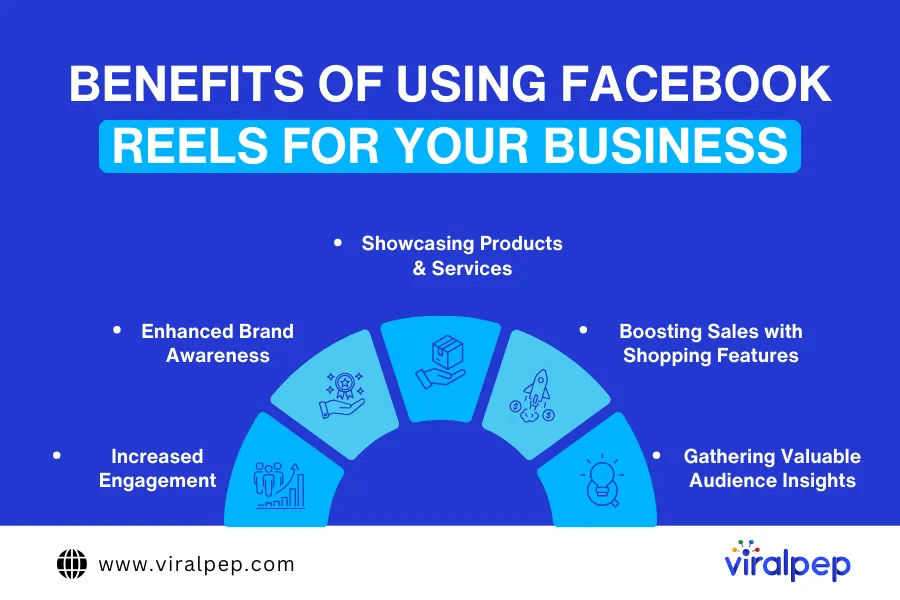
5 Benefits of Using Facebook Reels for Your Business

Facebook Reels have quickly emerged as a powerful tool for businesses to boost facebook engagement, reach a wider audience, and increase brand visibility. With the growing popularity of short-form videos, businesses can leverage Facebook Reels to enhance their marketing strategy.

Benefits of Using Facebook Reels

Here are five key benefits of using Facebook Reels for your business.

  1. Increased Engagement: Short-form videos are inherently more engaging than static posts. Facebook’s algorithm prioritizes Reels, making it easier to gain visibility.
  2. Enhanced Brand Awareness: Reels are shown to a broader audience beyond your followers, helping businesses expand their reach and attract new customers.
  3. Showcasing Products & Services: Demonstrate how your products work, share behind-the-scenes insights, or highlight customer testimonials through engaging video content.
  4. Boosting Sales with Shopping Features: Facebook allows businesses to tag products within Reels, enabling direct purchases and increasing conversions.
  5. Gathering Valuable Audience Insights: Monitor engagement metrics such as likes, shares, and comments to refine your content strategy and create more compelling videos.

Understanding the Facebook Reels Algorithm

Facebook’s algorithm prioritizes content that is engaging, high-quality, and original. To maximize your reach, focus on:

  • Creating Entertaining & Valuable Content: Videos that evoke emotions, educate, or entertain perform better.
  • Encouraging Engagement: The more likes, comments, shares, and watch time your video receives, the higher it ranks in the algorithm.
  • Leveraging Trends: Incorporate trending audio, hashtags, and topics to increase discoverability.

To maximize visibility, focus on storytelling, humor, educational content, and trending topics.

How to Create a Facebook Reel in 6 Simple Steps

Facebook Reels have become a powerful way for businesses, influencers, and content creators to engage audiences with short, dynamic videos. Whether you want to showcase products, share behind-the-scenes content, or entertain viewers, creating a Facebook Reel is simple and highly effective. Follow these six easy steps to create engaging and high-quality Facebook Reels.

  • Step 1: Open Facebook & Log in to Your Business or Personal Account

    To start creating a Facebook Reel, ensure you are logged into your Facebook account. If you are managing a business page, switch to your business profile to access additional features, such as audience insights and engagement tracking.

    Once logged in, navigate to your home feed or the Reels section in the menu. Facebook offers an easy-to-use interface that allows both personal and business accounts to create Reels effortlessly.

  • Step 2: Tap on “Create Reel”

    In the Facebook app, locate the “Reels” section in the main menu or your home feed. Tap the “Create Reel” button to start the process.

    If you don’t see the option, ensure your Facebook app is updated to the latest version, as Meta frequently introduces new features and updates.

  • Step 3: Select or Record a Video

    Facebook allows you to either upload pre-recorded clips or record a video directly within the app. When selecting a video, keep the following best practices in mind:

    • Duration: Facebook Reels can be between 3 to 90 seconds long.
    • Aspect Ratio: Use a 9:16 vertical format for the best viewing experience.
    • Resolution: Upload videos in 1080p HD quality to ensure crisp visuals.

    If recording within the app, you can start and stop multiple times, allowing you to create seamless transitions and more engaging content.

  • Step 4: Edit Your Video

    Editing plays a crucial role in making your Facebook Reel stand out. Facebook provides built-in tools to enhance your video, including:

    • Music & Sound Effects: Add trending music or original sound to make your content more engaging.
    • Text & Captions: Include overlays and captions to highlight important messages.
    • Filters & Effects: Apply visual enhancements, such as color filters, speed adjustments, and AR effects.
    • Trimming & Rearranging: Cut unnecessary parts and reorder clips for a more dynamic flow.

    Spending a little extra time on editing can significantly improve the quality and engagement of your Reels.

  • Step 5: Add a Caption & Optimize for Reach

    Before publishing, optimize your Reel by adding a compelling caption and relevant hashtags. This helps your content get discovered by a broader audience. Key optimization tips include:

    • Use Trending Hashtags: Incorporate popular and niche-specific hashtags to increase visibility.
    • Geotag Your Location: Tagging locations can help boost local reach.
    • Tag Collaborators & Pages: Engage with influencers and brands by tagging them.
    • Add a Call-to-Action (CTA): Encourage viewers to like, comment, share, or visit your website.
  • Step 6: Publish or Schedule Your Reel

    Once your Reel is finalized, you have two options:

    • Publish Immediately: Tap the “Share” button to post your Reel instantly.
    • Schedule for Later: Use Facebook’s scheduling tool or third-party tools like Viralpep to post at optimal times when your audience is most active.

    By scheduling Reels strategically, you can maintain consistency and maximize engagement.

Top 3 Tips for Creating High-Performing Facebook Reels

Facebook Reels have emerged as a powerful tool for businesses, influencers, and content creators to engage audiences and boost visibility. To make your Reels stand out and maximize their impact, you need a solid content strategy. Here are the top tips for creating high-performing Facebook Reels that drive engagement and reach a broader audience.

  1. Create Attention-Grabbing Content in the First Few Seconds

    With the short-form video format, first impressions matter. The initial 3–5 seconds of your Reel should be captivating enough to hook viewers instantly. Start with eye-catching visuals, a compelling question, or an intriguing statement. This keeps users watching and signals to the Facebook algorithm that your content is engaging.

    Additionally, adding bold text overlays and expressive gestures can enhance the visual appeal. Since most users watch videos on mute, consider using captions to ensure accessibility and retain viewer interest.

  2. Use Trending Music and Sound Effects

    Facebook’s algorithm prioritizes Reels that incorporate trending music and sound effects. The platform provides an extensive library of audio tracks, making it easy to add popular sounds that align with your content. Using trending audio increases discoverability, as users who engage with a specific sound are more likely to see Reels featuring the same track.

    If you’re showcasing your brand, consider blending trending audio with an original voiceover to maintain authenticity while still leveraging popular trends.

  3. Optimize Video Quality and Format

    High-quality videos perform better on Facebook Reels. Follow these essential specifications to ensure optimal playback:

    • Aspect Ratio: 9:16 (Vertical format)
    • Resolution: 1080p or higher
    • Frame Rate: 24–60 FPS
    • Duration: 3–90 seconds
    • File Size: Up to 1GB

    Avoid blurry, pixelated, or poorly lit videos, as they can negatively impact engagement and reach. Well-lit visuals, vibrant colors, and smooth transitions can make your Reels more appealing and professional.

  4. Post at the Right Time for Maximum Engagement

    Posting your Reels when your audience is most active can significantly boost visibility and engagement. Analyze your Facebook Insights to determine peak hours and schedule your content accordingly. In general, the best times to post on Facebook are:

    • Weekdays: 12 PM – 3 PM (Lunch breaks) and 7 PM – 9 PM (After work hours)
    • Weekends: 10 AM – 12 PM (Morning engagement window)

    Using a social media scheduling tool like Viralpep can help automate your posting schedule for optimal engagement.

  5. Include Clear Calls-to-Action (CTAs)

    A well-crafted call-to-action (CTA) encourages viewers to engage with your content. Whether you want users to like, comment, share, or visit your website, make your CTA clear and compelling. Examples include:

    • “Follow for more tips!”
    • “Tag a friend who needs to see this!”
    • “Click the link in the bio to learn more!”
    • “Comment below with your thoughts!”

    You can incorporate CTAs within the video, in text overlays, or in the caption to maximize audience interaction.

  6. Leverage Facebook Reels Analytics

    Tracking the performance of your Reels is crucial to refining your strategy. Facebook Reels Insights provide valuable data on metrics such as views, watch time, engagement rates, and audience demographics. Regularly reviewing these analytics helps identify what type of content resonates best with your audience, allowing you to optimize future Reels for higher performance.

  7. Stay Consistent and Experiment with Different Styles

    Consistency is key to building an engaged audience. Posting regularly keeps your content visible and strengthens your brand presence. Try different Reel formats, such as:

    • Educational content (quick tips, tutorials)
    • Behind-the-scenes clips
    • Customer testimonials
    • Product showcases
    • Fun challenges and trends

    Experimenting with different styles helps identify what works best for your audience and ensures your content remains fresh and engaging.

Boost Your Facebook Reels Strategy with Viralpep

Managing social media content can be time-consuming, but Viralpep simplifies the process by allowing you to:

  • Schedule and automate posts for optimal engagement
  • Track performance analytics to refine your strategy
  • Engage with your audience in real time

Conclusion

Facebook Reels have become a game-changer for content creators and businesses looking to expand their reach. By following best practices and leveraging tools like Viralpep, you can maximize engagement, increase brand awareness, and drive sales.

Take your Facebook Reels strategy to the next level start using Viralpep today!

The Ultimate Guide to AI-Powered Content Marketing: Tools, Benefits, and Best Practices

In the fast-paced world of content marketing, staying ahead of the competition is essential. From market research and content creation to SEO optimization and distribution, managing these tasks efficiently can be overwhelming. Falling behind means losing opportunities to competitors who leverage the latest technology. This is where AI-powered content marketing tools come in, revolutionizing the way marketers create, manage, and optimize content.

Powered by artificial intelligence, these tools bring automation, speed, and precision, making content marketing more effective than ever. AI can help streamline workflow, enhance content quality, and provide valuable insights to boost engagement and conversions.

In this guide, we’ll explore the top three benefits of AI in content marketing and introduce 11 must-have AI tools to optimize your marketing strategy in 2024.

What is AI Content Marketing?

AI content marketing refers to the integration of artificial intelligence technologies in content creation, optimization, distribution, and analysis. AI tools use machine learning algorithms and natural language processing (NLP) to help marketers automate tasks, generate ideas, improve SEO, and personalize content for target audiences. These AI-driven tools assist in various aspects of content marketing, such as:

  • Content Generation: AI can produce high-quality blog posts, social media captions, and video scripts in seconds. To make sure AI outputs remain readable and relatable, many marketers also use solutions that maintain natural, human-like writing, so the content feels authentic rather than robotic.
  • SEO Optimization: AI tools help identify high-performing keywords, optimize content, and track rankings.
  • Personalization: AI enables marketers to tailor content based on audience preferences and behavior.
  • Data Analysis: AI tools analyze customer interactions and content performance to provide actionable insights.

By leveraging AI, businesses can enhance content quality, predict consumer behavior, and maximize engagement with data-driven strategies. AI tools are designed to complement human creativity, allowing marketers to focus on strategy while automating repetitive tasks.

Three Biggest Advantages of Using AI for Content Marketing

If you are involved in content marketing, AI tools can help you simplify your workflow, save time, and increase your impact. Whether you are a writer, digital marketer, social media manager, or business owner, AI-powered solutions can be a valuable asset to your marketing efforts. Here are 3 biggest advantages of using AI for content marketing.

  1. Enhanced Content Quality and SEO Optimization

    AI-driven tools can analyze vast amounts of data to suggest trending topics, optimize keywords, and refine content for better readability and engagement. These tools help ensure that every piece of content is search engine-friendly, improving visibility and ranking.

    Key Benefits

    • Automated keyword research for SEO-friendly content
    • AI-generated topic suggestions based on audience interests
    • Content optimization for readability and engagement

    With AI-powered keyword research, content marketers can stay ahead of the competition and ensure their content reaches the right audience.

  2. Increased Productivity and Time-Saving Automation

    AI allows marketers to automate tedious tasks like social media scheduling, content editing, and performance tracking. This frees up valuable time for strategic planning and creative content development.

    Key Benefits

    • Automates scheduling and publishing of content
    • Speeds up content creation and editing processes
    • Reduces manual effort with AI-powered insights
  3. Better Audience Targeting and Personalization

    AI helps businesses understand consumer behavior and tailor content accordingly. Personalized recommendations, automated audience segmentation, and AI-driven analytics ensure content reaches the right audience at the right time.

    Key Benefits

    • AI-driven customer insights for targeted marketing
    • Personalization of content based on user preferences
    • Improved engagement through tailored messaging

11 AI Tools to Streamline Your Content Marketing Workflow

AI-driven tools have become essential for marketers looking to enhance efficiency, accuracy, and engagement. Below are some of the best AI content marketing tools that are transforming the industry and optimizing workflows.

  1. AI Tools for Content Creation and Editing

    • ChatGPT by OpenAI

      ChatGPT is an advanced AI model designed to generate human-like text, making it ideal for content creation. It can help with blog posts, social media copy, and even email marketing.

      Use Cases:

      • Creating blog content, scripts, and marketing copy
      • Generating creative writing and story ideas
      • Brainstorming social media captions

      Not ideal for:

      • Industry-specific technical writing requiring deep expertise
      • Content that needs up-to-date news or real-time trends

      Pricing: Free and paid subscription tiers available.

    • Jasper.ai

      Jasper.ai is an AI writing assistant that helps generate high-quality marketing content. It specializes in creating persuasive copy and engaging blog posts.

      Use Cases:

      • Writing ad copy and email campaigns
      • Generating SEO-friendly blog posts
      • Automating content ideation

      Pricing: Paid plans tailored to different content creation needs.

    • Grammarly

      Grammarly is an AI-powered tool that improves grammar, punctuation, and style in writing. It ensures that content is polished and error-free.

      Use Cases:

      • Enhancing readability and tone
      • Checking for plagiarism
      • Improving writing clarity and engagement

      Pricing: Free basic version with premium plans for advanced features.

    • Plagiarismdetector.net

      Plagiarismdetector.net offers a free paraphrasing tool that is an AI-powered solution, helping users paraphrase text while maintaining its original meaning. It’s designed to improve sentence structure, enhance readability, and make content unique for different use cases.

      Use Cases:

      • Rephrasing academic papers and essays.

      • Refreshing blog posts and website content.

      • Generating alternative versions of marketing copy.

      Not ideal for:

      • Producing entirely new ideas from scratch.

      • Highly technical or research-based writing that requires subject expertise.

      Pricing: Free of cost

  2. AI Tools for Content Distribution

    • Viralpep

      Viralpep is a powerful social media management platform that helps brands schedule, manage, and distribute content across multiple channels effortlessly.

      Use Cases:

      • Automating social media post scheduling
      • Managing content across various digital channels
      • Tracking content performance with analytics

      Pricing: Paid plans based on business needs.

    • Buffer

      Buffer is a social media management tool that helps schedule and analyze posts across different platforms, ensuring consistent engagement.

      Use Cases:

      • Scheduling posts across multiple social media channels
      • Tracking engagement metrics and analytics
      • Collaborating with teams on content strategy

      Pricing: Free and paid subscription plans available.

    • ContentStudio

      ContentStudio simplifies content discovery, scheduling, and social media management, making it a great tool for marketers looking to optimize their online presence.

      Use Cases:

      • Discovering trending topics and relevant content
      • Managing social media automation and publishing
      • Monitoring brand mentions and audience engagement

      Pricing: Paid plans with different tiers.

  3. AI Tools for SEO and Keyword Research

    • Ahrefs

      Ahrefs provides comprehensive SEO analysis, including keyword research, backlink tracking, and competitive analysis.

      Use Cases:

      • Conducting keyword research for SEO optimization
      • Tracking backlinks and domain authority
      • Analyzing competitor SEO strategies

      Pricing: Paid subscription plans available.

    • SEMrush

      SEMrush is an all-in-one digital marketing tool that provides insights into SEO, PPC, content marketing, and social media performance.

      Use Cases:

      • Conducting competitive analysis and keyword research
      • Optimizing content for higher search rankings
      • Tracking website performance metrics

      Pricing: Free and premium subscription options.

    • Ubersuggest

      Ubersuggest, developed by Neil Patel, offers free SEO tools for keyword research, backlink analysis, and site audits.

      Use Cases:

      • Generating keyword ideas and content topics
      • Conducting basic SEO analysis
      • Tracking website rankings and improvements

      Pricing: Free version with additional paid features.

  4. AI Tools for Social Media and Visual Content Creation

    • Lumen5

      Lumen5 is an AI-powered video creation tool that transforms blog posts and text-based content into engaging videos.

      Use Cases:

      • Converting articles into social media videos
      • Creating branded video content for marketing
      • Automating video editing and production

      Pricing: Free and premium subscription plans.

    • Canva

      Canva is a graphic design tool that leverages AI to create stunning visual content for marketing purposes.

      Use Cases:

      • Designing social media graphics and presentations
      • Customizing templates for marketing campaigns
      • Collaborating with teams on creative projects

      Pricing: Free with paid Pro plans.

AI Content Marketing Statistics for 2025

  • 80% of marketers believe that AI will significantly improve content marketing strategies by 2025.
  • AI-generated content is projected to account for over 30% of all marketing content by 2025.
  • Brands using AI-powered SEO tools have seen a 40% increase in organic traffic compared to manual SEO strategies.
  • AI-driven personalization has been shown to increase customer engagement rates by 60%..

Common Content Marketing Mistakes Made with AI

  1. Over-relying on AI Without Human Input – AI-generated content still requires human review to ensure quality, accuracy, and brand alignment.
  2. Ignoring SEO Best Practices – AI tools enhance SEO, but content should always be optimized using proper keyword strategies and search intent.
  3. Using AI Without Understanding the Target Audience – AI insights are valuable, but marketers must align content with audience needs and preferences.
  4. Focusing Only on Automation Without Creativity – AI tools streamline processes, but creativity and storytelling remain crucial for audience engagement.

Final Thoughts

AI-powered tools like Viralpep are revolutionizing content marketing by automating tedious tasks, optimizing content for SEO, and enhancing engagement across digital platforms. Whether you’re a content marketer, social media manager, or business owner, integrating AI into your strategy can improve efficiency, boost audience reach, and drive better results.

As AI continues to evolve, marketers who leverage its power will stay ahead of the competition and create more impactful content. Ready to take your content marketing to the next level? Start integrating AI tools like Viralpep into your workflow today!

The Best Time to Post on LinkedIn for Maximum Reach

Since its launch in 2002, LinkedIn has transformed from a simple job-searching platform into a powerful brand-building tool. Today, it serves as a hub for professionals, businesses, and industry leaders to share insights, network, and establish their thought leadership.

Statistics reveal that 91% of executives rank LinkedIn as their top choice for consuming professionally relevant content. With over 1 billion active members and 67 million companies vying for attention, standing out on LinkedIn requires more than just well-crafted posts. One crucial factor that determines the success of your LinkedIn content is timing—posting at the right time can significantly boost engagement and visibility.

However, finding the best time to post on LinkedIn isn’t always straightforward. Fortunately, after analyzing data from over 50,000+ LinkedIn accounts, we have identified the optimal posting times that can help you enhance your LinkedIn marketing strategy. In this blog, we’ll explore the best times to post on LinkedIn, backed by data and expert insights from Viralpep.

Why Timing Matters on LinkedIn

You might have written an engaging LinkedIn post with trending hashtags, but if you post it at the wrong time, it might not receive the attention it deserves. LinkedIn’s algorithm prioritizes content with high engagement—likes, comments, shares, and reposts. The more engagement a post receives, the more likely it is to be visible in other users’ feeds.

To maximize impressions and engagement, scheduling your LinkedIn posts strategically is essential. Posting at the right time ensures your content reaches your audience when they are most active, increasing the likelihood of meaningful interactions.

What is the Best Time to Post on LinkedIn?

The ideal time to post on LinkedIn depends on various factors, including the day of the week, geographic location, audience demographics, and user behavior. Just like any other social media platform, there are peak hours when engagement is high and off-peak times when your post might get lost in the feed.

While there’s no universal formula for success, industry trends and user activity patterns suggest that certain days and times yield better visibility and interaction. Understanding these trends can help you maximize your reach and engagement.

  • General Best Posting Times on LinkedIn

    Based on the analysis of over 50,000+ LinkedIn accounts, the best engagement occurs between 10 AM and 12 PM on Tuesday, Wednesday, and Thursday. However, here’s a more detailed breakdown of the best times to post on LinkedIn throughout the week:

    • Monday: 9 AM, 2 PM, 4 PM
    • Tuesday: 12 PM, 2 PM, 4 PM
    • Wednesday: 10 AM, 12 PM, 2 PM
    • Thursday: 10 AM, 2 PM, 4 PM
    • Friday: 8 AM, 1 PM, 3 PM
    • Saturday: 4 AM – 7 AM
    • Sunday: 8 AM – 2 PM

Best Times to Post on LinkedIn by Day

Want to maximize engagement and visibility on LinkedIn? Posting at the right time can help you connect with professionals when they’re most active. Here’s a breakdown of the best times to post each day:

  • Best Time to Post on LinkedIn on Monday

    9 AM, 2 PM, 4 PM

    Monday mornings are when professionals settle into their workweek, check emails, and look for industry updates. Posting at these times ensures your content catches their attention during their breaks.

  • Best Time to Post on LinkedIn on Tuesday

    12 PM, 2 PM, 4 PM

    By midday Tuesday, professionals are actively browsing LinkedIn for fresh content and motivation. Posting at these peak hours helps your insights reach a highly engaged audience.

  • Best Time to Post on LinkedIn on Wednesday

    10 AM, 12 PM, 2 PM

    Lunchtime and early afternoon are prime times for LinkedIn activity. Professionals take a break and catch up on industry news, making this the perfect window to share your content.

  • Best Time to Post on LinkedIn on Thursday

    10 AM, 2 PM, 4 PM

    Thursday afternoons are ideal for engagement as people wrap up tasks and seek valuable insights. Posting during these hours helps you connect with professionals during their breaks.

  • Best Time to Post on LinkedIn on Friday

    8 AM, 1 PM, 3 PM

    As the weekend approaches, professionals check LinkedIn early to stay updated before winding down. Posting at these times helps your content reach those reflecting on their week’s achievements.

  • Best Time to Post on LinkedIn on Saturday

    4 AM – 7 AM

    Entrepreneurs and early risers often check LinkedIn before starting their day. Posting in the early morning hours increases the chance of engaging this focused audience.

  • Best Time to Post on LinkedIn on Sunday

    8 AM – 2 PM

    Sunday is a time for planning and preparation. Many professionals browse LinkedIn to get a head start on the upcoming week, making this a great time to share content that offers insights and inspiration.

    By posting at these strategic times, you can increase engagement, boost visibility, and make a lasting impact on LinkedIn. Happy posting!

Best Times to Post on LinkedIn by Industry

Different industries have unique audience behaviors, meaning the best posting times may vary. Here’s when you should post based on your industry:

  • Technology & Software: Tuesday to Thursday, 9:00 AM – 11:00 AM
  • Healthcare & Pharmaceuticals: Wednesday, 8:00 AM – 10:00 AM; Thursday, 2:00 PM – 4:00 PM
  • Finance & Banking: Tuesday & Wednesday, 7:00 AM – 11:00 AM
  • Education & Nonprofits: Monday & Wednesday, 10:00 AM – 12:00 PM
  • Marketing & Advertising: Tuesday to Thursday, 9:00 AM – 12:00 PM
  • Manufacturing & Construction: Tuesday & Wednesday, 8:00 AM – 9:00 AM
  • Retail & E-commerce: Wednesday, 9:00 AM – 11:00 AM
  • Human Resources & Recruitment: Tuesday & Thursday, 10:00 AM – 12:00 PM
  • Legal & Consulting: Tuesday & Thursday, 9:00 AM – 11:00 AM
  • Travel & Hospitality: Tuesday to Thursday, 10 AM – 4 PM

By following these industry-specific insights, you can better target your LinkedIn audience and maximize engagement.

How to Identify Your Best Posting Times on LinkedIn

While general recommendations provide a solid starting point, the best way to determine your optimal posting time is through data analysis. Here’s how you can pinpoint the best time to post on LinkedIn for your audience:

  1. Use LinkedIn Analytics

    LinkedIn’s built-in analytics tool provides valuable insights into your post performance. By analyzing your past content’s engagement metrics, you can identify patterns and adjust your posting schedule accordingly.

  2. Track Engagement Manually

    If you prefer a more hands-on approach, maintain a LinkedIn engagement tracking spreadsheet. Record the date, time, and engagement levels (likes, comments, shares) of each post to determine which time slots yield the best results.

  3. Leverage Viralpep’s Scheduling & Analytics Features

    While LinkedIn provides basic analytics, third-party social media tools like Viralpep can offer advanced insights and automated scheduling to help optimize your LinkedIn posting strategy. Viralpep’s AI-powered features analyze engagement trends and suggest the best posting times to maximize visibility and interaction.

Maximize LinkedIn Engagement with Viralpep

Understanding the best times to post on LinkedIn is only the first step. To truly enhance your social media strategy, you need a tool that helps you schedule posts efficiently, analyze audience engagement, and adapt to changing trends.

With Viralpep, you can:

  • Automate LinkedIn post scheduling to ensure your content is published at optimal times.
  • Analyze engagement trends to refine your LinkedIn marketing strategy.
  • Utilize AI-driven insights for smarter content planning and distribution.
  • Monitor industry conversations to stay ahead of competitors and engage with trending topics.

Final Thoughts

Optimizing your LinkedIn posting schedule can significantly boost your content’s reach, visibility, and engagement. While general time slots provide a solid starting point, analyzing your audience’s behavior and using tools like Viralpep can help you find the best posting times tailored to your brand.

Are you ready to supercharge your LinkedIn marketing strategy? Start scheduling smarter with Viralpep today!

How to Repost on Instagram: A Complete Step-by-Step Guide

Instagram is one of the largest social media platforms in the world, making it an essential tool for businesses and individuals looking to boost their online presence. A crucial part of Instagram marketing involves reposting content, which allows you to share relevant and engaging posts with your audience. But how exactly do you repost on Instagram?

Unlike some social media platforms that offer built-in sharing options, Instagram does not have a native “repost” button for feed posts. However, there are several ways to share content, whether it’s a Story, a feed post, or a Reel. If you’re new to reposting on Instagram, don’t worry—it’s easier than it seems. This comprehensive guide will walk you through different reposting methods and best practices.

Why Reposting on Instagram is Important

Reposting is a valuable social media strategy for businesses, brands, and content creators. Here’s why it matters:

  1. Boosts Engagement: Sharing user-generated content encourages audience interaction and strengthens brand loyalty.
  2. Increases Visibility: Reposting relevant content can expose your brand to a wider audience and improve your reach.
  3. Saves Time: Instead of creating fresh content daily, reposting helps you maintain an active presence with less effort.
  4. Encourages Community Growth: Featuring customer photos, collaborations, or brand mentions strengthens relationships with your audience.
  5. Leverages Viral Content: If a post is already performing well, reposting it allows you to capitalize on its success.

Now, let’s explore the different ways to repost on Instagram.

How to Repost an Instagram Story

Reposting Instagram Stories can be beneficial for businesses and individuals who want to engage with their audience, highlight user-generated content, or promote an event. There are a few different ways to do this, depending on whether or not you’ve been tagged in the Story.

  • Reposting a Story You’re Tagged In

    When someone tags you in their Instagram Story, Instagram makes it simple to repost the Story to your own account. Here’s how:

    1. Check Your Notifications: You will receive a direct message (DM) notifying you that you’ve been tagged in a Story.
    2. Tap “Add to Your Story”: In the message, there will be an option to share the Story directly to your own Story.
    3. Customize Your Story: You can add stickers, GIFs, text, and even mention the original poster before publishing it.
    4. Tap “Your Stories”: Once you’re happy with the customization, click the “Your Stories” button to share it with your followers.

    If the “Add to Your Story” option is missing, it means the original poster has disabled sharing.

  • Reposting a Story You’re Not Tagged In

    If you aren’t tagged in a Story but still want to share it, Instagram’s native features won’t allow you to repost it directly. However, you can still do so using these methods:

    1. Take a Screenshot: Open the Story, press and hold your screen to hide the Instagram UI elements, and take a screenshot.
    2. Crop the Image: Edit the screenshot to remove any unnecessary parts.
    3. Post the Image as a New Story: Open Instagram, start a new Story, and upload the edited screenshot.
    4. Tag the Original Creator: Give credit by tagging the original poster in your Story.

    Alternatively, you can use third-party apps like Repost Stories for Instagram to download stories and repost Stories.

How to Share Someone Else’s Instagram Post to Your Story

Sometimes, you may want to share an interesting feed post or Reel to your Story. Here’s how you can do that:

  1. Find the Post You Want to Share: Scroll through your feed or search for a post that aligns with your brand.
  2. Tap the Paper Airplane Icon: Below the post, you’ll find a small paper airplane icon (next to the like and comment icons).
  3. Select “Add to Your Story”: This will open the Story creation interface.
  4. Customize the Story: Move the post, add text, stickers, or GIFs as needed.
  5. Tap “Your Stories”: Once ready, share it with your followers.
  • Why Can’t I Share a Post to My Story?

    If you don’t see the “Add to Your Story” option, it could be due to one of these reasons:

    • The account that posted it is private (you can only share posts from public accounts).
    • The user has disabled post sharing to Stories.
    • Your Instagram app is not updated to the latest version.

How to Repost an Instagram Post to Your Feed

Reposting feed posts can help extend the lifespan of valuable content and boost engagement. However, Instagram doesn’t offer a built-in way to do this. Here are some methods to repost content to your feed.

  • Reposting Your Own Instagram Post

    There are multiple reasons you might want to repost your own content—perhaps an old post is still relevant, or you want to bring more attention to a particular product or announcement.

    1. Take a Screenshot of the Original Post: Open your Instagram profile and take a screenshot of the post.
    2. Crop the Image: Edit the screenshot to focus only on the photo.
    3. Create a New Post: Open Instagram, tap the “+” icon, and upload the cropped screenshot.
    4. Write a New Caption: You can either reuse the original caption or modify it to reflect current updates.
    5. Post It: Once you’re satisfied with the caption and tags, share it with your followers.
  • Reposting Someone Else’s Post Using Third-Party Apps

    There are several apps that allow you to easily repost Instagram posts while giving credit to the original creator. Some popular apps include:

    • Repost for Instagram
    • InstaRepost
    • Regram App

    Here’s how to use these apps:

    1. Copy the Post’s Link: Tap the three dots on the post and select “Copy Link.”
    2. Open the Repost App: The app will detect the copied link and allow you to repost the content.
    3. Customize the Post: Most apps let you add attribution (credit to the original creator) and customize the post.
    4. Repost to Instagram: Share the post as you normally would.

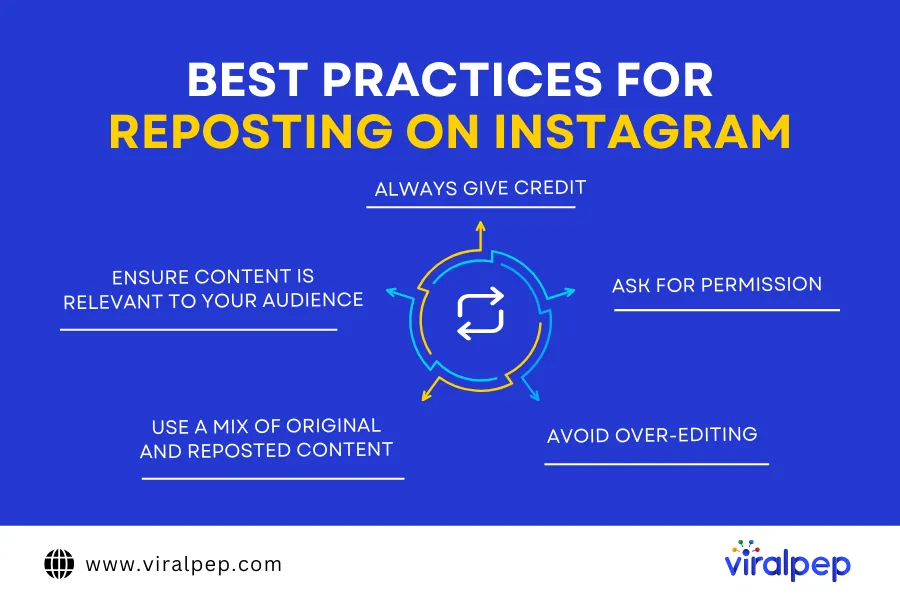
Best Practices for Reposting on Instagram

Reposting content can be a great strategy for engaging with your audience, but it’s important to do it properly.

Best Practices for Reposting on Instagram

Here are some best practices to follow:

  1. Always Give Credit

    Instagram’s policies state that the original photographer owns the rights to their photos. Always tag and mention the original poster in your caption or Story.

  2. Ask for Permission

    If you’re reposting a feed post, always ask for permission first. You can:

    • Comment on the post asking if you can repost it.
    • Send a direct message to the original creator.
    • Look for user-generated content under Instagram hashtags and reach out before sharing.
  3. Avoid Over-Editing

    Try to keep the reposted content as close to the original as possible. Over-editing or cropping can take away from the creator’s intent.

  4. Use a Mix of Original and Reposted Content

    A balanced feed is key. If your Instagram feed is only made up of reposted content, it might not reflect your brand’s unique voice.

  5. Ensure Content is Relevant to Your Audience

    Repost content that adds value to your followers. If it doesn’t align with your brand or niche, it may not perform well.

Final Thoughts

Reposting on Instagram is a powerful way to engage with your audience, highlight valuable content, and strengthen relationships with influencers or brands. Whether you’re sharing Stories, feed posts, or Reels, following best practices ensures you maintain credibility while expanding your reach.

Now that you know how to repost Instagram Stories, posts, and Reels, start experimenting with these techniques to enhance your social media strategy!

How to Add a Link in an Instagram Story: A Comprehensive Guide

Learn exactly how to add a link in an instagram story to boost your engagement and drive traffic. Instagram has made it easier than ever to add links to stories with link stickers, available to all users. While these stickers are a great way to drive traffic to your website, they may not be the most intuitive to use. For those wondering how to add a link to instagram story, this guide has you covered.

This article will also show you the best practices for a link in instagram story, ensuring maximum visibility. Continue reading to understand how to add a link in an instagram story and effectively convert viewers into visitors.

What is an Instagram Link Sticker?

A link sticker is an interactive element that allows you to add an active link to your Instagram story. It appears as a sticker with a link icon and a shortened URL, making it easy for users to tap and visit your website. Link stickers exemplify how to add a link in an instagram story in a seamless and interactive manner.

Instagram stories offer various stickers, including static images, GIFs, and interactive polls. However, when it comes to link stickers, you can only add one per story image or reel. The good news is that you can customize the text to make the link more engaging.

For instance, if your link points to a longer URL (e.g., https://www.viralpep.com/blog/instagram-story-downloader/), the sticker will only display the domain. When users tap the sticker, they’ll be directed to the full link.

Previously, Instagram required accounts to have 10,000 followers or be verified to use link stickers. Now, this feature is available to all users. However, if your account violates Instagram’s community guidelines (such as posting inappropriate content), you may temporarily lose access to link stickers.

Why Use Instagram Link Stickers?

Instagram stories don’t just keep users scrolling—they’re a powerful tool for engagement and business growth. Link stickers help you:

  • Drive traffic to your website.
  • Boost sales by linking directly to product pages.
  • Promote content like newsletters and podcasts.
  • Encourage engagement with clear calls to action.
  • Maintain brand consistency with customizable sticker designs.
  • Improve user experience by reducing the steps to take action.

Understanding how to add a link in an instagram story can significantly enhance your marketing efforts.

How to Add a Link Sticker to Instagram Story

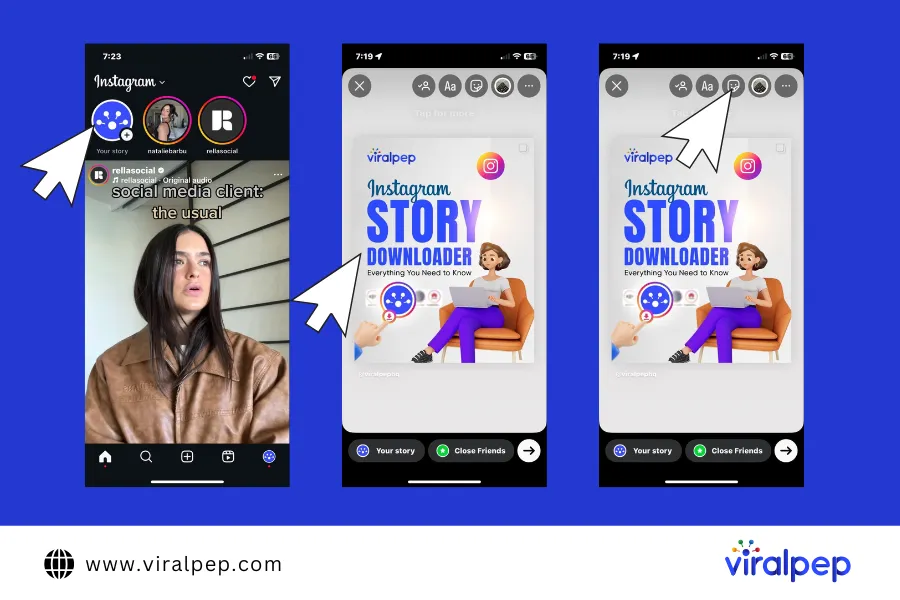
Follow the steps below to learn how to add a link in an instagram story effortlessly:Follow the steps below to learn how to add a link in an instagram story effortlessly:

  1. Step 1: Open the Story Creator

    Tap your profile image in the top-left corner of your Instagram home screen or profile page. You can also swipe right from the home screen to open the story creator.

  2. Step 2: Choose an Image or Video

    Capture a new photo/video using the camera button or swipe up to select from your gallery. Adjust the media as needed.

  3. Step 3: Open the Sticker Menu

    Tap the sticker icon (a small square with a smiley face) in the top-right corner.

    Open the Sticker Menu

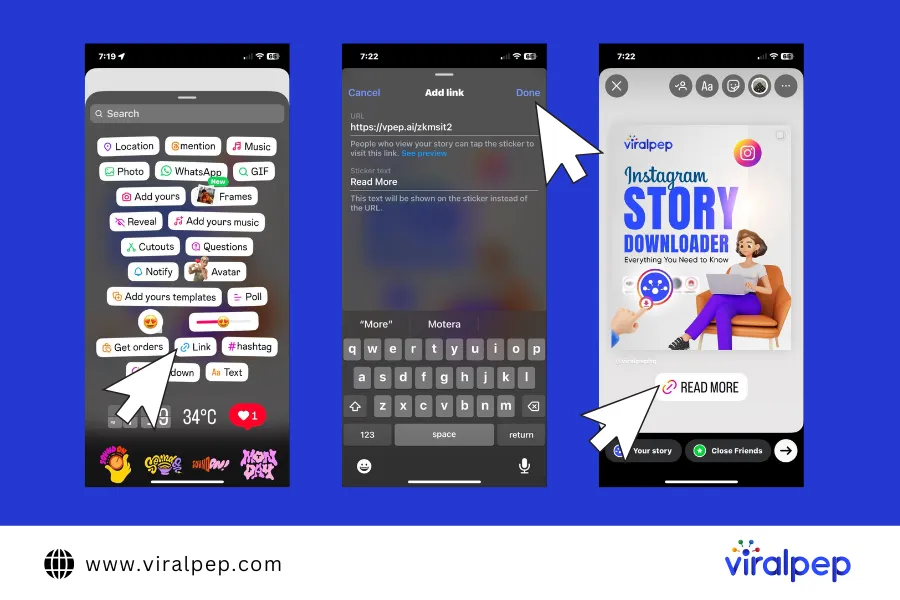
  4. Step 4: Select the Link Sticker

    Find the link sticker in the menu (it has a link icon and the word “Link”). If it’s not visible, use the search bar to find it.

  5. Step 5: Add Your Link and Customize the Text

    When you tap the link sticker, you’ll see two fields:

    1. URL Field – Enter the full link.
    2. Custom Text Field (Optional) – Customize the sticker text to make it more engaging.

    Once done, tap “Done” and position the sticker on your story.

    Add Link and Customize the Text

These steps outline not only how to add a link in an instagram story but also how to put a link in instagram stories for a smooth user experience. Once done, tap “Done” and position the sticker on your story.

How to Enhance Your Instagram Link Sticker Design

Link stickers aren’t just functional; they can be customized to enhance your story’s appeal.

  • Customizing Sticker Text

    By default, the link sticker displays the domain name. However, this may not be compelling enough. Instead, use the “Customize Sticker Text” option to create an engaging call to action (up to 46 characters).

    To do this:

    1. Tap the link sticker before placing it in your story.
    2. Select “Customize Sticker Text” and enter your desired text.
    3. Tap “Done” to finalize.
  • Changing Sticker Colors

    You can modify the text color to match your brand or make it stand out. There are two ways to do this:

    • Tap the sticker multiple times to cycle through default color options (blue, white, black with a pink icon).
    • Hold and drag the sticker to the color selector tool to match any color in your background image.
  • Creating a Custom Link Sticker

    For a more branded look, you can overlay a custom text or image on your link sticker. Here’s how:

    For a Custom Text Overlay:

    1. Place your link sticker on the story.
    2. Tap the text icon and type your custom text (e.g., “Read More!”).
    3. Adjust the font, size, and color.
    4. Drag the text over the link sticker to create a seamless look.

    For a Custom Image Overlay:

    1. Design a custom sticker in Canva or another graphics editor.
    2. Save the image to your phone.
    3. Add the image to your Instagram story and place it over the link sticker.
  • Best Practices for Link Sticker Placement

    Strategic placement of your link sticker can improve click-through rates and engagement. Follow these tips:

    • Position the link in a visible spot without covering key story elements.
    • Keep branding consistent—avoid overly large or distracting stickers.
    • Ensure the sticker is large enough to tap easily.
    • Avoid placing it near Instagram’s interface buttons, which may make it harder to click.

Effective Uses of Instagram Link Stickers

Instagram stories are more than just temporary posts—they’re a direct gateway to boosting your engagement and conversions. When you know how to add a link in an instagram story effectively, you unlock a world of marketing potential.By strategically using link stickers, you create seamless pathways for your audience to discover products, read blog posts, sign up for newsletters, explore multimedia content, and grab exclusive deals. Below are five dynamic strategies that transform your instagram link in story into a conversion powerhouse:

  1. Promoting Products and Launches

    Leverage link stickers to showcase new product launches or limited-edition items. By adding a link directly to a dedicated landing page or product detail page, you reduce friction in the buying process.

    Use engaging visuals along with a clear call-to-action such as “Shop Now” to drive conversions. This method is especially effective for e-commerce brands looking to maximize impulse purchases and generate buzz around new releases.

  2. Sharing Blog Posts and Articles

    Drive traffic to your content by linking directly to your latest blog posts or articles. This strategy not only increases readership but also enhances your SEO by encouraging longer session times on your website. Consider using intriguing teaser text in your story along with a swipe-up call-to-action (or a tapable link sticker) that invites followers to “Read More” or “Discover the Full Story.” This way, you transform your Instagram audience into dedicated website visitors.

  3. Driving Newsletter Signups

    Utilize link stickers to boost your email marketing efforts. By directing users to a well-designed sign-up page, you can grow your subscriber base effortlessly. Craft a compelling message like “Join Our Newsletter for Exclusive Tips” to capture interest. An effective signup funnel not only increases your email list but also enables deeper engagement with your audience through regular, personalized content.

  4. Directing Traffic to Podcasts and Videos

    Instagram is an excellent platform for cross-promoting multimedia content. Use link stickers to guide your audience to your latest podcasts, YouTube videos, or other video content platforms. Provide context in your story with a brief description or a teaser clip, encouraging users to tap the sticker and watch or listen to the full episode. This approach is particularly useful for content creators looking to build a multi-platform presence and drive higher engagement across channels.

  5. Running Exclusive Promotions

    Create a sense of urgency and exclusivity by using link stickers for time-sensitive offers, discounts, or flash sales. Promote special deals with a call-to-action like “Grab This Deal Now” or “Limited Time Offer,” which not only drives immediate traffic but also encourages quick conversions. By linking directly to the promotional page, you simplify the user journey and make it easier for gain followers to take advantage of your offers.

Conclusion

Instagram link stickers are a game-changer for driving traffic and engagement. By customizing your sticker text, optimizing its design, and placing it strategically, you can enhance your social media strategy and make the most out of every story.

Using Viralpep, you can schedule, manage, and optimize Instagram content with ease, making it a must-have tool for brands and influencers.

Try Viralpep 15-day free trial today and take your Instagram marketing to the next level!

How to Become a Social Media Manager: A Complete Guide

If you’ve ever wondered how to become a social media manager, you’re in the right place. While platforms and consumer preferences are constantly evolving, core principles remain crucial for building a successful career in social media management.

To gain insights, we interviewed four experienced social media managers about their career paths, the realities of the job, and how aspiring professionals can break into the field—even without prior experience. Here’s what they shared.

What is a Social Media Manager?

A social media manager represents a company across various social channels, acting as the voice of the brand. Their responsibilities include:

  • Monitoring audience engagement
  • Developing and executing campaigns
  • Creating content strategies
  • Providing expert guidance to enhance online presence

The title “social media manager” is often an umbrella term for various roles within the field. Many professionals start as social media coordinators, specialists, or content creators before stepping into a management position.

Why Become a Social Media Manager?

Each individual’s motivation for pursuing social media management varies based on career aspirations and personal fulfillment. Here’s what three professionals had to say about why they chose this path:

  1. Develop Essential Skills

    To succeed, you need a mix of technical and soft skills:

    • Content Creation – Craft engaging posts, captions, and visuals.
    • Analytics & Data Interpretation – Understand insights to optimize strategy.
    • SEO & Hashtag ResearchImprove visibility and engagement.
    • Customer Engagement – Interact with audiences professionally.
    • Graphic Design – Basic skills in Canva or Photoshop.
  2. Gain Experience & Certifications

  3. Build an Online Presence

    • Optimize your LinkedIn profile and showcase your expertise.
    • Start a blog or create a personal brand on Instagram/Twitter.
    • Share case studies and success stories.
  4. Apply for Jobs or Start Freelancing

    • Find opportunities on Indeed, LinkedIn, and Upwork.
    • Pitch your services to small businesses and startups.
    • Use Viralpep’s Social Media Scheduling Tool to streamline client work.
  5. Stay Updated

    • Follow social media news 
    • Join Facebook groups and LinkedIn communities.
    • Experiment with new platform features.

What Do Social Media Managers Do?

A social media manager is responsible for planning, implementing, managing, and monitoring a brand’s social media presence. They ensure that a company’s social channels align with its goals and engage the right audience.

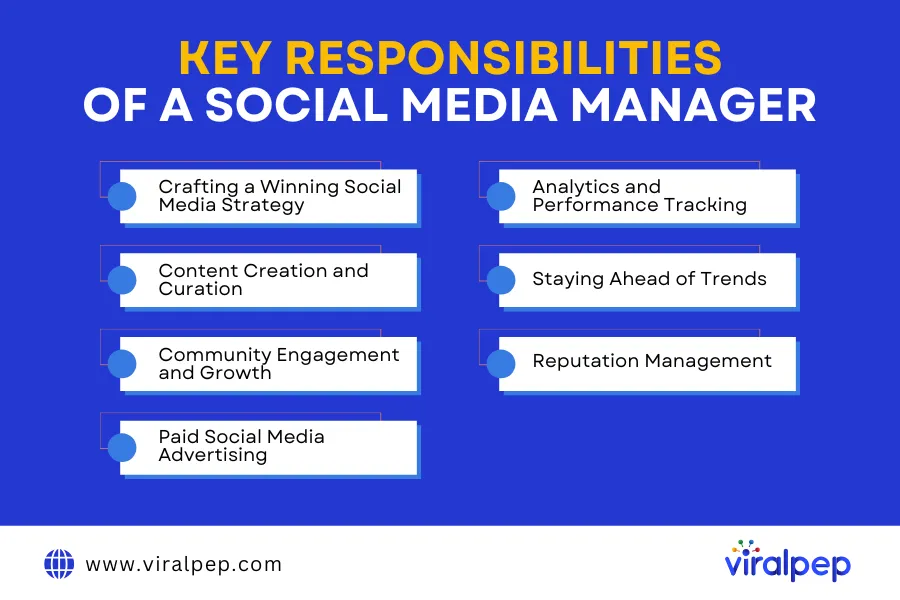
Key Responsibilities of a Social Media Manager

 Let’s dive into the key responsibilities of this dynamic role:

  1. Crafting a Winning Social Media Strategy

    A successful social media manager starts with a solid strategy. This involves setting clear goals, understanding the target audience, and choosing the right platforms for the brand. They create a structured content calendar that ensures consistent posting, engagement, and alignment with business objectives.

    For instance, a company targeting young audiences might focus more on Instagram and TikTok, while a B2B brand might prioritize LinkedIn and Twitter. Understanding platform-specific algorithms and audience behavior is crucial in shaping a winning strategy.

  2. Content Creation and Curation

    Creating engaging content is the foundation of effective social media management. A social media manager must craft visually appealing and compelling content that captures audience attention and drives engagement. Key aspects of content creation include:

    • Writing captivating captions and posts that align with the brand’s voice and messaging.
    • Designing eye-catching graphics and videos to enhance visual appeal.
    • Curating relevant industry news and user-generated content to keep the audience informed and engaged.
    • Maintaining brand consistency across all platforms with a cohesive content strategy.

    To achieve high-quality visuals, social media managers rely on graphic design tools like Canva, Adobe Express, and Photoshop for creating polished graphics. For video editing and short-form content, tools such as CapCut, InShot, and Adobe Premiere Rush are essential. By leveraging these tools, social media managers ensure their content stands out in a competitive digital landscape.

  3. Community Engagement and Growth

    Social media is all about interaction. A social media manager is responsible for engaging with followers by responding to comments, messages, and mentions. They also:

    • Monitor brand reputation and address customer concerns
    • Build relationships with influencers and industry leaders
    • Organize interactive content like polls, Q&A sessions, and giveaways

    By actively engaging with the audience, social media managers help foster a loyal community, which leads to higher brand trust and visibility.

  4. Paid Social Media Advertising

    Organic reach can only take a brand so far, which is why paid advertising is an essential aspect of social media management. Social media managers create and optimize ad campaigns on platforms like Facebook Ads, Instagram Ads, LinkedIn Ads, and Twitter Ads. Their job includes:

    • Defining the target audience and demographics
    • Creating high-converting ad creatives
    • Monitoring and adjusting ad performance to maximize ROI

    A well-planned ad campaign can drive traffic, increase conversions, and boost brand awareness significantly.

  5. Analytics and Performance Tracking

    Data is key to refining social media strategies. Social media managers use analytics tools to track key performance indicators (KPIs) such as engagement rate, click-through rate, follower growth, and conversion rate. Some of the commonly used tools include:

    • Google Analytics
    • Facebook Insights
    • Instagram Analytics

    Regular performance tracking helps in identifying what’s working and what needs improvement, allowing managers to adjust strategies for better results.

  6. Staying Ahead of Trends

    The social media landscape is ever-evolving. Platforms frequently update their algorithms, and new trends emerge constantly. A social media manager must stay updated with:

    • Algorithm changes on platforms like Facebook and Instagram
    • Emerging content formats such as Instagram Reels, YouTube Shorts, and TikTok trends
    • Industry news and competitive strategies

    Keeping up with these changes ensures that a brand remains relevant and continues to engage its audience effectively.

  7. Reputation Management

    Handling customer feedback and managing crises are crucial aspects of social media management. Many professionals use tools to monitor reviews and comments across platforms like Yelp, Google My Business, and TrustPilot.

How to Become a Social Media Manager

If you’re wondering how to become a social media manager, follow these steps:

  1. Step 1: Develop Your Skills

    A social media manager needs a mix of creativity, analytics, and communication skills. To get started:

    • Learn about different social media platforms and their best practices
    • Gain expertise in content creation tools like Canva and Photoshop
    • Understand analytics and performance-tracking tools
  2. Step 2: Gain Experience

    Hands-on experience is crucial. Start by:

    • Managing social media accounts for small businesses or nonprofits
    • Taking up internships in marketing agencies
    • Building your own personal brand on social media
  3. Step 3: Get Certified

    While formal education isn’t mandatory, certifications can give you an edge. Some recommended courses include:

    • HubSpot Social Media Certification
    • Facebook Blueprint Certification
    • Google Digital Marketing Certification
  4. Step 4: Build a Portfolio

    A strong portfolio can help showcase your skills to potential clients or employers. Include:

    • Case studies of successful campaigns
    • Engagement and growth metrics
    • Diverse content formats such as videos, infographics, and blog posts
  5. Step 5: Apply for Jobs or Start Freelancing

    Once you have the right skills and experience, start looking for job opportunities. Some popular platforms for social media jobs include:

    • LinkedIn
    • Upwork
    • Fiverr

    Freelancing is also a great option if you prefer flexibility in your career.

Essential Tools for Social Media Managers

Social media managers rely on various tools to streamline their workflow:

  • Content Creation: Canva, Adobe Spark
  • Scheduling & Management: Viralpep 
  • Analytics: Google Analytics, Social Media Analytics
  • Advertising: Facebook Ads Manager, Google Ads

Challenges Social Media Managers Face (And How to Overcome Them)

  1. Keeping Up with Algorithm Changes

    Social media algorithms are constantly evolving, making it challenging to maintain reach and engagement. Solution:

    • Follow industry blogs and updates
    • Regularly experiment with new content formats
  2. Handling Negative Comments

    Managing negative feedback requires professionalism. Best practices include:

    • Responding politely and offering solutions
    • Avoiding arguments and escalating issues privately
  3. Managing Multiple Platforms

    Juggling several platforms can be overwhelming. To stay organized:

    • Use scheduling tools like Viralpep
    • Prioritize platforms based on target audience engagement

Conclusion

A social media manager plays a crucial role in digital marketing. If you’re ready to become a social media manager, start by learning the skills, gaining experience, and building a portfolio.

Want to streamline your social media management? Try Viralpep today and take your strategy to the next level!

How to Find Instagram Influencers: A Comprehensive Guide

Instagram has transformed into a leading platform for influencer marketing, allowing brands to reach and engage their target audience through trusted voices. With millions of influencers across various niches, identifying the right ones for your brand can be challenging. However, leveraging the right tools and strategies can make this process seamless and highly effective.

In this guide, we will walk you through a detailed step-by-step approach to finding the best Instagram influencers for your brand. You’ll learn how to analyze influencers, evaluate their engagement, and use advanced tools to streamline influencer discovery, collaboration, and performance tracking. Whether you’re looking for micro-influencers with high engagement or macro-influencers with a massive reach, this guide will help you make well-informed decisions.

Why Instagram Influencers Are Important for Your Brand

Influencer marketing is one of the most effective ways to grow a brand, with studies showing that 49% of consumers depend on influencer recommendations when making purchasing decisions.

Some key benefits of partnering with Instagram influencers include:

  • Higher Engagement Rates: Instagram influencers have a loyal audience that trusts their opinions and recommendations.
  • Increased Brand Awareness: Working with popular influencers can expose your brand to thousands or even millions of potential customers.
  • Targeted Marketing: Collaborating with niche influencers ensures your message reaches the right audience.
  • Authenticity and Credibility: Influencers provide genuine endorsements, which are more effective than traditional advertisements.

Step 1: Define Your Goals and Target Audience

Before searching for Instagram influencers, it is essential to define your marketing goals. Understanding what you want to achieve will help you find the right influencers for your campaign.

Some common goals include:

  • Brand Awareness: Partnering with macro or celebrity influencers to reach a wider audience.
  • Customer Engagement: Collaborating with micro-influencers who have strong connections with their followers.
  • Sales and Conversions: Working with niche influencers who can drive direct purchases through authentic recommendations.

Additionally, analyze your target audience by considering factors such as:

  • Demographics (Age, Location, Gender, Interests)
  • Content Preferences (Videos, Stories, Reels, Static Posts)
  • Social Media Behavior (What type of Instagram influencers they follow and engage with)

Step 2: Use Instagram’s Built-In Search Tools

Instagram provides several features that can help you find relevant Instagram influencers within your niche.

  1. Hashtag Search

    Hashtags are an excellent way to discover Instagram influencers. Search for industry-specific hashtags such as:

    • #BeautyBlogger (For beauty brands)
    • #FitnessInfluencer (For fitness-related brands)
    • #TechReview (For technology products)

    Once you find potential influencers using hashtags, review their profiles to assess their content quality and engagement.

    Instagram Hashtag Search

  2. Explore Page and Suggested Accounts

    Instagram’s Explore Page suggests popular content based on user activity. You can also check the “Suggested for You” section when viewing an influencer’s profile to find similar creators.

    Explore Page and Suggested Accounts

  3. Engagement With Brand Mentions

    Monitor posts where users mention your brand. This is a great way to identify Instagram influencers who already appreciate your products and have an organic interest in your brand.

    Engagement with Brand Mentions

Step 3: Leverage Influencer Discovery Tools

Several online tools can help you streamline the process of finding Instagram influencers. Here are some of the best ones:

  1. Upfluence

    Upfluence is a data-driven influencer marketing platform that helps businesses search for Instagram influencers, manage campaigns, and track performance.

    Upfluence Influencer Tools

  2. Heepsy

    Heepsy is one of the best platforms to find influencers across different niches. It specializes in discovering micro and macro-influencers while analyzing their engagement rates, audience authenticity, and demographics to help brands choose the right partners.

    Heepsy Influencer Tools

  3. HypeAuditor

    This tool provides deep analytics on Instagram influencers, including audience authenticity, engagement quality, and follower demographics.

    Hypeauditor Influencer Tools

  4. AspireIQ

    AspireIQ connects brands with Instagram influencers and offers campaign management features.

    AspireIQ Influencer Tools

Step 4: Evaluate Influencer Authenticity and Engagement

Not all Instagram influencers provide real value. Some may have fake followers or artificially inflated engagement rates. Here’s how to ensure authenticity:

  1. Check Engagement Rate

    A high follower count does not guarantee real influence. A good engagement rate is around 2-4% for macro-influencers and higher for micro-influencers.

  2. Analyze Audience Demographics

    Ensure that the influencer’s audience matches your target customer base. Use analytics tools to get insights into follower location, age, and interests.

  3. Look for Genuine Interactions

    Review the influencer’s comments and interactions. Authentic Instagram influencers have meaningful conversations with their audience rather than just generic comments like “Nice post!”

  4. Identify Fake Followers

    Watch for sudden follower spikes, low engagement rates, and bot-like comments, which indicate purchased followers.

Step 5: Reach Out to Influencers

Once you have identified suitable Instagram influencers, follow these steps to initiate collaboration:

  1. Engage With Their Content First

    Like, comment, and share their posts before reaching out to build rapport.

  2. Send a Personalized Message or Email

    Avoid generic messages. Instead, craft a personalized outreach:

    “Hi [Influencer’s Name], I love your content, especially your recent post about [topic]. Our brand [brand name] aligns with your style, and we’d love to collaborate. Let’s discuss how we can work together!”

  3. Offer Value

    Instagram influencers receive numerous collaboration requests, so make yours stand out by offering:

    • Competitive compensation
    • Free products
    • Long-term partnerships

Step 6: Track and Measure Performance

Once you start working with Instagram influencers, track the campaign’s effectiveness using analytics tools. Key metrics include:

  • Engagement rates (likes, shares, comments)
  • Website traffic from influencer posts
  • Conversion rates and sales

Conclusion

Finding the right Instagram influencers is crucial for a successful marketing campaign. By defining clear goals, using Instagram’s search features, and leveraging powerful influencer marketing tools, you can streamline influencer discovery and management.

Additionally, using a reliable social media management tool like Viralpep helps brands schedule and publish social media, create social media content efficiently, collaborate with teams, and analyze campaign performance. Although Viralpep is not an influencer discovery tool, it enhances social media marketing strategies by improving workflow, scheduling, and analytics.

By following these steps, you can build authentic influencer partnerships, maximize engagement, and drive real business growth. Start leveraging influencer marketing today to elevate your brand’s reach and credibility!

FAQs

How do I find Instagram influencers for free?

You can use Instagram’s hashtag search, Explore Page, and suggested accounts to find influencers without paid tools.

What is the best tool to find Instagram influencers?

Platforms like Upfluence, Heepsy, and HypeAuditor are great for discovering and analyzing Instagram influencers.

How do I verify an influencer’s authenticity?

Check their engagement rate, analyze their audience demographics, and use tools like HypeAuditor.

Should I work with micro or macro-influencers?

Micro-influencers have better engagement, while macro-influencers provide wider reach. Choose based on your marketing goals.

What are the costs of influencer marketing?

Influencer pricing varies based on follower count and engagement. Micro-influencers may charge $50-$500 per post, while top influencers charge thousands.

Best YouTube Hashtags: Everything You Need to Know

Hashtags have taken over the internet, shaping the way we discover content, connect with brands, and even shop online. From social media to blogs, e-commerce stores, and even print ads—hashtags are everywhere! In fact, many young users now search for products using hashtags on social media instead of turning to Google.

With their ability to boost visibility and engagement, it’s no surprise that marketers are leveraging hashtags to drive sales and brand awareness. And YouTube is no exception. Content creators add hashtags to their videos hoping to increase discoverability, gain more views on YouTube, and attract a wider audience.

While hashtags help more people discover your videos, growing a loyal subscriber base is also important for long-term channel growth. Some creators use trusted options to get YouTube subscribers and strengthen their channel’s credibility.

At first glance, this strategy makes perfect sense. When you add a trending hashtag to your video, anyone who clicks on the same tag across YouTube can potentially find your content. But do YouTube hashtags really work? Are they as powerful as we think, or are they just another digital marketing trend?

Instead of giving you a generic list of “the best YouTube hashtags” (which you can easily find online), we’ll dive deep into real-life examples and data-driven strategies to help you craft a winning hashtag approach.

In this detailed guide, we’ll explore YouTube hashtags, their significance, and the best ways to use them to boost video views.

What Are YouTube Hashtags?

YouTube hashtags are clickable keywords or phrases that start with a # (hashtag) symbol. They help categorize your videos, making it easier for viewers to discover related content. When you add hashtags to a video title or description, they automatically link to a dedicated page that showcases all videos using the same hashtag.

  1. How Do YouTube Hashtags Work?

    By incorporating hashtags, you:

    • Increase discoverability – Hashtags connect your video to trending topics and similar content.

    • Improve content organization – Viewers can find related videos under the same hashtag.

    • Boost engagement – Trending and niche-specific hashtags help attract the right audience.

    • Enhance SEO – YouTube uses hashtags to better understand your content and suggest it to relevant viewers.

    For example, adding #CookingTips to a recipe video groups it with other cooking-related content. This helps YouTube’s algorithm categorise your video, making it more likely to appear in search results and suggested videos.

  2. Where Do YouTube Hashtags Appear?

    1. Above the video title – If no hashtags are added to the title, the first three hashtags from the description will appear above the title.

    2. Inside the video title – Hashtags added directly to the title are clickable.

    3. Within the video description – Hashtags placed in the description become clickable links, leading to hashtag-based content pages.

    By using hashtags strategically, you can reach a wider audience, connect with trending conversations, and improve your YouTube video rankings.

How to Find the Best YouTube Hashtags for Your Videos

Using the right YouTube hashtags can boost your video’s visibility, help reach the right audience, and improve SEO rankings. However, not all hashtags are effective—some may be too broad, irrelevant, or overused. To avoid this, it’s important to research hashtags before using them.

Find the Best YouTube Hashtags

Here are the best ways to find high-performing hashtags for your YouTube videos:

  1. Check Trending Videos in Your Niche

    One of the easiest ways to discover effective hashtags is by analyzing popular videos in your niche.

    • Search for a broad keyword related to your video’s topic.
    • Analyze the top-ranking videos and take note of the hashtags they use.
    • Avoid branded hashtags unless they belong to your brand.

    For example, if you’re creating content about Social Media Management, searching #SocialMediaManagement on YouTube can reveal high-performing hashtags used in top-ranking videos.

  2. Research Competitor Videos

    Your competitors can provide valuable insights into which hashtags perform well in your industry.

    • Identify top competitors in your niche.
    • Check their most viewed videos and analyze their hashtag usage.
    • Look at related videos to discover additional relevant hashtags.

    If a competitor’s video is ranking well with a specific hashtag, using a similar one can help improve your content’s discoverability in related searches.

  3. Use YouTube’s Autosuggest Feature

    Similar to Google, YouTube offers autocomplete suggestions when you type in the search bar.

    • Type “#” followed by your keyword in the YouTube search bar.
    • Observe the hashtag suggestions—these indicate trending and frequently used tags.
    • Experiment with variations to find the most relevant and effective options.

    For instance, searching #marketing might generate suggestions like #DigitalMarketing, #MarketingTips, or #OnlineMarketing. These recommendations help refine your hashtag strategy.

  4. Use a YouTube Hashtag Generator

    If you need a quick and efficient way to generate hashtag ideas, consider using a YouTube hashtag generator. These tools analyze search volume and competition to provide optimised hashtag suggestions.

    Recommended YouTube Hashtag Generators:

    • Ahrefs – Provides data-driven hashtag recommendations based on search trends.
    • Kparser – Generates keyword-based hashtags tailored for SEO optimization.
    • Aux Mode – Offers real-time trending hashtags for YouTube content.

    If you use a social media management tool like Viralpep, you can go beyond hashtag generators and track conversations, analyze sentiment, and discover emerging hashtags in real time.

How to Add Hashtags to YouTube Videos

Adding hashtags to your YouTube videos is a simple yet effective way to improve discoverability. YouTube allows hashtags in two key areas: the video title and the video description. Here’s how to use them strategically:

  1. Add Hashtags in the YouTube Video Title

    Including hashtags in your video title makes them clickable and visible to viewers. When users click on a hashtag, YouTube directs them to a page with all videos using the same tag, helping categorize your content and increasing its reach.

    Best Practices:

    • Add 1-2 relevant hashtags in the title.
    • Keep the total character count between 60-70 characters to maintain readability.
    • Avoid overly broad hashtags—choose ones directly related to your content.

    For example, a video titled “Best Tips for Social Media Marketing #SocialMediaGrowth” will appear in searches related to social media strategies.

    Note: If you add a hashtag in the title, it will always be clickable, meaning viewers might navigate away from your video to see other content using the same tag.

  2. Add Hashtags in the YouTube Video Description

    Hashtags in the video description are even more powerful because YouTube automatically displays the first three hashtags above the video title. This makes them highly visible to viewers without cluttering the title.

    Best Practices:

    • Use 3-5 hashtags in the description to maintain a clean look.
    • Place hashtags at the end of the description to keep the main content readable.
    • Make sure the selected hashtags are highly relevant to your video topic.

    For example, a tutorial on scheduling social media posts could include hashtags like:

    Learn how to automate your content and post at the best times on YouTube! #SocialMediaScheduling #ContentMarketing #Viralpep

By strategically placing hashtags in your title and description, you can increase your video’s reach, boost engagement, and help YouTube categorize your content for the right audience.

How to Add Hashtags to YouTube Shorts

Just like regular YouTube videos, hashtags play a crucial role in making YouTube Shorts more discoverable and engaging. Using the right hashtags can help your Shorts reach a wider audience and improve visibility in search results and the Shorts feed. Here’s how to use them effectively:

  1. Add Hashtags in the YouTube Shorts Title

    Including hashtags in the title helps YouTube’s algorithm categorize your Shorts instantly and increase their reach. A well-crafted title with relevant hashtags improves searchability and boosts engagement.

    Best Practices:

    • Add 1-2 relevant hashtags in the title.
    • Keep the title short and impactful (between 60-70 characters) for better visibility.
    • Ensure hashtags align with your content and audience.

    For example, a Short about social media marketing tips might have a title like “Boost Engagement with These Tips! #SocialMediaMarketing #SocialMediaManagementTool” to attract marketers and business owners looking for effective strategies.

  2. Add Hashtags in the YouTube Shorts Description

    Hashtags in the Shorts description work similarly to regular video descriptions. They help categorize the content and improve its discoverability.

    Best Practices:

    • Write a concise description summarizing the Short’s content.
    • Place hashtags at the end of the description to keep it clean and readable.
    • Use 3-5 relevant and trending hashtags to maximize reach.

    For instance, a Short showcasing a social media scheduling tool could include hashtags like #SocialMediaManagementTool #ContentScheduling #MarketingTools at the end of the description to target social media managers and digital marketers.

How to Find the Best YouTube Hashtags for Your Videos

Finding the right YouTube hashtags for your videos can be time-consuming, but using the right approach can make the process easier. Here are a few effective ways to discover relevant hashtags for your content:

  1. Use the Trending Feed

    Browse YouTube’s trending videos to see what content is currently popular. Focus on trending videos within your niche and analyze the hashtags they use. Selecting the right trending hashtags can improve your video’s visibility and engagement.

    For example, if you create social media marketing content, check out trending videos on digital marketing and use hashtags like #SocialMediaMarketing #SocialMediaManagementTool #MarketingTrends in your videos.

  2. Filter Videos by Upload Date

    To find the most recent trending videos, use YouTube’s upload date filter:

    • Search for a keyword related to your niche, like “content marketing” or “Instagram growth”.
    • Apply the “upload date: this week” filter to focus on the latest trending content.
    • Analyze the hashtags in these videos and use relevant ones for your content.

    For instance, if you run a fitness YouTube channel, filtering recent videos on “workout tips” can help you find the latest hashtags like #FitnessTips #WorkoutMotivation to reach a broader audience.

  3. Check Views on Videos

    Not all viral videos have the best hashtags. Instead, focus on videos with steady, organic growth that align with your niche.

    • Find competitor videos in your industry and check their most-used hashtags.
    • Identify the best-performing videos and consider incorporating some of their relevant hashtags into your own content.

    For example, if you’re creating content on social media growth strategies, look at popular social media influencers and their best-performing videos. If a video has high engagement and includes hashtags like #SocialMediaStrategy #SocialMediaManagementTool, those could be great choices for your content.

  4. Use the YouTube Search Box

    YouTube’s search suggestion feature is a powerful tool for finding popular hashtags.

    • Simply type “#” in the YouTube search bar.
    • YouTube will suggest trending hashtags based on popularity.
    • Select hashtags that are relevant to your content.

    For instance, if you start typing “#content”, YouTube might suggest #ContentMarketing, #ContentStrategy, #ContentCreation—all of which can help your video reach a targeted audience.

Best Practices for Using YouTube Hashtags

Using YouTube hashtags effectively can enhance your video’s reach, boost engagement, and help users discover your content more easily. However, misusing hashtags—such as adding too many, using irrelevant ones, or violating YouTube’s guidelines—can negatively impact your video’s performance. Below are the best practices to follow when incorporating hashtags into your YouTube strategy.

  1. Use 3-5 Relevant Hashtags Per Video

    YouTube allows up to 15 hashtags in a video description, but exceeding this limit causes YouTube to ignore all hashtags. To maximize results, limit your usage to 3-5 highly relevant hashtags per video.

    Additionally, while adding hashtags to your video title can improve discoverability, remember that only the first three hashtags in your description appear above the title.

  2. Leverage Trending and Branded Hashtags

    Trending hashtags can provide short-term visibility boosts, especially for YouTube Shorts. However, these trends fade quickly. Branded hashtags, on the other hand, are unique to your channel and help users find all your related content in one place.

    For example, if you create content about digital marketing, using #DigitalMarketing can help your video appear in searches, but a unique hashtag like #YourBrandNameMarketing ensures users see only your content when they click on it.

  3. Use Location-Based Hashtags for Local Videos

    If your video targets a specific geographic area, use location-based hashtags. Be specific—general tags like #Springfield could refer to multiple locations, whereas #SpringfieldIL makes it clear you’re referring to Springfield, Illinois.

  4. Monitor Hashtag Performance

    Once you’ve added hashtags, track their impact using YouTube Analytics. Identify which hashtags drive the most views and engagement, then adjust your strategy accordingly.

  5. Follow YouTube’s Hashtag Guidelines

    YouTube enforces strict guidelines for hashtags, and violating them can lead to penalties, including content removal. Keep these rules in mind:

    • No misleading hashtags – Only use hashtags relevant to your video content.
    • Avoid harassment or hate speech – Never use offensive, derogatory, or violent hashtags.
    • No explicit content – Sexually suggestive or vulgar hashtags may lead to video removal.
    • No excessive or repetitive hashtags – Overusing generic or spammy hashtags can lower your video’s reach.
  6. Track Industry and Competitor Hashtags

    Not sure which hashtags to use? Analyze your competitors’ videos to see which hashtags they use. This can provide valuable insights into trending topics and engagement strategies in your niche.

    By following these best practices, you can optimize your YouTube hashtag strategy and improve your content’s visibility and engagement.

Final Thoughts

Hashtags are a powerful for boosting user engagement, but they work best when used strategically. Focus on hashtags that are relevant, trending, and already in use within your niche.

Avoid excessive hashtag use, as it can make your content look spammy. Instead, develop your own branded hashtags to increase visibility and create a unique identity for your channel.

Consistently using well-researched hashtags in your videos can enhance discoverability, align with YouTube’s algorithm, and improve your video rankings.

Managing your YouTube content effectively requires the right social media management tool. With Viralpep, you can streamline your posting schedule and optimize your video strategy—all from a single, user-friendly dashboard.