The Basic Guide to understanding Clipboard on Facebook

Considering the computer literacy that has grown over the years, the clipboard isn’t a new term. We have been using the clipboard at different stages without being aware of its location and importance. When we encounter information we wish to preserve or transfer elsewhere, the clipboard in the application or the operating system comes into play

Facebook has held a prominent position in our digital lives. Staying connected with friends, family, and business associates was the main purpose of being online on Facebook. We will talk about the “Facebook Clipboard.” We will also learn about what a Facebook clipboard is, where it is located, and how Facebook Clipboard Saves your FB content.

If this sounds exciting, let’s dive into the topic.

What is Facebook Clipboard?

While browsing Facebook, you come across a piece of potential information you wish to save for the future. You would select and copy that information/text as a standard process. Now, this data is saved at a location on Facebook known as the Facebook Clipboard. Now is there a shortcut to open the clipboard? Now, this information becomes available to you temporarily. You may paste it to another location of your choice. Simply put, a clipboard is a temporary location that Facebook offers to save your data.

How Do I Find Clipboard on Facebook?

Finding the clipboard from your smart android phone (FB application).

In standard cases, when you copy some text from Facebook and paste it to your desired location on the smartphone, the clipboard will be that of your phone, not Facebook. Then how to see your clipboard? A simple answer is that you cannot access Facebook’s clipboard directly. But we have a solution.

Install a Clipboard Manager or a similar app on your android smartphone to access the clipboard on your phone and follow the below steps:

  1. Log in to your Facebook account and navigate to the text you want to copy. Highlight the text and right-click on it to choose the “Copy” option.
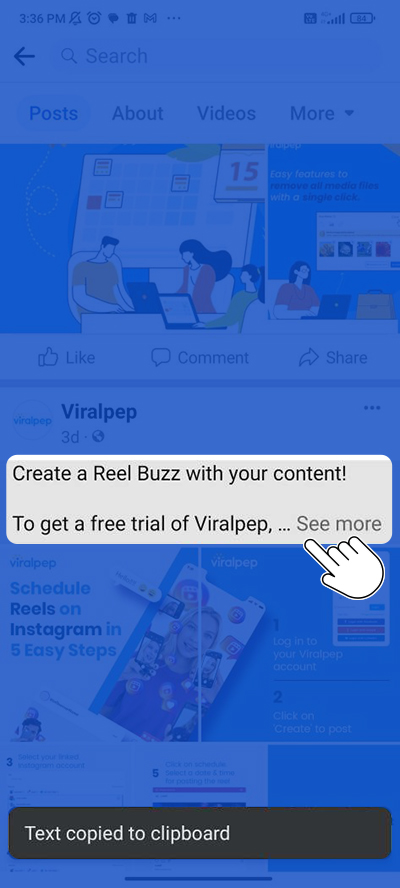
    Copy desired text from facebook feed

  2. Go to the location where you want to paste the text. Click on the blank text area to activate the keyboard. Right-click on the text area, go to the 3 Dot (…) icon on your mobile keyboard and tap on it.
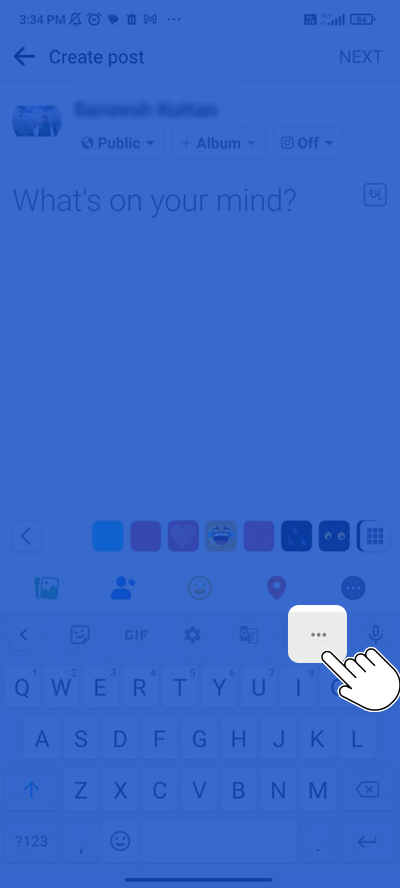
    click on three dots for accessing clipboard option

  3. Locate the Facebook Clipboard icon, which looks like a clipboard, in the toolbar above the text area. Click on the icon to access the clipboard.
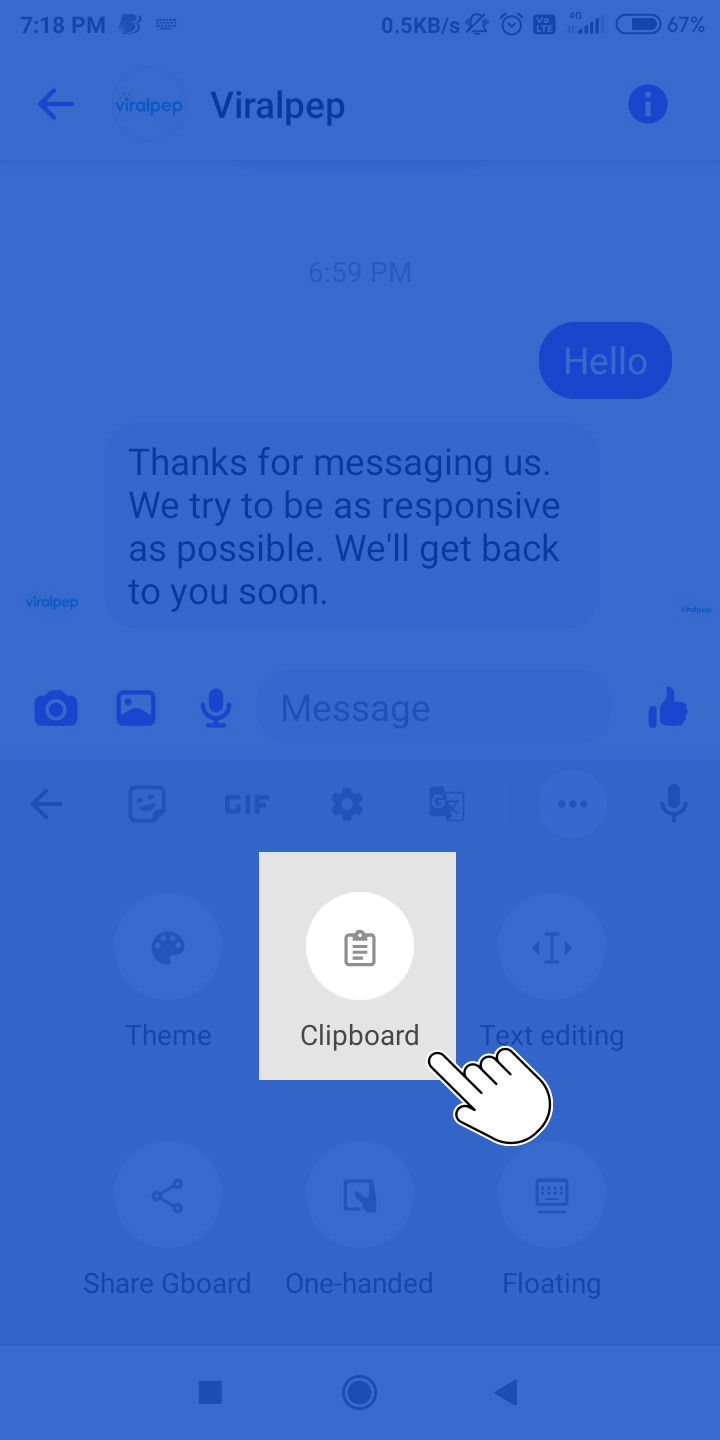
    click on clipboard icon

  4. The clipboard will display the previously copied texts. Click on the desired text to paste it into the text area. You can then edit or format the text as needed.
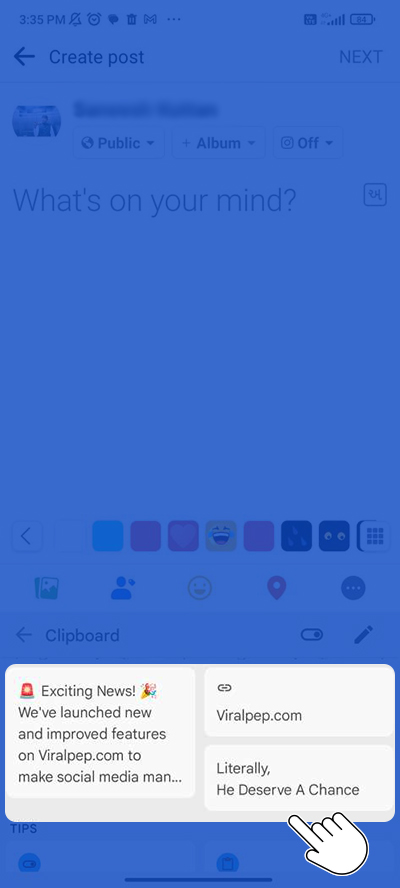
    Click on the desired text to paste it into the text area

  5. From these multiple texts, tap on your desired text to paste it into the blank text area. You can then choose to Save and Publish your content.
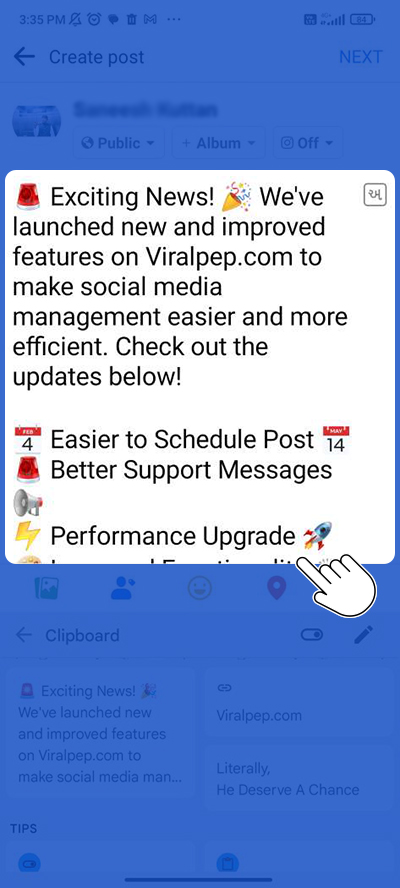
    click on text and edit, update text

Once you are done, you can save or publish the content by clicking on the respective buttons provided.

For a detailed visual guide, you can refer to the attached video for instructions on both using the Facebook Clipboard and saving posts.

The clipboard manager makes sharing things from Facebook easier and quicker. The next time you find something you want to post, remember how to copy from the clipboard and use this feature to simplify your life.

How to Save Posts on Clipboard FB?

This is a very simple and interesting process.

  1. Open your web browser and log in to your Facebook account.
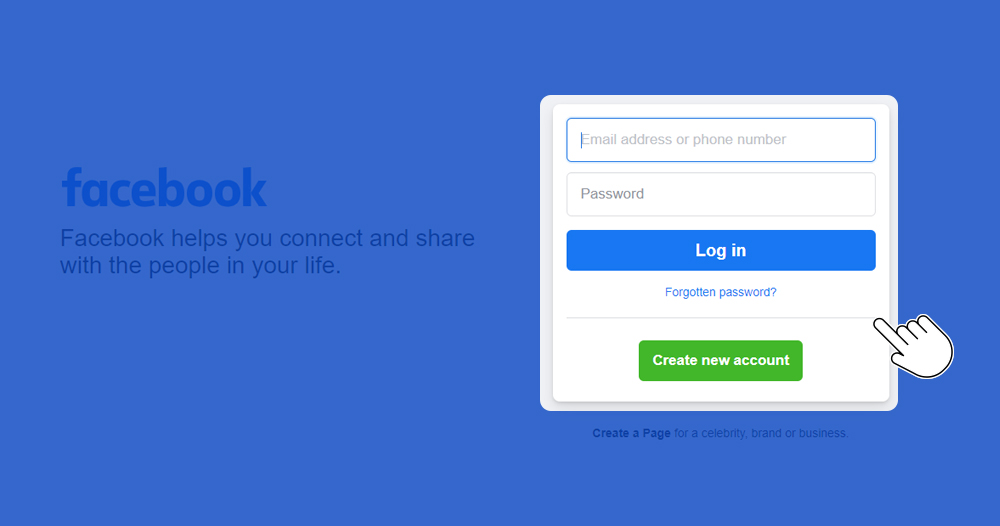
    login or register into facebook account

  2. Find the post you want to save. On the top-right corner of the post, click on the three horizontal dots (…).
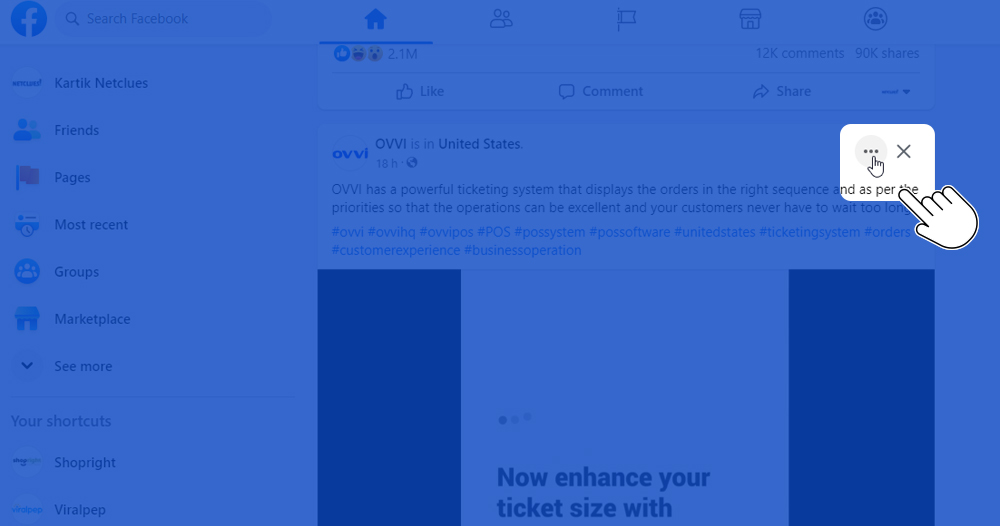
    click on three dots in facebook feed

  3. From the drop-down menu, select the “Save post” option.
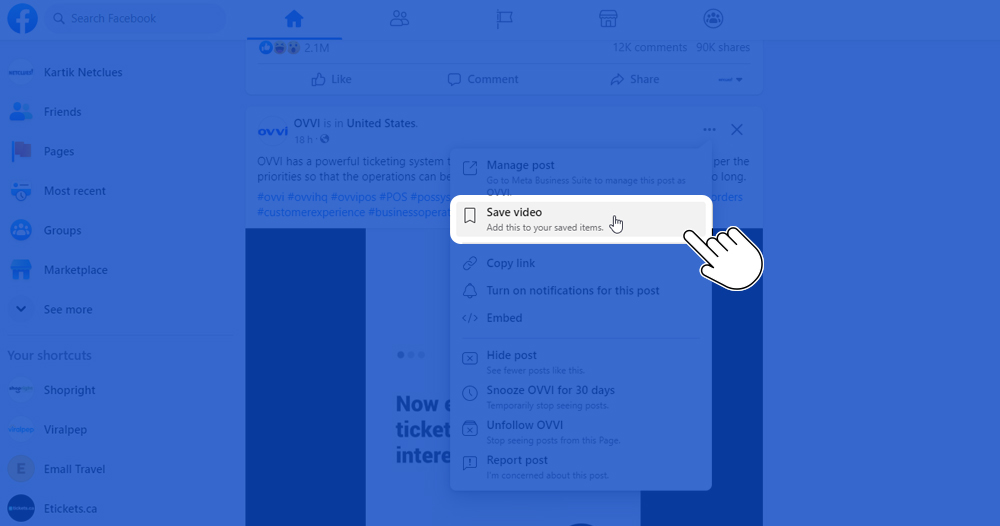
    select save post option from dropdown menu

  4. Choose the “Collection” where you want to save the post. If you don’t have a collection yet, you can create a new one by clicking on the “+ New collection” option. This will add the post to your saved items.
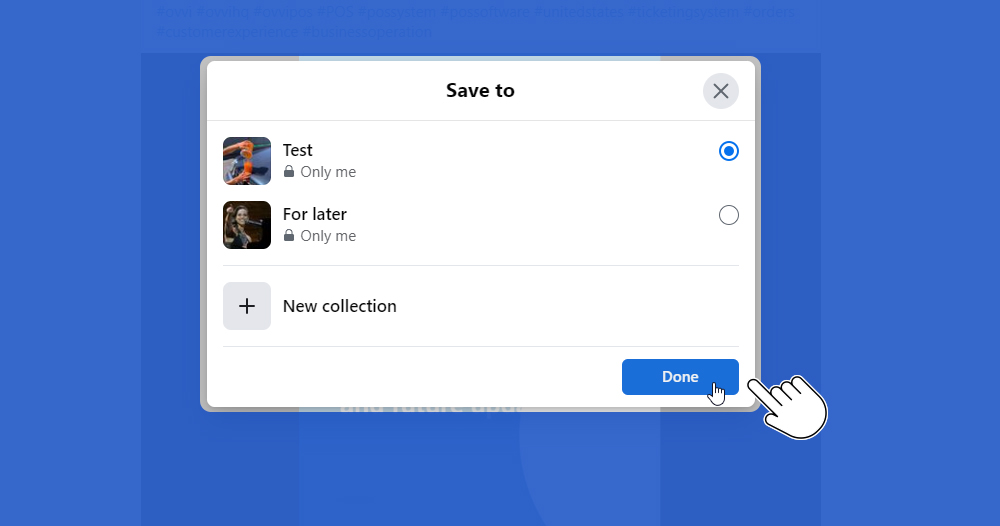
    Select desired collection or create a new collection

For a detailed visual guide, you can refer to the attached video for instructions on both using the Facebook Clipboard and saving posts.

Please note: The instructions provided are for desktop usage. If you are using Facebook on a mobile device, the process may vary slightly.

How to Use Clipboard in Facebook Messenger

  1. Open the Facebook Messenger app on your mobile device.
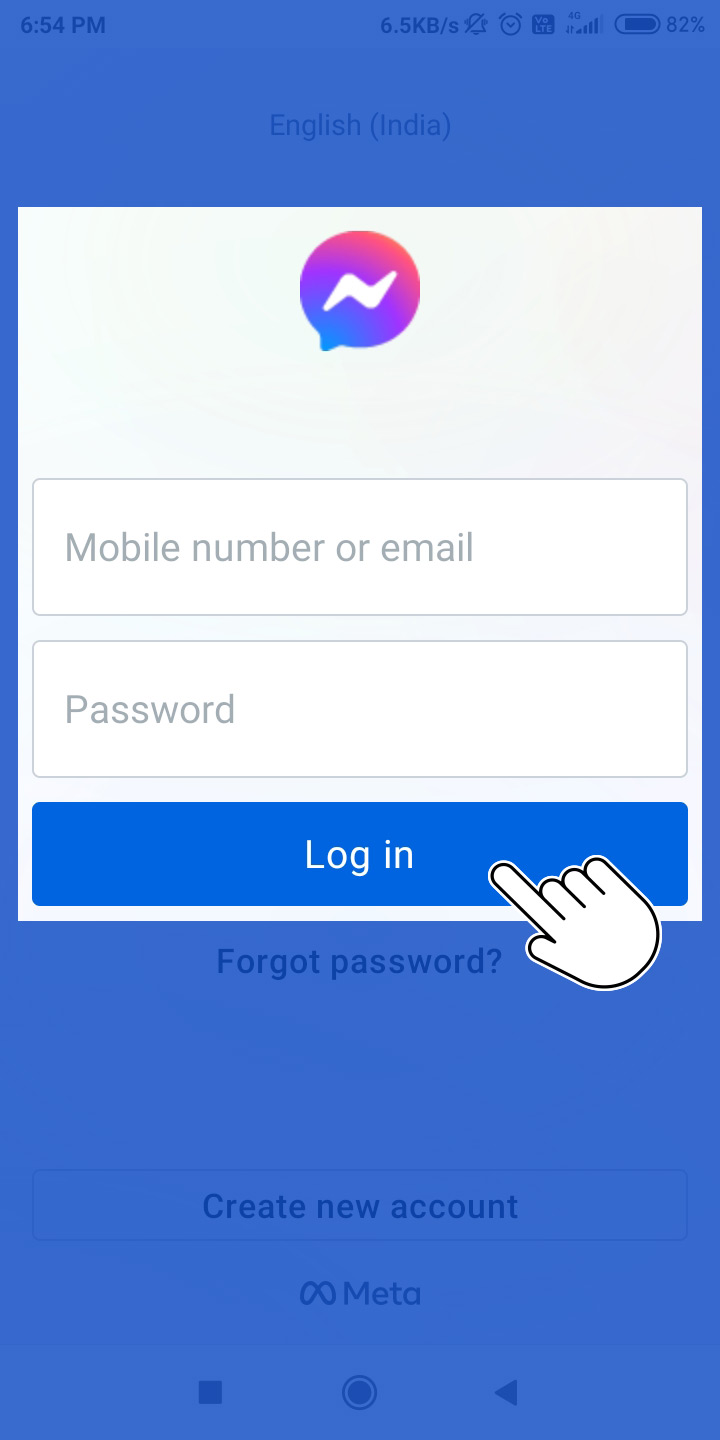
    login into Facebook Messenger App

  2. Tap on the conversation where you want to use the clipboard.
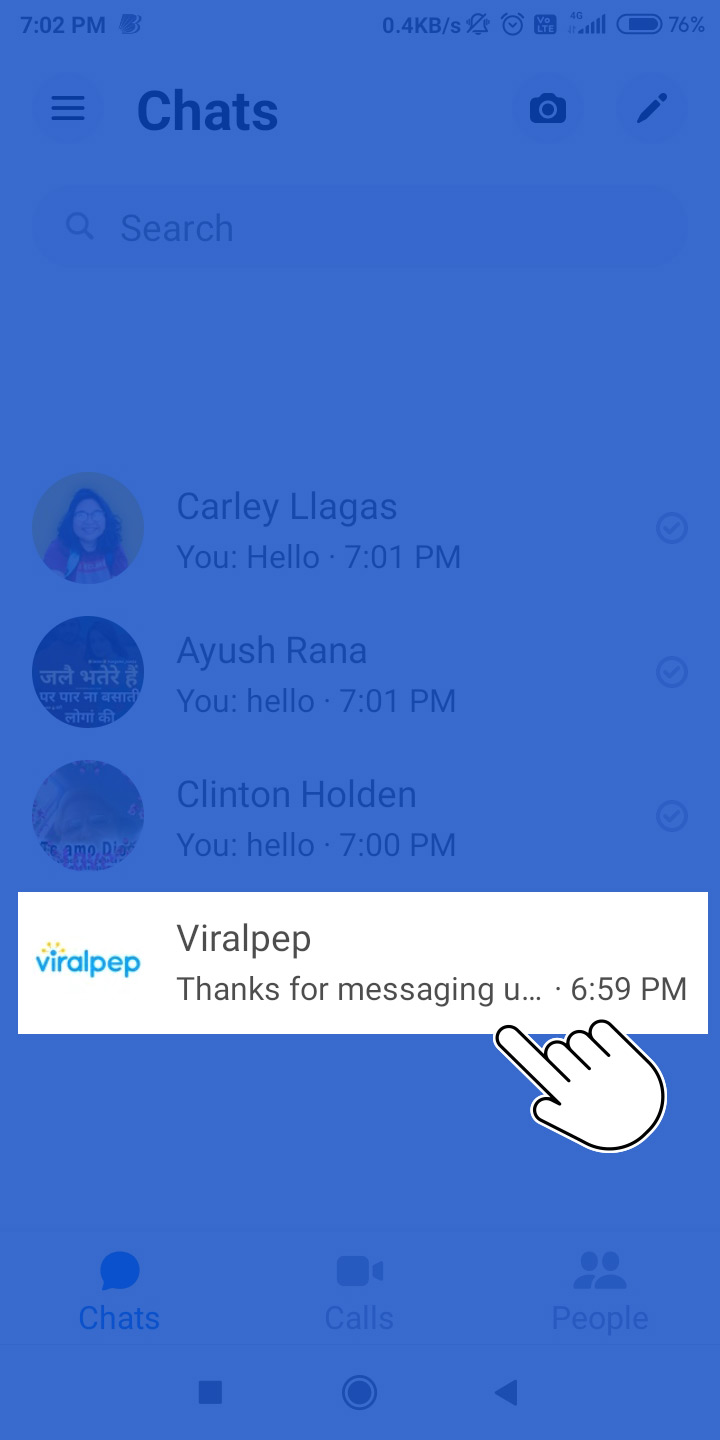
    Select conversation in Facebook messenger app to use facebook clipboard

  3. Long-press on the text input field to bring up the options menu.
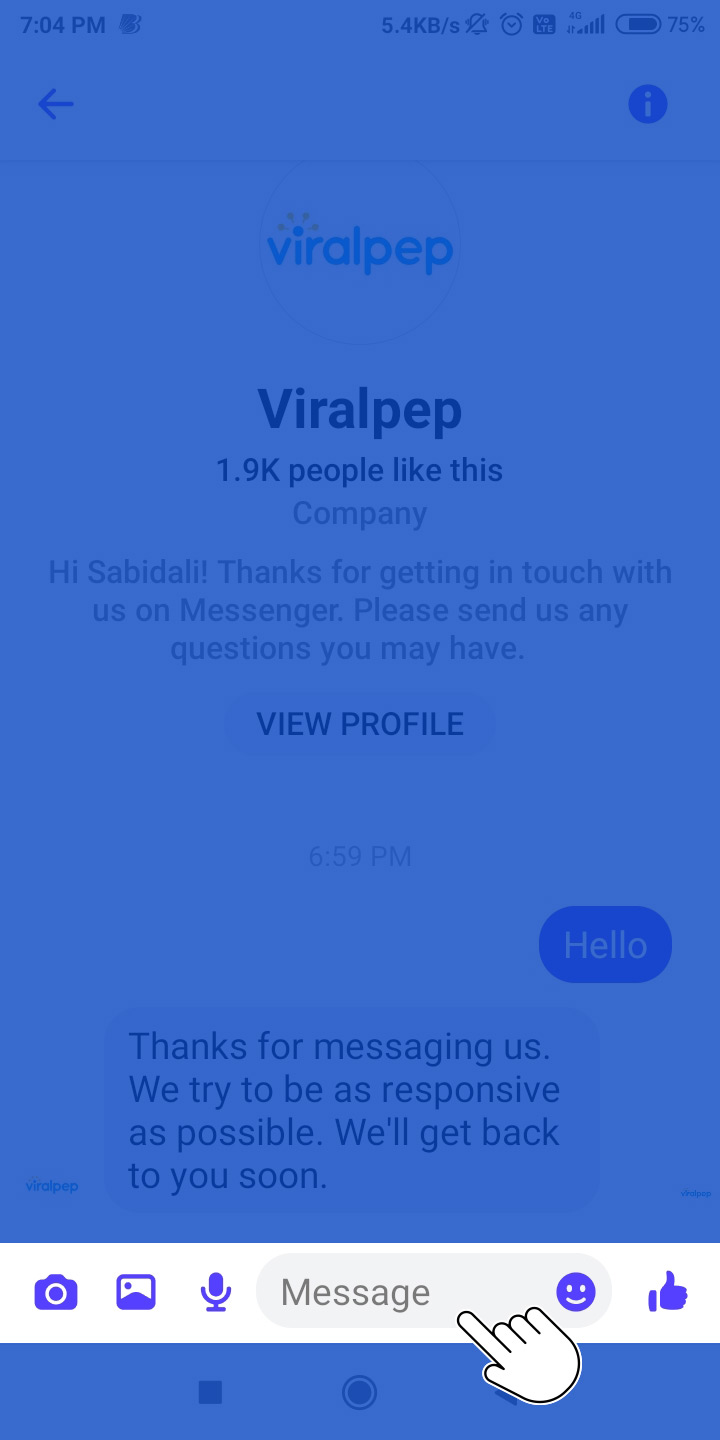
    Long-press on the text input field to bring up the options menu

  4. Tap on the “Clipboard” option from the menu.
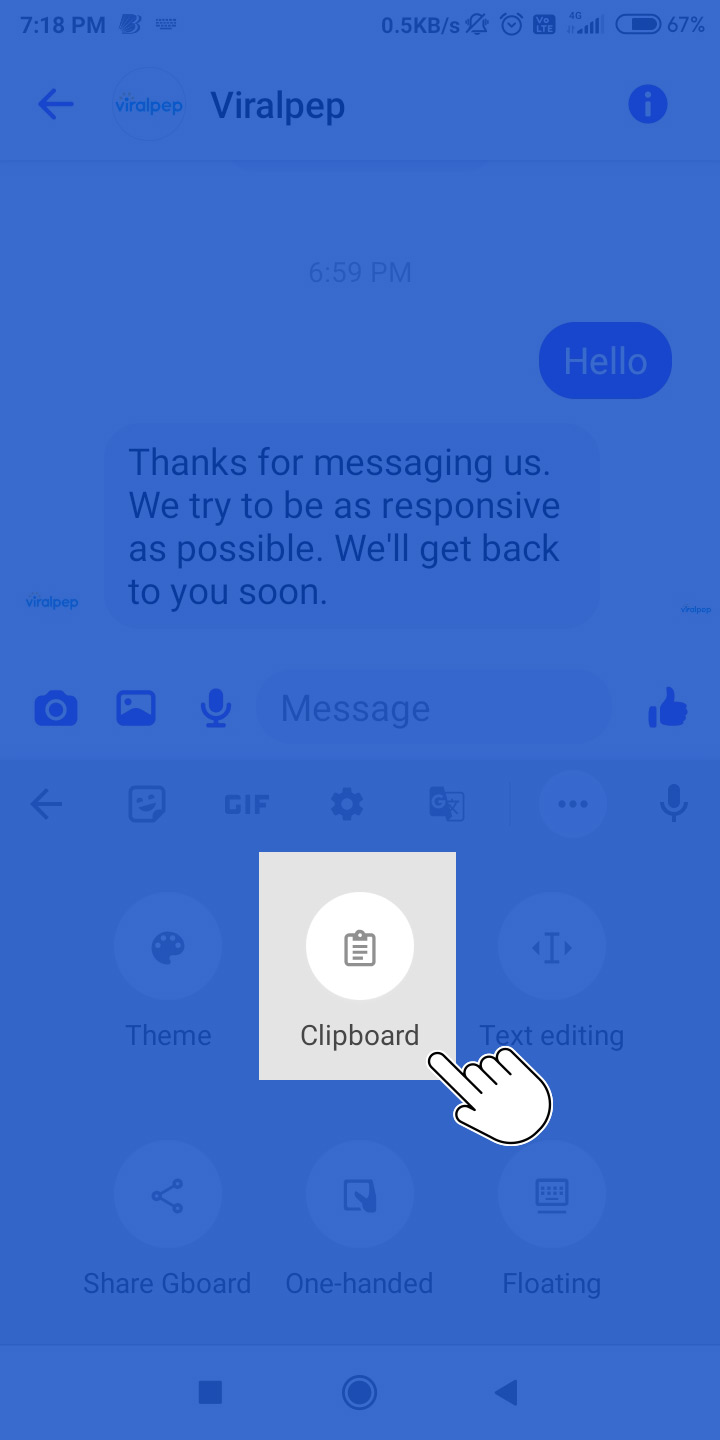
    Tap on the Clipboard option from the menu

  5. The clipboard will open, showing the text that you have copied or cut previously.
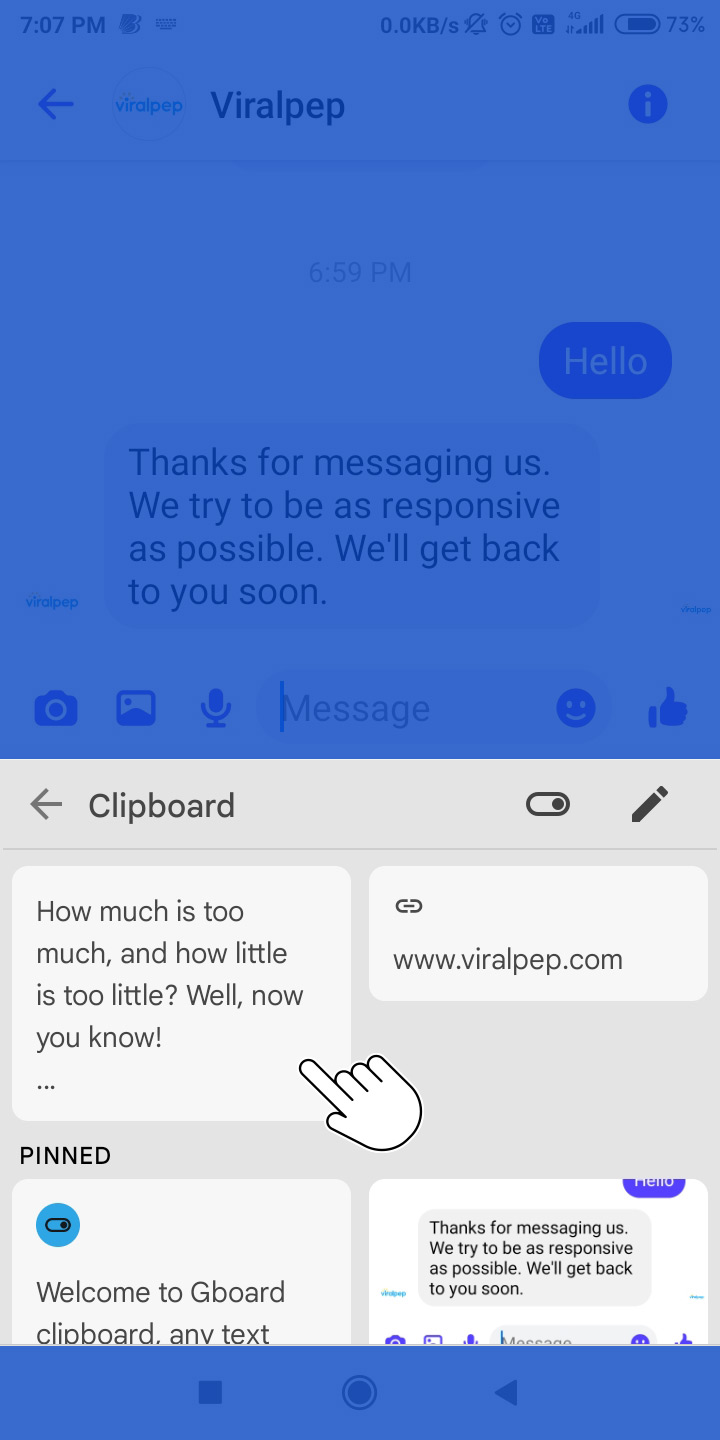
    clipboard with all the copied texts

  6. Tap on the desired text from the clipboard to paste it into the conversation.
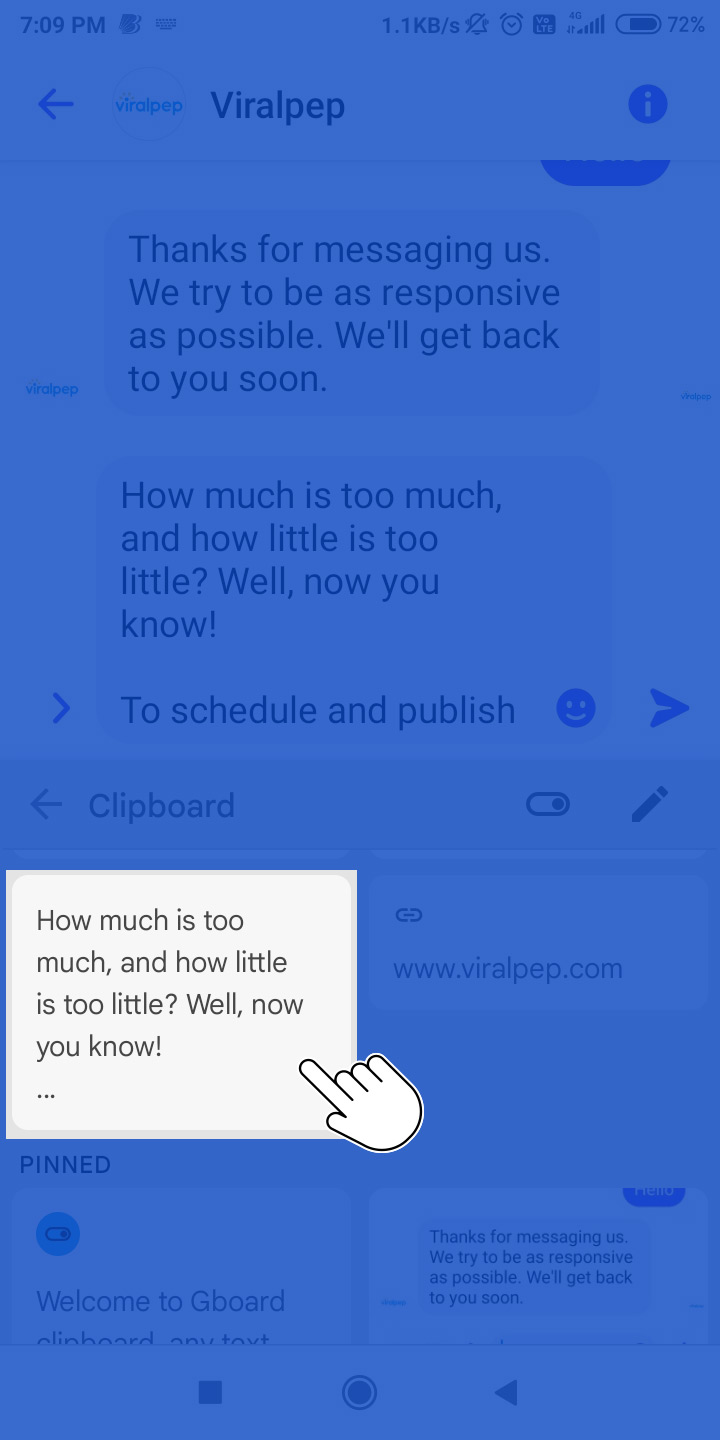
    click on desired text from clipboard

  7. You can also tap on the “Pin” icon next to a text to save it in the clipboard for quick access later.
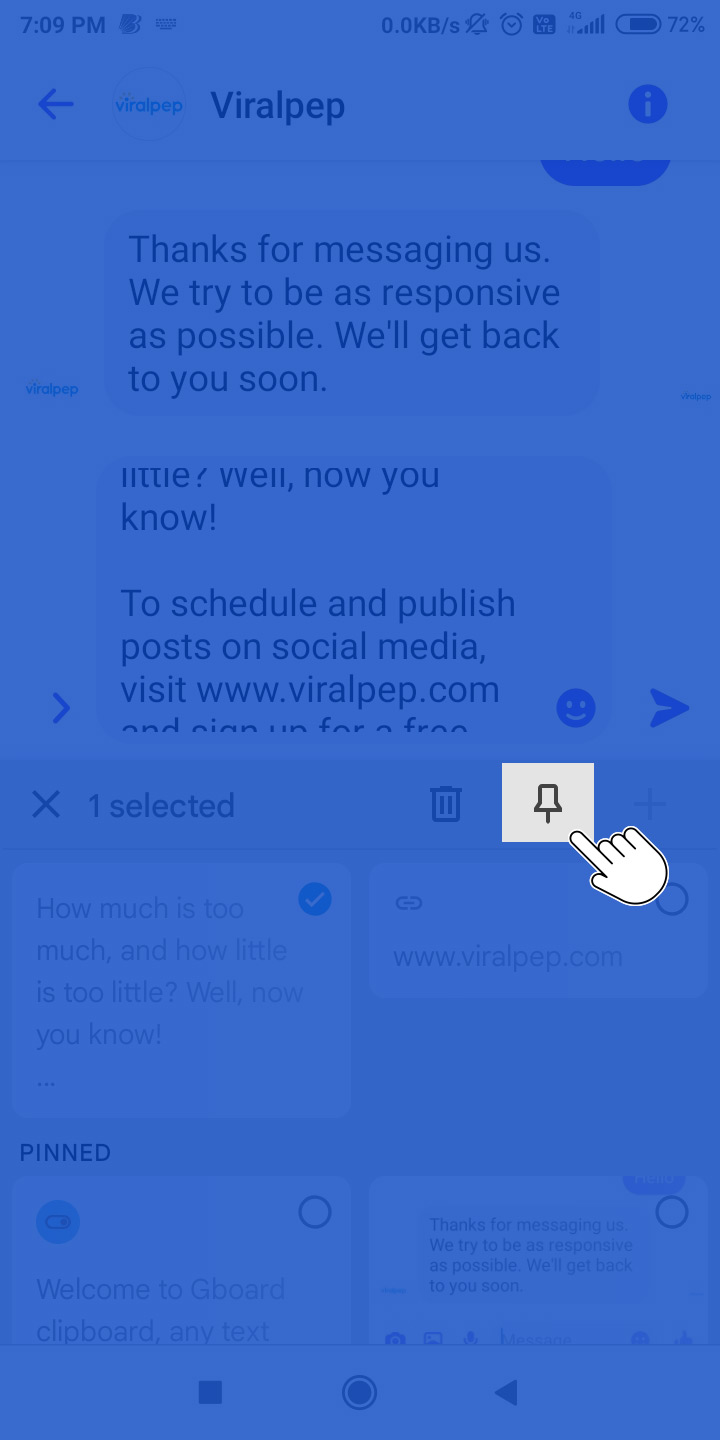
    click on pin icon to save the copied text

  8. Using the clipboard in Facebook Messenger allows you to quickly access and paste copied or cut text into your conversations, making it convenient to share information with your contacts.

What is the location of the items saved to the clipboard?

It is essential to understand where they are Saved OR the clipboard on Facebook.

There are 2 methods to reach your Saved items on FB.

  1. Click on the grid icon See All same as image in the left panel.
  2. Type www.facebook.com/saved in the browser’s address bar with the condition that you are already logged in to your FB account.

When you perform the 1st method, it opens the Menu as follows.
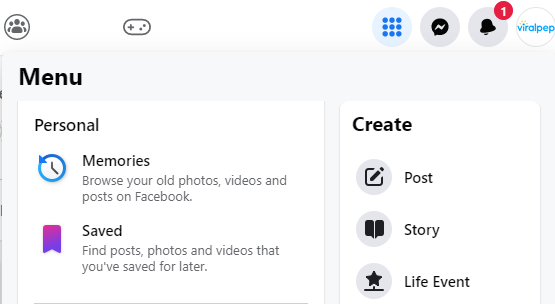
FB Clipboard Menu

Click on Saved to open the FB clipboard (Saved items and My collections).
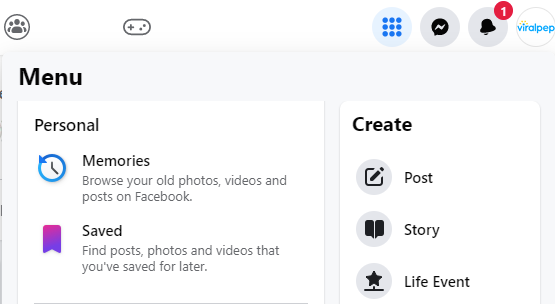
Saved item to FB clipboard

The 2nd method will take you directly to the Saved page (Saved items and My collections).

How Do You Post from FB Clipboard?

Follow these instructions to paste something from your clipboard onto Facebook.

  1.  Log in to your Facebook account.
  2.  Click the “Status” box above your profile page.
  3. Paste the content from the clipboard to the “Status” box.
  4. You may add extra remarks or relevant info to be added to your status update.
  5. Click the “Post” button to share your status update with your Facebook friends.

How to Clear Your Facebook Clipboard History?

Facebook saves all your activities during your FB sessions. Click on your profile pic/icon. Click on Settings & privacy from the drop-down. Select Activity log. This will open your Activity log interface. You can undo any action from here.

You may go to the Saved page (https://www.facebook.com/saved) for video posts.

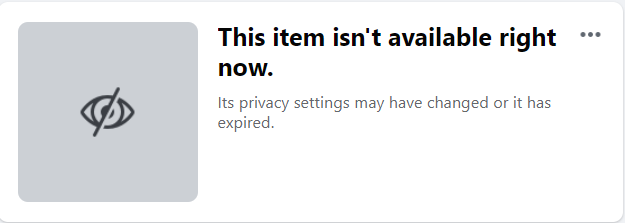
Locate the post that you want to delete. Click on 3 dots and select Unsave. This will remove the post. Select the relevant collection where that post was previously saved. You will see the following image instead of that post. Click on the 3 dots seen in that image. Select “Remove from the collection.

Clear Facebook Clipboard History

Conclusion.

In conclusion, we hope that utilizing the Facebook clipboard trick has been a time and cost-saving hack for you. However, if you’re seeking a more comprehensive solution to optimize your social media management and achieve even greater efficiency, we highly recommend trying out Viralpep.com. With Viralpep, you can elevate your social media game, save valuable time, and see tangible cost savings.

Don’t just take our word for it – businesses that have embraced Viralpep have reported a remarkable 30% increase in engagement, a substantial 25% reduction in content creation time, and an impressive 40% growth in overall social media reach. These statistics speak volumes about the effectiveness of Viralpep in helping businesses like yours succeed in the competitive landscape of social media marketing.

So, if you’re ready to take your social media management to new heights, sign up with Viralpep today and unlock the full potential of your social media efforts. With our user-friendly platform, dedicated support team, and proven track record of success, you can save time, money, and resources while achieving remarkable growth and success in the world of social media marketing. Experience the difference with Viralpep.com!

The importance of social media for your business in 2023

The use of social media has become an integral part of modern marketing.

A strong online presence is one of the most important aspects of being competitive in today’s digital world. Due to the fact that billions of people use social media platforms on a daily basis, businesses have the chance to reach and engage with their target audience in real-time through social media platforms.

It is expected that the importance of social media marketing is going to increase even more in the year 2023.

1675345213 image20230202T115656951Z

Jay Mehta, an expert in digital marketing, says that social media platforms are becoming increasingly sophisticated, offering a wealth of new tools and features for businesses to reach their target audience. In the past few years, video content has been used at an unprecedented rate for marketing purposes. In the era when platforms such as Instagram and TikTok continue to gain popularity, businesses have an opportunity to create engaging video content that catches the attention of their potential customers. Additionally, there is also a growing trend towards the use of augmented reality (AR) in 2023. In order to create engaging and interactive experiences that drive sales for a business, companies can leverage AR technology to create interactive experiences.

Additionally, Mehta emphasizes that consumers are becoming more selective about which brands they support as a result of social media marketing. Therefore, companies must develop strong relationships with their customers by ensuring that they provide them with valuable content on a regular basis and engage with them on a regular basis, in order to keep them engaged. There are a number of social media platforms available today, allowing businesses to share their brand story and offer promotions and discounts, as well as respond to the queries and feedback of their customers on these platforms. Taking such steps will enable businesses to build a following of loyal customers who are more likely to help their brand continue to grow in the future as a result.

Furthermore, with the rise of mobile usage, social media marketing is becoming more and more important as well. The number of smartphones in use around the world is expected to reach over half of the world’s population by 2023. Hence, it is imperative that businesses ensure that their social media presence is optimized for mobile devices, in order to be able to reach their target audience wherever they are in the world. Businesses can also boost their chances of appearing in search engine results by having a mobile-friendly social media presence, which will allow them to reach a wider audience by enhancing their chances of appearing in search engine results.

Possibly one of the most important reasons why social media marketing will receive a lot more attention in 2023 is the fact that it will provide businesses with a low-cost way to reach their target audiences. Compared to traditional marketing methods such as print and television advertising, social media marketing is much more cost-effective when it comes to promoting your business online. Businesses have the ability to reach their target audience at a fraction of the cost of traditional marketing methods by using social media platforms to reach out to their target audience. As a result, social media marketing has become an attractive option for small businesses who are looking for a cost-effective means of reaching their target audience without breaking the bank.

As a final note, social media marketing is also expected to become more important in 2023 as it provides businesses with valuable insights into their target audience that can be used to better target their marketing efforts. In order to gain a greater understanding of what their target audience likes and dislikes, businesses can track metrics such as engagement rates, click-through rates, and conversion rates. As a result of this information, businesses will be able to make better data-driven decisions that will result in improved results as a result of future marketing strategies.

In conclusion, as businesses seek to reach their target audiences in new and innovative ways in the coming years, social media marketing is set to grow in importance in 2023, as businesses seek to find new and innovative ways to reach them. The rise of video content, augmented reality, and mobile usage has given businesses the opportunity to engage their audiences in an entirely new way. In conjunction with this, social media marketing allows businesses to reach their target audience in a cost-effective way, as well as provide them with valuable insights into the behavior of their target audience. Businesses can stay relevant in the fast-paced digital landscape of 2023 by leveraging the power of social media platforms. 

ViralPep gives you control over your social media presence! Using a comprehensive social media calendar, you will be able to plan and schedule all of your posts in advance, in order to achieve a consistent and effective presence across all of your social media platforms. The stress of managing social media on a daily basis is over. With ViralPep.com, you can say goodbye to the stress of social media management on a daily basis and get a more organized and streamlined approach.

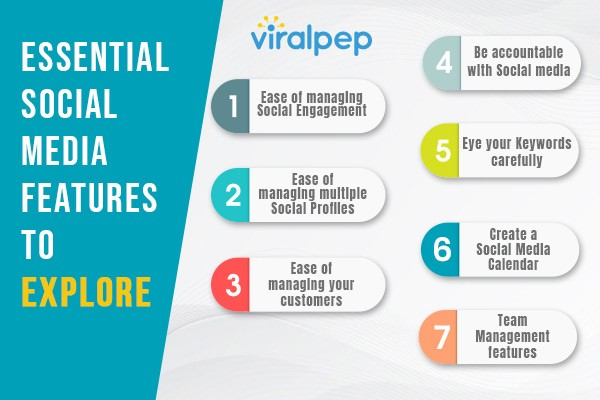
7 Essential Social Media Features To Explore

As Social Media Marketers, you have been continuously on a journey to discover new engagement methods where loyal followers become a necessity for your business. Clinging to a safe game might not yield results. You have to keep aside your conventional platform and switch to a trendy, more reliable, and highly robust social media management tool to achieve your business goals.

Hootsuite is a common name within social media circles. Hootsuite is an established name and has received its fame and popularity due to the features it has offered over time. This world does not thrive on monopoly but on the competition.

An inclination towards a specific tool can be a personal choice, but before deciding upon any Hootsuite alternative social media platform, let us have an overview of the 7 Essential Social Media Features To Explore. You must ensure before buying that your SM tool has these features.

Understanding Social Media Tools

Before we dive into the advantages, it is essential to understand what goes behind making a Social Media Management platform. What essential and critical features must you consider before choosing one?

Social Media Influencers consider a social media management platform a secured environment. Besides being capable of scaling itself, it goes into the core of your business. A social media tool is your smart joystick to manage multiple social media accounts across different organizational sections and departments.

Social Media experts use this powerful tool to post content, track the received responses, and monitor the progress. Experts use this platform to offer the best of services to their customers to generate leads. If these leads are served well, there is no looking back for opportunities, and your business will certainly grow in the coming years.

7 Important Features to Consider:

1. Ease of managing Social Engagement

A direct channel for the customers to voice their concerns and issues. The brands can hear them loud and clear.

2. Ease of managing multiple Social Profiles

The best feature lets you switch between multiple social pages/profiles without signing in and out each time. The companies that you work for might have multiple pages for various purposes. This feature within your social media platform will come in handy.

3. Ease of managing your customers

Your customer is into serious business, so don’t consider him part of a common crowd. Each customer is special and expects to be treated well. Your Social Media tool must have a built-in CRM-like feature that saves your customers’ communications, highlights important pointers, and checkmarks specific notes. This feature is the roadmap to a successful sales closure for your peers and team.

4. Be accountable with Social media

Social Media is a tool with latent fire within; use it with caution. Using social media tools adds layers of security to allow only the most reliable team members to send out the content. Amateurs within the team get no opportunity to outsmart the company.

5. Eye your Keywords carefully

Keywords hold a very substantial position in this Social Media Universe. They speak out customers’ minds. Use your social media tools to manage your keywords; these small phrases tell the mystery and history of your products. Create a collection of catchy, unique, and industry-specific keywords. Social Media experts are expected to perform competitor keyword analysis before deciding on the keywords for their products.

6. Create a Social Media Calendar

A social media calendar can be a wonderful strategy for planning and scheduling posts. Calendars help you balance your posts if you have volumes to schedule. This feature within your social media platform helps you plan your posts. You can target your posts such that you don’t miss blind spots. Plan your posts from a user perspective.

7. Team Management features
  • Setting up your Team Members’ AccountFor any growing startup planning to build a strong brand, safeguarding its reputation is critical. Hence, we have developed a platform that allows the administrator to grant access to his team without sharing passwords.Invite your team members to the platform and easily set up their accounts. As an admin, you can add up to 20 team members simultaneously. The system ensures that the team operates systematically and diligently, safeguarding the brand’s reputation.
  • Permit as much as necessary:While you must hold admin rights, you can apply limited access to your social media accounts. You can allow access to the profiles based on the requirements and tasks performed by the team members belonging to that profile. You can delete and prevent faulty posts from being uploaded to your social media accounts.
  • Staying up-to-date is the Key.To keep the audience engaged with the latest content and developments, your marketing team has been working hard on scheduling the right posts across social media channels. Their efforts will grow more consistent if they can access the past posts. This will help them plan their next series of posts enabling them to identify which channel generates the maximum engagement and sales

Final Words

The most effective Hootsuite alternative is the one that considers your requirements in the way you want. Price is an important criterion but not always. Therefore, consider your assigned budget viz-a-viz the features you need. Now decide if your needs will evolve with the tool of your choice. Try signing up with a robust tool that understands your needs, gives you flexibility, and incorporates future developments rather than migrating to new tools every few years.

A Brief Guide to understanding Access Token Expiration and Facebook Group Authorization

What is an Access Token?

As the name suggests, “Access Token” is a digitally created code containing significant information necessary for an application’s authentication. This information concerns the users, their assigned permissions, groups they belong to, and time instances when the scheduled tasks will occur. This information is integrated into a single token passed from a computer to other digital devices.

Reasons why access token expires

We must first understand that an access token expires for a purpose. Every social media platform follows the procedure of disconnecting your access token to keep your accounts safe and secured. So it should not be a matter of frustration but should be treated as a gesture of appreciation.

Here are a few reasons why your access token might expire:

  • Someone from your organization or team has changed the login passwords for the connected social media accounts. So when you try to access the social networks through softwares like Viralpep, it doesn’t get authorized as the existing credentials don’t match.
  • Administrative privileges have changed hands. This means that you or someone from your team might not be the administrator anymore. Hence, the older (non-administrative) profile wouldn’t have access to social networks.
  • Following a standard protocol, social media sites periodically revoke your access token, resulting in disconnection from the sites. This ensures you initiate a prescribed process to re-establish fresh connections with your social accounts. This step ensures better security of your accounts.
  • Suppose a social platform detects multiple logins (from multiple IP addresses) to the same account. The major possibility is that this scenario would pose a security risk to your account. This is an adequate reason for social platforms to act against your interests and disconnect your accounts, resulting in the expiry of your access token.

Standard token expiration limit for each social media.

People have taken a foot ahead and embraced Social Media platforms as a part of their lives. It is important to know when your access token will expire. We will consider Facebook, Instagram, Twitter, and Linkedin for this purpose.

  • Facebook: Facebook login provides your app with an Access Token when it authenticates a user. In standard cases, the token lasts close to 60 days if you use Facebook SDK in your app.There is a provision where an expired access token is refreshed automatically when a user logs in using an app, which means Facebook allows a lifespan of 60 days for any access token from its last usage.
  • Instagram: Instagram hails from the same family as Facebook. It offers an access token with a finite lifespan of 60 days. Instagram calls these long-lived access tokens. You can refresh them if they are atleast 24 hours old and are still valid. These refreshed tokens last for 60 days from their last refresh date.A word of caution: Suppose you haven’t refreshed your access token in the last 60 days. There are all possibilities of it getting expired, leaving you no room to refresh it any further.
  • Twitter: Twitter continues to have a simplified approach for access tokens. Hence, Twitter access tokens don’t have specific or finite expiry dates. There are 2 instances when your Twitter access token can expire.1. When a user intentionally revokes an application from his Twitter account.

    2. When Twitter tracks down a spam-like activity or publishing of duplicate content.

    Solution: Twitter suggests a 3-legged OAuth flow process to obtain user access tokens. Twitter facilitates the application to get its access token while directing the user to reauthorize the application.

  • LinkedIn: LinkedIn is very specific in its approach. LinkedIn offers a finite validity period of 60 days for every access token.Besides the regular Access Tokens, LinkedIn offers (programmatic) Refresh Tokens with a finite expiry of 12 months. Post expiry, the administrator must reauthorize the application to continue using the refresh tokens.

    As a practice, LinkedIn suggests and allows issuing programmatic refresh tokens to limited members only.

    Caution:1. In cases where LinkedIn discovers duplicate posts being published through various LinkedIn Accounts simultaneously, it would flag these instances as spam-like activity resulting in the expiry of your access tokens.

    2. LinkedIn would expire the access token where the administrator for a LinkedIn page has changed.

What is Facebook authorization, and why is it required?

Facebook Authorization is a process that Facebook recommends keeping in view the security of the managed pages.

Suppose you manage a page on Facebook. As a step towards security Facebook will ask you to complete the authorization process for that page so that you can continue posting on that page. This will prevent admins with fake identities from breaking into that page.

Process:

Facebook Authorization will ask the page manager to perform Two-factor authentication to secure their managed account. He must also confirm the primary country location. If the page manager requires authorization, a notice to begin the process will flash in his News Feed.

The process might sound difficult, but it isn’t. It takes a few minutes to complete the process to enable you to post content to your managed page.

Purpose:

The basic purpose is to secure the account and bar unauthorized access to the pages. Unless the page manager completes the Facebook authorization process, he won’t be allowed to post content on that page.

How to authorize your Facebook Group?

For New Public Groups Experience:

This category is for those public groups which have migrated to the new public group experience. These groups allow users to become members without the admin’s approval. If the group admin allows, the visitors (non-members) can post and comment in these groups.

The group admin can set an approval process for first-time members and visitors, converting them into participants. After the admin’s approval, such participants may publish their posts or comments for the first time. Despite being previously approved, such participants will again require the admin’s approval to share posts in the future.

Private and Public Groups – not migrated to new experience:

Consider that you are the admin of a private or a public group that hasn’t migrated to the New Public Groups Experience. In this situation, you can decide to allow membership by approval as mandatory. As a result, that group’s admins and moderators will receive membership requests. They will have to approve or decline the requests before an individual can join that group as a member.

If your group gains popularity, approving several daily membership requests might become a nightmare. You can use Facebook’s Admin Assist to do the job for you. You can define criteria like people answering the Membership Questions will be automatically approved. You can choose different criteria for approval and disapproval of membership requests.

Note: Admins can refer to Facebook Help Centre for more updates.

Conclusion

Understanding the nitty-gritty of Access Token Expiry and the Facebook Authorization process is essential. Through this blog, we have addressed these aspects in detail while maintaining the focus to the maximum possible extent. Access Token symbolizes a kind of currency without which your daily presence will cease to exist. Hence, you must follow the standard guidelines on each social media platform to continue your healthy presence.

We Are Discontinuing Free Plan

The idea behind Viralpep is to provide ways to manage your social media more effectively. As a social media manager, be it for your business or the company you are working for, you want to widen your reach, gain followers, increase sales, and reach your said goals. And as a social media software, we want to help you in all ways possible.

Our free plan included the most basic features, but we want all our users to experience the best of Viralpep. From 2nd May 2022, Viralpep will now become a paid-only platform offering a 15-day free trial.

The decision to discontinue our free plan comes with lots of benefits.

What are the benefits –

  • Dedicatedly creating more features frequently.
  • Offer better service to all paid clients.
  • Improving the overall quality and performance of the Viralpep platform.

What happens if I don’t upgrade?

If you are an existing user and have been using the free plan, you can continue using the same features.

  • View your dashboard
  • Access limited features
  • View your profile
  • Buy a paid plan

How do I upgrade to a paid plan?

Upgrading to a paid plan means you’ll have access to useful features, and you can schedule and post unlimited posts, manage teams and do much more.

To upgrade to a paid plan:

  • Go to the dashboard
  • Click the ‘Upgrade’ button on the top right corner or the side of the screen.
  • Select package (Monthly / Yearly)
  • Enter Payment Detail with Credit Card or PayPal
  • Proceed to checkout
  • Click on your profile picture on the left bottom corner and click on “My Package” to check your package status with invoice detail.

Important points to note :

  1. If you are an existing Free Plan subscriber, you can continue using Viralpep. It is your choice whether to upgrade or not.
  2. Discontinuing the downgrade completely. Paid users who fail to subscribe will not be allowed to fall back on the Free Plan. We will not block your login, you will be able to view your dashboard, but you will not be able to use any feature.

Do let us know if you have any queries.

Embrace and enjoy the upgrade.


Review Viralpep on CrowdReviews – Share Your Experience

CrowdReviews, as the name suggests, is a platform where users who have used or are using products and services share their thoughts on their experience. The platform also allows having an open discussion on the quality of service or product without any filter or hidden agendas. As our esteemed users, we urge you to leave us a review on CrowdReviews. Sharing your thoughts, process, and your authentic experience with Viralpep. It will help us reach out to all looking for solutions like Viralpep and help us grow as a company.

Our Journey

The creators of Viralpep are social media managers themselves, and after using various software and tools, they were still not satisfied. So they created a list, a list of pain points- of what, how, why- after months of research and development came Viralpep. So when you use Viralpep, you know where it comes from; it comes from users like you. Features like

  • Managing profiles on four major social media platforms – FB, IG, Twitter, LinkedIn
  • Ready to use, pre-defined messages
  • Preview post before it goes live
  • Add up to 10 images in one post
  • 24*7 Customer Service

And much more. We have had a fantastic journey and simply want to grow and reach out to creators all over the globe. We alone can keep bettering our service, but you, who have used or are using Viralpep, can share your experience with the others. And when you take out time from your schedule to leave us a review on CrowdReviews, it means the world to us. We take criticism in the same spirit we accept appreciation. We will be delighted to read your reviews and improve so you can make the best use of Viralpep.

Review Us on CrowdReviews

An Overview of the Most Important Social Media Metrics for Your Business

Did you ever wonder: what are social media metrics? The words “social media metrics” sound like one of the buzzwords you often hear but rarely understand in depth. The idea of tracking one’s social media metrics can leave creators and advertisers confused, especially if they’re encountering it for the first time.

According to a report by Sprout Social, the top three challenges that social media marketers face are measuring their ROI, identifying and reaching their target audience, and supporting their overall business goals.

Do you encounter the same problems? If so, you need to keep track of your social media activities and campaigns. Check the list of social media metrics below to get started.

The Importance of Social Media Metrics

There are many advantages to learning about social media metrics. For one, these figures will tell you how healthy or successful your social campaigns are. They’ll also show you which areas need improvement and what types of audiences you haven’t reached yet.

Another survey from Sprout Social revealed that 81% of businesses use social media publishing or analytics tools. Hence, your social media marketing stint won’t be successful without essential marketing analytics tools. They’ll serve as a handy guide to growing your business on social media.

What are Social Media Metrics?

Simply put, social media metrics are data. These data will tell you the impact of your social media efforts on your business, including your revenue rate, customer acquisition, publicity, and brand awareness. Reading these metrics and correlating them to what you need will give you the necessary information to leverage your business.

Social Media Engagement Metrics

As the term suggests, engagement metrics measure the number of engagements or interactions your posts receive on social media. Now, your basic understanding of engagements may only include reactions and comments, but there are several other metrics that you can keep track of, including:

  • Amplification Rate. The amplification rate is measured by the ratio. It measures the social shares of every post opposite your total number of followers. For example, if you have 1,000 followers and only 10 people shared your post, the ratio or the amplification rate would be lower. Ideally, the ratio should be 1000:200.
  • Applause Rate. The applause rate measures the number of positive reactions your post receives. For example, heart and wow reactions on Facebook are considered positive reactions.
  • Virality Rate. The virality rate measures the number of people who shared your posts compared to the number of unique views your post had.
  • Average Engagement Rate. The average engagement rate counts all types of interactions on your posts—positive, negative, and neutral.

Social Media Advertising Metrics

According to a study by Content Marketing Institute, 83% of B2B marketers use social media advertising on multiple platforms. To evaluate how your social media advertising works, you need to analyze the following metrics:

  • Cost per click (CPC). The CPC will tell you how much you need to pay every time someone clicks on your ad. If your CPC is too high, it isn’t a good sign because it means that you might not be able to recover your advertising expenses.
  • Click-through rate (CTR). These metrics are accumulated by dividing the number of times your ad is shown by the number of clicks your ad receives.
  • Bounce rate. The bounce rate is measured by the number of people who visit your site and then leave immediately. You can also keep track of visitors who stay and navigate other parts of your website.
  • Return on investment (ROI). Your ROI is measured by the number of social media posts that create action divided by your investment to achieve those posts.

Social Media Metrics for Different Platforms

1641564105 image2

Exploring the different metrics on various social media networks will help you understand which platforms are best for your social campaigns and which ones need improvement or should be of least priority.

Facebook Metrics

  • Impressions. This will tell you how many times people saw your posts. Even if they don’t react or comment on your posts, they will be counted as impressions as they see them.
  • Reach. Say you’re posting about the best media communications degree online. This type of metric will inform you how many people were exposed to your message when you ran an ad campaign.
  • Video Engagement. This will give you metrics about how well your video performs on Facebook—number of shares, comments, and reactions.
  • Click-through Rate (CTR). This type of metric will measure how many people actually clicked on your ad rather than just scrolling past it or ignoring it.

Instagram Metrics

  • Impressions. On Instagram, impressions mean how often people see your displayed post or content.
  • Reach. Like Facebook, Instagram reach measures how many unique views your post or story had.
  • Most Engaged Hashtags. These are hashtags used often by Instagram users in a particular period.
  • Discovery. This metric measures how many unique users discover your story on Instagram.

Twitter Metrics

  • Average Tweet Performance. This measures how your tweets perform on average and allows you to implement a better strategy for your brand marketing.
  • Audience Interests. This shows how much the audience is interested in your tweet.
  • Engagement Rate. The engagement rate records the number of interactions your tweets have with your followers.
  • Follower Growth. The follower growth indicates the amount of growth your followers had.

LinkedIn Metrics

  • Engagement Rate: This represents the number of positive and negative interactions you have on Linkedin.
  • Employee Advocacy Analytics. These analytics help you gauge the current trends in employee management and member engagement.

YouTube Metrics

  • Subscriber Count. This type of metric will tell you how many subscribers you have or how many dedicated viewers are waiting for your posts.
  • Engagement. This engagement reflects the number of engagements your videos have, including positive and negative ones. You can try tools like a Free online youtube video editor for creating the best video for your youtube channel for more engagement.
  • Watch Time. The watch time shows the length of time that viewers watch your videos.

Negative Metrics

Aside from measuring positive metrics, you should also note negative analytics to enhance your advertising campaigns.

  • Churn Rate/Attrition Rate. It measures the rate at which customers stop shopping for your products.
  • Unsubscribes/Unfollows. As the term suggests, this type of metric shows how many users unfollowed or unsubscribed your social media profiles.
  • Negative Reviews. It leaves a vocal sentiment of people’s bad experiences, either through interacting with your brand or purchasing your products.

Set your Social Media Metrics with Viralpep

If you feel like you need a little help with managing your social media metrics for your business, Viralpep is the answer. It features a great design and much power while giving you flexibility with what you need.

Wrap Up: Tracking Social Media Metrics is Vital for Your Social Media Marketing Campaigns

With all these helpful tips and the right social media metrics tools, you can surely get the hang of your social media analytics. Just know what you need to evaluate in your social media marketing campaigns and leverage your business with Viralpep.

Did you ever wonder: what are social media metrics? The words “social media metrics” sound like one of the buzzwords you often hear but rarely understand in depth. The idea of tracking one’s social media metrics can leave creators and advertisers confused, especially if they’re encountering it for the first time.

According to a report by Sprout Social, the top three challenges that social media marketers face are measuring their ROI, identifying and reaching their target audience, and supporting their overall business goals.

Do you encounter the same problems? If so, you need to keep track of your social media activities and campaigns. Check the list of social media metrics below to get started.

The Importance of Social Media Metrics

There are many advantages to learning about social media metrics. For one, these figures will tell you how healthy or successful your social campaigns are. They’ll also show you which areas need improvement and what types of audiences you haven’t reached yet.

Another survey from Sprout Social revealed that 81% of businesses use social media publishing or analytics tools. Hence, your social media marketing stint won’t be successful without essential marketing analytics tools. They’ll serve as a handy guide to growing your business on social media.

What are Social Media Metrics?

Simply put, social media metrics are data. These data will tell you the impact of your social media efforts on your business, including your revenue rate, customer acquisition, publicity, and brand awareness. Reading these metrics and correlating them to what you need will give you the necessary information to leverage your business.

Social Media Engagement Metrics

As the term suggests, engagement metrics measure the number of engagements or interactions your posts receive on social media. Now, your basic understanding of engagements may only include reactions and comments, but there are several other metrics that you can keep track of, including:

  • Amplification Rate. The amplification rate is measured by the ratio. It measures the social shares of every post opposite your total number of followers. For example, if you have 1,000 followers and only 10 people shared your post, the ratio or the amplification rate would be lower. Ideally, the ratio should be 1000:200.
  • Applause Rate. The applause rate measures the number of positive reactions your post receives. For example, heart and wow reactions on Facebook are considered positive reactions.
  • Virality Rate. The virality rate measures the number of people who shared your posts compared to the number of unique views your post had.
  • Average Engagement Rate. The average engagement rate counts all types of interactions on your posts—positive, negative, and neutral.

Social Media Advertising Metrics

According to a study by Content Marketing Institute, 83% of B2B marketers use social media advertising on multiple platforms. To evaluate how your social media advertising works, you need to analyze the following metrics:

  • Cost per click (CPC). The CPC will tell you how much you need to pay every time someone clicks on your ad. If your CPC is too high, it isn’t a good sign because it means that you might not be able to recover your advertising expenses.
  • Click-through rate (CTR). These metrics are accumulated by dividing the number of times your ad is shown by the number of clicks your ad receives.
  • Bounce rate. The bounce rate is measured by the number of people who visit your site and then leave immediately. You can also keep track of visitors who stay and navigate other parts of your website.
  • Return on investment (ROI). Your ROI is measured by the number of social media posts that create action divided by your investment to achieve those posts.

Social Media Metrics for Different Platforms

1641564105 image2

Exploring the different metrics on various social media networks will help you understand which platforms are best for your social campaigns and which ones need improvement or should be of least priority.

Facebook Metrics

  • Impressions. This will tell you how many times people saw your posts. Even if they don’t react or comment on your posts, they will be counted as impressions as they see them.
  • Reach. Say you’re posting about the best media communications degree online. This type of metric will inform you how many people were exposed to your message when you ran an ad campaign.
  • Video Engagement. This will give you metrics about how well your video performs on Facebook—number of shares, comments, and reactions.
  • Click-through Rate (CTR). This type of metric will measure how many people actually clicked on your ad rather than just scrolling past it or ignoring it.

Instagram Metrics

  • Impressions. On Instagram, impressions mean how often people see your displayed post or content.
  • Reach. Like Facebook, Instagram reach measures how many unique views your post or story had.
  • Most Engaged Hashtags. These are hashtags used often by Instagram users in a particular period.
  • Discovery. This metric measures how many unique users discover your story on Instagram.

Twitter Metrics

  • Average Tweet Performance. This measures how your tweets perform on average and allows you to implement a better strategy for your brand marketing.
  • Audience Interests. This shows how much the audience is interested in your tweet.
  • Engagement Rate. The engagement rate records the number of interactions your tweets have with your followers.
  • Follower Growth. The follower growth indicates the amount of growth your followers had.

LinkedIn Metrics

  • Engagement Rate: This represents the number of positive and negative interactions you have on Linkedin.
  • Employee Advocacy Analytics. These analytics help you gauge the current trends in employee management and member engagement.

YouTube Metrics

  • Subscriber Count. This type of metric will tell you how many subscribers you have or how many dedicated viewers are waiting for your posts.
  • Engagement. This engagement reflects the number of engagements your videos have, including positive and negative ones.
  • Watch Time. The watch time shows the length of time that viewers watch your videos.

Negative Metrics

Aside from measuring positive metrics, you should also note negative analytics to enhance your advertising campaigns.

  • Churn Rate/Attrition Rate. It measures the rate at which customers stop shopping for your products.
  • Unsubscribes/Unfollows. As the term suggests, this type of metric shows how many users unfollowed or unsubscribed your social media profiles.
  • Negative Reviews. It leaves a vocal sentiment of people’s bad experiences, either through interacting with your brand or purchasing your products.

Set your Social Media Metrics with Viralpep

If you feel like you need a little help with managing your social media metrics for your business, Viralpep is the answer. It features a great design and much power while giving you flexibility with what you need.

Wrap Up: Tracking Social Media Metrics is Vital for Your Social Media Marketing Campaigns

With all these helpful tips and the right social media metrics tools, you can surely get the hang of your social media analytics. Just know what you need to evaluate in your social media marketing campaigns and leverage your business with Viralpep.

5 Reasons To Upgrade Your Social Media Management Tool Plan

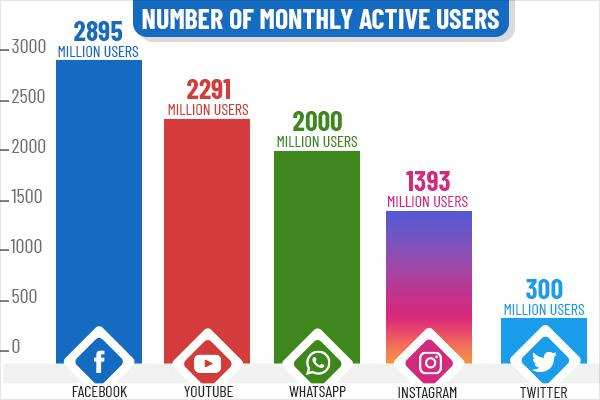
Anyone who uses a social media scheduler need not be told about its vast benefits. A social media management tool is diverse, like people’s requirements. What may be productive for a freelancer might not be useful for an IT firm. Most management tools have plans like Free, Premium, and Professional. The names of the plans may differ depending on the company, but the functions remain more or less the same. There are over 4.88 billion social media users across the globe, which accounts for 62% of the world’s population. Moreover, 6 of 10 people on the planet have a social media account.

Social media monthly active users

Being active on social media is necessary for 2021, not an option. You need to be on social media to develop a wide customer base and expand your reach. You need to have a robust digital marketing plan, including a foolproof SEO strategy to target customers. With that being said, you can’t deny that posting regularly and at the right time will deliver incredible results. Viralpep has the perfect social media management tool for every organization. You have four plans to choose from – Free, Professional, Business, and the Enterprise plan. To begin with, you can opt for a basic plan (free plan) for your social media needs. As time passes, you will have to upgrade your plan. Now, you would ask – Why should I upgrade to the business plan when the free plan does the job? Let’s dive into the details right away.

Why Should You Upgrade Your Social Media Management Plan?

1. Social Media Profiles

The free plan allows you to only post for 3 social media profiles. On the other hand, you can handle 10 social media accounts with the business plan. When you expand your business and acquire more clients, you will need this feature.

2. Monthly Posting Limit

Using the free plan, you can only schedule 10 posts a month which is very little, especially when you have multiple clients. You can’t tell your client that you need to move a post to next month because your free plan limits the number of posts that go out. The business plan has no limits. You can send out as many posts as you want in a month. This feature lets you serve your clients with complete dedication and never miss crucial posts/deadlines. On top of that, you can even schedule last-minute posts like a notice for a closed office, holiday greetings, events happening, or details regarding special discounts/vouchers/freebies/lucky draws, etc. Sometimes, you can’t anticipate such posts, and having posting limitations will greatly reduce your reach and hamper your ability to serve clients.

3. Team Management

Viralpep’s free plan has zero team management features. Upgrading to the business plan improves team efficiency and productivity because you can use hierarchies and approval workflows for your social media tasks. Every team member is assigned a specific role/task. The business plan’s team management feature defines accountability. Review your posts, new updates, approve, reject and do a lot more with this exciting feature.

4. Unleash the power of Instagram

Facebook, Twitter, and other social media platforms may be saturated. They are ideal for companies that can invest in paid marketing, ads, etc. On the other hand, Instagram allows you to market your products/services, highlight your achievements and boost engagement at no cost. Posting on Instagram is a must to compete with your rivals and stay relevant in the industry. Viralpep’s free plan doesn’t have a feature that enables you to post on Instagram, while the business plan does.

5. Support

Even though the Viralpep team puts a lot of hard work into creating innovative software, there may be times/days when it may not function properly. It can happen to any social media management tool. Viralpep has a dedicated team to tackle such issues. They will provide you with valuable advice, answer your queries and resolve technical problems. Please note that the support feature is only available for paid plans, not free ones. Imagine getting stuck in the middle of posting a plan. A few minutes/hours of downtime can lower your productivity and damage your reputation. Upgrading to the business plan can prevent such embarrassment and agony.

Final Thoughts

Upgrading from the free plan to the paid version requires you to pay some money, but the investment will be worth it. In a nutshell, the business version and other advanced plans offer features like team management, instant sharing, GIF support, URL shorteners, link preview, the option to post through various time zones, and much more. Regardless of the size of your business and the nature of your requirements, Viralpep has the ideal social media management plan for you. Want to try our services before you take the plunge? Enjoy a 15-days free trial and upgrade to the Professional, Business, or Enterprise plan later, as per your choice. With our yearly plans, you can save 20% or more. Double your social media traffic and save over 12+ hours a week. Need more information about our services? Contact us at support@viralpep.com. We will be glad to assist you. Most management tools have plans like Free, Premium, and Professional. The names of the plans may differ depending on the company, but the functions remain more or less the same. There are over 4.88 billion social media users across the globe, which accounts for 62% of the world’s population. Moreover, 6 of 10 people on the planet have a social media account.

Social media monthly active users

Being active on social media is necessary for 2021, not an option. You need to be on social media to develop a wide customer base and expand your reach. You need to have a robust digital marketing plan, including a foolproof SEO strategy to target customers. With that being said, you can’t deny that posting regularly and at the right time will deliver incredible results. Viralpep has the perfect social media management tool for every organization. You have four plans to choose from – Free, Professional, Business, and the Enterprise plan. To begin with, you can opt for a basic plan (free plan) for your social media needs. As time passes, you will have to upgrade your plan. Now, you would ask – Why should I upgrade to the business plan when the free plan does the job? Let’s dive into the details right away.

Why Should You Upgrade Your Social Media Management Plan?

1. Social Media Profiles

The free plan allows you to only post for 3 social media profiles. On the other hand, you can handle 10 social media accounts with the business plan. When you expand your business and acquire more clients, you will need this feature.

2. Monthly Posting Limit

Using the free plan, you can only schedule 10 posts a month which is very little, especially when you have multiple clients. You can’t tell your client that you need to move a post to next month because your free plan limits the number of posts that go out. The business plan has no limits. You can send out as many posts as you want in a month. This feature lets you serve your clients with complete dedication and never miss crucial posts/deadlines. On top of that, you can even schedule last-minute posts like a notice for a closed office, holiday greetings, events happening, or details regarding special discounts/vouchers/freebies/lucky draws, etc. Sometimes, you can’t anticipate such posts, and having posting limitations will greatly reduce your reach and hamper your ability to serve clients.

3. Team Management

Viralpep’s free plan has zero team management features. Upgrading to the business plan improves team efficiency and productivity because you can use hierarchies and approval workflows for your social media tasks. Every team member is assigned a specific role/task. The business plan’s team management feature defines accountability. Review your posts, new updates, approve, reject and do a lot more with this exciting feature.

4. Unleash the power of Instagram

Facebook, Twitter, and other social media platforms may be saturated. They are ideal for companies that can invest in paid marketing, ads, etc. On the other hand, Instagram allows you to market your products/services, highlight your achievements and boost engagement at no cost. Posting on Instagram is a must to compete with your rivals and stay relevant in the industry. Viralpep’s free plan doesn’t have a feature that enables you to post on Instagram, while the business plan does.

5. Support

Even though the Viralpep team puts a lot of hard work into creating innovative software, there may be times/days when it may not function properly. It can happen to any social media management tool. Viralpep has a dedicated team to tackle such issues. They will provide you with valuable advice, answer your queries and resolve technical problems. Please note that the support feature is only available for paid plans, not free ones. Imagine getting stuck in the middle of posting a plan. A few minutes/hours of downtime can lower your productivity and damage your reputation. Upgrading to the business plan can prevent such embarrassment and agony.

Final Thoughts

Upgrading from the free plan to the paid version requires you to pay some money, but the investment will be worth it. In a nutshell, the business version and other advanced plans offer features like team management, instant sharing, GIF support, URL shorteners, link preview, the option to post through various time zones, and much more. Regardless of the size of your business and the nature of your requirements, Viralpep has the ideal social media management plan for you. Want to try our services before you take the plunge? Enjoy a 15-days free trial and upgrade to the Professional, Business, or Enterprise plan later, as per your choice. With our yearly plans, you can save 20% or more. Double your social media traffic and save over 12+ hours a week. Need more information about our services? Contact us at support@viralpep.com. We will be glad to assist you.

Top 6 Image Editing Tools that Make You Look Like a Pro

Man is a visual creature!

A picture speaks a thousand words!

And, many such phrases will stay relevant for years to come now more than ever as we live in the age of social media!

Images, images, and images, be it memes, infographics, product images, and much more. Almost all social media marketers use plenty of visual content to engage with their audience, and quality photo editing tools are the need of the hour. If you struggle to find the best photo editing tools, this list will come in handy.

To ease your struggle, we have compiled a list of the 6 best photo editors online. The graphics have to be creative, out of the box, that makes your audience like and share your content. A unique photo post helps reinforce, transmit and emphasize your message.

6 Best Photo Editing Tools Online for Free

Let’s dive into the list of the most useful and popular that help skyrocket your reach on all social media platforms.

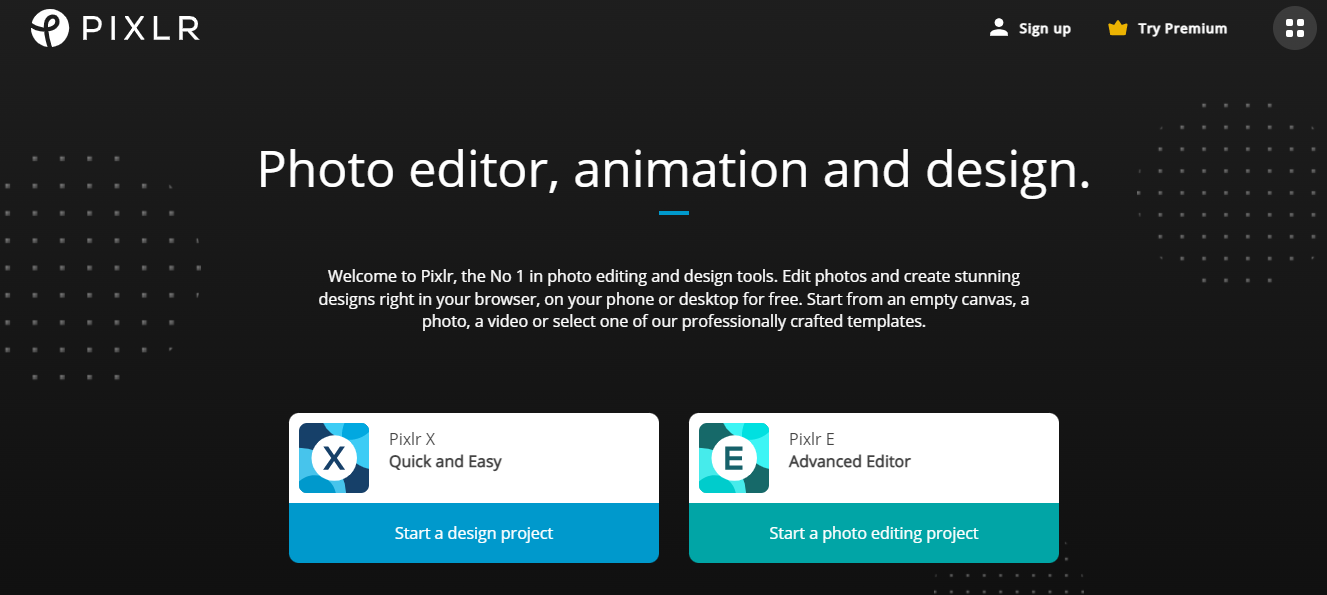
1. Pixlr

Pixlr is an ecosystem that comprises Pixlr Pro, Pixlr Editor, Pixlr X, and Pixlr Express. The photo editor is a tough cookie to break for first-time users, and its user interface is similar to Photoshop.

Pixlr

The photo editor is designed for basic portrait correction, advanced color grading, drawing, and graphic design. There are several automatic features like layers, brushes, advanced effects, curves, third-party plugin support, etc.

Pros:

  • Most advanced photo editing tool and offers incredible Photoshop features for free.
  • Highly customizable interface
  • Portable/Mobile
  • Detailed filters, layers, and adjustments.
  • Opens photos from desktop or URLs

Cons:

  • Pixlr requires Flash to run.
  • Ads can be distracting.

Pricing & Platforms

  • Platforms: Online, Windows, Mac OS,  Android, iOS
  • Free Version: Available
  • Premium Pack – $4.90 (If you pay yearly)
  • Creative Pack – $14.99 (If you pay yearly)

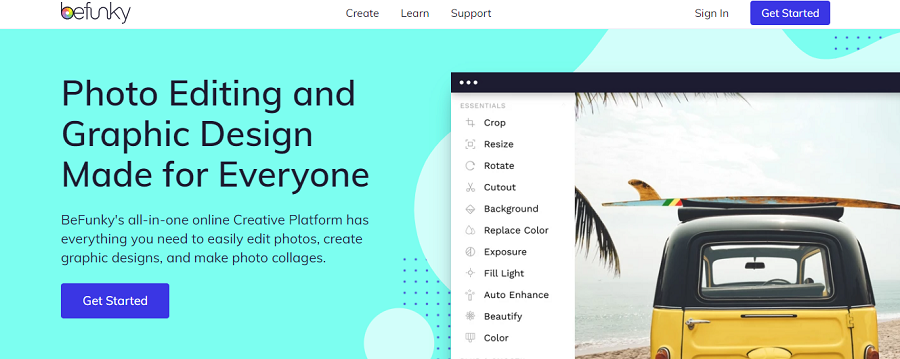
2. Befunky

BeFunky is a robust and simultaneously an easy to use Photo Editor, Collage Maker, and Graphic Designer for the web and social media platforms.

Befunky

A one-stop platform for hundreds of exhaustively customizable templates, an extensive tool library, and stunning design elements to choose from. BeFunky is an intuitive mobile Photo Editor for iOS, Android, and the web.

Pros:

  • Drag and drop feature that makes it easy to use.
  • No registration or account is required.
  • Upload multiple photos simultaneously
  • You can use full-screen mode while editing a photo.
  • Create, edit and share your collage.
  • Download photos directly from the stream

Cons:

  • Frequent ads
  • You will be reminded to upgrade to a paid version if you want to use certain features.
  • Access to additional content on the mobile app requires purchasing.

Pricing & Platforms

  • Platforms: Online, Windows, Mac OS,  Android, iOS
  • Free Version: Available
  • Befunky Plus: $4.99/month  (If you pay yearly)

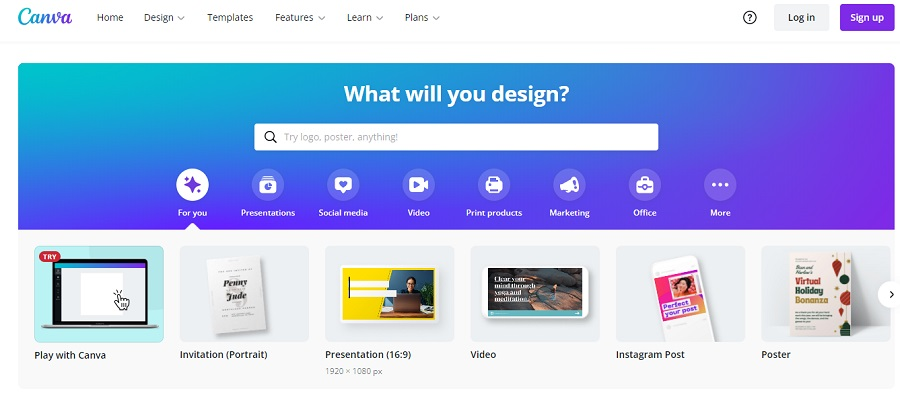
3. Canva

Canva is yet another popular and free photo editing tool that helps you create beautiful and unique photos and other visual content. Even if you’re not technically sound or a one-person social media marketer, Canva comes off as easy-to-use software.

Befunky

You can easily add interesting animation, videos from the vast library of options, amazing fonts, graphical elements, and filters that make your content, be it pictures, or infographics appealing.

Pros:

  • The free version gives you access to brilliant features that include filters, fonts, videos, and animation.
  • All social media platform post formats are available.
  • Upload & download multiple photos simultaneously
  • Access to compelling icons, shapes, and stickers.
  • Drag-and-drop editor

Cons:

  • You cannot create something creative from scratch.
  • Limited features/filters to enhance photos.
  • You cannot use full-screen mode to edit the photos; it is ‘view’ only.

Pricing & Platforms

  • Platforms: Online, Windows, Mac OS,  Android, iOS
  • Free Version: Available
  • Paid Version: $12.95/month

4. Fotor

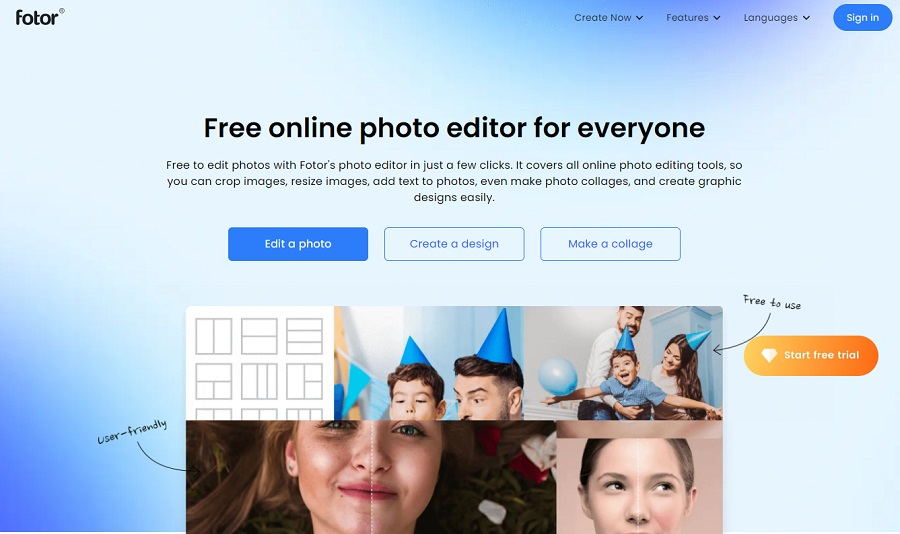
Fotor is an excellent image editing tool packed with great image-enhancing tools and filters that make your projects extraordinary. Simply put, it is an image editing, collage making, and design creating platform.

Fotor

Photographers – amateur or professional and creative individuals love Fotor. It is packed with one-click filters devised to improve your pictures based on the conditions in which they were taken and the subject. For example, artificial lighting, sunset, portrait, landscape, and theater. Another amazing feature is that it supports all popular image file formats and provides RAW file processing.

Pros:

  • Ability to duplicate and save your design as an ad set.
  • It allows you to save your image in a variety of file types.
  • Simple and user-friendly interface
  • Stunning library of filters and effects for editing photos and faces.

Cons:

  • Not an effective tool for drawing/designing
  • No brushes

Pricing & Platforms

  • Platforms: Windows, Mac, WebApp
  • Free Version: Available
  • Fotor Pro: $8.99/month
  • Fotor Pro Plus: $19.99/month

5. Lunapic

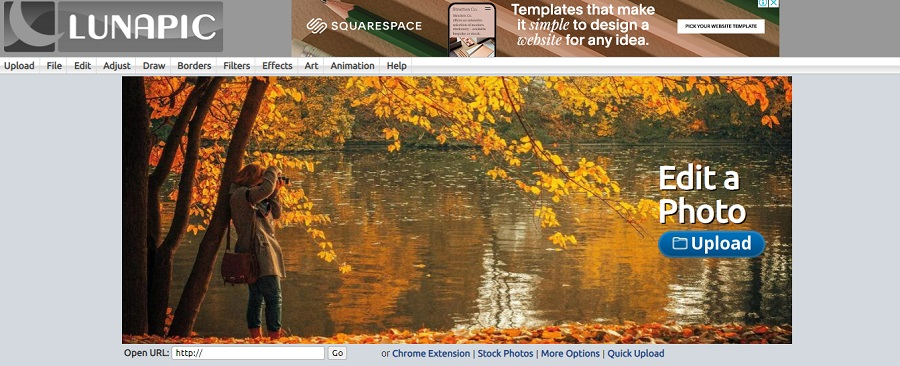
Lunapic is yet another very popular free image editing tool. It is loaded with myriad tools to edit any photo and deliver the precise effect you have a vision for.

Lunapic

The best part is that you don’t have to register or sign up. Just visit the website and effortlessly begin using the intuitive platform.  Even newbies with no experience in photo editing can easily create amazing photos and images delivering professional quality. It lets you crop, resize, make an object transparent, add text, frames, filters, effects, art, draw, adjust, animate, and do numerous other things with the photo.

Pros:

  • Hundreds of brilliant animation effects are available.
  • Detailed Undo history.
  • Comprehensive Help, Tutorial, and FAQ section available
  • You can edit your picture and directly post it on social media platforms.
  • It also allows you to sketch and design.

Cons:

  • No real-time preview for photo adjustment tools

Pricing & Platforms

  • Platforms: Online
  • Free Version: Available

6. Img2go

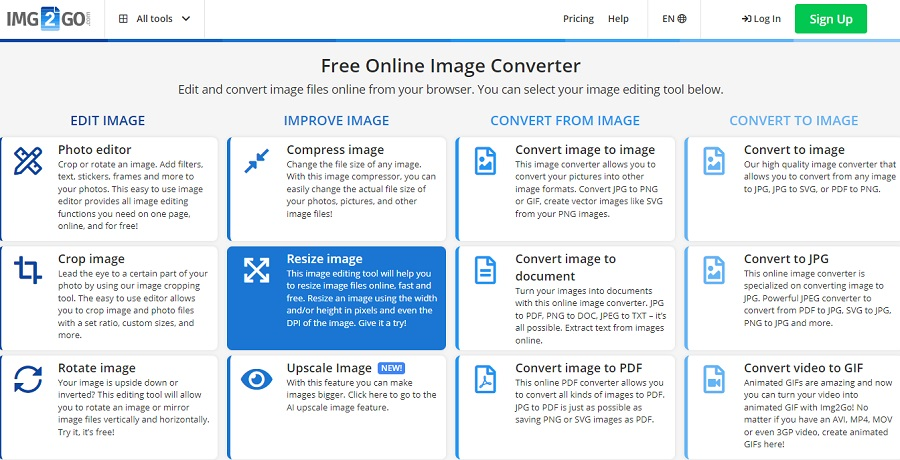
Img2go offers arrays of options for editing and enhancing images. It is highly versatile as you can convert different formats from and to images and easily create an animated GIF from a video. You can even add text and overlays.

Img2go

Pros:

  • Take advantage of Cloud Storage
  • Import-Export Option
  • Choose from plenty of fantastic effects, filters, and text tools
  • Enhancement Tools
  • Transform tools

Cons:

  • No built-in templates
  • No social media integration

Pricing & Platforms

  • Platforms: Online
  • Free Version: Available
  • Premium: $6.50 USD / month

To wrap things up

Every photo editing tool mentioned above has many great features and a few setbacks, but they deliver great results based on your requirement.

One important fact you should not lose sight of is that picture optimization is the key to succeeding on social media. Design your creatives from the very perspective of your audience. What would appeal to you if you were the audience?

On that note, may the light be with you!

Viralpep 2.0 – Everything You Need to Know

We are all adjusting to the new normal – be it in our professional or personal lives. As Work From Home is still being practiced worldwide,  Viralpep has upgraded to the latest version with design and features that empower your brand and help increase its engagement.

In 2020, 4.34 million new business applications were submitted, a whopping 74% rise compared to 24.19% in 2019. The fact that the world experienced and continues to bear the impact of the COVID-19 pandemic. Yet it is the most significant increase in the past decade.

According to other latest statistics, there are 3.196 billion people actively using social networks. More and more people have used social networking sites during the lockdown.

So, you ask what the connection is between the two data above.

Simple, it is time NOW to get your brand online on various social media platforms for excellent traction and engagement. And to help you manage your brand’s multiple social media profiles, Viralpep remains a perfect tool.

The New and Improved Viralpep –  Five Awesome Changes

We are excited to roll out the changes we have worked on tenaciously for the past few weeks.

  1. Minimalistic Design and Color theme
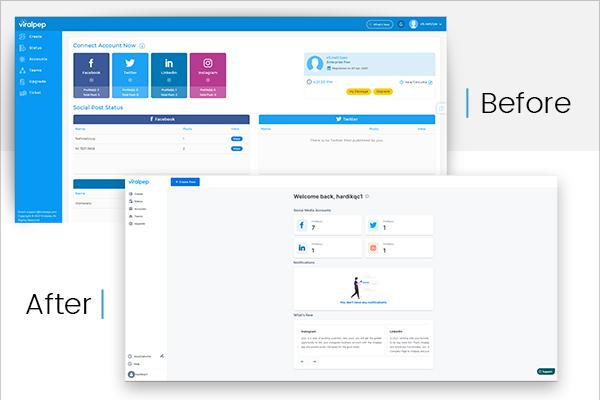
  2. Feature-rich Dashboard
  3. Social Media Post Review
  4. Post Filtering Process
  5. Ticket Support
1. Minimalistic Design and Color Theme

Everyone is a user/consumer. We always keep this in mind when we introduce changes or work on a feature. We have now modified the Viralpep’s look and feel to enhance the user experience. We’ve carefully applied minimalist principles with fewer elements to improve and simplify your online interaction.

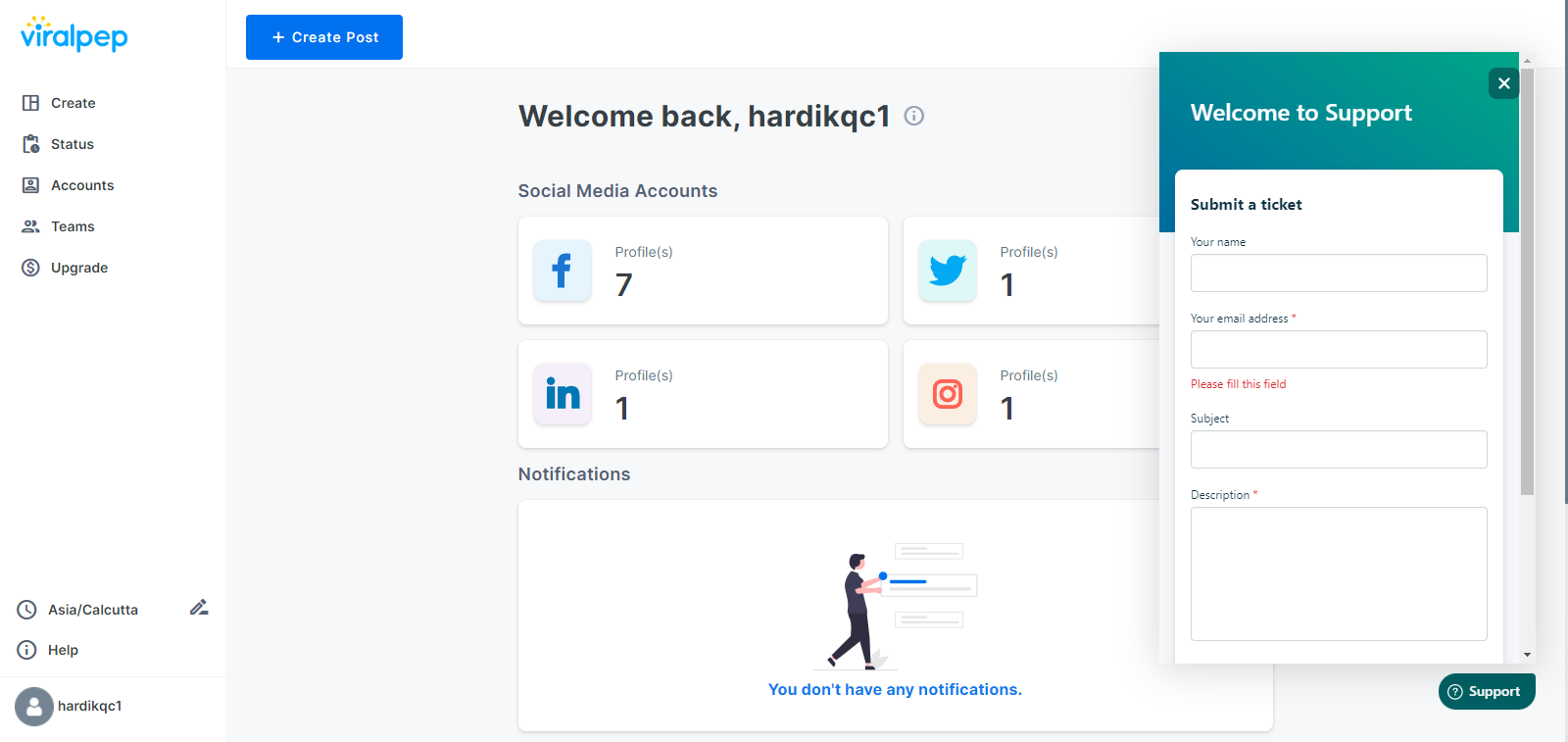
2. Feature-rich Dashboard

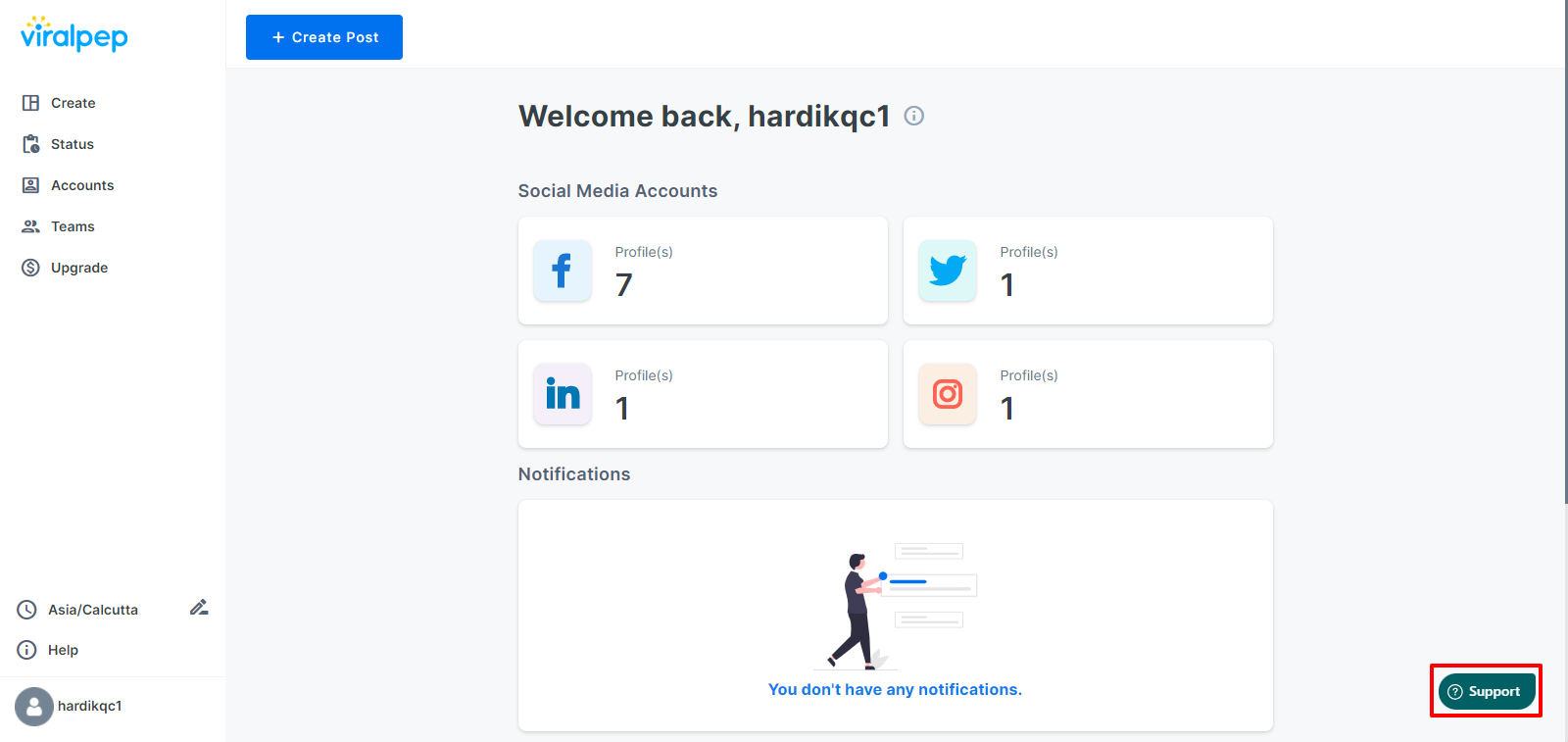
Feature-rich Dashboard

Active Social Media Accounts, Notifications, and What’s New all under one roof.

Once you log into your Viralpep account, you will see the number of profiles you use on each social media platform along with Team approval. Additionally, the “What’s New” section will keep you ahead of all small and big changes we implement in the Viralpep application. It will also showcase the Team approval notifications & package expiration date.

3. Social Media Post Review

To err is to human, but Preview is to perfection!

How cool is that!

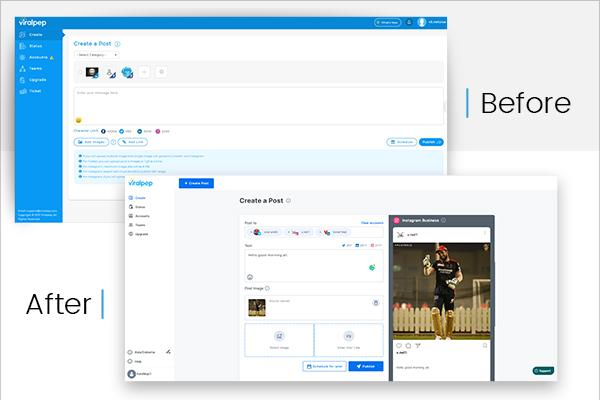
You get to see the Preview of the post content and graphics, so you make final tweaks and adjust all the changes before you schedule them. The Preview is available for all social media platforms that your brand has a profile on.

New Design

Create Post - New Design

Furthermore, you can create the post directly in the Viralpep application with a live character count specific to each social media platform. Now you also get single-click image upload, improvised the URL shorten tool, and link preview.

4. Post Filtering Process

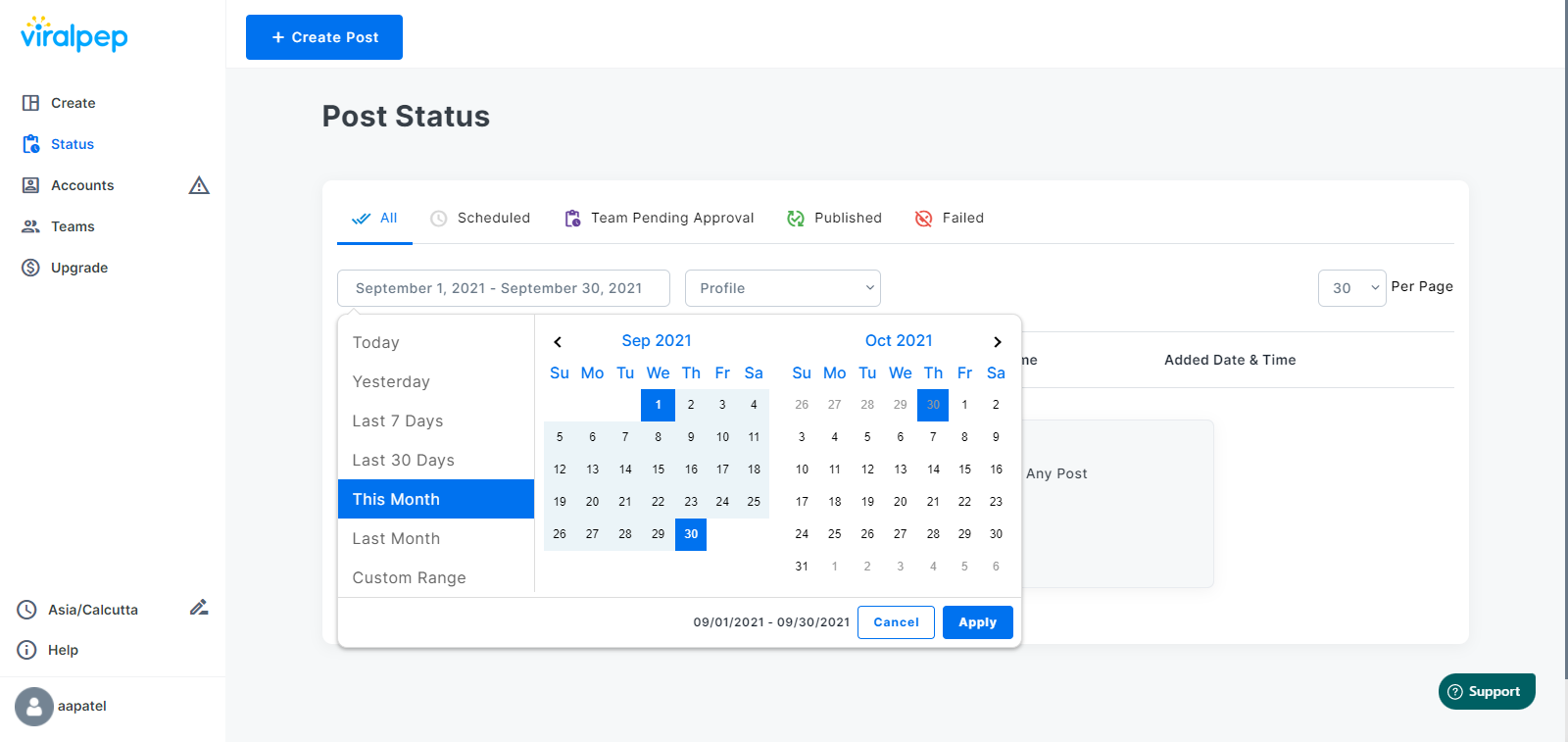
Post Filtering Process

To go back in the calendar to check on a post is a tedious process.

Not any more!

We have added a new date picker so that you can search posts according to specific dates.

5. Ticket Support

Have an issue you can’t resolve?

We have added a new support widget where you can directly submit tickets for the related issues. Earlier, the user had to take a screenshot, note down other related information, and then generate a ticket. But that’s an old story. The app does the job for you.

You can also check the status of your current ticket and the ones submitted in the past. There is a knowledge base article ready at your disposal if you need further help.

Need to attach screenshots

Viralpep Support 1

Viralpep Support 2

Other Notable Changes

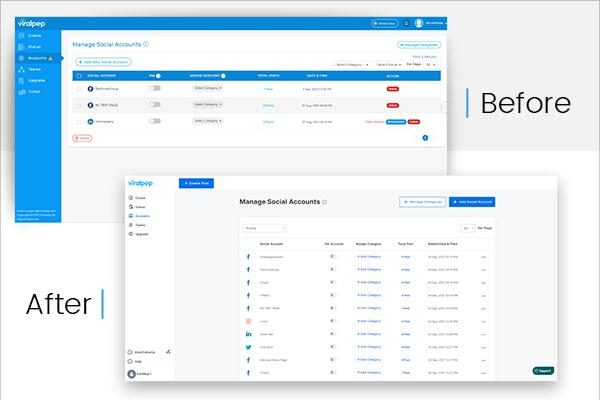
Accounts

New Design

Viralpep - Accounts

  • More Accessible tabular design
  • You will be able to assign a category for each account
  • Pin account for default selection

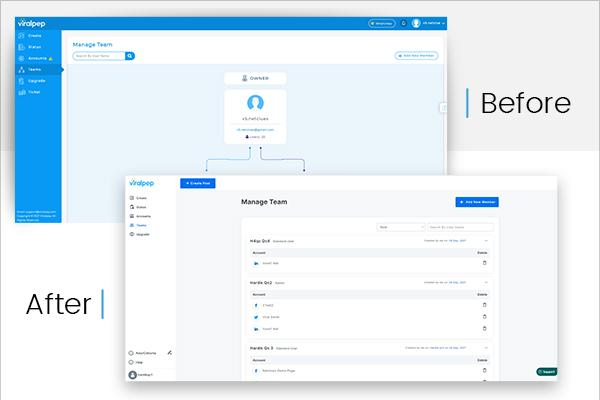
Manage Team

Viralpep - Manage Team

Bugfix and performance improvement

This is NOT it!

We are continuously changing Viralpep to further your association with us, making social media management for your business easy as a breeze.

Check out the latest upgrades now.

If you haven’t registered on Viralpep, start with a 15 day Free Trial period.

In 2020, 4.34 million new business applications were submitted, a whopping 74% rise compared to 24.19% in 2019. The fact that the world experienced and continues to bear the impact of the COVID-19 pandemic. Yet it is the most significant increase in the past decade.

According to other latest statistics, there are 3.196 billion people actively using social networks. More and more people have used social networking sites during the lockdown.

So, you ask what the connection is between the two data above.

Simple, it is time NOW to get your brand online on various social media platforms for excellent traction and engagement. And to help you manage your brand’s multiple social media profiles, Viralpep remains a perfect tool.

The New and Improved Viralpep –  Five Awesome Changes

We are excited to roll out the changes we have worked on tenaciously for the past few weeks.

  1. Minimalistic Design and Color theme
  2. Feature-rich Dashboard
  3. Social Media Post Review
  4. Post Filtering Process
  5. Ticket Support


1. Minimalistic Design and Color Theme

Everyone is a user/consumer. We always keep this in mind when we introduce changes or work on a feature. We have now modified the Viralpep’s look and feel to enhance the user experience. We’ve carefully applied minimalist principles with fewer elements to improve and simplify your online interaction.

2. Feature-rich Dashboard

Feature-rich Dashboard

Active Social Media Accounts, Notifications, and What’s New all under one roof.

Once you log into your Viralpep account, you will see the number of profiles you use on each social media platform along with Team approval. Additionally, the “What’s New” section will keep you ahead of all small and big changes we implement in the Viralpep application. It will also showcase the Team approval notifications & package expiration date.

3. Social Media Post Review

To err is to human, but Preview is to perfection!

How cool is that!

You get to see the Preview of the post content and graphics, so you make final tweaks and adjust all the changes before you schedule them. The Preview is available for all social media platforms that your brand has a profile on.

New Design

Create Post - New Design

Furthermore, you can create the post directly in the Viralpep application with a live character count specific to each social media platform. Now you also get single-click image upload, improvised the URL shorten tool, and link preview.

4. Post Filtering Process

Post Filtering Process

To go back in the calendar to check on a post is a tedious process.

Not any more!

We have added a new date picker so that you can search posts according to specific dates.

5. Ticket Support

Have an issue you can’t resolve?

We have added a new support widget where you can directly submit tickets for the related issues. Earlier, the user had to take a screenshot, note down other related information, and then generate a ticket. But that’s an old story. The app does the job for you.

You can also check the status of your current ticket and the ones submitted in the past. There is a knowledge base article ready at your disposal if you need further help.

Need to attach screenshots

Viralpep Support 1


Viralpep Support 2

Other Notable Changes

Accounts

New Design

Viralpep - Accounts

  • More Accessible tabular design
  • You will be able to assign a category for each account
  • Pin account for default selection

Manage Team

Viralpep - Manage Team

Bugfix and performance improvement

This is NOT it!

We are continuously changing Viralpep to further your association with us, making social media management for your business easy as a breeze.

Check out the latest upgrades now.

If you haven’t registered on Viralpep, start with a 15 day Free Trial period.